
1. Киришүү
This manual provides instructions for the Generic RC-799M infrared replacement remote control. This remote is designed to operate various Onkyo A/V receivers and components. It offers a straightforward, ready-to-use solution without complex programming.
Маанилүү эскертүү: This is a replacement remote and may not offer all functions of your original Onkyo remote. Please review the compatibility section carefully.
2. Шайкештик
The Generic RC-799M remote control is compatible with a range of Onkyo A/V receivers. Please ensure your specific model is listed below before use. If your model is not listed, this remote may not be compatible.
Compatible Onkyo Models include:
- RC-717M
- RC-763M
- TX-NR906
- TX-NR626
- HT-R520
- RC-687M
- RC-690M
- RC-649M
- RC-807M
- TX-NR1008
- TX-SR502
- TX-SR706
- HT-S5600
- TX-SR502S
- TX-SR706S
This remote is designed to control Onkyo and INTEGRA components only. It cannot be programmed to control other brands of televisions or devices.
3. Орнотуу
The Generic RC-799M remote control requires two AA batteries (not included) for operation. No programming is required; simply insert the batteries, and the remote will be ready to use with compatible Onkyo A/V receivers.
3.1. Батареяларды орнотуу
- Пульттун артындагы батарея бөлүкчөсүнүн капкагын табыңыз.
- Капкакты ылдый жылдырыңыз же аны ачуу үчүн бекиткичти басыңыз.
- Insert two new AA batteries, ensuring the positive (+) and negative (-) terminals align correctly with the markings inside the compartment.
- Батарея бөлүкчөсүнүн капкагын бекем чыккыча ордуна жылдырыңыз.

Сүрөт 1: Артка view батарея бөлүмүн көрсөтүп турган алыстан башкаруу пультунун сүрөтү.
Once batteries are installed, the remote is ready for immediate use with your compatible Onkyo A/V receiver.
4. Пультту иштетүү
This remote control operates using infrared (IR) technology. Point the remote directly at your Onkyo A/V receiver and ensure there are no obstructions between the remote and the receiver's IR sensor.
4.1. Негизги функциялар
The remote features standard buttons for common A/V receiver functions. While the exact layout may vary slightly from your original remote, the functions are generally intuitive.
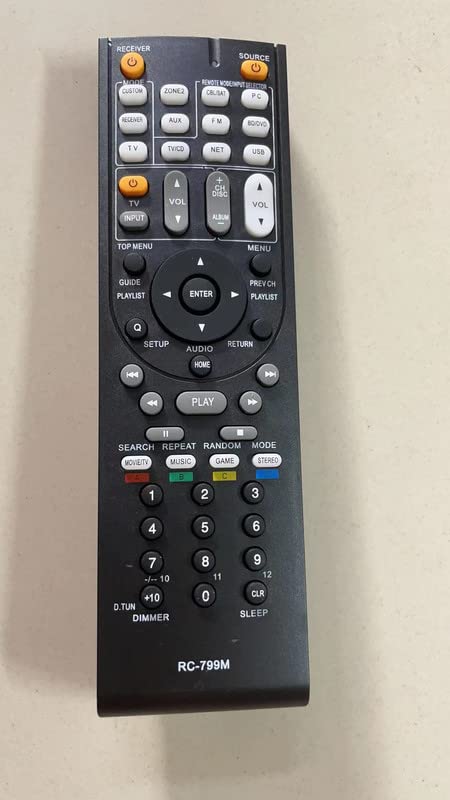
Сүрөт 2: Алдыңкы view алыстан башкаруу пультунун, анын баскычтарынын жайгашуусун көрсөтүү.
- Күч: Ресиверди күйгүзөт же өчүрөт.
- Үнүн жогорулатуу/төмөндөтүү: Аудионун үнүн тууралайт.
- Киргизүү тандагыч: Cycles through available audio/video inputs.
- Чабыттоо баскычтары: For menu navigation (if supported by your receiver).
- Ойнотуу башкаруулары: Play, Pause, Stop, Fast Forward, Rewind (for connected media devices, if supported).
Refer to your Onkyo A/V receiver's original manual for specific button functions and their corresponding operations.
5. Техникалык тейлөө
To ensure optimal performance and longevity of your remote control, follow these simple maintenance guidelines:
- Тазалоо: Wipe the remote control with a soft, dry cloth. Do not use liquid cleaners, solvents, or abrasive materials, as these can damage the surface or internal components.
- Батареяны алмаштыруу: Пульттун реакциясы жайлап калса же иштебей калса, батареяларды алмаштырыңыз. Ар дайым эки батареяны тең бир эле учурда жаңы AA батареялары менен алмаштырыңыз. Эски жана жаңы батареяларды, же ар кандай типтеги батареяларды аралаштырбаңыз.
- Сактагыч: If the remote will not be used for an extended period, remove the batteries to prevent leakage, which can damage the remote. Store the remote in a cool, dry place away from direct sunlight and extreme temperatures.
- Тамчылардан качуу: Protect the remote from drops and impacts, which can damage its internal circuitry.
6. Кыйынчылыктарды
Эгерде сиз алыстан башкаруу пультуңузда көйгөйлөргө туш болсоңуз, төмөнкү көйгөйлөрдү чечүү кадамдарын колдонуп көрүңүз:
- Пульт жооп бербей жатат:
- Ensure the remote has fresh AA batteries installed correctly.
- Check for any obstructions between the remote and the A/V receiver's IR sensor.
- Make sure you are pointing the remote directly at the receiver.
- Verify that your Onkyo A/V receiver model is listed in the compatibility section of this manual.
- Айрым функциялар иштебейт:
- As a replacement remote, it may not support all advanced or specific functions of your original Onkyo remote. This is normal.
- Confirm that the function you are trying to use is supported by your specific Onkyo A/V receiver model.
- Remote controls other devices unintentionally:
- This remote is designed for Onkyo and INTEGRA components only. It cannot be programmed for other brands. Ensure you are not attempting to control non-compatible devices.
7. Техникалык шарттар
| Өзгөчөлүк | Деталь |
|---|---|
| Модель аты | RC-799M |
| Бренд | Жалпы |
| Байланыш технологиясы | Инфракызыл (IR) |
| Шайкеш түзмөктөр | Various Onkyo A/V Receivers (see Compatibility section) |
| Power Source | 2 x AA батарейкалар (киргизилген эмес) |
| баскычтардын саны | 10 |
| Өзгөчөлүктөр | Cannot be programmed; controls Onkyo & INTEGRA components only; no mute button. |
8. Кепилдик маалыматы
Бул продукт менен келет 90 күндүк кепилдик from the date of purchase. This warranty covers manufacturing defects. It does not cover damage caused by misuse, accidents, unauthorized modifications, or battery leakage. Please retain your proof of purchase for warranty claims.
9. Колдоо
For further assistance or inquiries regarding this product, please contact the seller directly through the platform where the purchase was made. Provide your order number and a detailed description of the issue for prompt support.