
TEIMO G1
TEIMO Bluetooth Headset G1 User Manual
Wireless Earpiece with Charging Case
Introduction
Thank you for choosing the TEIMO Bluetooth Headset G1. This manual provides detailed instructions for setting up, operating, and maintaining your new wireless earpiece. Please read this manual carefully before use to ensure optimal performance and longevity of your device.

Image: The TEIMO Bluetooth Headset G1, showcasing the earpiece and its compact charging case. The earpiece features an over-ear hook design and an in-ear bud, with the charging case displaying battery indicators.
Пакеттин мазмуну
Пакетиңизде бардык буюмдар бар экенин текшериңиз:
- TEIMO Bluetooth Headset G1
- 400mAh кубаттагыч
- USB Type-C кубаттоочу кабель
- Кулак учтарынын бир нече өлчөмү (S, M, L)
- User Manual

Image: The TEIMO Bluetooth Headset G1 shown alongside three different sizes of ear tips (Small, Medium, Large), highlighting the customizable fit for user comfort.
Орнотуу колдонмосу
1. Гарнитураны жана кутучаны кубаттоо
Before first use, fully charge the headset and its charging case. The charging case provides extended battery life for the headset.
- Берилген USB Type-C кабелин корпустагы кубаттоо портуна жана USB кубат булагына туташтырыңыз.
- The digital display on the charging case will indicate the charging status.
- Charging time for the case and headset is approximately 1.5 hours.

Image: The TEIMO Bluetooth Headset G1 charging case connected to a USB Type-C cable, illustrating the charging process. The headset is shown next to the case.

Image: A graphic illustrating the battery life of the TEIMO Bluetooth Headset G1, showing 12 hours of talking time, 10 hours of music time, and up to 55 hours of total playtime with the charging case.
2. Түзмөгүңүз менен жупташтыруу
The TEIMO G1 headset uses Bluetooth V5.1 for stable and fast pairing.
- Take the headset out of the charging case. It will automatically enter pairing mode (indicated by a flashing LED light).
- Смартфонуңузда, планшетиңизде же башка Bluetooth иштетилген түзмөгүңүздө Bluetooth жөндөөлөрүнө өтүңүз.
- Издөө available devices and select "TEIMO G1" from the list.
- Once connected, the LED indicator on the headset will stop flashing.
- The headset can be paired with two devices simultaneously.

Image: A visual representation of the TEIMO Bluetooth Headset G1 pairing simultaneously with a smartphone and a tablet, demonstrating its multi-device connectivity feature.

Image: An illustration highlighting the V5.1 Bluetooth technology of the TEIMO G1 headset, emphasizing stable signal, fast pairing, and a 33ft/10m connection distance.
3. Гарнитураны тагынуу
The TEIMO G1 is designed for comfortable and secure wearing, suitable for both ears.
- Choose the ear tip size (S, M, L) that provides the best fit and comfort for your ear canal.
- Place the ear hook over your ear and gently insert the ear tip into your ear canal.
- Adjust the ear hook and microphone boom for optimal positioning. The headset supports 180° rotation for the ear hook, 360° rotation for the microphone boom, and 45° angle adjustment for the earpiece.

Image: Diagrams showing the adjustable features of the TEIMO Bluetooth Headset G1, including 180° rotation of the ear hook, 360° rotation of the microphone boom, and 45° angle adjustment of the earpiece for a comfortable fit on either ear.
Иштөө нускамалары
The TEIMO G1 headset features sensitive touch controls and mechanical buttons for easy operation.
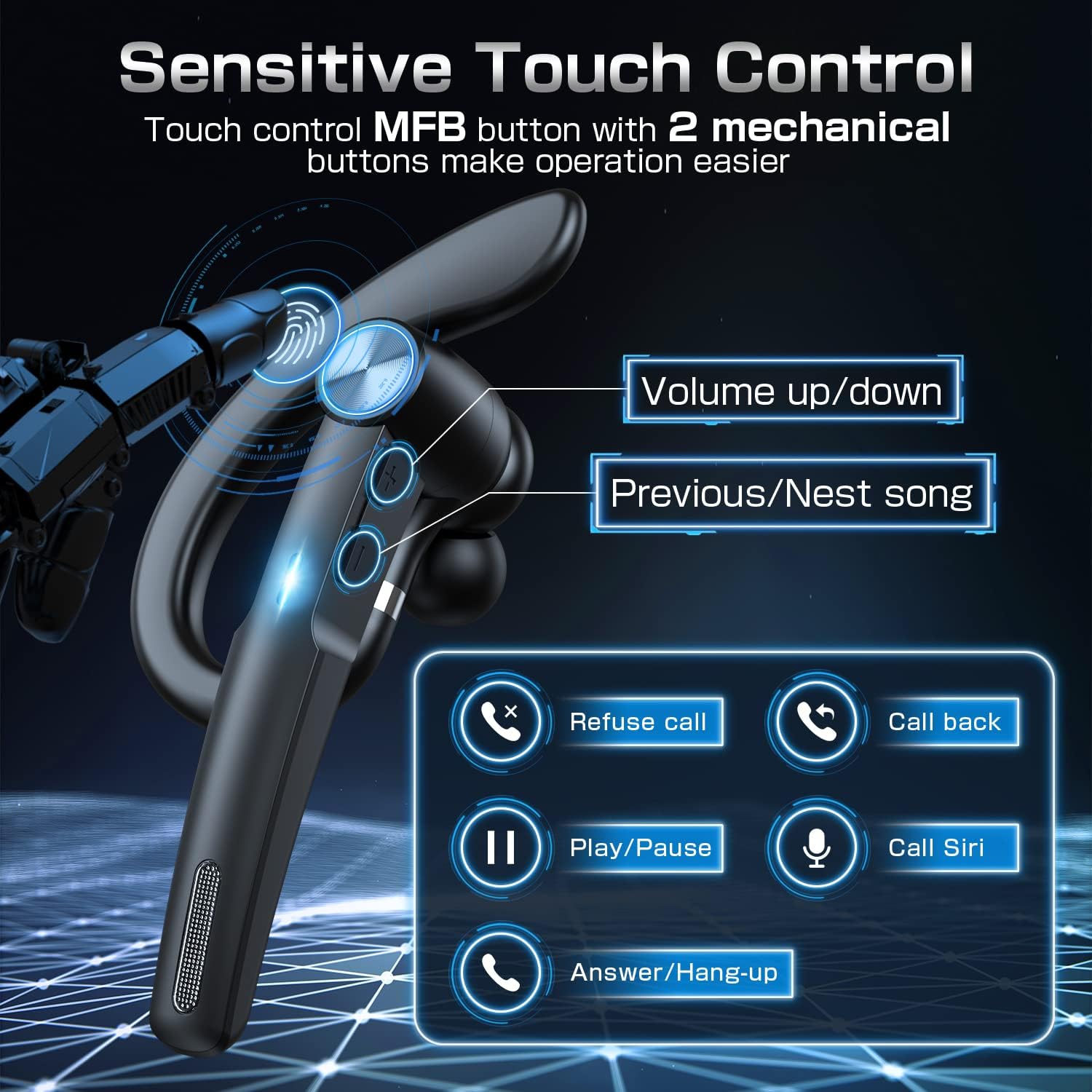
Image: A detailed diagram of the TEIMO Bluetooth Headset G1 highlighting its control buttons and their respective functions, including volume up/down, previous/next song, refuse call, call back, play/pause, call Siri, and answer/hang-up.
Чалууларды башкаруу
- Answer/Hang-up Call: Short press the MFB (Multi-Function Button).
- Чалуудан баш тартуу: MFB баскычын көпкө басыңыз.
- Кайра чалуу: MFBди эки жолу басыңыз.
Музыканы ойнотуу
- Ойнотуу/тындыруу: MFBди кыска басыңыз.
- Кийинки ыр: Short press the "Next" button.
- Мурунку ыр: Short press the "Previous" button.
Үндү көзөмөлдөө
- Көлөмү: "Үндү катуулатуу" баскычын кыскача басыңыз.
- Үнүн азайтуу: "Үндү азайтуу" баскычын кыскача басыңыз.
Үн жардамчысы
- Үн жардамчысын иштетүү (Siri/Google Жардамчысы): MFB баскычын көпкө басыңыз.
Техникалык тейлөө жана кам көрүү
Proper maintenance ensures the longevity and optimal performance of your TEIMO G1 headset.
- Тазалоо: Use a soft, dry cloth to clean the headset and charging case. Do not use abrasive cleaners or solvents.
- Сактагыч: When not in use, store the headset in its charging case to protect it from dust and damage. Store in a cool, dry place.
- Суудан качуу: Гарнитура суу өткөрбөйт. Сууга, жамгырга же ашыкча нымдуулукка дуушар кылбаңыз.
- Температура: Аппаратты өтө жогорку температурага (ысык же муздак) тийгизбеңиз.
- Заряддоо: Заряддоо үчүн берилген Type-C кабелин гана колдонуңуз.
Проблемаларды чечүү
| Көйгөй | Мүмкүн себеп | Чечим |
|---|---|---|
| Гарнитура күйбөйт. | Батарея аз. | Charge the headset and charging case fully. |
| Түзмөк менен жупташтыруу мүмкүн эмес. | Bluetooth is off on device; headset not in pairing mode; too far from device. | Ensure Bluetooth is enabled. Take headset out of case to enter pairing mode. Move headset closer to device (within 33ft/10m). Try forgetting the device on your phone and re-pairing. |
| Үн жок же үнү төмөн. | Volume too low on headset or device; headset not connected properly. | Increase volume on both headset and connected device. Reconnect the headset. |
| Микрофон иштебей жатат. | Microphone muted; headset not selected as audio input. | Ensure microphone is not muted. Check audio input settings on your device to confirm TEIMO G1 is selected. |
| үзгүлтүктүү байланыш. | кийлигишүү; аппараттан өтө алыс; аз батарея. | Move away from sources of interference (Wi-Fi routers, other Bluetooth devices). Stay within 33ft/10m range. Charge the headset. |
Продукт спецификациялары
| Өзгөчөлүк | Деталь |
|---|---|
| Модель номери | G1 |
| Бренд | TEIMO |
| Зымсыз технология | Bluetooth V5.1 |
| Заряддоо кутусунун кубаттуулугу | 400mAh |
| Жалпы ойноо убактысы | 55 саатка чейин (кубаттоочу корпусу менен) |
| Talking Time | 12 саатка чейин |
| Музыка убактысы | 10 саатка чейин |
| Заряддоо убактысы | Болжол менен 1.5 саат |
| Башкаруу ыкмасы | Touch & Mechanical Buttons |
| Заряддоо порту | USB Type-C |
| Зымсыз диапазон | 33 фут (10 метр) чейин |
| Кулак жайгаштыруу | Кулактагы (кулактын үстүнөн бекитилүүчү илгич менен) |
| Элемент Салмагы | 5.9 унция |
| Пакеттин өлчөмдөрү | 5.94 x 3.58 x 1.3 дюйм |
| Өндүрүүчү | Anuodun |
Кепилдик жана колдоо
For warranty information and technical support, please refer to the contact details provided with your product packaging or visit the official TEIMO webсайт. Кепилдик дооматтары үчүн сатып алганыңыздын далилин сактап коюңуз.
Эскертүү: Кепилдиктин конкреттүү шарттары аймакка жараша өзгөрүшү мүмкүн.
Ask a question about this manual
Ask about setup, troubleshooting, compatibility, parts, safety, or missing instructions. Manuals+ will review the question and use this page’s manual context to help answer it.