1. Продукт бүтүп калдыview
The VILONG Pop Up Outlet is a versatile power solution designed for seamless integration into various surfaces such as kitchen countertops, office desks, and conference tables. It provides convenient access to power outlets and charging ports while maintaining a clean and organized workspace.

Figure 1: The VILONG Pop Up Outlet in its extended position, showcasing the wireless charging pad and various ports.
2. Негизги өзгөчөлүктөрү
- Pop Up Countertop Outlet: Features 4 AC Outlets (12A/120V/1500W/800J) and 2 PD 20W USB Ports (3.1 A Total Max), providing multiple options for device charging.
- 15W Wireless Charging Station: Integrated wireless charger on top, offering 15W max fast wireless charging compatible with Qi standard devices.
- Retractable & Hidden Design: Fits a 4.75-inch (120mm) hole size. Fully automatic retractable desktop design; simply press to raise the power outlet.
- Орун үнөмдөө: When concealed, the socket sinks to just 5.8 inches beneath your desk, maximizing space efficiency.
- Кеңири колдонуу мүмкүнчүлүгү: Suitable for various settings including nightstands, kitchen islands, granite countertops, conference tables, and more.
- Коопсуздук сертификаттары: ETL and FCC Certifications ensure product safety and reliability.

Figure 2: ашыкview of the 7-in-1 charging capabilities, including 15W wireless charging, PD 20W USB-C, QC 20W USB-A, and 4 AC outlets.

Figure 3: The pop-up outlet providing fast charging for multiple devices, including wireless charging for a smartphone.
3. Пакеттин мазмуну
Пакетти ачкандан кийин бардык буюмдар бар экенин жана жакшы абалда экендигин текшериңиз:
- VILONG Pop Up Outlet Unit (Model: OEUP021A)
- Колдонуучунун инструкциясы
4. Техникалык шарттар
| Өзгөчөлүк | Нарк |
|---|---|
| Продукциянын өлчөмдөрү | 5.3"L x 5.3"W x 2.95"H (узартылган) |
| Элемент моделинин номери | OEUP021A |
| Салмагы | 3.28 фунт |
| AC розеткалары | 4 AC Outlets (12A/120V/1500W/800J) |
| USB порттору | 2 PD 20W USB Ports (3.1A Total Max) |
| Зымсыз заряддоо | 15W Max (Qi-standard compatible) |
| Desk Hole Size | 4.75 дюйм (120мм) |
| Concealed Depth | 5.8 inches (beneath desk) |
| Кордун узундугу | 6FT |
| Материал | Акрилонитрил бутадиен стирол (ABS), поливинилхлорид (PVC) |
| Сертификаттар | ETL, FCC Listed |
5. Орнотуу боюнча колдонмо
Follow these steps for proper installation of your VILONG Pop Up Outlet. Ensure you have the necessary tools and a suitable location before beginning.
- 1-кадам: Бургулоочу тешик
Drill a 4.75-inch (120mm) diameter hole in your desired surface (e.g., countertop, desk). Ensure the hole is clean and smooth. - Step 2: Insert Unit
Take out the ring from the pop-up unit. Carefully insert the pop-up outlet unit into the drilled hole from the top. - Step 3: Secure Unit
From underneath the surface, tighten the securing ring onto the threaded body of the pop-up unit until it is firmly in place. Note: A minimum of 5.5 inches of clear space is required beneath the table for proper installation and retraction. - Step 4: Connect Power & Activate
Plug the 6FT power cord into a standard wall outlet. Press the top panel of the unit to make the outlet automatically raise up, ready for use.

Figure 4: Step-by-step visual guide for installing the pop-up outlet into a countertop or desk.
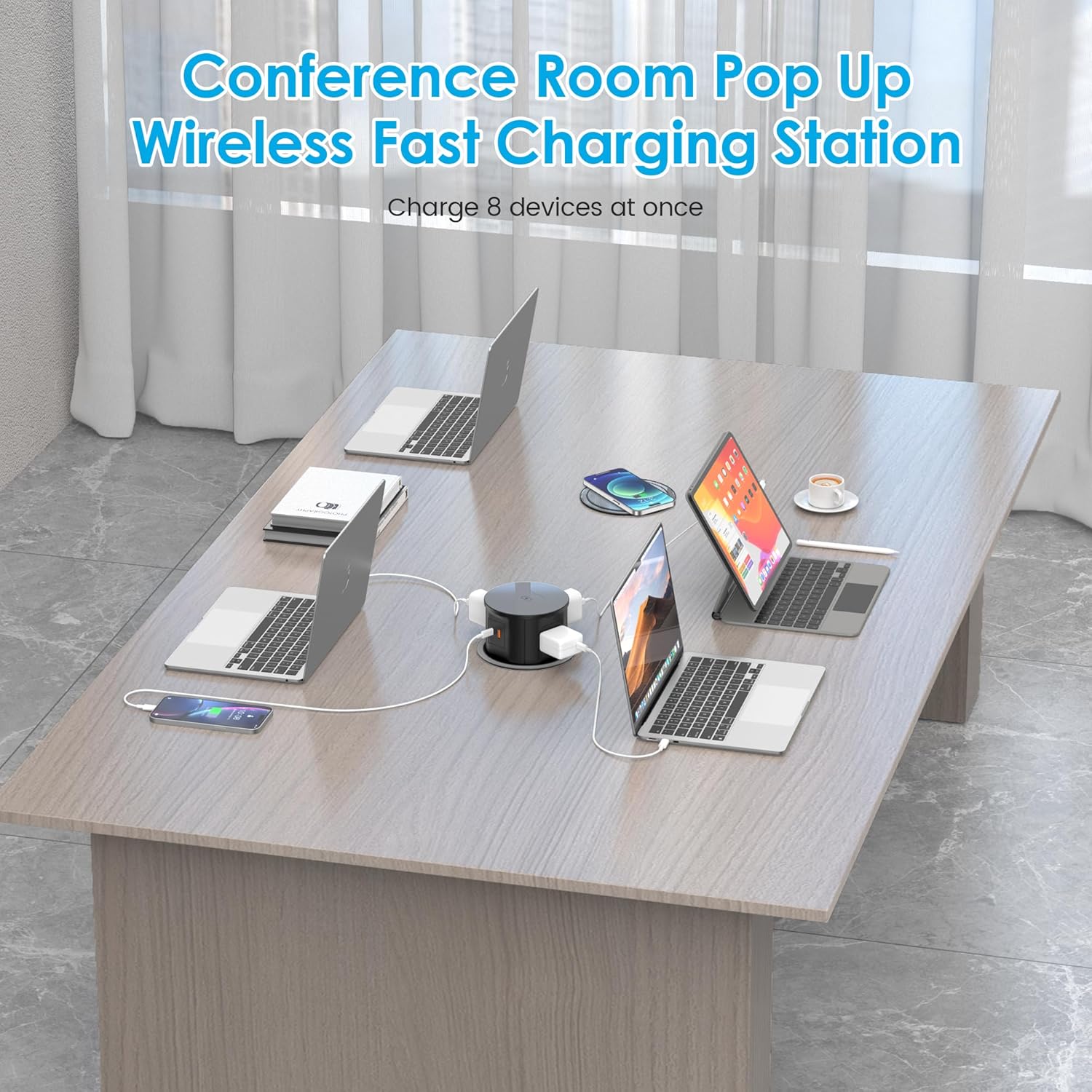
Figure 5: The pop-up outlet seamlessly integrated into a conference table, providing power for multiple devices.
6. Иштөө нускамалары
6.1 Activating and Retracting the Unit
- To Pop Up: Gently press down on the center of the top panel. The unit will automatically rise to its extended position.
- Баш тартуу үчүн: Once you are finished using the outlets, gently press down on the top panel again. The unit will retract and sit flush with the surface.
6.2 AC розеткаларын колдонуу
The unit provides 4 standard AC outlets. Plug your electronic devices directly into these outlets. Ensure the total power consumption of all connected devices does not exceed 1500W to prevent overloading.
6.3 USB кубаттоо портторун колдонуу
Connect your USB-A or USB-C compatible devices (e.g., smartphones, tablets) to the respective 20W USB ports for fast charging. The ports deliver up to 3.1A total maximum output.
6.4 Using Wireless Charging
Place your Qi-compatible smartphone or other device directly onto the designated wireless charging pad on the top surface of the unit. Ensure the device is centered for optimal charging. The pad supports up to 15W fast wireless charging.
7. Коопсуздук маалыматы
Коопсуз иштөөнү камсыз кылуу жана зыяндын алдын алуу үчүн, төмөнкү коопсуздук көрсөтмөлөрүн аткарыңыз:
- Агрегатты сууга же ашыкча нымдуулукка дуушар кылбаңыз.
- Do not attempt to disassemble, modify, or repair the unit yourself. Refer to qualified personnel for service.
- Ensure the unit is properly installed and grounded according to local electrical codes.
- Агрегатты балдар жана үй жаныбарлары жетпеген жерде сактаңыз.
- Do not overload the outlets. Always check the power requirements of your devices and the unit's maximum capacity (1500W).
- Avoid placing foreign objects into the outlets or USB ports.
- Unplug the unit from the main power source before cleaning or if it will not be used for an extended period.

Figure 6: Built-in safety protections for the VILONG Pop Up Outlet, including flame retardant materials and various circuit protections.
8. Кароо жана тейлөө
- Тазалоо: Use a soft, dry cloth to clean the exterior of the unit. Do not use liquid cleaners, aerosols, or abrasive materials, as these may damage the surface or internal components.
- Механизмди текшерүү: Periodically check the pop-up mechanism to ensure it operates smoothly and is free from debris or obstructions.
- Сактагыч: If storing the unit for an extended period, ensure it is clean, dry, and stored in a cool, dry place away from direct sunlight.
9. Кыйынчылыктарды
If you encounter any issues with your VILONG Pop Up Outlet, please refer to the table below for common problems and their solutions.
| Көйгөй | Мүмкүн себеп | Чечим |
|---|---|---|
| Unit does not pop up or retract smoothly. | Obstruction in the mechanism; unit not properly installed. | Check for any debris or objects blocking the mechanism. Ensure the unit is securely and levelly installed in the hole. |
| AC розеткаларынан же USB портторунан кубат жок. | Unit not fully extended; power cord not plugged in; circuit overload; internal fuse tripped. | Ensure the unit is fully extended and locked into place. Verify the power cord is securely plugged into a live wall outlet. Reduce the number of connected devices to prevent overload. If the issue persists, contact customer support. |
| Зымсыз кубаттоо иштебей жатат. | Device not Qi-compatible; device not properly aligned; foreign objects between device and pad; thick phone case. | Confirm your device supports Qi wireless charging. Reposition the device on the charging pad to ensure proper alignment. Remove any metal objects or overly thick phone cases. |
| Unit feels warm during operation. | Normal operation; excessive load. | A slight warmth is normal during operation. If the unit becomes excessively hot, unplug it immediately and reduce the load. Ensure adequate ventilation around the unit. |
10. Кепилдик жана Кардарларды колдоо
The VILONG Pop Up Outlet is designed and manufactured to high-quality standards and is ETL and FCC Certified, ensuring safety and performance.
For any questions, concerns, or assistance with installation or operation, please do not hesitate to contact VILONG customer service. You can reach us through the Amazon platform's messaging system.
Please retain your purchase receipt for warranty purposes. Specific warranty details may be provided with your product packaging or available upon request from customer support.