
Eumspo G3
Eumspo G3 Bluetooth Headset User Manual
Model: G3 | Brand: Eumspo
1. Киришүү
Thank you for choosing the Eumspo G3 Bluetooth Headset. This manual provides essential information for setting up, operating, and maintaining your headset. Please read it thoroughly to ensure optimal performance and longevity of your device.
2. Кутуда эмне бар
Пакетиңизде бардык буюмдар бар экенин текшериңиз:
- Eumspo G3 Bluetooth Headset
- Заряддоо кутусу (400 мАч)
- USB-C заряддоо кабели
- Replacement Eartips (various sizes)
- User Manual

Image: Contents of the Eumspo G3 Bluetooth Headset package.
3. Продукт бүтүп калдыview
Familiarize yourself with the main components and controls of your Eumspo G3 headset.
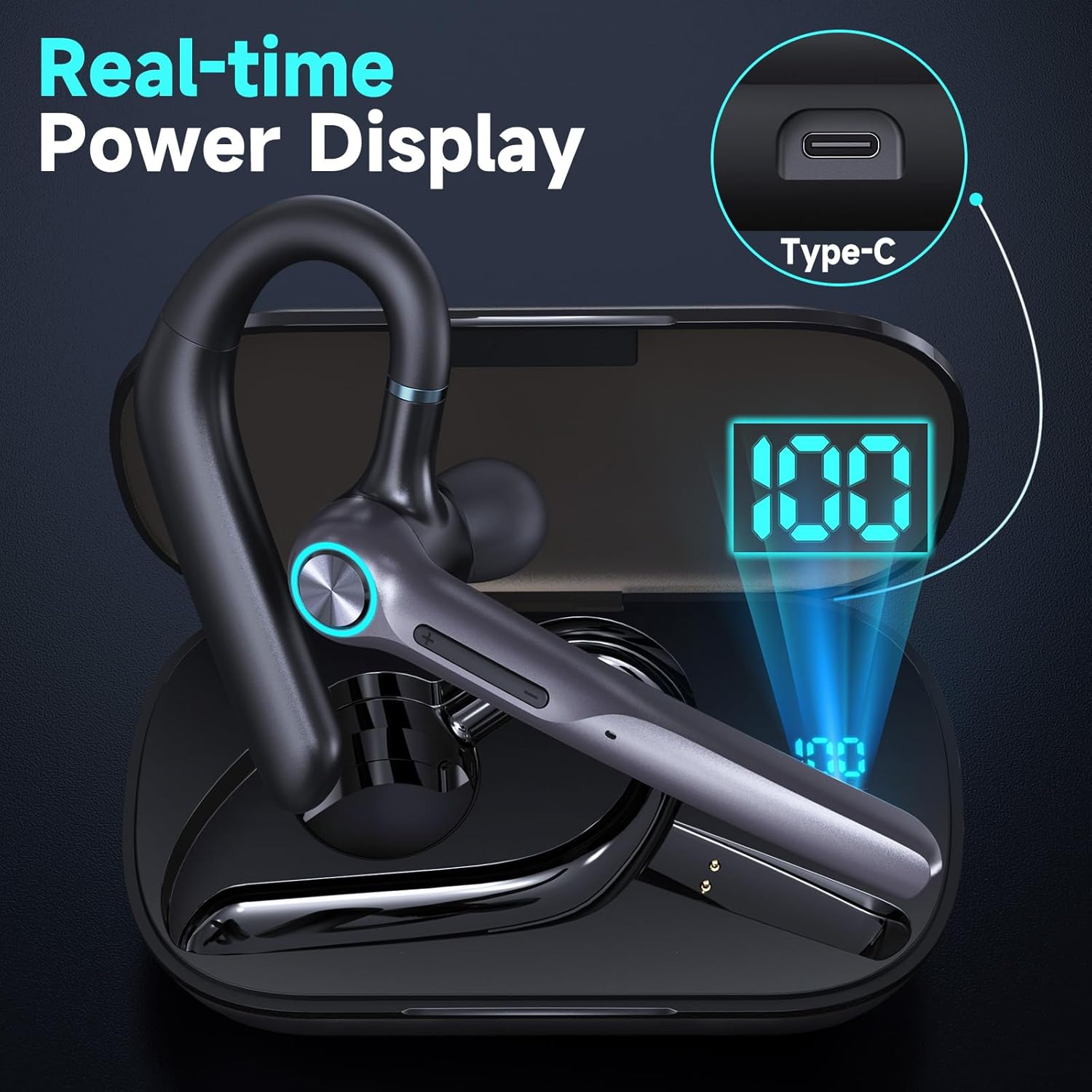
Image: Headset Features Showcase - MFB button, Power, Volume, and Dual Mic Noise Cancelling.
- Көп функциялуу баскыч (MFB): Controls power, calls, and voice assistant.
- Үн баскычтары (+/-): Adjusts volume and navigates music tracks.
- Микрофон: Features dual noise-canceling microphones.
- Кулак илгич: Rotates for comfortable fit on either ear.
- Наушник: Soft silicone for in-ear comfort.
4. Орнотуу
4.1 Алгачкы заряддоо
Before first use, fully charge your headset and charging case.
- Гарнитураны заряддоо кутусуна салыңыз.
- USB-C кабелин кубаттоочу кутуга жана кубат булагына туташтырыңыз.
- The LED display on the case will show the charging status. A full charge takes approximately 1.5 hours for the headset and 2 hours for the case.

Image: Real-time Power Display on the charging case.
4.2 Bluetooth жупташтыруу
To connect your headset to a device:
- Take the headset out of the charging case. It will automatically enter pairing mode.
- On your smartphone, tablet, or laptop, activate Bluetooth.
- Издөө "G3 Bluetooth Headset" (or similar, e.g., M53) in the list of available devices and select it to connect.
- Үн менен билдирүү ийгиликтүү жупташууну тастыктайт.

Image: Dual Device Bluetooth Pairing with V5.3 chips.
4.3 Кош түзмөк байланышы
The Eumspo G3 supports connecting to two devices simultaneously:
- Pair the headset with the first device (e.g., Phone A).
- Turn off Bluetooth on Phone A. The headset will re-enter pairing mode.
- Pair the headset with the second device (e.g., Phone B).
- Turn on Bluetooth on Phone A. The headset will automatically connect to both devices.
5. Гарнитураны тагынуу
For optimal comfort and sound quality, adjust the headset to fit your ear.

Image: Comfortable for Both Ears - Ergonomic design minimizes ear strain.
- Кулакчындын учунун коопсуз жана ыңгайлуу болушу үчүн, анын туура өлчөмүн тандаңыз.
- Insert the eartip into your ear canal.
- Position the ear hook over the back of your ear. The ear hook rotates 180 degrees, and the microphone boom rotates 270 degrees for use on either ear.
- Adjust the microphone boom to point towards your mouth for clear voice pickup.
Video: Instructions on how to install the ear hook for the headset.
6. Иштөө нускамалары
6.1 Күйгүзүү/өчүрүү
- Күйгүзүү: MFB баскычын 3 секунд басып туруңуз.
- Өчүрүү: MFB баскычын 3 секунд басып туруңуз.
6.2 Чалууларды башкаруу
- Чалууга жооп берүү/аяктоо: MFB баскычын бир жолу басыңыз.
- Чакырууну четке кагуу: MFB баскычын 3 секунд басып туруңуз.
- Үнсүз/Ачуу: Press the power button for 2 seconds during a call. (Note: This function may not support PC calls).
6.3 Музыкалык башкаруу
- Ойнотуу/тындыруу: MFB баскычын бир жолу басыңыз.
- Кийинки ыр: "+" баскычын 2 секунд басып, кармап туруңуз.
- Мурунку ыр: "-" баскычын 2 секунд басып, кармап туруңуз.
6.4 Үн жардамчысы
- Activate Voice Assistant (Siri/Google Voice): Click the MFB button 3 times.
Video: Demonstration of how to use the X01 Bluetooth headset, which shares similar functionalities with the G3 model.
7. Негизги өзгөчөлүктөрү
- Узак ойноо убактысы: Up to 12 hours talk/music time on a single charge, extended to 50 hours with the 400mAh charging case. 500 hours standby time.
- Dual Noise Cancelling Microphones: Built-in HD omnidirectional microphones with Bluetooth V5.3 technology for clear calls by blocking out ambient noise.
- Bluetooth V5.3: Ensures quick, stable, and low-latency connection up to 33 feet.
- Эргономикалык дизайн: Rotatable ear hook and flip-boom microphone for comfortable wear on either ear, with multiple eartip sizes for a perfect fit.
- Үн жардамчысын колдоо: Quick activation of Siri/Google Voice for hands-free operation.

Image: Noise Cancelling Headset with Dual-Mic technology.
8. Техникалык шарттар
| Модель аты | G3 Bluetooth гарнитура |
| Байланыш технологиясы | Зымсыз (Bluetooth V5.3) |
| Наушник уясы | USB-C |
| Заряддоо убактысы | Болжол менен 2 саат |
| Батареянын орточо иштөө мөөнөтү | 60 саат (заряддоо кутусу менен) |
| Максималдуу операциялык аралык | 10 метр (33 фут) |
| Башкаруу түрү | Touch, Siri |
| Noise Control | Активдүү ызы-чууну жокко чыгаруу |
| Материал | Пластик |
| Элемент Салмагы | 72.6 грамм |
| Сууга туруктуулук деңгээли | Сууга чыдамдуу |
9. Кыйынчылыктарды
- Кубат жок: Ensure the headset and charging case are fully charged.
- Жупташуу мүмкүн эмес: Make sure the headset is in pairing mode (flashing indicator). Turn off and on Bluetooth on your device, then try pairing again. Ensure the headset is within 10 meters of your device.
- Үн сапаты начар: Check the headset's fit in your ear and try different eartip sizes. Ensure there are no obstructions between the headset and your device.
- Микрофон иштебейт: Ensure the microphone is not muted during a call. Check device settings for microphone input.
10. Техникалык тейлөө
- Clean the eartips and headset regularly with a soft, dry cloth.
- Avoid exposing the headset to extreme temperatures, humidity, or corrosive liquids.
- Гарнитураны коргоо жана кубатталып туруу үчүн колдонулбаган учурда кубаттоочу кутучасында сактаңыз.
11. Коопсуздук маалыматы
- Гарнитураны ажыратпаңыз же өзгөртпөңүз.
- Балдар жетпеген жерде сактаңыз.
- Avoid using the headset at high volumes for extended periods to prevent hearing damage.
- Use caution when driving or engaging in activities that require your full attention.
12. Кепилдик жана колдоо
For warranty information or technical support, please refer to the contact details provided with your purchase or visit the official Eumspo webсайт. Ар кандай кепилдик дооматтары үчүн сатып алганыңыздын далилин сактаңыз.
Ask a question about this manual
Ask about setup, troubleshooting, compatibility, parts, safety, or missing instructions. Manuals+ will review the question and use this page’s manual context to help answer it.