
Introduction
This manual provides detailed instructions for the installation, operation, and maintenance of your UNITOPSCI Android 13 Car Stereo Radio. Designed specifically for Honda Odyssey models from 2005 to 2010, this 10.1-inch touch screen unit integrates advanced features such as Bluetooth, GPS navigation, Mirror Link, and backup camera support to enhance your driving experience. Please read this manual thoroughly before use to ensure proper functionality and safety.

Figure 1: UNITOPSCI Android 13 Car Stereo Radio with accessories.
Коопсуздук маалыматы
- Кесиптик орнотуу сунушталат: Due to the complexity of vehicle electrical systems, professional installation is highly recommended to prevent damage to the unit or your vehicle.
- Электр камсыздоо: Түзмөктүн 12 В туруктуу ток булагына терс жерге туташтырылганын текшериңиз. Туура эмес көлөмtagе зыян келтириши мүмкүн.
- Зымдар: Do not modify or cut the wiring harness. Refer to the wiring diagram for correct connections.
- Иштөө температурасы: The unit is designed to operate within a temperature range of -40℃ to 80℃.
- Айдоо коопсуздугу: Агрегатты иштетпеңиз же view videos that may distract you while driving. Always prioritize road safety.
- Вентиляция: Ашыкча ысып кетүүнүн алдын алуу үчүн аппараттын айланасында жетиштүү желдетүүнү камсыз кылыңыз.
Пакеттин мазмуну
Төмөндө тизмеленген нерселердин баары пакетиңизге камтылганын текшериңиз:
- 1 x Android Car Stereo (pre-installed with trim)
- 1 х Камера
- 1 x Кубат кабели
- 1 x GPS антеннасы
- 1 x Камеранын киргизүү кабели
- 1 х RCA киргизүү жана чыгаруу кабели
- 2 х USB кабелдери
- 1 x Instruction Manual
- 1 x Орнотуу куралдарынын топтому
- 1 х тышкы микрофон
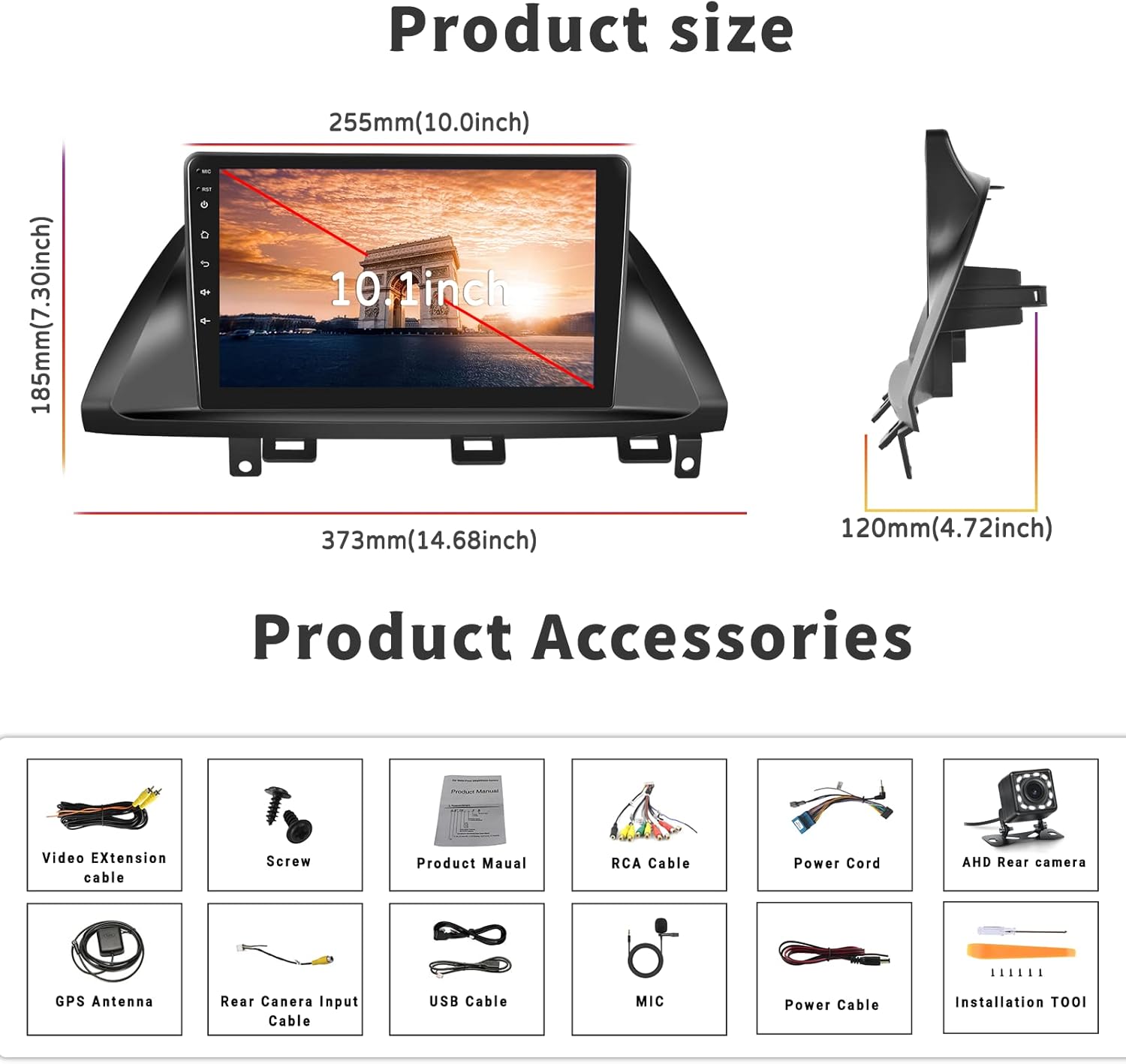
2-сүрөт: Продукциянын өлчөмдөрү жана ага кошулган аксессуарлар.
Орнотуу жана орнотуу
Шайкештик
This car stereo is designed for Honda Odyssey models from 2005 to 2010. It is compatible with vehicles that have an original car radio with a DVD player. It is туура келбейт with original car radios that have a factory screen or GPS. In such cases, an additional wire harness may be required. Please verify your car's center console size and wire harness details before installation.

Figure 3: Car compatibility and wiring harness details.
Wiring Diagram for Backup Camera
Proper connection of the backup camera is crucial for its automatic activation. Follow these steps:
- Кубат кабелин туташтыруу: Connect the red wire of the backup camera's power cable to the positive reversing light, and the black wire to the negative reversing light.
- RCA кабелинин туташуусу: Insert the yellow RCA cable from the camera into the 'CAM-IN' (yellow) port on the back of the radio unit.
- Тескери триггер зымы: Ensure the 'reverse (+)' wire connection (typically a pink wire on the power wire harness labeled 'back') is securely connected to the positive wire of the reversing light. This enables the unit to automatically display the rear view image when the vehicle is in reverse.
Эскертүү 1: The short red wires next to the RCA port do not require connection in this wiring setup.
Эскертүү 2: When the device is in parking mode (displaying the rear view), other functions will temporarily pause.

4-сүрөт: Арткы view камеранын электр схемасы.
Жалпы орнотуу кадамдары
While specific steps may vary by vehicle, the general installation process involves:
- Батареяны ажыратыңыз: Ишке кирүүдөн мурун, электр зымдарынын кыска туташууларын болтурбоо үчүн унаанын терс батарея терминалын ажыратыңыз.
- Эски бирдикти алып салуу: Carefully remove the existing car stereo and trim.
- Зымдарды туташтыруу: Connect the new stereo's power harness, speaker wires, antenna, and other necessary cables according to the provided wiring diagram.
- GPS антеннасын орнотуу: GPS антеннасын ачык жерге орнотуңуз view асмандын, адатта аспаптар тактасында же алдыңкы айнектин астында.
- Камераны орнотуу: Route the backup camera cable from the rear of the vehicle to the head unit, connecting it as described in the wiring section.
- Сыноо байланыштары: Before fully securing the unit, reconnect the battery and perform a quick test of all functions (power, audio, radio, GPS, camera, etc.).
- Коопсуздук бирдиги: Once tested, carefully slide the new stereo into the dash opening and secure it with screws. Reinstall the trim.
- Акыркы текшерүү: Perform a comprehensive test of all features to ensure proper operation.
Иштөө нускамалары
Bluetooth & FM/RDS Radio Function
The unit features built-in Bluetooth 4.2 and an FM/RDS radio. The integrated microphone supports hands-free calling, Bluetooth music streaming, and automatic phone book download. The FM radio includes 18 preset stations for news, music, and weather broadcasts. You can also adjust sound settings with the EQ balance function and connect to a subwoofer.

Figure 5: Bluetooth and FM Radio interface.
GPS навигациясы жана WiFi
The head unit comes with preloaded offline maps and supports both online and offline navigation. With a WiFi connection, you can access online maps and download additional maps as needed. To download maps, connect to WiFi, open the 'Here We Go' app, click the 'folder' icon, select 'download maps', and choose the appropriate region. WiFi connectivity also allows you to surf the internet and download various applications.

Figure 6: GPS Navigation and WiFi features.
Mirror Link for Android and iOS Phones
The unit supports mirror link functionality for both Android and iOS mobile phones. For iOS devices, it supports one-way projection via WiFi. For Android phones, it supports two-way connection via WiFi or the original USB phone cable, allowing you to control your phone's apps directly from the 10.1-inch screen. This feature is convenient for displaying videos or navigation maps from your phone. Note: Not compatible with Samsung phones for two-way control.

7-сүрөт: Mirror Link функциясы.
Камдык камера киргизүү
A backup camera is included with the unit. When the vehicle is shifted into reverse gear, the screen will automatically switch to display the reversing image, providing a clear view of the area behind your car. The camera features waterproof design, night vision, and a 170° wide-angle view күчөтүлгөн коопсуздук үчүн.

Figure 8: Backup Camera Input display.
Video Output & Split Screen
The unit supports video output, allowing you to share entertainment with a backseat monitor. Additionally, the split-screen function enables you to display two applications side-by-side simultaneously, such as navigation and music playback, for improved multitasking.

Figure 9: Video Output and Split Screen functionality.
Рулду башкаруу (SWC)
The unit supports steering wheel control functions, allowing you to manage various features directly from your vehicle's steering wheel buttons. Please note that a steering wheel controller may need to be ordered separately if your vehicle does not have compatible controls or if the existing system works with a CANbus (this unit does not support CANbus). Refer to the unit's settings to map your steering wheel buttons.
Техникалык тейлөө
- Экранды тазалоо: Сенсордук экранды акырын сүртүү үчүн жумшак, түксүз чүпүрөктү колдонуңуз. өжөр тактар үчүн, бир аз гampчүпүрөккө суу же электроника үчүн арналган экран тазалагыч. Катуу химиялык заттардан же абразивдүү материалдардан алыс болуңуз.
- Жалпы тазалоо: Keep the unit and surrounding area free from dust and debris. Use a soft brush or compressed air to clean vents and ports.
- Программалык камсыздоо жаңыртуулары: Periodically check for software updates from the manufacturer's official channels to ensure optimal performance and access to new features.
- Ашыкча температурадан сактаныңыз: While the unit is designed for a wide temperature range, prolonged exposure to extreme heat or cold can affect its lifespan.
Проблемаларды чечүү
Бул бөлүм сиз кабылышы мүмкүн болгон жалпы көйгөйлөрдү карайт. Эгер көйгөй чечилбесе, кардарларды колдоо менен байланышыңыз.
| Көйгөй | Мүмкүн себеп | Чечим |
|---|---|---|
| Түзмөк күйбөйт. | Туура эмес зымдар; күйгүзүлгөн сактагыч; Бошоң байланыш. | Check power cable connections (red and yellow wires); Inspect vehicle's fuse box; Ensure all harnesses are securely plugged in. |
| Динамиктерден үн жок. | Динамик зымдары туура эмес туташтырылган; Үнү өтө төмөн; Үнсүз режим функциясы иштеп турат. | Verify speaker wire connections; Increase volume; Check if unit is muted. |
| GPS сигналы начар же жеткиликсиз. | GPS антеннасы туура эмес орнотулган же тосулуп калган. | Ensure GPS antenna is mounted in a clear, unobstructed location; Check antenna connection to the unit. |
| Камдык камера көрсөтүлбөй жатат. | Incorrect camera wiring; 'Reverse' trigger wire not connected. | Review the 'Wiring Diagram for Backup Camera' section; Ensure the camera's power and RCA cables are correctly connected, and the 'reverse' trigger wire is properly linked to the vehicle's reversing light positive. If the camera has an LED light, check if it illuminates when reverse is engaged. |
| Mirror Link not connecting. | Incorrect connection method; Incompatible phone model; App issues. | For iOS, use WiFi only. For Android, try both WiFi and USB (original phone cable). Ensure your phone is not a Samsung model (known compatibility issue). Restart both phone and head unit. |
| Unit lags or freezes. | Too many apps running; Low memory. | Close unnecessary applications; Restart the unit. |
Техникалык шарттар
| Өзгөчөлүк | Спецификация |
|---|---|
| Система | Android 13.0 |
| Чипсет | 8227L-DEMO |
| Screen Size | 10.1 дюйм |
| Screen Resolution | 1024 x 600 |
| Эстутум (RAM+ROM) | 1 ГБ RAM + 32 ГБ ROM |
| Mirror Link | Android/iOS (Android two-way, iOS one-way) |
| Video Output/WiFi | Колдоого алынган |
| Радио тобу | FM |
| Радио чип | NXP6851 |
| Күч Ampкөтөргүч чип | AC7315 |
| Power Output | 4*45 Вт |
| Иш температурасы | -40 градустан 80 градуска чейин |
| Руль башкаруу | Supported (controller may be separate) |
| Bluetooth версиясы | 4.2 |
| Карталар | Камтылган оффлайн карталары |
| USB интерфейси | Кош USB |
| Аудио форматты колдоо | APE/FLAC/WAV/MP3/WMA ж.б. |
| Видео форматын колдоо | MKV/RMVB/AVI/MP4/MDV ж.б. |
| Сүрөт форматын колдоо | PNG/JPEG/JPG/GIF/WBMP/BNP ж.б. |
| Продукциянын өлчөмдөрү | 0.39 x 0.39 x 0.39 дюйм |
| Элемент Салмагы | 3.27 фунт |
Кепилдик жана колдоо
UNITOPSCI is committed to providing high-quality products and satisfactory services. We offer the following support:
- Replacement Availability: Алмаштыруулар сатып алынгандан кийин 24 айдын ичинде жеткиликтүү.
- Тез жооп: 16 сааттын ичинде суроолорго жооп күтүңүз.
- Өмүр бою сатуудан кийинки колдоо: We provide lifetime after-sales consultation and technical support.
- Кайтаруу саясаты: 60 күндүк кабатыр болбостон кайтарып берүү мөөнөтүнөн ырахат алыңыз.
For any questions, technical assistance, or warranty claims, please contact us directly via email:
Электрондук почта: UNITOPSCI@126.com

Figure 10: UNITOPSCI Customer Support Information.