
1. Киришүү
The Black Box Boxilla KVM Manager, model BXAMGR-R2-ULT, is a robust and TAA-compliant KVM management solution designed to streamline network operations. This device allows for efficient management and control of an unlimited number of devices within your KVM infrastructure, eliminating the need for multiple licenses. It ensures compliance with government and public sector standards, providing a secure and reliable platform for KVM management.
This manual provides comprehensive instructions for the setup, operation, maintenance, and troubleshooting of your Boxilla KVM Manager.
2. Коопсуздук маалыматы
Please read and understand all safety instructions before operating this device. Failure to follow these instructions may result in electric shock, fire, or damage to the product.
- Түзмөктүн жерге туташтырылган розеткага туташтырылганын текшериңиз.
- Аппаратты сууга же ашыкча нымдуулукка дуушар кылбаңыз.
- Аппаратты ачпаңыз casinг. Бардык тейлөөлөрдү квалификациялуу кызматкерлерге тапшырыңыз.
- Аппаратты белгиленген температура жана нымдуулук диапазондорунда иштетиңиз.
- Түзмөктү тазалоодон же жылдыруудан мурун электр кубатынан ажыратыңыз.
3. Пакеттин мазмуну
Пакетте бардык буюмдар бар экенин текшериңиз:
- Black Box Boxilla KVM Manager (BXAMGR-R2-ULT)
- Кубаттуу адаптер
- Quick Start Guide
- Орнотуу жабдуулары (эгер бар болсо)
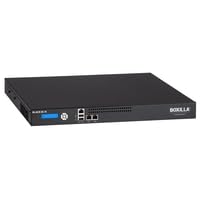
Image of the Black Box Boxilla KVM Manager, model BXAMGR-R2-ULT, showing its front panel and compact design.
4. Орнотуу
Follow these steps for initial setup of your Boxilla KVM Manager:
- Аппаратты таңгактан чыгаруу: Carefully remove the KVM manager and all accessories from its packaging.
- Жайгашкан жери: Place the device on a stable, flat surface or mount it in a rack using the provided hardware. Ensure adequate ventilation around the unit.
- Тармак кабелдерин туташтыруу: Connect the KVM manager to your network infrastructure using standard Ethernet cables. Refer to your network topology for specific port connections.
- Туташуу кубаты: Plug the power adapter into the KVM manager's power input, then connect it to a grounded electrical outlet. The device will power on automatically.
- Баштапкы конфигурация: Аппаратка кириңиз web аркылуу интерфейс web browser using its default IP address (refer to the Quick Start Guide for default IP and login credentials). Follow the on-screen prompts to configure network settings, user accounts, and initial KVM device discovery.
5. Иштөө нускамалары
Once the Boxilla KVM Manager is set up, you can begin managing your KVM devices. The primary interface for operation is the web-based management console.
- Кирүү: ачуу а web browser and navigate to the IP address or hostname of your Boxilla KVM Manager. Enter your username and password.
- Түзмөктү ачуу: Use the discovery tools within the interface to find and add KVM transmitters and receivers to your management system.
- Колдонуучуну башкаруу: Create and manage user accounts, assigning appropriate access levels and permissions for KVM control.
- Session Management: Initiate, monitor, and terminate KVM sessions to connected devices.
- Системанын мониторинги: Review system logs, device status, and network performance metrics through the dashboard.
- Программалык камсыздоонун жаңыртуулары: Оптималдуу иштөөнү жана коопсуздукту камсыз кылуу үчүн микропрограмманын жаңыртууларын үзгүлтүксүз текшерип жана колдонуңуз.
6. Техникалык тейлөө
Regular maintenance ensures the longevity and optimal performance of your Boxilla KVM Manager.
- Тазалоо: Аппараттын сыртын тазалоо үчүн жумшак, кургак чүпүрөктү колдонуңуз. Суюк тазалагычтарды же аэрозолдорду колдонбоңуз.
- Вентиляция: Ашыкча ысып кетүүнүн алдын алуу үчүн желдетүү тешиктери чаңдан жана тоскоолдуктардан тазаланганын текшериңиз.
- Микропрограмма: Keep the device firmware updated to the latest version. Refer to the Black Box support website for updates and instructions.
- Камдык конфигурация: Periodically back up your device configuration settings to prevent data loss in case of an unforeseen issue.
7. Кыйынчылыктарды
This section addresses common issues you might encounter with the Boxilla KVM Manager.
| Көйгөй | Мүмкүн себеп | Чечим |
|---|---|---|
| Түзмөк күйбөйт. | Электр менен камсыздоонун, кубат адаптеринин же розеткадагы көйгөйдүн жоктугу. | Check power cable connection. Verify power outlet functionality. Try a different power adapter if available. |
| Кирүү мүмкүн эмес web интерфейс. | Incorrect IP address, network connectivity issue, or firewall blocking access. | Verify the device's IP address. Check network cable connections. Ensure your computer is on the same network segment. Temporarily disable firewall for testing. |
| KVM devices not discovered. | Network configuration issues, KVM devices not powered on, or incorrect discovery settings. | Ensure KVM transmitters/receivers are powered and connected. Verify network settings on Boxilla and KVM devices. Check discovery range settings in the web интерфейс. |
| Жай аткаруу. | Network congestion, outdated firmware, or high CPU/memory usage. | Check network bandwidth. Update firmware to the latest version. Monitor system resources via the web интерфейс. |
8. Техникалык шарттар
Detailed specifications for the Black Box Boxilla KVM Manager BXAMGR-R2-ULT:
- Модель номери: BXAMGR-R2-ULT
- ASIN: B0BCX8GNRR
- Продукциянын өлчөмдөрү: 11 x 10 x 6 дюйм
- Өндүрүүчү: Black Box Network
- Биринчи жеткиликтүү: 30-май, 2023-жыл
- Лицензия: Unlimited Device License
- Шайкештик: TAA ылайыктуу
9. Кепилдик жана колдоо
For warranty information and technical support, please refer to the official Black Box Network webсайтка же кардарларды тейлөө бөлүмүнө кайрылыңыз. Кепилдик дооматтар үчүн сатып алуу дүмүрчөгүңүздү сактаңыз.
Black Box Network Official Webсайт: www.blackbox.com