
1. Киришүү
Thank you for choosing the ABASK Q40S Dashcam. This device is designed to provide reliable video recording of your journeys, enhancing safety and providing evidence in case of incidents. It features Full HD 1080P recording, a wide-angle lens, night vision, G-sensor, loop recording, and parking monitoring capabilities. Please read this manual carefully before use to ensure proper installation and operation.
2. Пакеттин мазмуну
Сураныч, пакетте төмөнкү нерселерди текшериңиз:
- ABASK Q40S Dashcam
- Арткы камера
- Сорох кубогын таһыгар
- Унаа кубаттагыч (тамеки күйгүзгүч адаптер)
- Mini USB Cable (0.6 m)
- 32 ГБ SD карта
- Tape & Screws (for rear camera installation)
- User Manual

2.1-сүрөт: Пакеттин мазмуну
3. Продукциянын өзгөчөлүктөрү
- Full HD 1080P Dual Recording: The dashcam supports Full HD 1080P recording for both front and rear cameras, capturing clear video of the road ahead and behind. Equipped with a 6-layer HD lens and WDR technology, it provides crystal-clear video and image quality day or night, regardless of lighting conditions.

3.1-сүрөт: Dual Camera Recording (170° Front, 140° Rear)
- Супер түнкү көрүнүш: Utilizes multiple technologies to maximize night vision, ensuring clear recordings in low-light environments.

3.2-сүрөт: Super Night Vision
- Parking Monitoring & Motion Detection: The dashcam automatically turns on and starts recording video when an impact is detected while your car is parked, providing evidence if your car is scratched or damaged. This feature requires an ACC hardwire kit (not included) to connect the camera to the car battery for 24-hour surveillance.

3.3-сүрөт: 24 саат бою унаа токтотуучу жайды көзөмөлдөө
- Циклдик жаздыруу жана G-сенсор: The loop recording function automatically overwrites the oldest unlocked video files to free up memory on the SD card, ensuring continuous recording. The variable-sensitivity G-Sensor (Gravity Sensor) automatically detects sudden collisions or braking, recording and locking the corresponding video immediately. These locked videos cannot be overwritten, serving as crucial evidence.

3.4-сүрөт: Loop жаздыруу
- Parking Assistance System: When reverse gear is engaged, the screen automatically displays the rear view with parking guidelines, assisting drivers in safe parking maneuvers. The red reverse line on the rear camera extension cable must be connected to the positive pole of the reverse light.

3.5-сүрөт: Parking Assistance System
- WDR (Кең динамикалык диапазон): Improves video quality in high-contrast lighting conditions, ensuring clear images in both bright and dark areas of the frame.
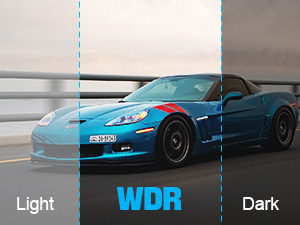
3.6-сүрөт: WDR технологиясы
4. Орнотуу жана орнотуу
Follow these steps to install your ABASK Q40S Dashcam:
- Алдыңкы айнекти тазалаңыз: Use a clean cloth to wipe the area on your windshield where the dashcam will be mounted. Ensure it is free of dust and grease for optimal suction.
Видео 4.1: Dashcam Installation and Operation Guide. This video demonstrates cleaning the windshield, attaching the suction cup, routing cables, installing the rear camera, plugging in the power adapter, and the camera automatically starting.
The video shows a hand cleaning the windshield with a wipe.
- Сорох чөйчөк монтажын тиркөө: Secure the suction cup mount to the cleaned area of your windshield. Ensure it is firmly attached.
The video shows a hand attaching the dashcam with its suction cup mount to the windshield.
- Кабелдерди багыттоо жана жашыруу: Connect the power cable to the dashcam. Carefully route the cable along the edge of the windshield and down the A-pillar to conceal it. This provides a neat and safe installation.

4.1-сүрөт: Кабель багыттоо
The video shows hands tucking the power cable into the car's trim along the windshield and A-pillar.
- Арткы камераны орнотуу: Mount the rear camera on your rear windshield using the provided tape and screws. Connect its cable to the main dashcam unit. Ensure the red reverse line on the rear camera extension cable is connected to the positive pole of your car's reverse light for parking assistance functionality.
The video shows a hand installing the rear camera on the interior of the rear windshield.
- Plug in the Car Charger: Унааңыздын кубаттагычын унааңыздын тамеки күйгүзгүч розеткасына сайыңыз.
- Күйгүзүү: The dashcam will automatically power on and begin recording when you start your car.
- Micro SD картаны форматтоо: Before first use, or if you encounter recording issues, format the Micro SD card through the dashcam's settings menu. Navigate to the settings, find the 'Format' option, and confirm. This ensures optimal performance and compatibility.
The video demonstrates navigating the menu to the 'Format' option and confirming the formatting of the Micro SD card.
5. Операция
Here are the basic operating instructions for your dashcam:
- Автоматтык жаздыруу: Once powered on, the dashcam automatically starts recording. The screen will display the live view from the front and/or rear cameras.
- Viewжаздырылган Footage: үчүн view recorded videos, stop the current recording (if active), switch to playback mode, and then navigate through the files. You can select and play back specific video clips.
The video demonstrates stopping video recording, switching to camera mode, and then playing back recorded images/videos.
- G-сенсорду активдештирүү: Капыстан сокку же кагылышуу болгон учурда, орнотулган G-sensor окуяны автоматтык түрдө аныктап, учурдагы видеону бекитет file, анын циклдик жаздыруу менен кайра жазылышына жол бербейт.
- Унаа токтотуучу жай: If the optional hardwire kit is installed, the dashcam will automatically detect vibrations or impacts while parked and record a short video clip, providing surveillance for your vehicle.
- Цикл жаздыруу: The dashcam continuously records in short segments (e.g., 1, 3, or 5 minutes). When the memory card is full, the oldest unlocked files жаңы жаздыруулар үчүн орун бошотуу үчүн автоматтык түрдө үстүнө жазылат.
6. Техникалык тейлөө
- Тазалоо: Камера линзасын жана экранын тазалоо үчүн жумшак, кургак чүпүрөктү колдонуңуз. Абразивдүү тазалоочу каражаттарды же эриткичтерди колдонуудан алыс болуңуз.
- SD картага кам көрүү: Regularly format your Micro SD card (e.g., once a month) to maintain optimal performance and prevent data corruption. Use a high-quality Class 10 or higher Micro SD card.
- Температура: Видеорегистраторду узак убакыт бою өтө жогорку температурага дуушар кылбаңыз, анткени бул батареянын иштөө мөөнөтүнө жана түзмөктүн иштешине таасир этиши мүмкүн.
7. Кыйынчылыктарды
- Камера күйбөй жатат: Ensure the car charger is properly connected to both the dashcam and the cigarette lighter socket. Check if the car's ignition is on.
- Жаздыруу күтүлбөгөн жерден токтойт: The SD card might be full or corrupted. Format the SD card. Ensure you are using a high-speed (Class 10 or higher) SD card.
- Видеонун сапаты начар: Clean the camera lens. Ensure the protective film has been removed from the lens. Check the video resolution settings.
- Rear camera not working: Check all cable connections between the rear camera and the main unit. Ensure the rear camera cable is not damaged.
- Parking monitor not working: This feature requires a hardwire kit (not included) to be installed and correctly connected to your car's battery.
8. Техникалык шарттар
| Өзгөчөлүк | Description |
|---|---|
| Бренд | АБАСК |
| Модель номери | Q40S |
| Унаа кызматынын түрү | Машина |
| Байланыш технологиясы | USB |
| Өзгөчөлүктөр | Loop Recording, G-Sensor |
| Видео жаздыруу чечими | 1296p (Front), 1080P (Overall system) |
| Монтаж түрү | Сорох кубогын таһыгар |
| Түс | Боз |
| талаасы View | 170 Degrees (Front), 140 Degrees (Rear) |
| Башкаруу ыкмасы | тийүү |
| Screen Size | 4 дюйм (LCD) |
| Батарея түрү | Литий-ион |
| Кошулган эстутум картасынын өлчөмү | 32 ГБ |
| Элементтин өлчөмдөрү (L x W x Y) | 9.9 x 6 x 3.9 см |
| Элемент Салмагы | 32 грамм |
9. Кепилдик жана колдоо
ABASK products are designed for reliability and performance. For any issues or questions regarding your ABASK Q40S Dashcam, please refer to the contact information provided with your purchase or visit the official ABASK support website. We are committed to providing satisfactory solutions within 24 hours.