
Introduction
Thank you for choosing the Admiral 50-inch Ultra HD LED Smart TV, model ADL50UWOSAC. This manual provides essential information for setting up, operating, maintaining, and troubleshooting your new television. Please read these instructions carefully before using the product to ensure proper operation and to maximize your viewтажрыйбасы.
This television features a 4K LED display, Dolby Sound System, WebOS, built-in Chromecast, Bluetooth, and Wi-Fi connectivity, offering a wide range of entertainment options.
1. Орнотуу
1.1 Пакеттен чыгаруу
Carefully remove the TV from its packaging. Ensure all accessories are present, including the remote control, power cable, and stand components. Retain the packaging for future transport or service needs.
1.2 Стендди орнотуу
Телевизор стенди орнотуу үчүн:
- Телевизордун экранын ылдый каратып жумшак, тегиз жерге коюңуз.
- Стенддик негиздер менен телевизордун түбүндөгү тиешелүү уячаларды тууралаңыз.
- Берилген бурамалар менен стенддерди бекитиңиз. Алардын бекем кысылганын текшериңиз.
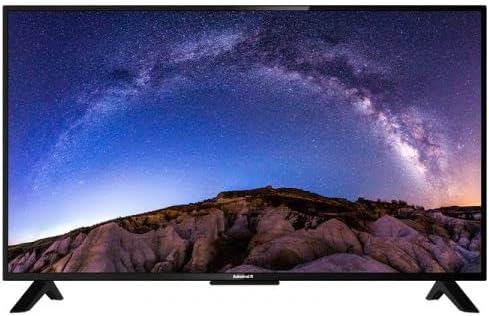
Сүрөт: алдыңкы view of the Admiral 50-inch Smart TV with its stand properly installed. This shows the display and the two support feet at the bottom.
1.3 Түзмөктөрдү туташтыруу
Before connecting any devices, ensure the TV is unplugged from the power outlet.
- Кубат кабели: Кубат кабелин телевизордун кубат киресине, андан кийин розеткага туташтырыңыз.
- HDMI түзмөктөрү: Use HDMI cables to connect external devices such as Blu-ray players, gaming consoles, or set-top boxes to the HDMI ports on the TV.
- USB түзмөктөрү: Медиа ойнотуу үчүн USB дисктерди USB портторуна салыңыз.
- Антенна/кабель: Connect an antenna or cable TV source to the RF input.

Сүрөт: Арткы view of the Admiral 50-inch Smart TV, highlighting the location of various input ports including HDMI, USB, and power input.
1.4 Баштапкы күйгүзүү жана орнотуу устасы
After connecting all necessary cables, plug the TV into a power outlet. Press the power button on the remote control or on the TV itself. The TV will guide you through the initial setup wizard, which includes:
- Тил тандоо.
- Тармакка туташуу (Wi-Fi же Ethernet).
- Каналды сканерлөө.
- Убакыт алкагынын жөндөөлөрү.
2. Иштөө нускамалары
2.1 Алыстан башкаруу функциялары
The provided remote control allows you to navigate the TV's features. Key functions include:
- Кубат баскычы: Телевизорду күйгүзөт же өчүрөт.
- Киргизүү/Булак: Selects the input source (HDMI 1, USB, TV, etc.).
- Үнүн жогорулатуу/төмөндөтүү: Үн деңгээлин тууралайт.
- Канал өйдө/төмөн: Телеканалдарды өзгөртөт.
- Навигация баскычтары (жебе баскычтары, OK): Менюларды багыттоо жана тандоолорду ырастоо.
- Үй баскычы: Smart TV башкы экранына (WebOS).
- Колдонмонун кыска баскычтары: Direct access to popular streaming services like Netflix, YouTube, and Prime Video.
2.2 Smart TV функциялары (WebOS)
Your Admiral Smart TV runs on WebOS, providing an intuitive user interface for accessing various applications and content.
- Үй башкаруу тактасы: Press the Home button to access the main dashboard, where you can find installed apps, input sources, and settings.
- App Store: Download and install additional applications from the integrated app store.
- Chromecast камтылган: Cast content from compatible mobile devices or computers directly to your TV. Ensure your device and TV are on the same Wi-Fi network.
- Bluetooth байланышы: Connect Bluetooth-enabled devices such as headphones or soundbars wirelessly to the TV. Access Bluetooth settings in the TV menu.
- Wi-Fi туташуусу: Connect to your home wireless network for internet access and smart features. Manage Wi-Fi settings in the TV's network menu.
2.3 Киргизүү булагын тандоо
To switch between connected devices or TV channels, press the "Input" or "Source" button on your remote control. A menu will appear, allowing you to select the desired input (e.g., HDMI 1, HDMI 2, USB, TV).
3. Техникалык тейлөө
3.1 Телевизорду тазалоо
- Экран: Экранды жумшак, түксүз чүпүрөк менен акырын сүртүңүз. өжөр белгилери үчүн, бир аз гampчүпүрөккө суу же атайын экран тазалоочу каражат. Суюктукту экранга түз чачпаңыз.
- Дене: Телевизордун тешиктерин тазалоо үчүн жумшак, кургак чүпүрөктү колдонуңузasinг. Абразивдүү тазалагычтарды же эриткичтерди колдонуудан алыс болуңуз.
- Тазалоодон мурун дайыма сыналгыдан ажыратыңыз.
3.2 Программалык камсыздоо жаңыртуулары
Periodically check for software updates through the TV's settings menu. Updates can improve performance, add new features, and enhance security. Ensure the TV is connected to the internet during the update process.
4. Кыйынчылыктарды
Эгер сыналгыңызда көйгөйлөргө туш болсоңуз, колдоо бөлүмүнө кайрылуудан мурун төмөнкү жалпы чечимдерди караңыз.
| Көйгөй | Мүмкүн чечим |
|---|---|
| Күч жок |
|
| Сүрөт же үн жок |
|
| Пульт иштебей жатат |
|
| Wi-Fi'га туташпай жатат |
|
5. Техникалык шарттар
| Өзгөчөлүк | Деталь |
|---|---|
| Бренд | адмирал |
| Модель номери | ADL50UWOSAC |
| Screen Size | 50 дюйм |
| Дисплей технологиясы | LED |
| Резолюция | 4K Ultra HD |
| Жаңыртуу ылдамдыгы | 60 Гц |
| Операция системасы | WebOS |
| Өзгөчөлүктөр | Built-In Speaker, Dolby Sound System, Chromecast Built-in |
| Байланыш технологиясы | HDMI, USB, Wi-Fi, Bluetooth |
| Аспект катышы | 16:9 |
| Продукциянын өлчөмдөрү (D x W x Y) | 14D x 121W x 74H сантиметр |
| Элемент Салмагы | 11.16 кг |
| Өндүрүүчү | ADMIRAL TV |
6. Кепилдик маалыматы
This Admiral 50-inch Smart TV (Model ADL50UWOSAC) comes with a 2 жылдык кепилдик from the date of purchase. This warranty covers manufacturing defects and ensures peace of mind. Please retain your proof of purchase for warranty claims. For specific terms and conditions, refer to the warranty card included with your product or contact Admiral customer support.
7. Кардарларды колдоо кызматы
If you require further assistance, have questions not covered in this manual, or need to report a technical issue, please contact Admiral customer support. Refer to the contact information provided on the product packaging or the official Admiral webакыркы колдоо маалымат үчүн сайт.
When contacting support, please have your TV model number (ADL50UWOSAC) and serial number ready.