
1. Киришүү
This manual provides essential information for the safe and efficient operation of your PowerWalker VFI 1000 AT FR Online Uninterruptible Power Supply (UPS). The VFI AT series utilizes double-conversion technology to provide reliable power protection for critical devices. Please read this manual thoroughly before installation and use, and retain it for future reference.
2. Коопсуздук нускамалары
WARNING: Failure to follow these safety instructions can result in fire, electric shock, serious injury, or death.
- UPSти ачпаңыз casinг. Ичинде колдонуучу тейлей турган бөлүктөр жок. Бардык тейлөөлөрдү квалификациялуу тейлөө кызматкерлерине тапшырыңыз.
- Do not connect appliances that could overload the UPS, such as hair dryers or vacuum cleaners.
- Ensure the UPS is connected to a properly grounded power outlet.
- Do not block ventilation openings. Maintain adequate clearance around the UPS for proper airflow.
- UPSти чаң, нымдуулук же экстремалдуу температура болгон жерлерде орнотуудан алыс болуңуз.
- In case of emergency, press the OFF button and disconnect the UPS from the AC power source.
3. Продукт бүтүп калдыview
The PowerWalker VFI 1000 AT FR UPS is designed to provide clean, stable power to your connected equipment. It features a user-friendly interface and various connectivity options.
3.1 алдыңкы панели

Figure 3.1: Front Panel of the UPS. This image shows the main display screen indicating input and output voltage, battery status, and load level. Below the screen are four control buttons: ON, OFF, ENTER, and ESC.
The front panel includes an LCD display that provides real-time information about the UPS status, such as input/output voltage, battery charge, and load level. Control buttons allow for easy navigation and configuration.
- LCD дисплей: Shows operational status and parameters.
- ON баскычы: Powers on the UPS.
- OFF баскычы: Powers off the UPS.
- ENTER баскычы: Тандоолорду ырастайт же менюга кирет.
- ESC баскычы: Менюдан чыгат же операцияларды жокко чыгарат.
3.2 Арткы панель
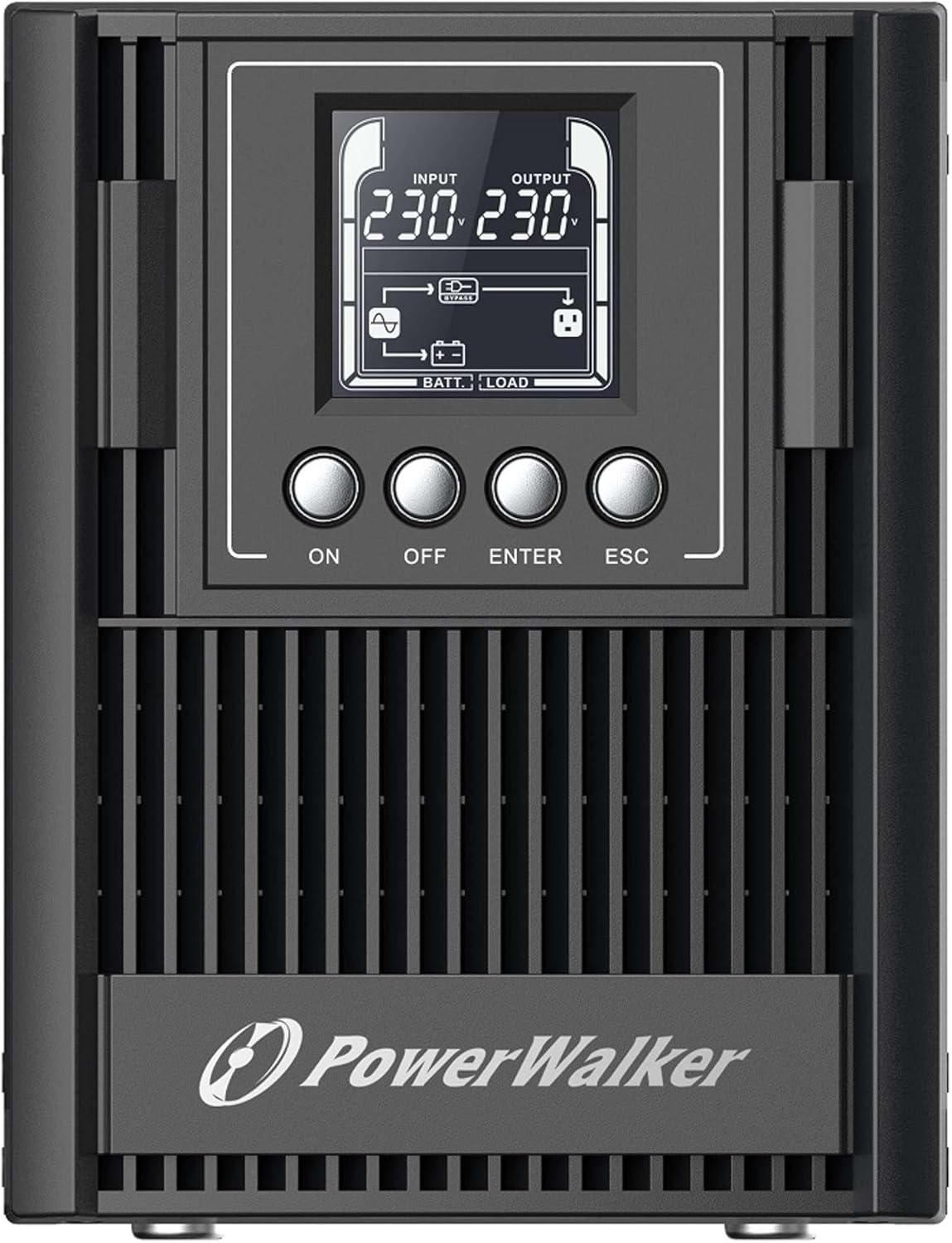
Figure 3.2: Rear Panel of the UPS. This image displays the connectivity options including a serial port (DB9), cooling fan, multiple Type F outlets, a USB port, an EPO (Emergency Power Off) terminal, and the AC input socket.
The rear panel provides all necessary connections for input power, output to protected devices, and communication interfaces.
- AC киргизүү: UPSти негизги кубат булагына туташтырат.
- Чыгуу розеткалары: Type F, Type E, or Type G outlets (depending on model) for connecting protected equipment.
- USB порт: For communication with a computer and monitoring software.
- RS-232 Port (Serial): For advanced communication and monitoring.
- EPO (Emergency Power Off) Terminal: For remote emergency shutdown.
- Акылдуу уяча: For optional communication cards (e.g., SNMP card).
- Тышкы батарея пакетинин туташтыргычы: For connecting optional external battery packs to extend backup time.
4. Орнотуу
4.1 Таңгактан чыгаруу жана текшерүү
Carefully unpack the UPS and inspect it for any shipping damage. If any damage is found, do not install the unit and contact your dealer.
4.2 Орнотуу
Place the UPS in a clean, dry, and well-ventilated area. Ensure sufficient clearance (at least 20 cm) around the unit for proper heat dissipation. Avoid direct sunlight, heat sources, and excessive moisture.
4.3 Алгачкы заряддоо
Before initial use, connect the UPS to a standard AC power outlet for at least 8 hours to ensure the internal batteries are fully charged. The UPS will charge its batteries whether it is turned ON or OFF.
4.4 Туташтыргыч жабдуулар
- Connect your critical equipment (computers, monitors, network devices) to the output sockets on the rear panel of the UPS.
- Connect the UPS power cord to a grounded AC power outlet.
- (Optional) Connect the USB or RS-232 cable from the UPS to your computer for monitoring and management.
- (Optional) If using external battery packs, connect them according to their specific instructions to the designated connector on the UPS.
5. UPSти иштетүү
5.1 UPSти күйгүзүү
басып, кармап туруңуз ON button on the front panel for approximately 2 seconds until you hear a beep and the LCD display illuminates. The UPS will perform a self-test and then enter normal operating mode.
5.2 UPSти өчүрүү
To turn off the UPS, press and hold the ӨЧҮРҮҮ button for approximately 2 seconds until the LCD display turns off. Ensure all connected equipment is properly shut down before turning off the UPS.
5.3 ЖК дисплей жана навигация
The LCD display provides various operational parameters. Use the ENTER жана ESC buttons to navigate through menus and view different information screens. The display automatically darkens after a period of inactivity and can be woken up with a single button press.
5.4 Remote Shutdown (RPO)
The UPS supports Remote Power Off (RPO) functionality. Connect an external switch to the EPO terminal on the rear panel. Activating this switch will immediately shut down the UPS and connected equipment. Refer to the wiring diagram in the advanced user manual for proper connection.
6. Техникалык тейлөө
6.1 Батареяга кам көрүү
The UPS contains internal lithium batteries. To maximize battery life:
- Keep the UPS connected to AC power to keep batteries charged.
- UPSти өтө жогорку температурада сактоодон алыс болуңуз.
- Perform a battery calibration (if available via software) or a full discharge/recharge cycle every 3-6 months.
- Replace batteries when their capacity significantly degrades. Battery replacement should only be performed by qualified personnel.
6.2 Тазалоо
UPSтин сыртын жумшак, кургак чүпүрөк менен тазалаңыз. Суюктук же аэрозолдук тазалоочу каражаттарды колдонбоңуз. Желдетүүчү тешиктердин чаң жана таштандыдан таза болушун камсыз кылыңыз.
6.3 Сактоо
If storing the UPS for an extended period, ensure the batteries are fully charged. Recharge the batteries every three months to prevent permanent damage.
7. Кыйынчылыктарды
This section provides solutions to common issues you may encounter with your UPS. If the problem persists, contact technical support.
| Көйгөй | Мүмкүн себеп | Чечим |
|---|---|---|
| UPS күйбөйт. | No AC input power; Low battery charge. | Check AC power connection; Allow UPS to charge for 8 hours. |
| UPS тынымсыз сигнал берет. | Ашыкча жүктөө; Аз батарея; Ката абалы. | Reduce connected load; Allow batteries to charge; Check LCD for error codes. |
| Кыска камдык убакыт. | Batteries not fully charged; Batteries reaching end of life. | Ensure full charge; Consider battery replacement. |
| Туташкан жабдуулар электр энергиясын албай жатат. | UPS is off; Output sockets not enabled; UPS in fault mode. | Turn on UPS; Check LCD for status; Consult manual for output settings. |
8. Техникалык шарттар
| Өзгөчөлүк | Деталь |
|---|---|
| Модел | VFI 1000 AT FR (Model Number: 10122183) |
| Бренд | PowerWalker |
| Чыгаруу кубаттуулугу | 900 Вт |
| Киргизүү көлөмүtage | 220V (Wide input voltage диапазон) |
| Батарея түрү | Литий |
| Output Sockets | Type F, Type E, Type G (various versions available) |
| Байланыш порттору | USB (HID support), RS-232, Intelligent Slot |
| Өлчөмдөрү (H x W x D) | 50 x 10 x 48 см (болжол менен) |
| Салмагы | 2 килограмм |
| Өзгөчөлүктөр | Double-conversion online technology, Generator compatible, RPO, External battery pack support, Automatically darkening LCD. |
9. Кепилдик жана колдоо
The PowerWalker VFI 1000 AT FR UPS is covered by a standard manufacturer's warranty. Please refer to the warranty card included with your product or visit the official PowerWalker webдеталдуу кепилдик шарттары жана шарттары үчүн сайт.
For technical support, troubleshooting assistance beyond this manual, or spare parts inquiries, please contact your local dealer or PowerWalker customer service. The EU Spare Part Availability Duration is 2 Years.