
ZABBOW F-SL001A
ZABBOW Scorpion Bluetooth Headset
User Manual
Model: F-SL001A
1. Продукт бүтүп калдыview
The ZABBOW Scorpion Bluetooth Headset is a versatile wireless earphone designed for clear communication and audio playback across various activities such as sport, office work, and driving. Featuring Bluetooth V5.3 technology, it ensures stable connections and wide compatibility with devices like iOS, Android, and PS3. Its design prioritizes comfort and includes a noise-canceling microphone for enhanced call quality.

Сүрөт: алдыңкы view of the ZABBOW Scorpion Bluetooth Headset, showcasing its red and black design with an ear hook.
Негизги өзгөчөлүктөрү:
- Кеңири шайкештик: Advanced Bluetooth V5.3 for stable connections with iOS, Android, and PS3 devices.
- Ultra-Long Battery Supply: Up to 10 hours of continuous call time and 160 hours standby on a 2-hour charge.
- Мыкты үн сапаты: High-detail treble and bass response with noise reduction and echo cancellation technology.
- Comfort Design for Sports: Lightweight and comfortable fit, suitable for extended wear without discomfort.
2. Продукциянын компоненттери жана башкаруу элементтери
Familiarize yourself with the various parts and controls of your ZABBOW Scorpion Bluetooth Headset.

Image: Diagram illustrating the essential information and labeled components of the ZABBOW Scorpion Bluetooth Headset, including buttons, ports, and indicators.
| Компонент | Функция |
|---|---|
| Функция баскычы | Power On/Off, Play/Pause, Answer/End Call, Voice Assistant activation. |
| Volume "+" / Previous | Increase volume, skip to previous track. |
| Volume "-" / Next | Decrease volume, skip to next track. |
| Заряддоо порту | Connect charging cable to power source. |
| Lamp (LED Indicator) | Indicates power status, pairing mode, charging status. |
| Микрофон | Microphone for voice input during calls. |
| Кулак илгич | Provides secure and comfortable fit over the ear. |
3. Орнотуу
3.1 Гарнитураны заряддоо
Before first use, fully charge your headset. A full charge takes approximately 2 hours.
- Заряддоо кабелин гарнитуранын кубаттоо портуна туташтырыңыз.
- Кабелдин экинчи учун USB кубат булагына туташтырыңыз (мисалы, компьютердин USB порту, дубал адаптери).
- The LED indicator (Lamp) will show the charging status. It typically turns red during charging and blue or off when fully charged.
3.2 Түзмөк менен жупташтыруу
To use your ZABBOW Scorpion headset, you must first pair it with your Bluetooth-enabled device.
- Гарнитура өчүрүлгөнүн текшериңиз.
- басып, кармап туруңуз Функция баскычы for approximately 5-7 seconds until the LED indicator flashes red and blue alternately. This indicates the headset is in pairing mode.
- On your device (smartphone, tablet, PS3, etc.), enable Bluetooth and search for available devices.
- Select "ZABBOW Scorpion" or a similar name from the list of found devices.
- Once paired, the LED indicator on the headset will typically flash blue slowly or turn off, and you will hear a confirmation tone.
Note: The headset will automatically attempt to reconnect to the last paired device when powered on, if that device's Bluetooth is active and within range.
4. Иштөө нускамалары
4.1 Күйгүзүү/өчүрүү
- Күйгүзүү: басып, кармап туруңуз Функция баскычы for about 3 seconds until the LED indicator flashes blue and you hear a power-on tone.
- Өчүрүү: басып, кармап туруңуз Функция баскычы for about 4 seconds until the LED indicator flashes red and you hear a power-off tone.
4.2 Чалууларды башкаруу
- Чалууга жооп берүү/аяктоо: баскычын кыска басыңыз Функция баскычы.
- Чакырууну четке кагуу: басып, кармап туруңуз Функция баскычы for about 2 seconds during an incoming call.
- Акыркы номерди кайра терүү: эки жолу басыңыз Функция баскычы чалуу жок болгондо.
4.3 Музыканы ойнотуу
- Ойнотуу/тындыруу: баскычын кыска басыңыз Функция баскычы.
- Кийинки трек: баскычын кыска басыңыз Volume "-" / Next баскычы.
- Мурунку трек: баскычын кыска басыңыз Volume "+" / Previous баскычы.
4.4 Үндү башкаруу
- Көлөмүн жогорулатуу: басып, кармап туруңуз Volume "+" / Previous баскычы.
- Көлөмдү азайтуу: басып, кармап туруңуз Volume "-" / Next баскычы.
4.5 Үн жардамчысын жандыруу
- Үн Жардамчысын жандыруу: Үч жолу басыңыз Функция баскычы (if supported by your connected device).

Image: A person using the ZABBOW Scorpion Bluetooth Headset while driving, highlighting its suitability for hands-free communication.
5. Техникалык тейлөө
5.1 Тазалоо
- Гарнитураны жумшак, кургак, түксүз чүпүрөк менен сүртүңүз.
- Абразивдүү тазалагычтарды, эриткичтерди же аэрозолдук спрейлерди колдонбоңуз.
- Ар кандай тешиктерге ным кирүүдөн сактаңыз.
5.2 Сактоо
- Гарнитураны салкын, кургак жерде, экстремалдык температурадан жана тике күн нурунан алыс сактаңыз.
- Эгер батарейканы узак убакытка сактасаңыз, анын иштөө мөөнөтүн сактоо үчүн аны мезгил-мезгили менен (мисалы, ар бир 3 ай сайын) кубаттап туруңуз.
5.3 Ear Hook Disassembly/Assembly
The ear hook can be removed or replaced for comfort or maintenance.
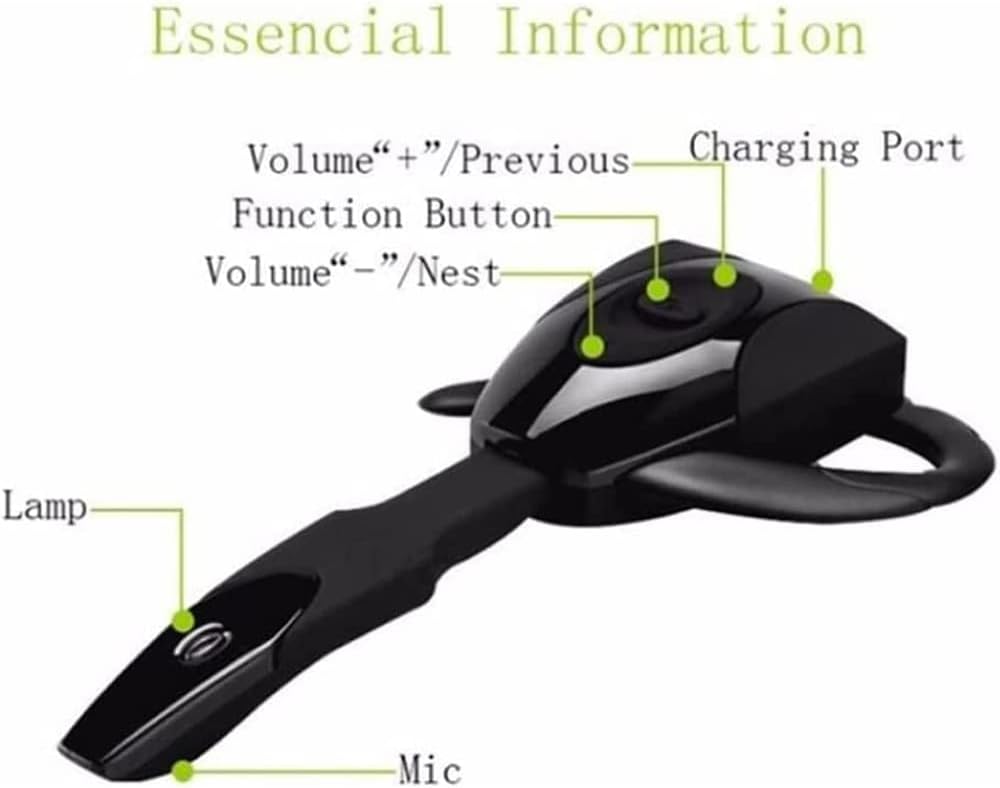
Image: A four-panel schematic diagram illustrating the steps for disassembling and assembling the ear hook of the ZABBOW Scorpion Bluetooth Headset.
- Алып салуу үчүн: Gently buckle the clear lens near the charging port, then push the ear hook out.
- Орнотуу үчүн: Align the ear hook with the slot and push it in until it clicks securely into place.
6. Кыйынчылыктарды
If you encounter issues with your headset, refer to the following common problems and solutions.
| Көйгөй | Мүмкүн чечим |
|---|---|
| Гарнитура күйбөйт. | Ensure the battery is charged. Connect to a charger and check the LED indicator. |
| Гарнитураны түзмөгүм менен жупташтырууга мүмкүн болбой жатат. |
|
| Үн жок же үнү төмөн. |
|
| Чалуу сапаты начар. |
|
7. Техникалык шарттар
| Атрибут | Деталь |
|---|---|
| Бренд | ZABBOW |
| Модель аты | Bluetooth кулакчындары |
| Элемент моделинин номери | F-SL001A |
| Байланыш технологиясы | Bluetooth V5.3 |
| Форма фактору | Кулактагы (бир кулак) |
| Noise Control | Active Noise Cancellation (for mic) |
| Түс | Кызыл |
| Продукциянын өлчөмдөрү | 10.92 x 5.08 x 2.54 см |
| Элемент Салмагы | 14 г |
| Батареянын иштөө мөөнөтү (сүйлөшүү убактысы) | 10 саатка чейин |
| Батареянын иштөө мөөнөтү (күтүү режими) | 160 саатка чейин |
| Заряддоо убактысы | Болжол менен 2 саат |
8. Кепилдик жана колдоо
For warranty information and customer support, please refer to the documentation provided at the time of purchase or contact the retailer/manufacturer directly.
Өндүрүүчү: ZABBOW
Сураныч, кепилдик дооматтар үчүн сатып алуу далилиңизди сактап коюңуз.
Ask a question about this manual
Ask about setup, troubleshooting, compatibility, parts, safety, or missing instructions. Manuals+ will review the question and use this page’s manual context to help answer it.