
Introduction
This manual provides detailed instructions for the setup, operation, maintenance, and troubleshooting of your HOMPOW Native 1080P 4K Supported Bluetooth Projector. Please read this manual thoroughly before using the product to ensure proper function and longevity.
Кутуда эмне бар
- Алыстан башкаруу
- User Manual
- Электр кабели
- HDMI кабели
Негизги өзгөчөлүктөрү
- 1080P Full HD High Performance: Native resolution of 1920*1080 with 6000:1 contrast ratio, supporting 4K input. Delivers 10% brighter images than similar projectors.
- Bluetooth Connection & HiFi Stereo Speaker: Supports various Bluetooth speakers and headphones for immersive sound. Features built-in HiFi stereo speakers for quality audio.
- Кеңири шайкештик: Connects via HDMI to Laptops, TV Sticks, ROKU, PS4, Smartphones (adapter not included). Also features AV and USB ports for versatile connectivity.
- Keystone Correction & Zoom: Adjustable vertical and horizontal angles (±15°) via keystone correction. Zoom function allows image size reduction to 50% without moving the projector.
- Узун Лamp Жашоо: LED bulb designed for 100,000 hours of lamp өмүр бою.
Жайгашуу
1. Жайгаштыруу
Place the projector on a stable, flat surface or mount it securely. Ensure adequate ventilation around the projector to prevent overheating. Consider the projection distance to achieve your desired screen size.

Figure 1: The projector supports various installation methods, including front projection on a table, ceiling mount, and rear projection.
2. Power Connection
Connect the power cord to the projector's power input and then to a power outlet.
3. Түзмөктөрдү туташтыруу
The projector offers multiple input options:
- HDMI: Use the provided HDMI cable to connect your Laptop, TV Stick, ROKU, PS4, or other HDMI-enabled devices.
- USB: Insert a USB flash drive into the USB port to play videos or view pictures directly.
- OF: Use an AV cable to connect older devices like DVD players.
- Bluetooth: Pair with external Bluetooth speakers or headphones for enhanced audio.
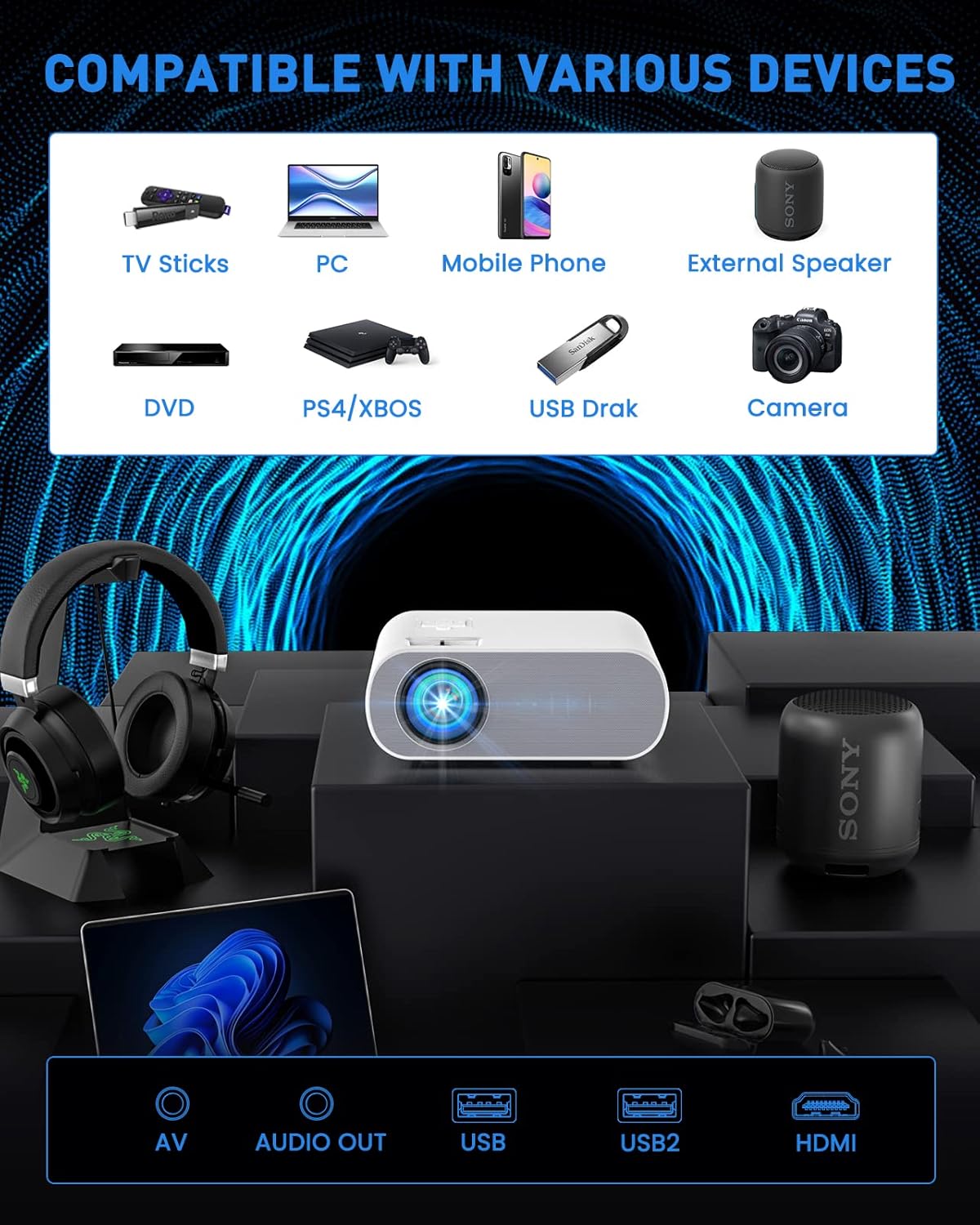
Figure 2: The projector is compatible with a wide range of devices via its multiple input ports.

Figure 3: Connect your smartphone or iPad using an HDMI adapter (not included) for screen mirroring.
4. Сүрөттү тууралоо
- Фокус: Сүрөт даана жана курч болгонго чейин проектордун линзасындагы фокус шакекчесин айландырыңыз.
- Негизги ташты оңдоо: Use the keystone correction function (manual ±15°) to adjust the vertical and horizontal angles of the image if it appears trapezoidal.
- Чоңойтуу: Utilize the ZOOM function to reduce the image size to 50% without physically moving the projector.

Figure 4: Adjust focus and keystone correction for optimal image clarity and shape.
Иштөө нускамалары
1. Күйгүзүү/өчүрүү
Проектордун же пульттун кубат баскычын басып, блокту күйгүзүңүз же өчүрүңүз.
2. Булак тандоо
Use the "Source" button on the remote or projector to select the desired input source (HDMI, USB, AV).
3. Аудио орнотуулары
The projector has built-in HiFi stereo speakers. For external audio, connect Bluetooth speakers or headphones via the Bluetooth pairing function in the projector's settings menu.

Figure 5: The projector features Bluetooth 5.0 for wireless audio connectivity.
4. Колдонуу сценарийлери
The HOMPOW projector is ideal for home cinema and video games. For optimal performance, use in a relatively dark room environment.

Figure 6: Enjoy immersive outdoor movie experiences with the HOMPOW projector.

Figure 7: Experience a large, immersive display up to 200 inches.
Техникалык тейлөө
1. Лamp Жашоо
Проектордун светодиоду лamp has a lifespan of approximately 100,000 hours, reducing the need for frequent bulb replacements.
2. Тазалоо
- Regularly clean the lens with a soft, lint-free cloth designed for optical surfaces.
- Keep the projector's ventilation openings clear of dust and debris to ensure proper airflow.
Проблемаларды чечүү
If you encounter issues with your projector, please refer to the following common solutions:
- Сүрөт жок/сигнал:
- Ensure the correct input source is selected (HDMI, USB, AV).
- Check all cable connections (HDMI, power) to ensure they are secure.
- Verify the connected device (laptop, TV stick) is powered on and outputting a signal.
- Үн жок:
- Проектордун да, туташкан түзмөктүн да үнүн тууралаңыз.
- Эгер тышкы динамиктерди колдонсоңуз, алардын Bluetooth аркылуу туура туташканын же жупташтырылганын текшериңиз.
- Note: The projector does not support Dolby sound. If playing videos from services like Netflix or Amazon Prime Video, ensure Dolby sound is turned off in your source device's audio settings (e.g., Settings > Display & Sounds > Audio > Dolby Digital Output > OFF).
- бүдөмүк сүрөт:
- Проектор объективиндеги фокус шакегин тууралаңыз.
- Use the keystone correction to correct any trapezoidal distortion.
- Проекциялык беттин тегиз жана жылмакай экенине ынаныңыз.
- Ашыкча ысып кетүү:
- Ensure the projector has adequate ventilation and its vents are not blocked.
- Avoid operating the projector in excessively hot environments.
Техникалык шарттар
| Өзгөчөлүк | Деталь |
|---|---|
| Бренд | HOMPOW |
| Модель номери | C10 |
| Native Resolution | 1920 x 1080 (1080P Full HD) |
| 4K колдоо | Ооба |
| Контраст катышы | 6000:1 |
| Жарыктык | 10% brighter than similar projectors (specific lumens not provided in feature bullets, but 6000L is mentioned in an image) |
| Байланыш технологиясы | Bluetooth (5.0), HDMI, USB, AV |
| Баяндамачы | Built-in HiFi Stereo Speaker |
| Keystone Correction | Manual ±15° (Vertical and Horizontal) |
| Zoom функциясы | Image size reduction to 50% |
| Lamp Жашоо | 100,000 саат |
| Элемент Салмагы | 4.33 фунт |
| Пакеттин өлчөмдөрү | 12.01 x 9.88 x 5.47 дюйм |
Кепилдик жана колдоо
HOMPOW provides a 2 жылдык кепилдик for this projector, along with lifetime professional technical support. For any problems or inquiries, please feel free to contact us anytime.

Figure 8: Dedicated customer support is available for assistance.