
Introduction
The Andoer Carbon Fibre Camera Track Slider is designed to provide smooth, stable camera movements for video recording and time-lapse photography. Constructed from high-quality metal and carbon fibre, it supports a maximum load capacity of approximately 5 kg. This manual provides instructions for setup, operation, maintenance, and troubleshooting to ensure optimal performance of your slider.
Пакеттин мазмуну
Сиздин пакетиңизде төмөнкү нерселердин бардыгы камтылганын текшериңиз:
- 1 x Camera Track Slider
- 1 x Mini Ball Head
- 1 x Телефон Clamp
- 4 x Floor Mat Screws (for adjustable feet)
- 1 x Ташуу сумкасы

Image: All components of the Andoer Camera Track Slider kit, including the slider, mini ball head, phone clamp, adjustable feet, and a black carry bag.
Орнотуу нускамалары
- Attach the Mini Ball Head or Phone Clamp: The slider plate features a 1/4 inch screw. Attach the included mini ball head or phone clamp to this screw. Ensure it is securely tightened. The mini ball head also includes a 1/4 inch screw for camera attachment.
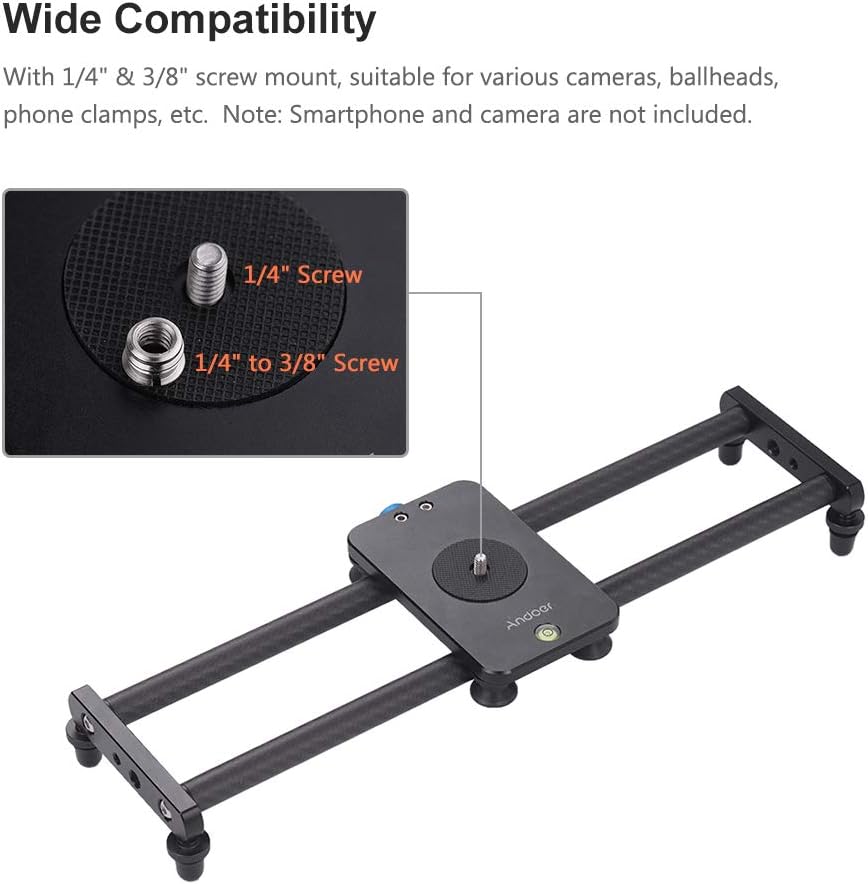
Image: Detail of the slider's mounting plate, highlighting the 1/4 inch screw and an adapter for 3/8 inch compatibility, used for attaching accessories like ball heads or phone clamps.
- Түзмөгүңүздү орнотуңуз:
- For cameras (DSLR, camcorder, DV): Attach your camera directly to the mini ball head's 1/4 inch screw.
- For smartphones: Secure your smartphone within the phone clamp.
- Буттарды тууралоо: Screw the four floor mat screws into the designated holes at the ends of the slider. These non-slip rubber feet allow for height adjustment and provide stability when the slider is placed on a flat surface.
- Mount on a Tripod (Optional): The slider is equipped with multiple 1/4 inch and 3/8 inch screw holes on its underside, allowing it to be mounted onto a tripod or two tripods for added stability and versatility.

Image: The camera slider shown mounted on a tripod, illustrating its compatibility with various devices such as a mini ball head, a phone clamp, and a camcorder.
Иштөө нускамалары
- Горизонталдык жылдыруу: Place the slider on a flat surface or mount it horizontally on a tripod. Gently push the camera carriage along the carbon fibre rails to achieve smooth, linear camera movements. The 4 high-precision bearings ensure a silent sliding effect.

Image: A DSLR camera mounted on the Andoer slider, illustrating the smooth and silent horizontal movement capability of the device.
- Vertical or Angled Sliding: By connecting the slider to a ball head (not included) and then mounting it on a tripod, the sliding track can be tilted to achieve vertical or angled shots. This allows for dynamic camera movements beyond horizontal.

Image: The camera slider positioned vertically on a tripod, showcasing its versatility for capturing upward or downward sliding shots.
- Using the Spirit Level: The built-in spirit level on the slider plate helps you quickly and accurately find balance, ensuring your shots are level. Adjust the slider's position or tripod until the bubble is centered.

Сүрөт: деталдуу view of the slider's bubble level, indicating its function for precise leveling, next to the metal plate with various screw mounts.

Image: The Andoer Carbon Fibre Camera Track Slider in an outdoor setting, with a DSLR camera mounted, demonstrating its application for capturing dynamic video footage.
Техникалык тейлөө
- Тазалоо: Wipe the carbon fibre rails and metal parts with a soft, dry cloth after each use to remove dust and debris. Avoid using abrasive cleaners or solvents.
- Сактагыч: Store the slider in its included carry bag in a dry, cool place when not in use to protect it from dust and potential damage.
- Текшерүү: Бардык бурамалар жана туташуулар бекем жана коопсуз экенин текшерүү үчүн мезгил-мезгили менен текшерип туруңуз.
Проблемаларды чечүү
- Slider movement is not smooth:
- Check the carbon fibre rails for any obstructions or debris. Clean them thoroughly.
- Ensure the camera carriage is properly seated on the rails.
- Verify that the slider is placed on a stable, level surface or tripod.
- Device feels unstable on the slider:
- Ensure the mini ball head or phone clamp is securely tightened to the slider plate.
- Confirm that your camera or smartphone is firmly attached to the mini ball head or phone clamp.
- Check that the total weight of your equipment does not exceed the maximum load capacity of 5 kg.
- Slider wobbles on a surface:
- Adjust the four floor mat screws to ensure all feet are making firm contact with the surface and the slider is level.
- If using a tripod, ensure the tripod is stable and securely attached to the slider.
Техникалык шарттар
| Бренд | Андоер |
| Модел | B0BFBDZFJ8 |
| Материал | Metal and Carbon Fibre |
| Max. Жүктөө кубаттуулугу | Болжол менен 5 кг (11 фунт) |
| Item Size (Folded) | 40 x 10 x 1.8 см (15.7 x 3.9 x 0.7 дюйм) |
| Track Gauge | 2.6 дюйм |
| Plate Size | 12.3 x 7.5 см (4.8 x 3 дюйм) |
| Элемент Салмагы | 578 г (20.4 унция) |
| Шайкеш түзмөктөр | Camcorder, Camera, Cellphone (with included accessories) |

Image: A visual representation of the camera slider with its key dimensions labeled, including overall length and the dimensions of the sliding plate.
Кепилдик жана колдоо
For warranty information or technical support, please contact the manufacturer, Andoer, directly through their official webсайт же продукт сатылып алынган чекене сатуучу. Сураныч, кепилдик дооматтар үчүн сатып алуу далилиңизди сактап коюңуз.