
Introduction
This manual provides comprehensive instructions for the Realforce Topre R3S TKL Keyboard (Topre 45g), Model R3SD31. It covers setup, operation, maintenance, troubleshooting, and detailed specifications to ensure optimal use of your keyboard. The Realforce R3S TKL keyboard features a space-saving tenkeyless form factor, laser-printed PBT keycaps, and full N-key rollover (NKRO) support, utilizing high-quality Topre switches for a unique typing experience.
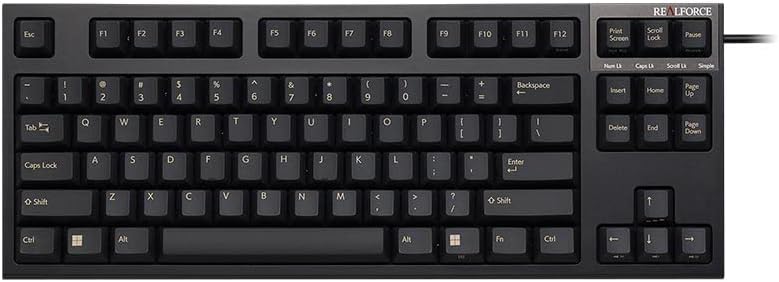
Сүрөт: алдыңкы view of the Realforce Topre R3S TKL Keyboard.
Жайгашуу
Follow these steps to set up your Realforce Topre R3S TKL Keyboard:
- Баскычтопту таңгактан чыгаруу: Carefully remove the keyboard and the included USB cable from its packaging.
- Компьютерге туташуу: The keyboard features a non-detachable USB-A cable. Connect the USB-A end of the cable to an available USB-A port on your computer (Laptop or PC).
- Операциялык системанын шайкештиги: The keyboard is compatible with Windows operating systems. No special drivers are typically required for basic functionality; it should be recognized automatically.
- Жайгашкан жери: Place the keyboard on a stable, flat surface. Adjust the keyboard feet on the underside for your preferred typing angle, if available.

Сүрөт: Арткы view of the Realforce R3S TKL Keyboard, illustrating the USB cable connection and the product label with model information.
Иштөө нускамалары
The Realforce Topre R3S TKL Keyboard is designed for intuitive use. Here are key aspects of its operation:
Негизги терүү
The keyboard features a standard QWERTY layout with 87 keys. Its tenkeyless (TKL) form factor provides a compact design while retaining essential keys for efficient typing. The Topre 45g switches offer a tactile typing experience.

Сүрөт: жогорудан төмөнгө view of the Realforce R3S TKL Keyboard, showing the QWERTY layout and 87 keys.
Topre Switches
This keyboard utilizes Topre electrostatic capacitive non-contact switches, known for their smooth, tactile feel and durability. The 45g weighting provides a consistent and satisfying keypress.

Сүрөт: жарылган view of a Topre switch, illustrating its internal components and non-contact design.
Feather-Key Touch
The Topre switches are designed to provide a 'feather-key touch' sensation, characterized by a smooth press and a distinct tactile bump without a harsh bottom-out. This design aims to reduce finger fatigue during extended typing sessions.

Image: A force curve graph demonstrating the 'feather-key touch' characteristic of Topre switches, showing the force required over key travel.
Actuation Point Changer (APC) Function
The keyboard supports an Actuation Point Changer (APC) function, allowing you to customize the key actuation point. This feature enables you to adjust how deep a key needs to be pressed before it registers, offering flexibility for different typing styles or applications like gaming.

Image: A diagram illustrating the adjustable actuation points (0.8mm, 1.5mm, 2.2mm, 3mm) for the keyboard switches.
Настройкаланган программалык камсыздоо
The Realforce R3S TKL Keyboard is supported by dedicated software that allows for advanced customization. This software enables users to adjust the actuation point per key, remap keys, and configure other settings to personalize their typing experience.

Image: Screenshot of the Realforce R3S customization software interface, showing options for actuation point adjustment and key remapping.
Техникалык тейлөө
Proper maintenance ensures the longevity and performance of your Realforce keyboard:
- үзгүлтүксүз тазалоо: Use a soft, lint-free cloth to wipe down the keycaps and keyboard surface regularly. For deeper cleaning, a can of compressed air can be used to remove dust and debris from between the keys.
- Клавиатураны тазалоо: The PBT keycaps are durable. If necessary, keycaps can be carefully removed using a keycap puller (not included) for thorough cleaning. Clean them with mild soap and water, then ensure they are completely dry before reattaching.
- Суюктуктардан алыс болуңуз: Клавиатурага суюктук төгүп албаңыз. Кокусунан төгүлүп кетсе, клавиатураны компьютериңизден дароо ажыратып, кайра туташтыруудан мурун толугу менен кургатыңыз.
- Сактагыч: Узак мөөнөткө колдонулбаганда, клавиатураны таза, кургак чөйрөдө күн нурунан жана экстремалдык температурадан алыс сактаңыз.
Проблемаларды чечүү
If you encounter issues with your Realforce Topre R3S TKL Keyboard, try the following steps:
- Баскычтоп жооп бербейт:
- USB кабели клавиатурага жана компьютериңизге бекем туташып турганын текшериңиз.
- Баскычтопту компьютериңиздин башка USB портуна туташтырууга аракет кылыңыз.
- Көйгөй клавиатурадабы же баштапкы компьютердеби, аныктоо үчүн клавиатураны башка компьютерден сынап көрүңүз.
- Компьютериңизди өчүрүп күйгүзүңүз.
- Атайын ачкычтар иштебейт:
- Check for any physical obstructions or debris under the non-functioning keycap.
- If using the customization software, ensure no key remapping or actuation point settings are causing the issue. Reset to default settings if necessary.
- Күтүлбөгөн жүрүм-турум:
- If the keyboard is behaving erratically, disconnect it and reconnect it.
- Иштөө тутумуңуз жаңыртылганын текшериңиз.
Эгерде бул кадамдар көйгөйдү чечпесе, кошумча жардам алуу үчүн Колдоо бөлүмүнө кайрылыңыз.
Техникалык шарттар
| Бренд | Realforce |
| Модель номери | R3SD31 |
| Байланыш технологиясы | USB-A (Зымдуу) |
| Которуу түрү | Topre Electrostatic Capacitive (Tactile, 45g) |
| Баскыч капкактары | Laser Printed PBT |
| Баскычтоптун жайгашуусу | QWERTY, 87 Keys (Tenkeyless) |
| Шайкеш түзмөктөр | Ноутбук, компьютер |
| Шайкеш Операция системасы | Windows |
| Продукциянын өлчөмдөрү (L x W x Y) | 14.53" x 5.59" x 1.5" (36.9 см x 14.2 см x 3.8 см) |
| Элемент Салмагы | 1.1 килограмм (2.43 фунт) |
| Материал | Акрилонитрил бутадиен стирол (ABS) |
| Өзгөчөлүктөр | Full N-Key Rollover (NKRO), Topre Switches, Customizable Actuation Point (via software) |
| Кутуда эмне бар | USB кабели |
Кепилдик
The Realforce Topre R3S TKL Keyboard comes with a 1-year limited repair warranty from the manufacturer, Topre Corporation. This warranty covers defects in materials and workmanship under normal use. Please retain your proof of purchase for warranty claims.
Колдоо
For further assistance, technical support, or warranty inquiries, please contact Realforce customer service or visit the official Realforce store.
Realforce Store: Visit the Realforce Store on Amazon
When contacting support, please have your keyboard's model number (R3SD31) and proof of purchase readily available.