
1. Киришүү
Thank you for choosing the UNITED LED40HS82A11 40-inch Full HD Smart Android TV. This television combines a vibrant Full HD display with the power of Android 11, offering a seamless entertainment experience. With built-in Chromecast and Airplay, Wi-Fi, Ethernet, and support for various digital broadcasting standards (DVB/T2/S2/C, MPEG-4, HEVC Main 10), your new TV is designed for versatile use, from watching movies and playing games to browsing the internet.
This manual provides essential information for setting up, operating, and maintaining your television. Please read it thoroughly before using the product and keep it for future reference.

Сүрөт 1.1: Алдыңкы view of the UNITED LED40HS82A11 TV with Android TV interface.
2. Коопсуздук маалыматы
Before operating your TV, please read all safety instructions carefully. Improper use can result in electric shock, fire, or damage to the appliance.
- Электр камсыздоо: Телевизордун 100-240 В, 50/60 Гц AC кубат булагына туташтырылганын текшериңиз. Розеткаларды ашыкча жүктөбөңүз.
- Вентиляция: Вентиляция тешиктерин жаап албаңыз. Тийиштүү аба агымы үчүн сыналгынын айланасында жетиштүү орун калтырыңыз.
- Суу жана ным: Телевизорду жамгырга же нымга тийгизбеңиз. Сыналгыга ваза сыяктуу суюктуктар толтурулган нерселерди койбоңуз.
- Жылуулук булактары: Телевизорду радиаторлор, жылуулук регистрлери, мештер же жылуулук чыгарган башка шаймандар сыяктуу жылуулук булактарынан алыс кармаңыз.
- Тазалоо: Тазалоодон мурун телевизорду розеткадан сууруп алыңыз. Жумшак, кургак чүпүрөктү колдонуңуз. Суюк тазалагычтарды же аэрозоль тазалагычтарды колдонбоңуз.
- Тейлөө: Бул продуктту өзүңүз тейлөөгө аракет кылбаңыз. Бардык тейлөөнү квалификациялуу тейлөө кызматкерлерине тапшырыңыз.
- Балдар: Балдардын телевизор менен ойнобошун көзөмөлдөп туруңуз.
3. Пакеттин мазмуну
Сиздин сыналгы пакетиңизде төмөнкү нерселер бар экенин текшериңиз:
- UNITED LED40HS82A11 40-inch Full HD Smart Android TV
- Remote Control (with 2x AAA 1.5V batteries)
- Электр кабели
- Телевизордук стенд (2 даана) жана бурамалар
- MiniAV Adapter Cable
- Колдонуучунун Колдонмосу (бул документ)
Эгерде кандайдыр бир буюмдар жок же бузулуп калса, сатуучуга кайрылыңыз.
4. Орнотуу
4.1 Стендди бекитүү
- Carefully place the TV face-down on a soft, flat surface (e.g., a blanket or foam) to prevent screen damage.
- Тургучтун буттарын телевизордун түбүндөгү тиешелүү уячаларга тууралаңыз.
- Secure each stand leg with the provided screws. Ensure they are tightened firmly.
- Телевизорду этияттык менен тик абалга көтөрүп, туруктуу, тегиз жерге коюңуз.
4.2 Дубалга орнотуу (кошумча)
This TV is compatible with VESA standard wall mounts. The VESA mounting pattern for this model is typically 200x200mm. Please consult a professional for wall mounting to ensure proper installation and safety. Wall mount bracket and screws are not included.
4.3 Тышкы түзмөктөрдү туташтыруу
Your TV offers various connectivity options for external devices.
Сүрөт 4.1: Арткы view of the TV with port layout.
- HDMI: Connect Blu-ray players, game consoles, set-top boxes, or other HDMI-enabled devices. The TV supports multiple HDMI inputs.
- USB: Медиа файлдарды ойнотуу үчүн USB сактагыч түзмөктөрүн (мисалы, флешкаларды) туташтырыңыз files. The TV has 1 USB port.
- MiniAV: Use the provided MiniAV adapter cable to connect older devices with composite video and stereo audio outputs.
- Гарнитуранын чыгышы: Жеке угуу үчүн гарнитураны туташтырыңыз.
4.4 Антенна/кабелди туташтыруу
Connect your terrestrial antenna (DVB-T/T2) or satellite dish (DVB-S/S2) cable to the appropriate input on the back of the TV. For cable TV (DVB-C), connect the cable to the antenna input.
4.5 Network Connection (Wi-Fi & Ethernet)
Your TV can connect to the internet via Wi-Fi or an Ethernet cable.
- Wi-Fi: During the initial setup or via the settings menu, select your Wi-Fi network and enter the password.
- Ethernet: Роутериңизден чыккан Ethernet кабелин телевизордун арткы жагындагы LAN портуна туташтырыңыз.
5. Биринчи жолу орнотуу
- Күйгүзүү: After connecting all necessary cables, plug the power cord into an electrical outlet. Press the power button on the remote control or on the TV.
- Баштапкы конфигурация: The TV will guide you through the initial setup process.
- Тил тандоо: Өзүңүзгө жаккан тилди тандаңыз.
- Тармакты орнотуу: Connect to your Wi-Fi network or use an Ethernet connection.
- Google аккаунту: Sign in with your Google account to access the Google Play Store, personalized recommendations, and other Android TV features.
- Каналды сканерлөө: The TV will prompt you to scan for available channels based on your antenna/cable connection.
- Купуялык жөндөөлөрү: Review жана купуялык жөндөөлөрүн каалагандай тууралаңыз.
- Орнотуу аяктады: Once all steps are finished, your TV is ready for use.
6. Сыналгыңызды иштетүү
6.1 Алыстан башкаруу функциялары
The remote control allows you to navigate the TV's features. Familiarize yourself with the buttons:
- Күч: Телевизорду күйгүзөт/өчөт.
- Киргизүү: Киргизүү булагын тандайт (HDMI, AV, TV).
- Чабыттоо баскычтары (өйдө/төмөн/сол/оң): Менюлар жана опциялар аркылуу өтүңүз.
- OK/Enter: Тандоолорду ырастайт.
- Артка: Мурунку экранга кайтат.
- Үй: Android TV башкы экранына жетет.
- Үнүн жогорулатуу/төмөндөтүү: Үнүн тууралайт.
- Канал өйдө/төмөн: Телеканалдарды өзгөртөт.
- Google Жардамчысы: Үн буйруктарын иштетет.
- Колдонмо баскычтары: Популярдуу агымдык тиркемелерге түз жетүү.
6.2 Navigating Android TV Interface
The Android TV home screen provides access to your installed apps, live TV, and recommended content. Use the navigation buttons on your remote to browse categories like Search, Home, Discover, and Apps.

Image 6.1: Android TV home screen with various applications.
6.3 Киргизүү булагын тандоо
басыңыз Киргизүү button on your remote control to switch between connected devices (e.g., HDMI 1, HDMI 2, AV) and the built-in TV tuner.
6.4 каналды тюнинг
If you connected an antenna or cable, you can access live TV channels. Use the Канал өйдө/төмөн buttons to change channels. To perform a new channel scan or adjust channel settings, go to the TV's settings menu.
6.5 Using Smart Features
- Колдонмолор: Google Play дүкөнүнөн ар кандай тиркемелерди жүктөп алып, орнотуңуз.
- Chromecast камтылган: Cast content (videos, photos, music) from your compatible smartphone, tablet, or computer directly to your TV. Look for the Chromecast icon in supported apps.
- Эфир ойнотуу: For Apple device users, Airplay allows you to stream content or mirror your screen to the TV.
- Интернетте серептөө: колдонуу a web browser app to surf the internet.
7. Техникалык тейлөө
7.1 Телевизорду тазалоо
- Тазалоодон мурун дайыма сыналгыдан ажыратыңыз.
- Экранды жана шкафты сүртүү үчүн жумшак, кургак, түксүз чүпүрөктү колдонуңуз.
- Экрандагы өжөр тактар үчүн, жеңилampчүпүрөккө суу же атайын экран тазалагыч (экранга түздөн-түз чачпаңыз).
- Абразивдүү тазалагычтарды, момдорду же эриткичтерди колдонуудан алыс болуңуз, анткени алар сыналгыга зыян келтириши мүмкүн.
7.2 Программалык камсыздоо жаңыртуулары
Your Android TV may receive software updates to improve performance and add new features. It is recommended to keep your TV connected to the internet to receive these updates automatically. You can also check for updates manually in the TV's settings menu.
8. Кыйынчылыктарды
Телевизоруңузда көйгөйлөргө туш болсоңуз, төмөнкү жалпы көйгөйлөрдү жана аларды чечүү жолдорун караңыз:
- Кубат жок:
- Электр шнурунун сыналгыга жана розеткага бекем сайылганын текшериңиз.
- Ensure the wall outlet is working by plugging in another device.
- Жөн гана пульттун эмес, сыналгыдагы кубат баскычын басып көрүңүз.
- Сүрөт жок, бирок үн бар:
- Туура киргизүү булагы тандалганын текшериңиз.
- Тышкы түзмөктөргө туташкан кабелдерди текшериңиз.
- Телевизорду жана туташкан түзмөктү өчүрүп-күйгүзүп көрүңүз.
- Үн жок, бирок сүрөт бар:
- Үн деңгээлин текшерип, сыналгынын үнү өчүрүлбөгөнүн текшериңиз.
- Verify audio settings in the TV menu and on the external device.
- Try a different HDMI cable or input.
- Алыстан башкаруу иштебейт:
- Пульттагы батарейкаларды алмаштырыңыз.
- Пульт менен сыналгынын IR сенсорунун ортосунда эч кандай тоскоолдуктар жок экенин текшериңиз.
- Пультту түз сыналгыга багыттаңыз.
- Wi-Fi туташуу маселелери:
- Роутериңизди жана модемиңизди өчүрүп күйгүзүңүз.
- Киргизилген Wi-Fi сырсөзүнүн туура экенин текшериңиз.
- Move the TV closer to the router or use an Ethernet cable for a stable connection.
Татаал маселелер үчүн кардарларды колдоо бөлүмүнө кайрылыңыз.
9. Техникалык шарттар
Here are the technical specifications for the UNITED LED40HS82A11 TV:
| Өзгөчөлүк | Спецификация |
|---|---|
| Бренд | БИРИККЕН |
| Модель аты | LED40HS82A11 |
| Screen Size | 40 дюйм |
| Display Resolution | Full HD (1920 x 1080 пиксель) |
| Операция системасы | Android 11 |
| Байланыш технологиясы | Wi-Fi, Ethernet, Bluetooth, HDMI, USB |
| Өзгөчөлүктөр | Smart TV, Flat Screen, Chromecast Built-in, Airplay, Pre-installed Apps |
| Түнерлер | DVB/T2/S2/C |
| Видеону чечмелөө | MPEG-4, HEVC Main 10 |
| Жаңыртуу ылдамдыгы | 60 Гц |
| Аспект катышы | 16:9 |
| USB порттору | 1 |
| Шайкеш түзмөктөр | Наушник |
| Түс | Кара |
| Өндүрүүчү | CHANGHONG EUROPE ELECTRIC SRO |
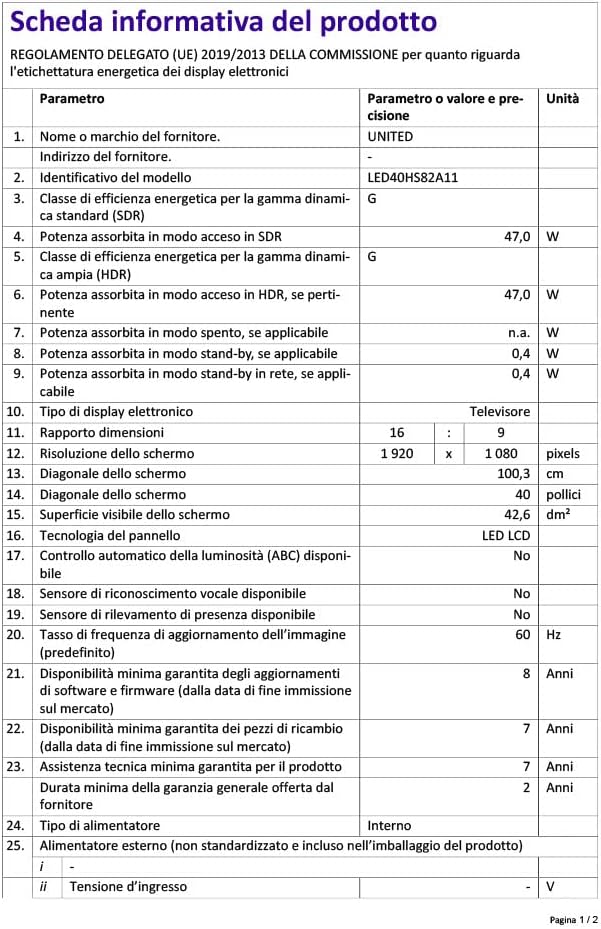
Image 9.1: EU Energy Label for LED40HS82A11.
For detailed product information, including energy consumption data, please refer to the official EU EPREL database via the QR code on the energy label or by visiting https://eprel.ec.europa.eu/qr/1068369.
10. Кепилдик жана колдоо
For warranty information, please refer to the warranty card included with your product or contact your retailer. The manufacturer, CHANGHONG EUROPE ELECTRIC S.R.O., provides general support for this product.
Please note that information regarding software update guarantees and spare parts availability is not explicitly provided for this model. For any technical assistance or service inquiries, please contact the customer support channels provided by your point of purchase.


