
Introduction
The AODELAN WTR-2 is a versatile wireless remote shutter release system designed for Canon EOS cameras. It functions as both a remote shutter release and a programmable timer, offering advanced control over your camera's exposure settings. This manual provides detailed instructions for setting up, operating, and maintaining your WTR-2 system.
The system operates using 2.4 GHz wireless transmission, providing a range of up to 60 meters (196.8 feet). It features an LCD screen for easy programming and monitoring of settings.
Пакеттин мазмуну
Сураныч, пакеттин мазмунун текшерип, бардык буюмдар бар экенин текшериңиз:
- WTR-2 Transmitter (Remote Control)
- WTR-2 Receiver
- Connecting Cable (C8 type for Canon)
- 2x Lanyards
- Instruction Manual

Image: The complete package contents of the AODELAN WTR-2 wireless remote shutter release system.
Продукт бүттүview
Өткөргүч (алыстан башкаруу)
The transmitter features an LCD display for setting timer functions and viewing current modes. It includes a two-stage shutter release button (half-press for autofocus, full-press for shutter release), mode buttons, and navigation controls.
Алуучу
The receiver connects to your camera's remote port and receives signals from the transmitter. It has a hot shoe mount for easy attachment to your camera or a cold shoe mount on a rig.

Сүрөт: бүттүview of the AODELAN WTR-2 Transmitter and Receiver, highlighting key features like timer, time-lapse, bulb mode, 2.4G wireless, and operating range.
Жайгашуу
1. Батареяны орнотуу
Both the transmitter and receiver require 2x AAA batteries (not included). Open the battery compartment on the back of each unit and insert the batteries, observing the correct polarity.

Image: Battery installation for the WTR-2 Transmitter and Receiver, showing the location for two AAA batteries in each unit.
2. Connecting the Receiver to your Camera
Attach the receiver to your camera's hot shoe or a cold shoe mount. Connect the C8 connecting cable to the receiver's port and then to your Canon camera's remote control terminal. Ensure the connection is secure.

Image: The C8 connecting cable being inserted into the 3-pin remote connection port of a Canon EOS camera.
3. Күйгүзүү
Turn on both the transmitter and the receiver using their respective ON/OFF buttons. The receiver's LED will blink red initially, then periodically blink green to indicate it is active and paired.
Иштөө режимдери
The WTR-2 offers various shooting modes and timer functions. Use the РЕЖИМ button on the transmitter to cycle through the main shooting modes (S, C, B, 2S) and the ТАЙМЕР button to access timer settings.
Shutter Release Modes
- S (Single Shot): Takes a single photo with each full press of the shutter button.
- C (Continuous Shooting): Takes multiple photos as long as the shutter button is held down.
- B (Bulb Mode): Keeps the shutter open for as long as the shutter button is pressed, ideal for long exposures.
- 2S (2-Second Delay): Takes a single photo after a 2-second delay.
Таймер функциялары
The WTR-2 provides advanced timer settings for precise control over your photography. Press the ТАЙМЕР button to access these functions. Use the arrow keys to navigate and the SET ырастоо үчүн баскыч.
- DELAY (Self-Timer): Sets a delay before the first exposure. Adjustable in 0.1-second increments.
- LONG (Long Exposure Timer): Sets the duration of the shutter opening for long exposures, especially useful in Bulb mode. Adjustable in 0.1-second increments.
- INTVL (Interval Timer): Sets the time interval between consecutive shots for time-lapse photography. Adjustable in 0.1-second increments.
- N (Number of Exposures): Sets the total number of photos to be taken in a sequence.
- BKLN (Bracketed Exposure): Automatically triggers a sequence of 3, 5, or 7 bracketed exposures for HDR photography.
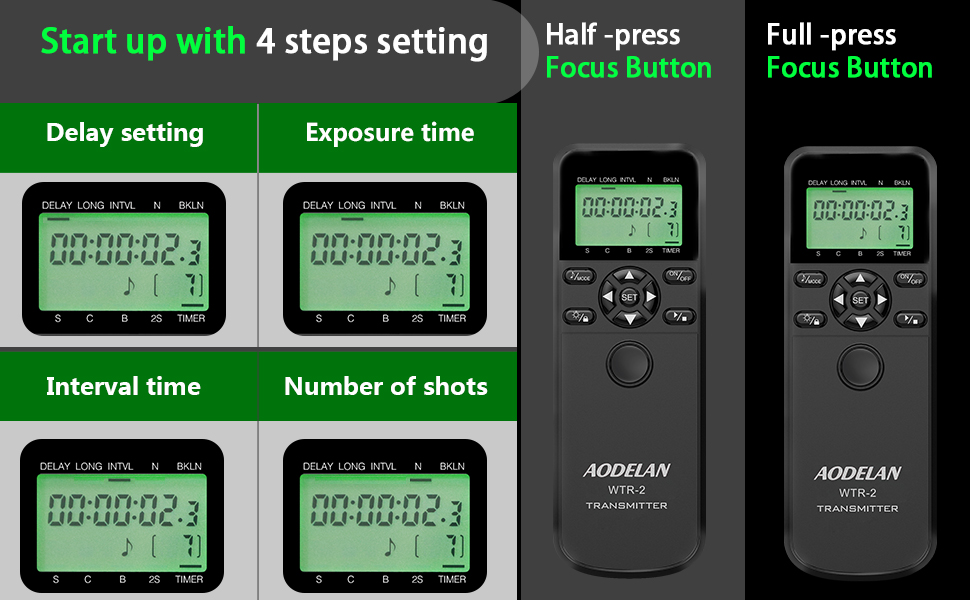
Image: The LCD display of the WTR-2 transmitter showing the settings for Delay, Long Exposure, Interval, and Number of Shots.
Example: Time-Lapse Photography
To set up a time-lapse sequence:
- коюңуз КЕЧИКТИРҮҮ to your desired initial delay (e.g., 10 seconds).
- коюңуз УЗАК exposure time (if applicable, otherwise set to 0).
- коюңуз INTL (interval) between shots (e.g., 10 seconds).
- коюңуз N (number of exposures) (e.g., 120 shots for a 1-hour time-lapse with 30-second intervals).
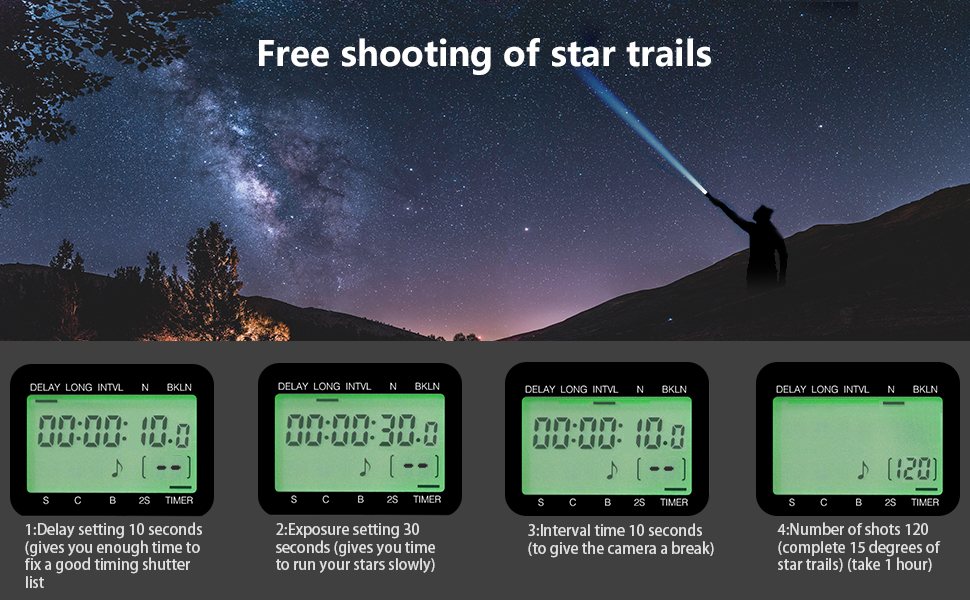
Сүрөт: мурункуample of star trail photography, illustrating how the WTR-2's timer functions (Delay, Exposure, Interval, Number of shots) can be configured for complex sequences.
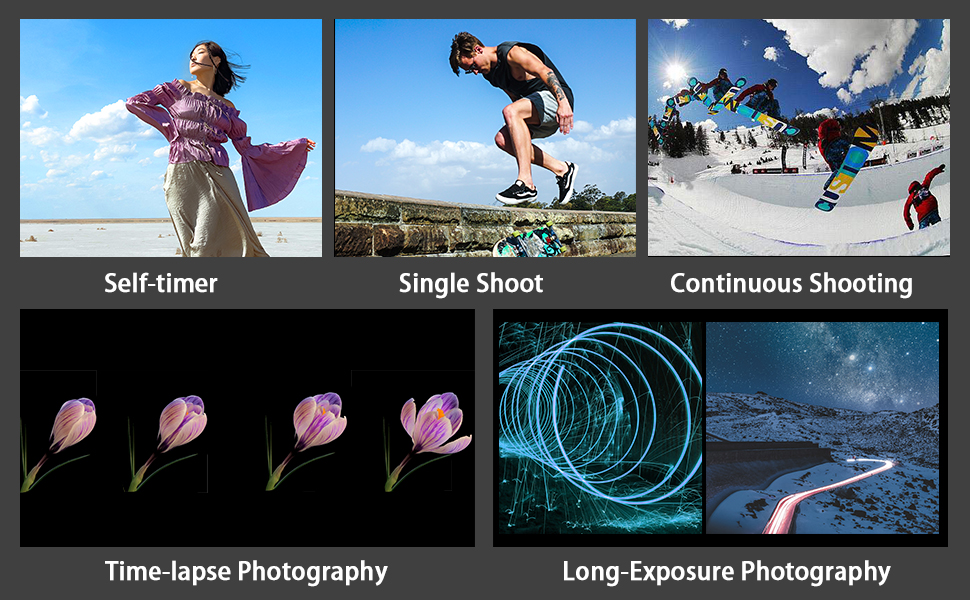
Image: Visual representations of various photography techniques achievable with the WTR-2, including self-timer, single shot, continuous shooting, time-lapse, and long exposure.
Техникалык тейлөө
- Түзмөктү кургак кармаңыз. Аны нымдуулукка же жамгырга тийгизбеңиз.
- Clean the unit with a soft, dry cloth. Do not use harsh chemicals or abrasive cleaners.
- Агып кетпеш үчүн аппарат узак убакыт бою колдонулбаса, батареяларды алып салыңыз.
- Күн тийбеген, салкын, кургак жерде сактаңыз.
Проблемаларды чечүү
| Көйгөй | Мүмкүн болгон себеп / Чечим |
|---|---|
| Түзмөк күйбөйт. | Батареянын орнотулганын текшерип, батареялардын жаңы экенин текшериңиз. Зарыл болсо, алмаштырыңыз. |
| Camera does not respond to shutter release. |
|
| ЖК дисплей күңүрт же бош. | Өткөргүчтөгү батарейкаларды алмаштырыңыз. |
| Таймер функциялары күтүлгөндөй иштебей жатат. | Review the timer settings on the transmitter's LCD. Ensure all parameters (Delay, Long, Interval, N) are correctly configured and activated. |
Техникалык шарттар
| Модель аты: | WTR-2 |
| Бренд: | АОДЕЛАН |
| Байланыш технологиясы: | 2.4 ГГц зымсыз |
| Максималдуу диапазон: | 60 метр (196.8 фут) |
| Шайкеш түзмөктөр: | Canon EOS R3, R5, R5 C, 10D, 6D Mark II, 1D X Mark III, 1D X Mark II, 1D X, 1D C, 1DS Mark III, 1DS Mark II, 1Ds, 1D Mark IV, 1D Mark III, 1D Mark II N, 1D Mark II, 1D, 5D Mark II, 5D Mark III, 5D Mark IV, 5DS, 5DS R, 6D, 7D, 7D Mark II, 50D, 40D, 30D, 20D, D2000, D60, D30, EOS-1V, EOS-3 (C8 type connection) |
| Кубат булагы: | 2x AAA batteries for Transmitter, 2x AAA batteries for Receiver (not included) |
| Өзгөчө өзгөчөлүгү: | Digital LCD Display, Timer Functions (Delay, Long Exposure, Interval, Number of Shots, Bracketed Exposure) |
| Баскычтардын саны: | 3 (main control buttons, plus navigation/set) |
| Келип чыккан өлкө: | Кытай |
Кепилдик жана колдоо
Specific warranty information is typically provided with your purchase documentation. For product support, technical assistance, or warranty claims, please refer to the contact information provided by your retailer or visit the official AODELAN webсайт.
Кошумча жардам алуу үчүн, сиз да кайрыла аласыз AODELAN brand page on Amazon.