
SEVERIN KA 4851
Severin KA 4851 FILKA Instruction Manual
Model: KA 4851 | Brand: SEVERIN
Introduction
This instruction manual provides detailed information on the safe and efficient operation, maintenance, and troubleshooting of your Severin KA 4851 FILKA filter coffee machine with integrated grinder. Please read this manual thoroughly before first use and keep it for future reference.
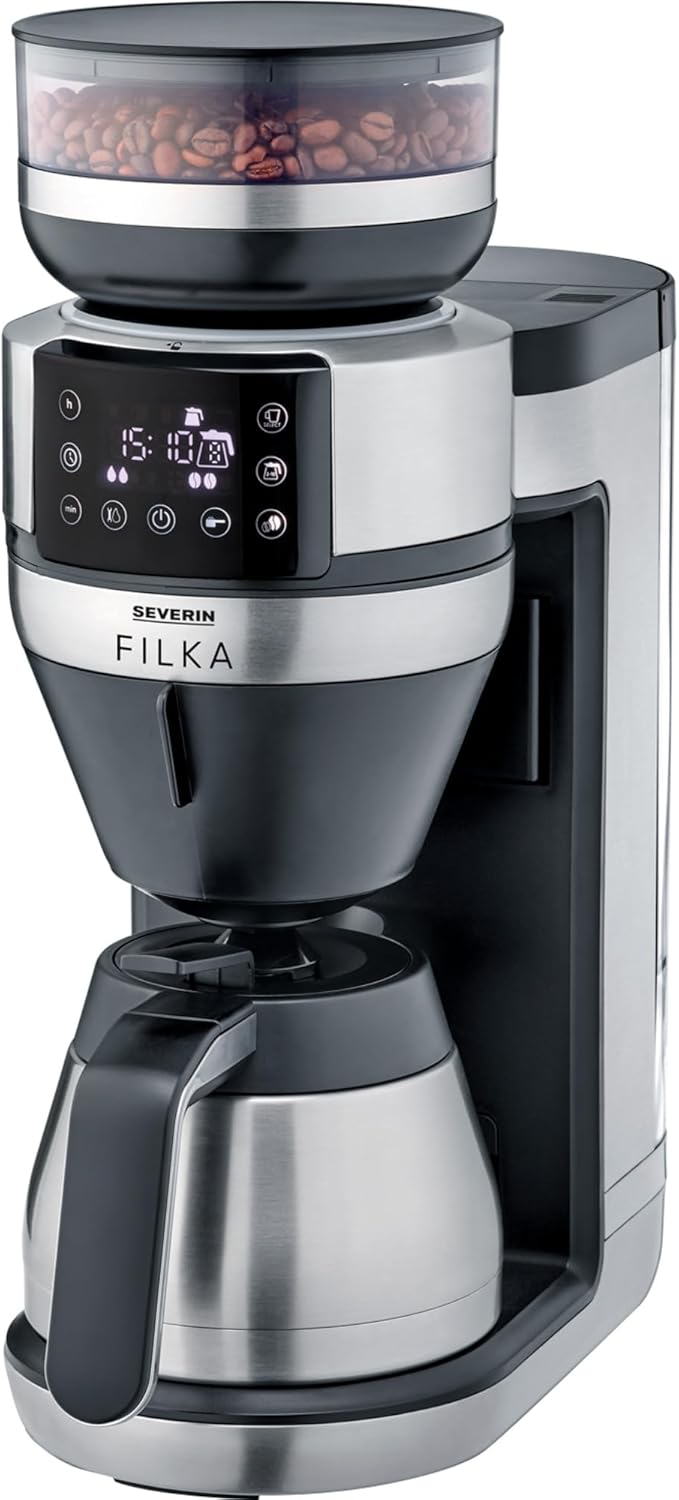
Image: The Severin KA 4851 FILKA coffee machine, featuring a sleek silver and black design with a bean hopper on top, a digital display, and a thermal carafe at the base.
Коопсуздук маалыматы
Жараат же шайманга зыян келтирбөө үчүн ар дайым төмөнкү коопсуздук чараларын сактаңыз:
- VoltagТехникалык маалымат тактасында көрсөтүлгөн e сиздин электр кубатыңызга дал келет.
- Шайманды, шнурду же сууга же башка суюктуктарга батырбаңыз.
- Шайманды балдар жетпеген жерде сактаңыз.
- Unplug the appliance from the mains socket when not in use, before cleaning, or in case of malfunction.
- Шайманды шнур же сайгыч бузулуп иштетпеңиз.
- Оригиналдуу аксессуарларды жана запастык бөлүктөрдү гана колдонуңуз.
- Do not open the housing of the appliance. Repairs should only be carried out by authorized personnel.
- Шайман тиричиликте гана колдонууга арналган.
- Avoid contact with hot surfaces, especially the brewing unit and hot water/coffee.
Продукт бүттүview
Familiarize yourself with the components of your Severin KA 4851 FILKA coffee machine:
- 1. Bean Hopper: For storing whole coffee beans.
- 2. Grinder: Integrated conical burr grinder for fresh grinding.
- 3. Суу резервуары: Таза суу менен толтуруу үчүн алынуучу резервуар.
- 4. Башкаруу панели: Digital display and buttons for settings and operation.
- 5. Brewing Unit: Кофе кайнатылган жерде.
- 6. Permanent Gold Tone Filter: Reusable filter for ground coffee.
- 7. Drip Stop: Prevents dripping when the carafe is removed.
- 8. Thermal Carafe: Insulated carafe to keep coffee warm.
- 9. Cup Control Platform: Adjustable platform for various cup and carafe sizes.

Image: A user's hand interacting with the Severin KA 4851 FILKA coffee machine, highlighting its slim design and the thermal jug. The image also points out features like "Easy Clean" and "Super Silent".
Жайгашуу
- Пакеттен чыгаруу: Бардык таңгактоочу материалдарды кылдаттык менен алып салыңыз жана бузулганын текшериңиз. Зарыл болсо, келечектеги ташуу үчүн таңгактарды сактаңыз.
- Алгачкы тазалоо: Before first use, clean all removable parts (water tank, bean hopper, permanent filter, thermal carafe) with warm water and a mild detergent. Wipe the main unit with a damp кездеме.
- Позициялоо: Place the appliance on a stable, level, and heat-resistant surface, away from heat sources and direct sunlight. Ensure adequate ventilation.
- First Use (Rinsing Cycle):
- Fill the water tank with fresh cold water up to the MAX mark.
- Place the empty thermal carafe with its lid closed on the warming plate.
- Run a full brewing cycle without coffee beans or ground coffee to rinse the internal components. Discard the water. Repeat this process 2-3 times.
Иштөө нускамалары
Brewing Coffee from Whole Beans
- Сууну толтуруу: Fill the water tank with fresh, cold water according to the desired number of cups. The "Cup Control" feature automatically draws the necessary amount of water.
- Кофе буурчактарын кошуу: Төө буурчак бункеринин капкагын ачып, ага бүт кофе дандарын толтуруңуз. Капкакты бекем жабыңыз.
- Фильтрди киргизүү: Ensure the permanent gold tone filter is correctly inserted into the brewing unit. You may also use a traditional paper filter if preferred.
- Графини/Чөйчөктү жайгаштыруу: Place the thermal carafe on the warming plate for multiple cups, or adjust the Cup Control platform and place your single cup/travel mug for individual servings.
- Орнотууларды тандоо: Use the control panel to select the desired coffee strength and number of cups. The machine offers flexible options for various container sizes.
- Сыра кайнатууну баштоо: Press the start button. The machine will grind the beans, brew the coffee, and dispense it into your chosen container.
Майдаланган кофеден кофе кайнатуу
- Сууну толтуруу: Суу резервуарына таза, муздак суу толтуруңуз.
- Майдаланган кофе кошуу: Open the brewing unit and add the desired amount of pre-ground coffee into the permanent gold tone filter (or paper filter).
- Графини/Чөйчөктү жайгаштыруу: Place the thermal carafe or your single cup/travel mug.
- Орнотууларды тандоо: Use the control panel to select the ground coffee mode and desired strength/cups.
- Сыра кайнатууну баштоо: Баштоо баскычын басыңыз.
Программалануучу өзгөчөлүктөрү
The Severin KA 4851 FILKA features a programmable timer. Refer to the control panel instructions on the display to set the desired brewing time for automatic start.

Image: An illustration highlighting key features of the Severin KA 4851 FILKA, including "Cup Control" for automatic water measurement, "Flexible & Individual" 5-in-1 compatibility for various containers, "Hot & Strong" brewing temperature up to 96°C, and the "Gold Tone Filter" as a reusable alternative to paper filters.
Тейлөө жана тазалоо
Үзгүлтүксүз тазалоо жана тейлөө кофе машинаңыздын оптималдуу иштешин жана узак иштөөсүн камсыздайт.
Күнүмдүк тазалоо
- Ар бир колдонгондон кийин шайманды розеткадан сууруп, муздаганга чейин күтүңүз.
- Remove and empty the permanent gold tone filter. Rinse it thoroughly under running water. It is dishwasher-safe.
- Empty and rinse the thermal carafe and its lid.
- Жарнама менен шаймандын сыртын сүртүңүзamp кездеме. Абразивдүү тазалагычтарды колдонбоңуз.
- Clean the drip tray and Cup Control platform.
Кактан тазалоо
Depending on water hardness and frequency of use, descaling is necessary to prevent limescale buildup. The machine may indicate when descaling is required. Use a commercially available descaling agent suitable for coffee machines and follow the manufacturer's instructions. Always rinse the machine thoroughly with several cycles of fresh water after descaling.
Майдалагычты тазалоо
Periodically clean the grinder to remove coffee oil residue and old grounds. Refer to the specific instructions in the appliance's digital display or a more detailed manual for grinder cleaning, as this may involve removing specific parts.
Проблемаларды чечүү
| Көйгөй | Мүмкүн себеп | Чечим |
|---|---|---|
| Coffee does not brew or flows slowly. | Water tank empty; filter clogged; limescale buildup; carafe not correctly placed. | Fill water tank; clean filter; descale the machine; ensure carafe is properly seated. |
| Кофенин даамы алсыз же өтө күчтүү. | Incorrect coffee-to-water ratio; grind setting too coarse/fine; old coffee beans. | Adjust coffee quantity; adjust grind setting; use fresh coffee beans. |
| Майдалагыч ызы-чуу чыгарып жатат же майдалабай жатат. | Bean hopper empty; foreign object in grinder; grinder clogged. | Fill bean hopper; check for and remove foreign objects; clean grinder. |
| Машинадан суу агат. | Water tank not properly seated; internal component issue. | Суу куюлган бактын бекем орнотулганын текшериңиз. Эгерде агып кетүү улана берсе, кардарларды тейлөө кызматына кайрылыңыз. |
Техникалык шарттар
- Бренд: СЕВЕРИН
- Модель номери: KA 4851
- Түсү: Brushed, matte, black, silver-colored
- Өлчөмдөрү (L x W x Y): 17 x 38 x 46 см
- Салмагы: 8.2 килограмм
- Сыйымдуулугу: 350 Milliliters (Note: This capacity seems low for a coffee machine, likely refers to a specific component or is a typo in source data. Typically coffee machines measure capacity in liters or cups for the carafe.)
- Тtage: 230 вольт
- Материал: Дат баспаган болот
- Өзгөчөлүктөр: Permanent filter, Programmable
- Түрү: Электр чыпкасы бар кофе машинасы
Кепилдик жана колдоо
For warranty information, technical support, or spare parts, please contact SEVERIN customer service directly. Refer to the official SEVERIN website or your purchase documentation for contact details and specific warranty terms applicable to your region.
You can visit the official SEVERIN store on Amazon for more information: SEVERIN Store
Ask a question about this manual
Ask about setup, troubleshooting, compatibility, parts, safety, or missing instructions. Manuals+ will review the question and use this page’s manual context to help answer it.