
Introduction
Сатып алганыңыз үчүн рахматasing the Thomson MIC401BT Stereo CD/Bluetooth Micro-Chain System. This manual provides essential information for the safe and efficient operation of your new audio system. Please read these instructions thoroughly before use and retain them for future reference.
Коопсуздук маалыматы
- Кубат булагы: электр менен жабдууну камсыз кылуу voltage бирдиктеги рейтинг белгисине дал келет.
- Вентиляция: Желдетүүчү тешиктерди жаппаңыз. Аба агымынын жакшы айланышы үчүн түзмөктүн айланасында жетиштүү орун калтырыңыз.
- Суу жана ным: Аппаратты жамгырдын, нымдуулуктун же тамчылаган/чачыраган суюктуктардын таасирине дуушар кылбаңыз. Вазалар сыяктуу суюктуктар толтурулган буюмдарды аппараттан алыс кармаңыз.
- Жылуулук: Аппаратты радиаторлор, жылуулук регистрлери, мештер же башка аппараттар (анын ичинде) сыяктуу жылуулук булактарынын жанына койбоңуз. ampкөтөргүчтөр) жылуулукту пайда кылуучу.
- Тазалоо: Тазалоодон мурун түзмөктү розеткадан сууруп алыңыз. Жумшак, кургак чүпүрөктү гана колдонуңуз.
- Тейлөө: Бул продуктту өзүңүз тейлөөгө аракет кылбаңыз. Бардык тейлөөнү квалификациялуу тейлөө кызматкерлерине тапшырыңыз.
Пакеттин мазмуну
Carefully unpack your micro-chain system and check that all items are present and in good condition. The package should contain:
- Thomson MIC401BT Stereo Micro-Chain System
- Алыстан башкаруу
- Кубаттуу адаптер
- User Manual
Packaging box of the Thomson MIC401BT Stereo CD/Bluetooth Micro-Chain System, showing the product and its features.
Продукт бүттүview
Familiarize yourself with the main components and controls of your Thomson MIC401BT system.
Фронт View

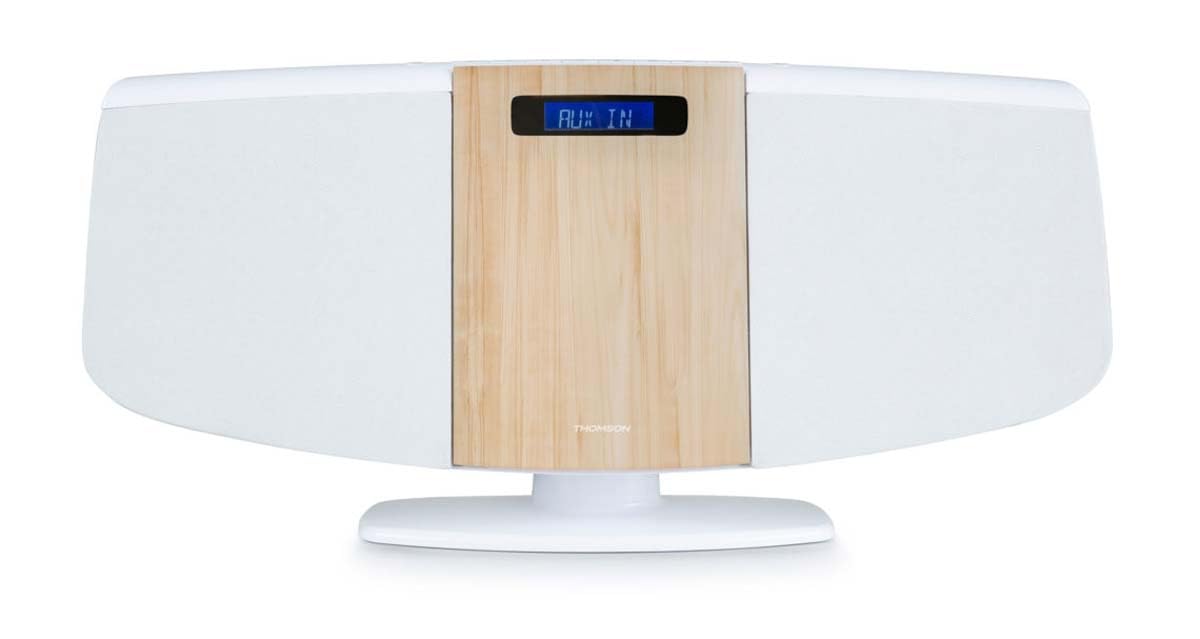
Фронт view of the Thomson MIC401BT micro-chain system, showcasing its white and wood-grain design with a digital display.
The front panel features the central digital display, the CD loading slot (behind the wood-grain panel), and integrated stereo speakers on either side.
Top Panel Controls and Ports

Close-up of the top panel controls of the Thomson MIC401BT, including the USB charge port, AUX-IN jack, and various function buttons for playback and settings.
The top panel includes:
- SOURCE баскычы: To switch between input modes (CD, Bluetooth, FM, AUX).
- SLEEP баскычы: To set the sleep timer.
- TIME баскычы: Саатты коюу үчүн.
- ALARM баскычы: To set the alarm function.
- ENTER баскычы: Тандоолорду ырастоо үчүн.
- Ойнотуу башкаруу баскычтары: Play/Pause, Stop, Skip Forward/Backward.
- USB CHARGE Port (5V === 1000mA): Тышкы түзмөктөрдү кубаттоо үчүн.
- AUX IN (3.5 мм): Тышкы аудио булактарын туташтыруу үчүн.
- Гарнитура уячасы: Жеке угуу үчүн.
Жайгашуу
1. Power Connection
- Кубат адаптерин түзмөктүн арткы жагындагы DC IN портуна туташтырыңыз.
- Кубат адаптерин стандарттуу розеткага сайыңыз.
2. FM антеннасы
Extend the FM wire antenna fully for optimal radio reception. Position it away from other electronic devices to minimize interference.
3. Жайгаштыруу параметрлери
The MIC401BT can be placed on a flat surface using its integrated stand or mounted on a wall.
- Иш тактада жайгаштыруу: Агрегаттын туруктуу, түз бетине коюлганын текшериңиз.
- Дубалга орнотуу: Use appropriate screws and wall plugs (not supplied) for your wall type. Consult a professional if unsure. Ensure the unit is securely fastened to prevent falling.

The Thomson MIC401BT micro-chain system mounted on a wall shelf, demonstrating its versatile placement options.
Иштөө нускамалары
1. Күйгүзүү/өчүрүү
басыңыз БУЛАК button once to turn the unit on. Press and hold the БУЛАК аны өчүрүү үчүн баскыч.
2. Булак тандоо
басыңыз БУЛАК button repeatedly to cycle through available modes: CD, Bluetooth, FM Radio, AUX-IN.
3. CD ойнотуу
- колдонуп, CD режимин тандаңыз БУЛАК баскычы.
- Gently open the CD door (the wood-grain panel) and insert a CD with the label side facing forward.
- Close the CD door. The system will automatically begin playing the CD.
- Use the Play/Pause, Stop, and Skip buttons on the unit or remote control to manage playback.

Деталдаштырылган view of the Thomson MIC401BT CD player mechanism with the disc tray open, ready for CD insertion.
4. Bluetooth Жупташтыруу
- колдонуп, Bluetooth режимин тандаңыз БУЛАК button. The display will show "BLUETOOTH" and flash, indicating it's in pairing mode.
- Мобилдик түзмөгүңүздө Bluetooth'ду иштетиңиз (смартфон, планшет ж.б.).
- Издөө "MIC401BT" in your device's Bluetooth settings and select it to pair.
- Once paired, the display will stop flashing, and you can play audio from your device through the micro-chain system.
5. FM радиосу
- FM радио режимин тандаңыз, БУЛАК баскычы.
- Use the Skip Forward/Backward buttons to manually tune to a station or press and hold them for automatic scanning.
- To save a station, refer to the detailed instructions in the full manual for memory presets.
6. AUX-IN туташуусу
- Тышкы аудио аспапты (мисалы, MP3 ойноткуч) туташтыруу AUX IN port using a 3.5mm audio cable (not supplied).
- колдонуп, AUX-IN режимин тандаңыз БУЛАК баскычы.
- Туташкан түзмөгүңүздөн аудио ойнотуңуз.
7. USB кубаттоо
Connect your USB-powered device to the USB кубаттоо port (5V === 1000mA) on the top panel to charge it. This port is for charging only and does not support media playback.
8. Ойготкуч функциясы
басыңыз АЛАРМ button to enter alarm setting mode. Use the navigation buttons to set the desired alarm time and source (e.g., FM radio, CD). Press ENTER to confirm each setting. Refer to the full manual for detailed alarm setup instructions.
Техникалык тейлөө
- Агрегатты тазалоо: Түзмөктүн сыртын тазалоо үчүн жумшак, кургак чүпүрөктү колдонуңуз. Абразивдүү тазалоочу каражаттарды, момдорду же эриткичтерди колдонбоңуз.
- CD ойноткучка кам көрүү: Keep the CD compartment clean. Avoid touching the lens. If a CD is dirty, wipe it with a soft, lint-free cloth from the center outwards.
- Сактагыч: Эгерде түзмөк көпкө чейин колдонулбаса, аны розеткадан сууруп, салкын, кургак жерде сактаңыз.
Проблемаларды чечүү
| Көйгөй | Мүмкүн себеп | Чечим |
|---|---|---|
| Күч жок | Электр кабели туташкан эмес; розетка туура эмес | Электр кабелинин туташуусун текшериңиз; Башка розетканы колдонуп көрүңүз |
| Үн жок | Volume too low; Incorrect source selected; Headphones connected | Increase volume; Select correct source; Disconnect headphones |
| CD ойнобой жатат | CD inserted incorrectly; CD is dirty or scratched; Incorrect mode | Re-insert CD correctly; Clean or replace CD; Select CD mode |
| Bluetooth жупташкан жок | Device too far; Bluetooth not enabled on device; Incorrect mode | Move device closer; Enable Bluetooth on device; Select Bluetooth mode |
| FM кабыл алуу начар | Antenna not extended; Interference | Extend and adjust antenna; Move unit away from other electronics |
Техникалык шарттар
- Модел: MIC401BT
- Бренд: Thomson (Manufactured by Big Ben)
- Байланыш: Көмөкчү, Bluetooth, USB
- Түсү: Ак
- Динамик түрү: Стерео
- Кубат булагы: Электр кабели
- Шайкеш түзмөктөр: MP3 player, Personal computer, Tablet, Television, Smartphone
- Стиль: CD Boombox
- Аудио Power Output: 60 Ватт
- Колдоого алынган стандарттар: Bluetooth, FM
- Audio Format колдоо: CD, MP3
- Баяндамачылардын саны: 2
- USB Charge Output: 5В, 1000мА
Кепилдик жана колдоо
This Thomson MIC401BT Stereo CD/Bluetooth Micro-Chain System comes with a 2 жылдык кепилдик сатып алынган күндөн тартып. Кепилдик дооматтары үчүн сатып алганыңыздын далилин сактап коюңуз.
For technical support, troubleshooting assistance beyond this manual, or warranty service, please contact your retailer or the official Thomson customer support channel. Contact information can typically be found on the product packaging or the manufacturer's webсайт.