
1. Продукт бүтүп калдыview
The havit GK59 Gaming Microphone is designed for clear audio capture during gaming, streaming, and voice communication. It features a condenser microphone for high-quality sound and a versatile design for ease of use.

Сүрөт 1.1: Алдыңкы view of the havit GK59 Gaming Microphone, showcasing its main body, stand, and control buttons.
Негизги өзгөчөлүктөрү:
- Колдонууга оңой: Simple plug-and-play functionality.
- Good Performance: Delivers clear and consistent audio.
- Good Quality: Durable construction for reliable use.
- Портативдик дизайн: Компакттуу жана ташуу оңой.
- Жөнгө салынуучу стенд: Allows for flexible positioning.
2. Орнотуу нускамалары
2.1 Пакеттин мазмуну
Сураныч, пакетте төмөнкү нерселерди текшериңиз:
- havit GK59 Gaming Microphone
- USB туташуу кабели
- Колдонуучунун Колдонмосу (бул документ)
2.2 Микрофонду туташтыруу
The GK59 microphone offers versatile connectivity options for various devices.
- USB туташуу: Connect the provided USB cable to the USB-C port on the back of the microphone and the other end to an available USB port on your computer or gaming console. The microphone is plug-and-play and should be automatically recognized by most operating systems.
- 3.5 мм уяча туташуусу: For devices supporting a 3.5mm auxiliary input, connect a 3.5mm audio cable (not included) to the 3.5mm jack on the back of the microphone and to your device's audio input.
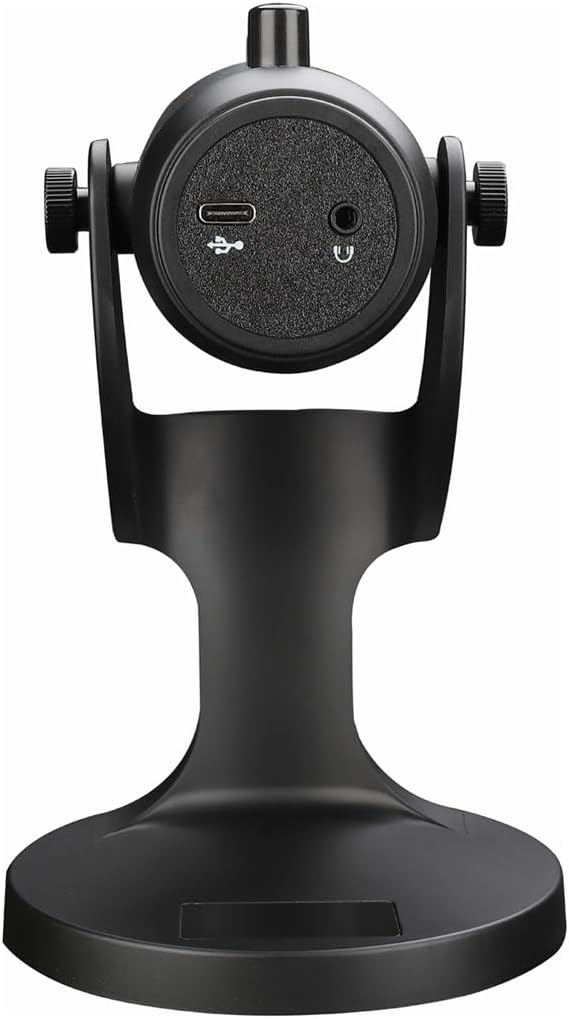
2.1-сүрөт: Арткы view of the havit GK59 Gaming Microphone, highlighting the USB-C port for data and power, and the 3.5mm headphone jack for monitoring.
After connecting, ensure the microphone is selected as the default input device in your system's sound settings or your gaming/streaming software.
3. Иштөө нускамалары
3.1 Негизги башкаруу каражаттары
The havit GK59 features intuitive controls located on the front of the microphone body:
- Үнсүз баскычы: Press to mute or unmute the microphone. An indicator light will typically show the mute status.
- MIC +/- Buttons: Adjust the microphone input sensitivity (gain). Press '+' to increase, '-' to decrease.
- VOL +/- баскычтары: Adjust the headphone output volume for monitoring. Press '+' to increase, '-' to decrease.
- ECHO +/- Buttons: Adjust the echo effect level. Press '+' to increase, '-' to decrease.
3.1-сүрөт: Детальдуу view of the microphone's control panel, including the mute button, microphone gain, volume, and echo adjustment buttons.
3.2 Adjusting Microphone Position
The microphone is equipped with an adjustable stand, allowing you to optimize its position for best sound capture and comfort.
- Gently hold the microphone body and the base of the stand.
- Tilt the microphone forward or backward to achieve the desired angle. The stand's design helps reduce vibration and abnormal sounds during use.
- Position the microphone approximately 6-12 inches (15-30 cm) from your mouth for optimal voice clarity.

Figure 3.2: The havit GK59 microphone demonstrating its adjustable tilt feature on the stand, designed for anti-vibration.
4. Техникалык тейлөө
4.1 Тазалоо
To maintain the microphone's performance and appearance:
- Disconnect the microphone from its power source before cleaning.
- Сырткы беттерди сүртүү үчүн жумшак, кургак чүпүрөктү колдонуңуз.
- Суюк тазалоочу каражаттарды, аэрозолдорду же эриткичтерди колдонбоңуз, анткени алар капталга же ички компоненттерге зыян келтириши мүмкүн.
4.2 Сактоо
When not in use, store the microphone in a cool, dry place away from direct sunlight and extreme temperatures. Protect it from dust and moisture.
5. Кыйынчылыктарды
If you encounter issues with your havit GK59 Gaming Microphone, please refer to the following table for common problems and solutions:
| Көйгөй | Мүмкүн себеп | Чечим |
|---|---|---|
| No sound input from microphone | Микрофон туура эмес туташтырылган Туура эмес киргизүү түзмөгү тандалды Микрофондун үнү өчүрүлдү | USB кабели коопсуз туташканын текшериңиз. Check system sound settings and select GK59 as input. Микрофондогу үнсүз баскычын басып, үнсүз кылыңыз. |
| Микрофондун үнү төмөн | Microphone gain too low Системанын киргизүү көлөмү өтө төмөн | Press the 'MIC +' button on the microphone. Adjust input volume in your system's sound settings. |
| Бурмаланган же түшүнүксүз аудио | Microphone gain too high Microphone too close to mouth Экологиялык ызы-чуу | Press the 'MIC -' button on the microphone. Adjust microphone position (6-12 inches from mouth). Айлана-чөйрөңүздөгү фондук ызы-чууну азайтыңыз. |
| No headphone monitoring sound | Кулакчындар туташкан эмес Кулакчындын үнү өтө төмөн | Ensure headphones are plugged into the 3.5mm jack. Press the 'VOL +' button on the microphone. |
6. Техникалык шарттар
Below are the technical specifications for the havit GK59 Gaming Microphone:
| Өзгөчөлүк | Спецификация |
|---|---|
| Бренд | зыян |
| Модель номери | GK59 |
| Байланыш технологиясы | USB, 3.5 mm Jack (Auxiliary) |
| Сунушталган Колдонуулар | Оюндар |
| Полярдык үлгү | Бир багыттуу |
| Микрофон форма фактору | Handheld (with desktop stand) |
| Элемент Салмагы | 429 грамм |
| Импеданс | 250 Ом |
| Ызы-чуунун катышы | 18 дБ |
| Уккулуктуу ызы-чуу | 18 децибел |
| Power Source | Зымдуу электр (USB аркылуу) |
| Шайкеш түзмөктөр | Gaming Consoles, PCs |
| Элементтин өлчөмдөрү (LxWxH) | 5.59 x 4.92 x 9.06 дюйм |
| Түс | Кара |
7. Кепилдик жана колдоо
7.1 Кепилдик маалыматы
The havit GK59 Gaming Microphone comes with a standard manufacturer's warranty. Please refer to the warranty card included in your product packaging or visit the official havit webдеталдуу кепилдик шарттары жана шарттары үчүн сайт.
7.2 Кардарларды колдоо
For technical assistance, troubleshooting not covered in this manual, or warranty claims, please contact havit customer support through their official channels. You can find more information and contact details on the havit Store on Amazon же алардын кызмат адамы webсайт.