
Introduction
This manual provides detailed instructions for the setup, operation, maintenance, and troubleshooting of your Varmilo VA Series V2 Warrior Soar TKL Mechanical Keyboard. This keyboard features a Tenkeyless (TKL) form factor, durable Dye Sub PBT keycaps, and genuine Cherry MX Blue mechanical switches.

Figure 1: Varmilo VA Series V2 Warrior Soar TKL Mechanical Keyboard (Cherry MX Blue).
Жайгашуу
1. Баскычтопту туташтыруу
- Locate the USB-C port on the back of your Varmilo VA Series V2 keyboard.
- Берилген USB-C кабелин клавиатуранын USB-C портуна туташтырыңыз.
- Connect the other end of the USB-C cable to an available USB port on your computer (PC or Laptop).
- Баскычтоп плагин жана ойнотуу болуп саналат жана операциялык тутумуңуз тарабынан автоматтык түрдө таанылышы керек.
2. Кабелдик башкаруу
The VA Series V2 features cable grooves on the bottom case, allowing the USB-C cable to exit from the left, right, or middle of the keyboard. Route the cable through the desired groove to customize your desk setup.
3. Adjusting Kickstands
The keyboard is equipped with double-section kickstands on the underside. Gently flip out the kickstands to adjust the typing angle to your preference. The double-section design offers multiple height options.

2-сүрөт: астыңкы жагы view illustrating cable routing grooves and adjustable kickstands.
Иштөө нускамалары
1. Keyboard Layout and Functions
The Varmilo VA Series V2 Warrior Soar is a Tenkeyless (TKL) keyboard, meaning it omits the numeric keypad to save space while retaining all essential keys, including the function row (F1-F12), navigation cluster, and arrow keys.
2. Cherry MX Blue Switches
This keyboard is equipped with genuine Cherry MX Blue mechanical switches. These switches are characterized by:
- Operation Force: 50gf (gram-force)
- Которуу түрү: Clicky
- Пикир: Tactile bump and audible click
- Үн: Classic clicky sound

Figure 3: Cherry MX Blue Mechanical Switch characteristics and Force-Travel diagram.
3. Индикатор жарыктары
Indicator lights for functions such as Caps Lock are located on the top right of the keyboard. These lights provide visual feedback on the status of specific keyboard functions.
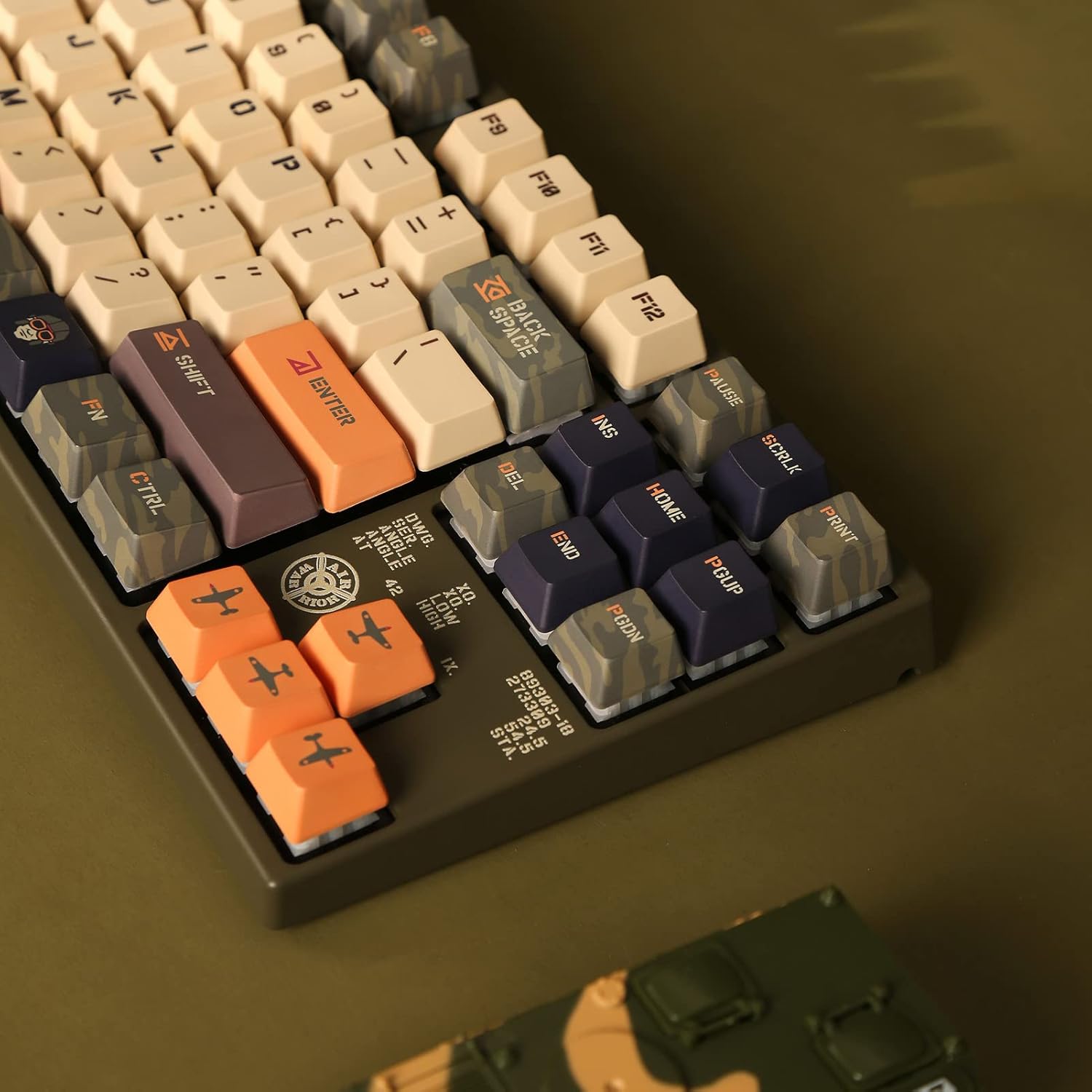
Figure 4: Close-up of indicator lights and keycap legends.
4. Баскычтын капкагынын материалы
The keyboard features thick Dye Sub PBT keycaps. PBT (Polybutylene Terephthalate) is known for its durability, resistance to shine, and long-lasting legends due to the dye-sublimation process.
Техникалык тейлөө
1. Жалпы тазалоо
- Тазалоодон мурун клавиатураны компьютерден ажыратыңыз.
- Баскыч капкактарынын ортосундагы чаңды жана калдыктарды тазалоо үчүн жумшак щетка же кысылган абаны колдонуңуз.
- For surface cleaning, lightly dampen a microfiber cloth with water or a mild, non-abrasive cleaner. Avoid excessive moisture.
- Тазалоочу эритмелерди түздөн-түз клавиатурага чачпаңыз.
2. Баскыч капкагына кам көрүү
The Dye Sub PBT keycaps are highly durable. To clean them, you may carefully remove them using a keycap puller (not included) and wash them with mild soap and water. Ensure they are completely dry before reattaching them to the switches.
3. Sound-Proofing
The keyboard incorporates sound-proof silicone pads between the PCB and the positioning plate. This design helps to minimize typing noise. Avoid disassembling the keyboard to maintain the integrity of these components.
Проблемаларды чечүү
Баскычтоп жооп бербейт
- Кабель туташуусун текшерүү: Ensure the USB-C cable is securely connected to both the keyboard and the computer. Try reconnecting the cable.
- Башка USB портун колдонуп көрүңүз: Connect the keyboard to a different USB port on your computer.
- Башка компьютерде сыноо: If possible, test the keyboard on another computer to determine if the issue is with the keyboard or the original computer's setup.
- Компьютерди кайра иштетүү: A simple computer restart can often resolve connectivity issues.
Ачкычтар катталбайт
- Баскычтоптун астындагы капкактарды тазалоо: Dust or debris under a keycap can prevent it from registering. Refer to the Maintenance section for cleaning instructions.
- Которгучтун бузулушу: If a specific key consistently fails, the switch itself might be faulty. Contact Varmilo support for assistance.
Техникалык шарттар
| Бренд | Varmilo |
| Модель номери | VEA87 |
| Баскычтоптун түрү | Механикалык |
| Форма фактору | Тилексиз (TKL) |
| Которуу түрү | Алча түстүү MX көк |
| Клавиатура материалы | Dye Sub PBT (Polybutylene Terephthalate) |
| Байланыш | USB-C |
| Шайкеш түзмөктөр | Ноутбук, компьютер |
| Камтылган компоненттер | USB кабели |
Кепилдик маалымат
Specific warranty terms and conditions for your Varmilo VA Series V2 Warrior Soar TKL Mechanical Keyboard are typically provided with the product packaging or available on the official Varmilo website. Please refer to these resources for detailed warranty coverage and claim procedures.
Колдоо
For further assistance, technical support, or to inquire about replacement parts, please visit the official Varmilo website or contact their customer service department. You may find contact information and FAQs on their support pages.
Varmilo Official Webсайт: Visit Varmilo Store on Amazon