
Introduction
This manual provides essential instructions for the proper setup, operation, and maintenance of your BOROFONE BD1 Smart Sports Watch (Call Version). Please read this guide thoroughly before using your device to ensure optimal performance and longevity.
The BOROFONE BD1 is a smart sports watch designed for active lifestyles, featuring Bluetooth connectivity for calls, comprehensive sleep pattern monitoring, and a high-resolution display for clear visual interaction.
Баштоо
Пакеттин мазмуну
Продукцияңыздын таңгагында бардык элементтер бар экенин текшериңиз:
- BOROFONE BD1 Smart Watch
- Магниттик зымсыз кубаттагыч

Сүрөт: алдыңкы жана каптал view of the BOROFONE BD1 Smart Watch packaging, displaying the watch image and brand logo.
Аппаратты заряддоо
Before initial use, fully charge your BOROFONE BD1 Smart Watch. Connect the magnetic wireless charger to a compatible USB power source. Align the watch with the charging contacts on the charger until it magnetically snaps into place. The watch display will indicate charging status.
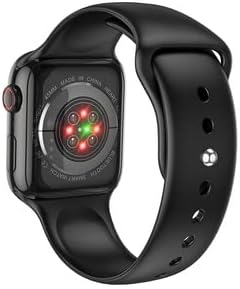
Сүрөт: Арткы view of the BOROFONE BD1 Smart Watch, highlighting the heart rate sensors and magnetic charging contacts.
Adjusting the Watch Strap
The watch features an adjustable strap with a stainless steel metal buckle. To adjust, slide the buckle along the strap until it fits comfortably and securely on your wrist. No specific wrist measurement is required for fitting.
Баштапкы күйгүзүү
Press and hold the side button on the watch until the BOROFONE logo appears. The watch will then boot up to the main display.
Смартфонуңуз менен жупташуу
- Смартфонуңуздун Bluetooth иштетилгенин текшериңиз.
- On your watch, navigate to the Bluetooth settings or pairing mode.
- On your smartphone, search for available Bluetooth devices and select "BOROFONE BD1" (or similar name).
- Жупташтыруу процессин аяктоо үчүн экрандагы көрсөтмөлөрдү аткарыңыз.
- For full functionality, download and install the recommended companion application for the BOROFONE BD1 from your smartphone's app store.

Image: A BOROFONE BD1 Smart Watch with a white strap positioned next to a smartphone, suggesting device pairing or app interaction.
Operation Guide
Негизги навигация
The BOROFONE BD1 features a touchscreen display for primary interaction. Swipe across the screen to navigate through menus and functions. A side button provides additional control, typically for returning to the home screen or accessing specific features.

Сүрөт: алдыңкы view of the BOROFONE BD1 Smart Watch, showcasing its main watch face with time, date, and various functional icons.
Чалууларды кабыл алуу жана кабыл алуу
As a call version smart watch, the BD1 allows you to make and receive calls directly from your wrist when connected to your smartphone via Bluetooth. Access the call function through the watch's menu. You can view incoming call notifications and answer or reject calls using the touchscreen.
Monitoring Sleep Patterns
The watch automatically monitors your sleep patterns. Wear the watch while sleeping to track deep and light sleep hours. This data can be viewed on the watch or through the companion app on your smartphone, providing insights into your sleep quality.
Дисплей өзгөчөлүктөрү
The BD1 features a high-resolution LCD display, offering clear and colorful visuals. The larger screen size enhances the visual and touch control experience, allowing for more detailed information to be displayed.

Сүрөт: жакын план view of the BOROFONE BD1 Smart Watch face, displaying a digital time and a clean, modern interface.
Башка функциялар
The watch includes various other functions typical of a smart sports watch, such as activity tracking, notification alerts from your smartphone, and potentially different sports modes. Refer to the companion app for a complete list of features and customization options.
Кароо жана тейлөө
Саатыңызды тазалоо
To clean your BOROFONE BD1, gently wipe the screen and body with a soft, lint-free cloth. For stubborn dirt, slightly dampen the cloth with water. Avoid using harsh chemicals or abrasive materials, as these can damage the watch's finish and display.
Батареяга кам көрүү
To prolong battery life, avoid fully discharging the watch frequently. Charge the device regularly, and if storing for an extended period, ensure it has at least a 50% charge. Avoid exposing the watch to extreme temperatures.
Суу каршылык
While the watch is designed for sports, specific water resistance ratings are not provided. It is generally recommended to avoid prolonged submersion in water and exposure to high-pressure water jets. Dry the watch thoroughly if it gets wet.
Проблемаларды чечүү
Жалпы маселелер жана чечимдер
- Күйгүзүлбөйт: Сааттын толук заряддалганын текшериңиз. Аны магниттик кубаттагычка туташтырып, кайра күйгүзүүдөн мурун бир нече мүнөт күтө туруңуз.
- Bluetooth туташуу маселелери: Check that Bluetooth is enabled on both your watch and smartphone. Ensure the devices are within range. Try unpairing and re-pairing the watch with your phone. Restarting both devices can also resolve connectivity problems.
- Заряддоо көйгөйлөрү: Verify that the magnetic charger is properly connected to both the watch and the power source. Ensure the charging contacts on the watch and charger are clean and free of debris. Try a different USB power adapter or port.
- Дисплей жооп бербейт: If the touchscreen is unresponsive, try restarting the watch by holding down the side button. If the issue persists, ensure the watch is charged.
Продукт спецификациялары
| Өзгөчөлүк | Спецификация |
|---|---|
| Бренд | БОРОФОН |
| Модель аты | BD1 |
| Операция системасы | Android Wear 2.0 |
| Байланыш технологиясы | Bluetooth |
| Зымсыз байланыш стандарты | Bluetooth |
| Дисплей технологиясы | LCD |
| Дисплей түрү | LCD |
| Сканер резолюциясы | 240 x 240 |
| Адам интерфейсинин киргизүү | Сенсордук экран |
| GPS | GPS жок |
| Өзгөчөлүктөр | Дисплей |
| Элемент Салмагы | 150 г |
| Пакеттин өлчөмдөрү | 22 x 6.8 x 3 см |
| Түс | Bright Black |
| Элементтин формасы | Тегерек |
| Стиль | Заманбап |
Кепилдик жана колдоо
Кепилдик маалымат
The BOROFONE BD1 Smart Sports Watch is covered by a manufacturer's warranty. Please refer to the warranty card included in your product packaging or contact your retailer for specific details regarding warranty terms and conditions.
Кардарларды колдоо
For technical assistance, troubleshooting not covered in this manual, or warranty claims, please contact the retailer where you purchased the product or visit the official BOROFONE webколдоо булактары үчүн сайт.