
1. Киришүү
Thank you for choosing the Voktta Battery Capacity Voltage Meter. This device is designed to accurately monitor your battery's capacity, voltage, and temperature, providing essential data for various applications. It features a clear display, alarm functions, and broad compatibility with different battery types. Please read this manual thoroughly before installation and operation to ensure correct usage and optimal performance.
2. Продукциянын өзгөчөлүктөрү
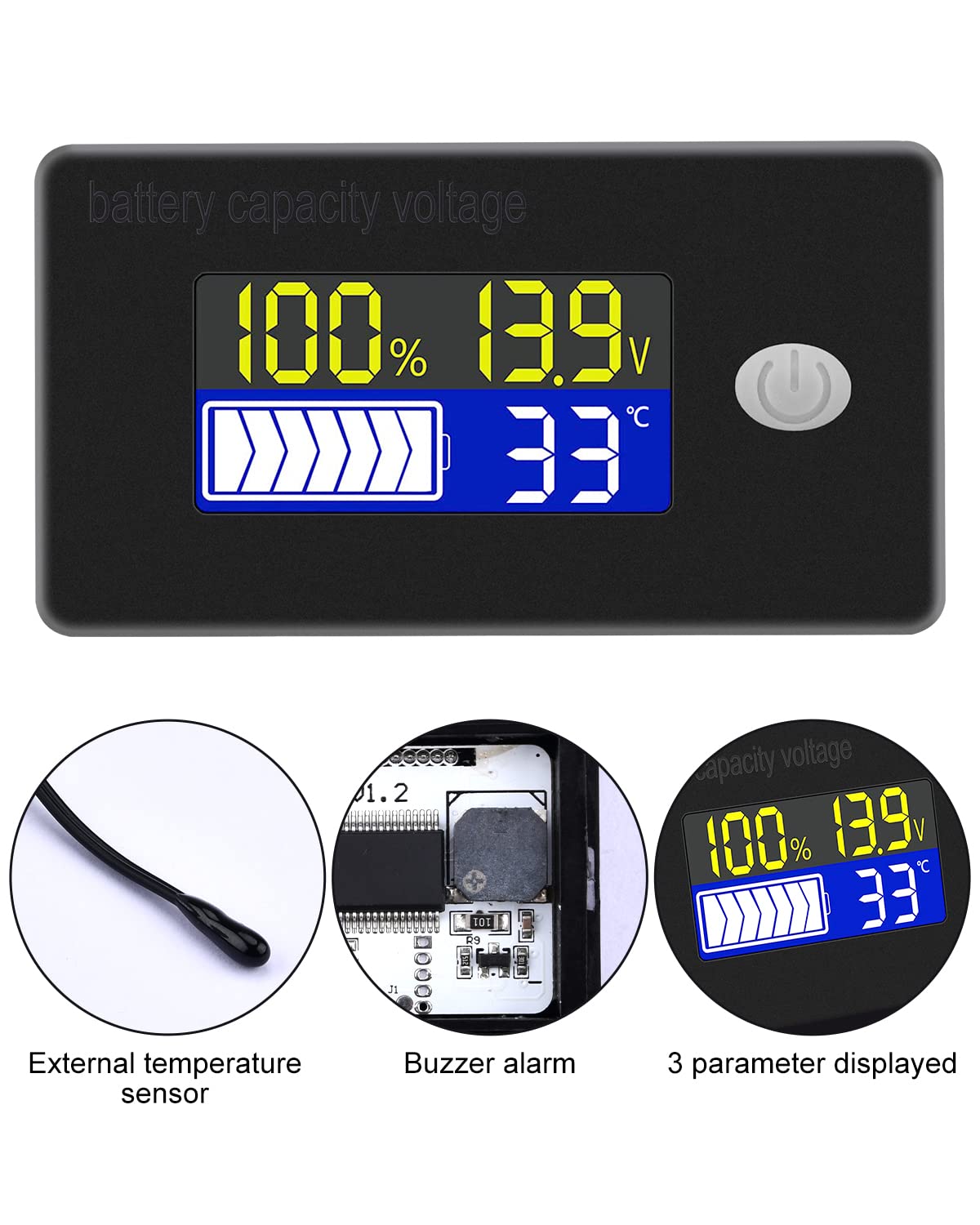
- Көп функциялуу дисплей: Simultaneously shows battery capacity percentage, томtage, and temperature (Celsius or Fahrenheit).
- Интеграцияланган коргоо: Equipped with a protective cover, dustproof and waterproof surface, and reverse input connection protection.
- External Temperature Sensor & Buzzer: Includes an external temperature sensor for accurate readings and an internal buzzer for high/low voltage and over-temperature alarms.
- Six Programmable Modes: Allows setting battery type, delay for ultra-low power mode, adjusting battery percentage limits, activating undervoltage alarm and threshold, activating temperature alarm, and voltage калибрлөө.
- Батареянын кең шайкештиги: Compatible with 12V, 24V, 36V, 48V, 60V, 72V, 84V lead-acid batteries, lithium-ion batteries, polymer lithium-ion batteries, 3-15 series lithium-ion batteries, water batteries, and lithium iron phosphate batteries.
- Кеңири колдонуу: Suitable for use in jet skis, golf carts, RVs, lawnmowers, aquariums, DIY solar generators, and other systems requiring battery monitoring.
3. Пакеттин мазмуну
Сураныч, пакетте төмөнкү нерселерди текшериңиз:
- Voktta Battery Capacity Voltage Meter
- Connection Wires (Red for positive, Black for negative)
- Тышкы температура сенсору
- Колдонуучунун Колдонмосу (бул документ)

4. Коопсуздук маалыматы
- Түзмөктү орнотуудан же тейлөөдөн мурун ар дайым электр кубатынан ажыратыңыз.
- Ensure correct polarity when connecting the wires (Red to positive, Black to negative) to prevent damage to the meter and battery.
- Көрсөтүлгөн иштөө көлөмүнөн ашпаңызtage диапазону (10-100V).
- Keep the device away from extreme temperatures, moisture, and corrosive environments.
- Аппаратты ажыратууга же өзгөртүүгө аракет кылбаңыз. Бардык тейлөөлөрдү квалификациялуу кызматкерлерге тапшырыңыз.
5. Продукт бүтүп калдыview
The Voktta Battery Capacity Voltage Meter features a compact design with a clear LCD display and a single control button. The external temperature sensor provides accurate ambient or battery temperature readings.

6. Орнотуу жана зымдар
Туура орнотуу үчүн бул кадамдарды аткарыңыз:
- Монтаждоо: Choose a suitable location for the meter, ensuring it is protected from direct impact and excessive vibration. The meter is designed for panel mounting.
- Кубат туташуу: Connect the red wire to the positive (+) terminal of your battery system and the black wire to the negative (-) terminal. Ensure a secure connection. The meter supports a wide voltag10-100V кириш диапазону.
- Температура сенсорунун туташуу: Plug the external temperature sensor into its designated port on the back of the meter. Position the sensor to measure the desired temperature (e.g., near the battery for battery temperature, or in the environment for ambient temperature).

7. Баштапкы орнотуу
After connecting the meter, you may need to configure it for your specific battery type and preferences.
7.1 Күйгүзүү/өчүрүү
Press the power button (usually located on the front panel) to turn the device on or off.

7.2 Батареянын түрүн орнотуу
The meter supports various battery types. Refer to the detailed programming instructions (often accessed by holding the power button or a dedicated 'SET' button) to select the correct battery chemistry and voltage configuration (e.g., 3S Lithium, 12V Lead-Acid).

8. Иштөө нускамалары
Once powered on and configured, the meter will display real-time battery information.
8.1 Көрсөтүү режимдери
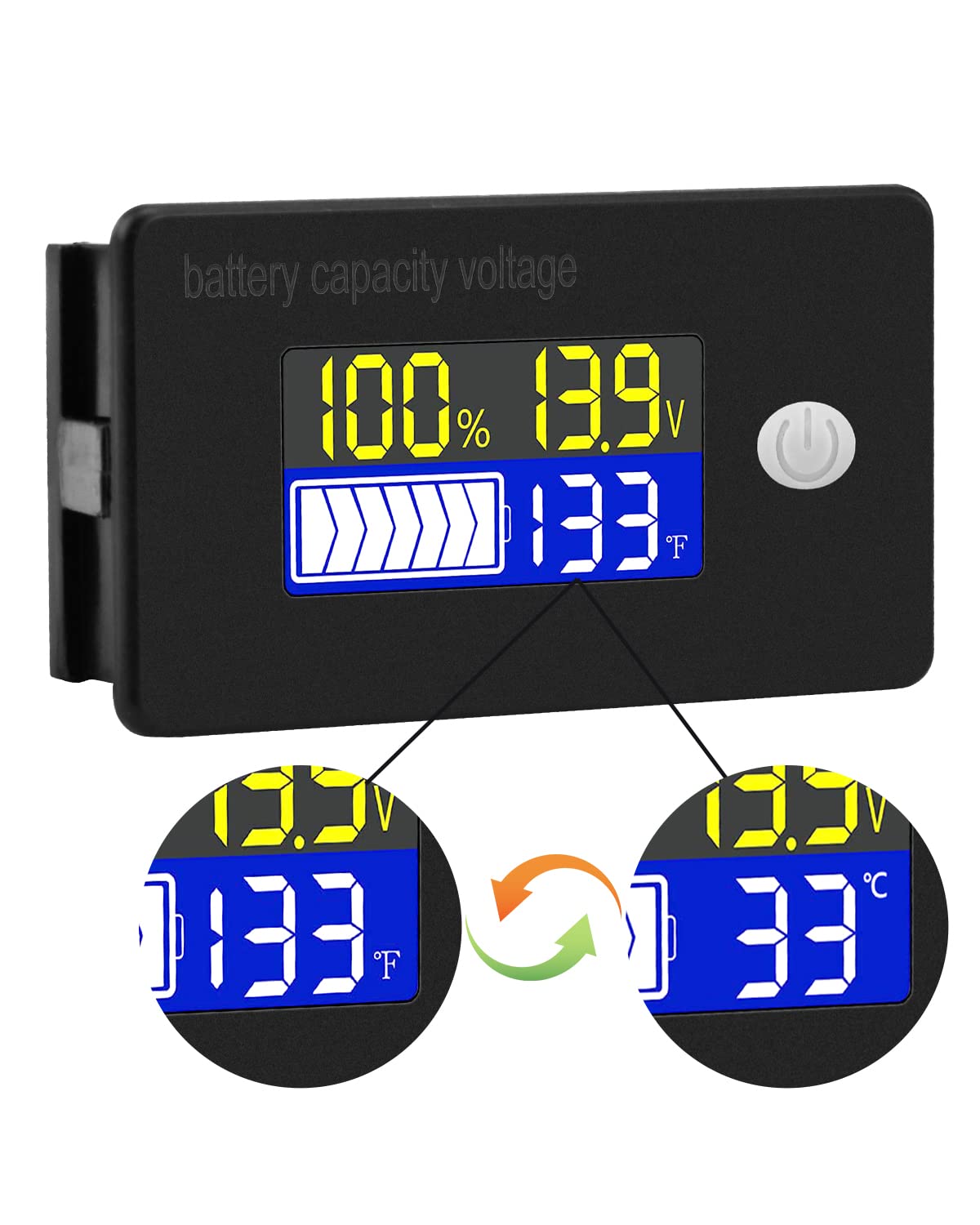
The display typically shows battery capacity percentagд, учурдагы томtage, and temperature. Some models allow switching between Celsius and Fahrenheit for temperature display.
8.2 Ойготкуч функциялары
The internal buzzer will activate if the battery voltage falls below the set low voltage threshold, exceeds the high voltage threshold, or if the temperature goes beyond the set limits. This provides an audible warning for critical conditions.
9. Өркүндөтүлгөн конфигурация
The meter offers several programmable modes for fine-tuning its operation. Access these modes by following the specific button press sequences outlined in the full product documentation (if provided separately) or by holding the main button for an extended period.
- Батарея түрү жөндөө: Configure the meter for your specific battery chemistry and cell count (e.g., LiFePO4, Li-ion, Lead-Acid, 3S, 4S, etc.).
- Ultra-Low Power Mode Delay: Set a delay (10s, 20s, 30s, 60s, 120s adjustable) before the meter enters a low power consumption state to conserve energy.
- Батарея Персенtage Лимиттер: Adjust the upper and lower voltage thresholds that correspond to 100% and 0% battery capacity for accurate percentage дисплей.
- Undervoltage Ойготкуч: Activate and set the specific voltage threshold (e.g., 10.5V to 60.0V) at which the low voltage alarm will trigger.
- Абанын температурасынан жогору коңгуроо: Activate and set the temperature threshold (e.g., 0°C to 79°C or 0°F to 179°F) at which the over-temperature alarm will trigger.
- Тtage Калибрлөө: Perform voltage calibration to ensure the most accurate readings.
10. Техникалык шарттар
| Параметр | Нарк |
|---|---|
| Бренд | Voktta |
| Модель номери | B0BHSSKRVP |
| Operating Voltage | 10-100V |
| Иштөө агымы | 8-10мА |
| Энергияны керектөө (Уйку режими) | 15-20uA |
| Тtage Тактык | ±0.1% ~ ±0.5% |
| Температуранын тактыгы | ±0.5℃ ~ ±1℃ (built-in standard, external 30cm probe) |
| Температура диапазону | -19~80℃ / 0~179℉ |
| Over-temperature Alarm Setting | 0~79℃ / 0~179℉ |
| Low Voltage Сигнал орнотуу | 10.5~60.0V |
| Базердин үнү | 60~80дБ |
| Иштөө температурасы | -10~65℃ |
| Түс | Кара |
| Шайкештик | CE, IP67, RoHS |
| Өлчөө түрү | Вольтметр |
11. Кыйынчылыктарды
If you encounter issues with your Voktta Battery Capacity Voltage Meter, refer to the following common problems and solutions:
- Дисплей жок:
- Check power connections: Ensure red wire is connected to positive and black to negative, and connections are secure.
- Батареянын көлөмүн текшериңизtage: Confirm the battery voltage 10-100V иштөө диапазонунда.
- Туура эмес окуулар:
- Тtagе/Мүмкүнчүлүгү: Ensure the correct battery type and voltage configuration are set in the meter's settings. Perform voltage calibration if available.
- Температура: Check if the external temperature sensor is properly connected and positioned.
- Ойготкучтун үзгүлтүксүз иштетилиши:
- Review alarm thresholds: Adjust the low voltage, жогорку тtage, or over-temperature alarm settings to appropriate levels for your battery and application.
- Check battery health: A constantly triggering low voltage alarm might indicate a failing battery.
- Баскычтар жооп бербейт:
- Power cycle the device: Turn the meter off and then on again.
- Баскычтарды эч кандай таштандылар тосуп калбаганын текшериңиз.
12. Техникалык тейлөө
To ensure the longevity and accurate operation of your Voktta Battery Capacity Voltage Meter, follow these maintenance guidelines:
- Тазалоо: Use a soft, dry cloth to clean the display and housing. Do not use abrasive cleaners or solvents.
- Байланыштары: Мезгил-мезгили менен бардык зымдарды байланыштарды текшерип туруңуз, алар бекем жана коррозиядан таза.
- Курчап турган чөйрөнү коргоо: While the device has some dust and water resistance (IP67), avoid prolonged exposure to harsh weather conditions or direct water immersion.
- Сактагыч: Эгерде түзмөктү көпкө сактасаңыз, аны кубат булагынан сууруп, салкын, кургак жерде сактаңыз.
13. Колдоо
For any questions, technical assistance, or if you encounter issues not covered in this manual, please contact Voktta customer support. We are committed to providing assistance to resolve any problems you may experience.
Байланыш маалыматын, адатта, продуктунун таңгагынан же чекене сатуучунун маалыматынан тапса болот webпродукт сатылып алынган сайт.