
1. Киришүү
Сатып алганыңыз үчүн рахматasing the MAGIC-REFINER x ZIYOU LANG K68 Wireless Mechanical Keyboard. This compact 68-key keyboard offers versatile connectivity options and a customizable typing experience. It features dual-mode wireless connectivity (2.4GHz and Bluetooth 5.0), hot-swappable mechanical switches, and a durable design. This manual provides detailed instructions for setup, operation, and maintenance to ensure optimal performance.
Technical Standard Compliance Certification Number: 219-239327
Негизги өзгөчөлүктөрү:
- Кош режимдеги туташуу: Seamlessly switch between 2.4GHz wireless and Bluetooth 5.0 for connection to multiple devices.
- Ыкчам алмаштыруучу которгучтар: Customize your typing feel by easily changing 3-pin mechanical switches without soldering.
- Компакт 68 ачкыч жайгашуусу: Space-saving design with essential keys, including dedicated arrow keys.
- Кызыл механикалык өчүргүчтөр: Linear and smooth keystrokes suitable for both typing and gaming.
- Акылдуу энергияны үнөмдөө: Automatic sleep mode after 30 minutes of inactivity to conserve battery life.
- Кеңири шайкештик: Supports Windows, Mac, iPad, iOS, Android, and Surface devices.
2. Коопсуздук маалыматы
- Do not expose the keyboard to water or excessive humidity.
- Баскычтопту түшүрүүдөн же катуу таасирлерге дуушар кылуудан качыңыз.
- Балдар жетпеген жерде сактаңыз.
- Use only AAA batteries as specified. Ensure correct polarity during installation.
- Do not attempt to disassemble or repair the keyboard yourself. Contact support if issues arise.
- This product does not feature backlighting to optimize power consumption for extended battery life.
3. Пакеттин мазмуну
- MAGIC-REFINER x ZIYOU LANG K68 Wireless Mechanical Keyboard
- 2.4GHz USB Receiver (integrated into the keyboard)
- USB Cable (for wired connection/charging, if applicable)
- Keycap Puller / Switch Puller (for hot-swappable models)
- User Manual
4. Продукт бүтүп калдыview
The K68 keyboard features a compact 68-key layout, providing essential functionality while saving desk space. It supports both 2.4GHz wireless and Bluetooth connectivity.
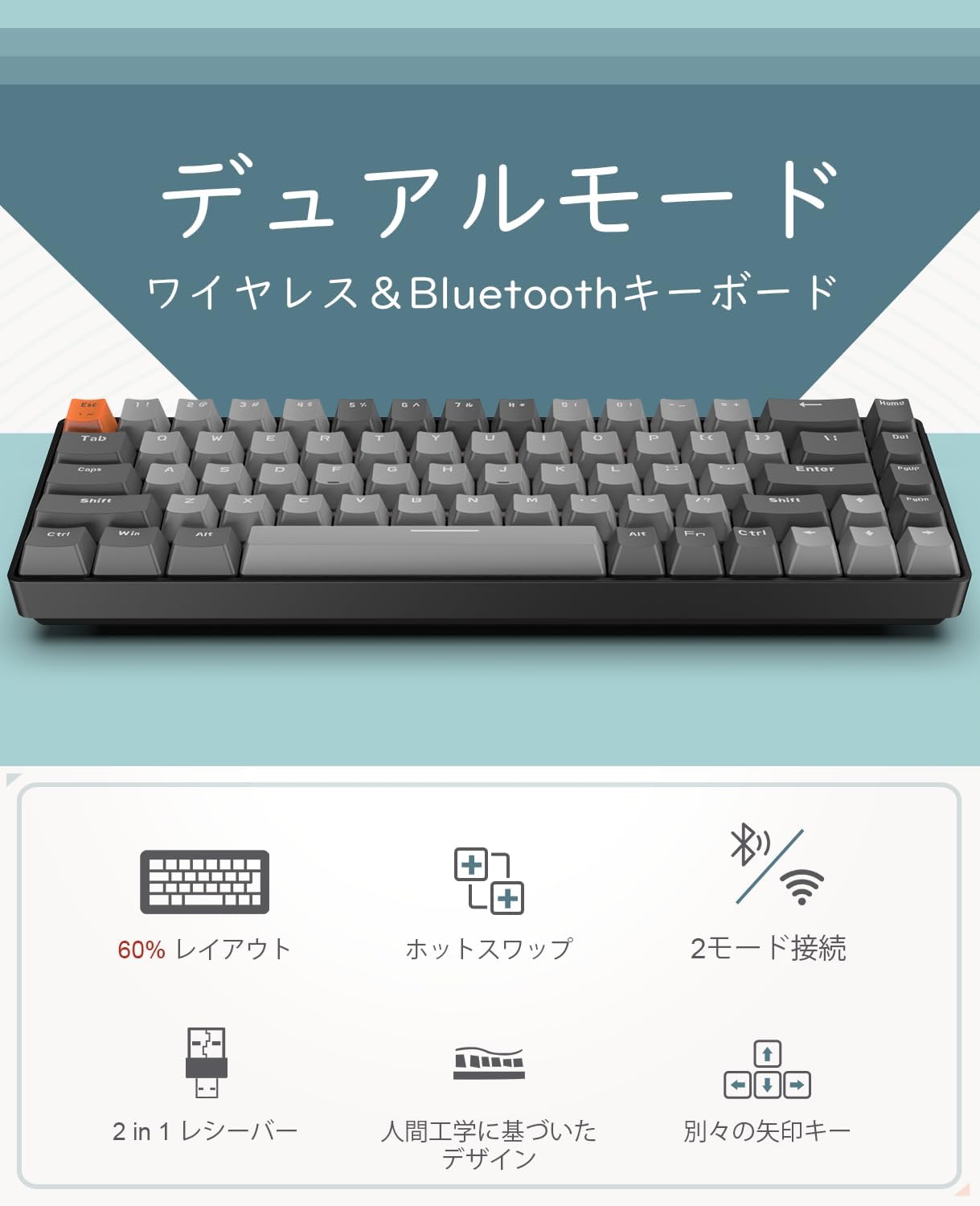
Сүрөт: бүттүview of the K68 keyboard highlighting its dual-mode wireless and Bluetooth capabilities.

Image: Diagram showing the 60% layout, hot-swappable feature, 2-mode connection, 2-in-1 receiver, ergonomic design, and separate arrow keys.
5. Орнотуу
5.1 Батареяны орнотуу
The K68 keyboard requires two AAA batteries (not included). Locate the battery compartment on the underside of the keyboard, open it, insert the batteries according to the polarity indicators, and close the compartment.

Image: Underside of the K68 keyboard showing the battery compartment for two AAA batteries.
5.2 Күйгүзүү/өчүрүү
Locate the power switch on the keyboard and slide it to the 'ON' position to power on the device.
5.3 2.4 ГГц зымсыз туташуу
- Баскычтоп күйгүзүлгөнүн текшериңиз.
- Басып кармап туруңуз FN + Q for 3 seconds. The Q key indicator light will flash rapidly, indicating pairing mode.
- Insert the 2.4GHz USB receiver into an available USB port on your computer or mobile device (using a Type-C or USB adapter if necessary).
- Once connected, the Q key indicator light will turn off, and the keyboard is ready for use.
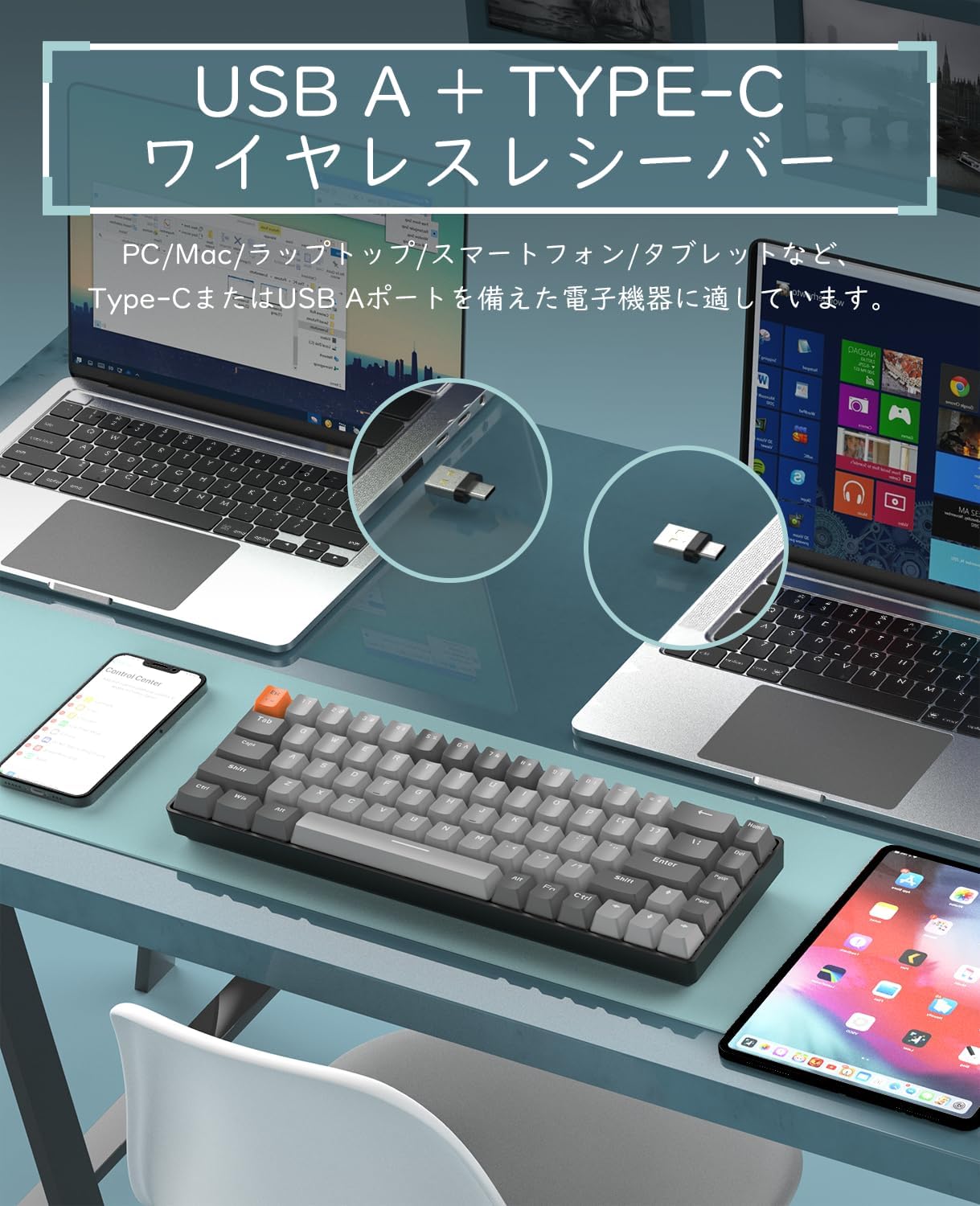
Image: The K68 keyboard with its USB A and Type-C compatible wireless receiver, shown connected to a laptop and a smartphone.
5.4 Bluetooth байланышы
The keyboard supports connecting to two Bluetooth devices simultaneously (BT1 and BT2).
- Баскычтоп күйгүзүлгөнүн текшериңиз.
- Басып кармап туруңуз FN + W (BT1 үчүн) же FN + E (for BT2) for 3 seconds. The W or E key indicator light will flash rapidly, indicating Bluetooth pairing mode.
- On your device (e.g., smartphone, tablet, PC), enable Bluetooth and search for available devices.
- Select "K68 BT5.0" or "K68 BT3.0" from the list to pair.
- Once connected, the W or E key indicator light will turn off, and the keyboard is ready for use.
Video: Demonstration of the K68 keyboard's dual-mode connectivity, hot-swappable switches, and connection methods. This video illustrates the process of connecting via Bluetooth and 2.4GHz wireless, as well as customizing switches.
6. Иштөө нускамалары
6.1 Түзмөктөрдүн ортосунда которулуу
Туташкан түзмөктөр арасында которулуу үчүн:
- Басыңыз FN + Q to switch to the 2.4GHz wireless connection.
- Басыңыз FN + W Bluetooth түзмөгүнө которулуу үчүн 1.
- Басыңыз FN + E Bluetooth түзмөгүнө которулуу үчүн 2.
6.2 Smart Power Saving Mode
The K68 keyboard features an intelligent power-saving function. If there is no operation for 30 minutes, the keyboard will enter sleep mode. Press any key to wake it up.
6.3 Keycap and Switch Replacement (Hot-Swappable)
The keyboard's hot-swappable PCB allows you to freely replace 3-pin switches without soldering. This enables customization of your typing experience.
- Керектүү баскычтоптун капкагын этияттык менен алып салуу үчүн комплекттеги баскычтоптун капкагын тартуучу каражатты колдонуңуз.
- Use the included switch puller to gently remove the mechanical switch from the PCB.
- Жаңы 3-пиндүү которгучтун төөнөгүчтөрүн платадагы тешиктер менен тегиздеп, ал ордуна чыкылдаганча бекем басыңыз.
- Баскычтын капкагын кайра бекитиңиз.
Эскертүү: Be careful when inserting new switches to avoid bending the pins. The PCB is compatible with 99% of 3-pin switches.

Image: A hand demonstrating the removal and insertion of a mechanical switch on the K68 keyboard, highlighting its hot-swappable feature.
6.4 Input Method Switching (US Layout)
This product uses a US layout keyboard. If you need to switch input methods on your operating system, you can typically do so using:
- Ctrl + Боштук
- or Ctrl + Shift
Refer to your operating system's documentation for specific input method settings.
7. Техникалык тейлөө
7.1 Тазалоо
Баскычтопту тазалоо үчүн:
- Disconnect the keyboard from all devices and power sources.
- Бир аз жумшак, түксүз кездемени колдонуңуз dampклавиатураны жана бетти сүртүү үчүн суу же жумшак тазалоо эритмеси менен жабыңыз.
- For deeper cleaning, remove keycaps using the keycap puller and clean underneath with compressed air or a small brush.
- Ensure the keyboard is completely dry before re-connecting or powering on.
7.2 Сактоо
When not in use for extended periods, store the keyboard in a cool, dry place away from direct sunlight and extreme temperatures. Remove batteries if storing for several months.
8. Кыйынчылыктарды
8.1 Байланыш маселелери
- Keyboard not connecting via 2.4GHz: Ensure the USB receiver is properly inserted and the keyboard is in 2.4GHz mode (FN+Q). Try a different USB port.
- Баскычтоп Bluetooth аркылуу туташпай жатат: Ensure Bluetooth is enabled on your device and the keyboard is in the correct Bluetooth pairing mode (FN+W or FN+E). Forget the device on your system and try pairing again.
- Үзгүлтүксүз туташуу: Check battery levels. Ensure no strong interference sources (e.g., other wireless devices) are nearby.
8.2 Ачкычтар жооп бербейт
- Айрым баскычтар иштебей жатат: If you have replaced switches, ensure the new switch is properly seated and its pins are not bent. Try swapping the problematic switch with a known working one.
- All keys not working: Check battery levels and replace if necessary. Ensure the keyboard is properly connected to your device.
8.3 Батареянын иштөө мөөнөтү
Under normal usage, batteries can last 3 to 6 months. If battery life is significantly shorter, ensure you are using quality AAA batteries. The keyboard does not have backlighting, which helps extend battery life.
If you encounter any other issues, please contact our customer service for assistance.
9. Техникалык шарттар
| Өзгөчөлүк | Description |
|---|---|
| Бренд | СЫЙКЫРДУУ ТАЗАЛООЧУ |
| Модел | K68 |
| Байланыш технологиясы | Bluetooth (BT5.0/BT3.0), 2.4GHz Wireless |
| Которуу түрү | Mechanical (Red Switches) |
| Ачкыч саны | 68 Ачкычтар |
| Баскычтоптун жайгашуусу | US QWERTY |
| Ыкчам алмаштырылуучу | Yes (3-pin switches) |
| Power Source | 2 x AAA Батареялар (киргизилген эмес) |
| Энергияны үнөмдөө | 30 мүнөттүк аракетсиздиктен кийин автоматтык уйку режими |
| Шайкештик | Windows, Mac, iPad, iOS, Android, Surface |
| Өлчөмдөрү (L x W x Y) | 30.9 см х 10 см х 83.8 см |
| Technical Standard Certification Number | 219-239327 |
10. Кепилдик жана колдоо
10.1 Quality Guarantee
This product comes with a 12-month quality guarantee from the date of purchase. We conduct product inspections before shipment to ensure quality.
10.2 Кардарларды колдоо
If you encounter any product defects or connection issues, please contact our customer service. We are committed to actively resolving any inconveniences you may experience.
Байланыш маалыматы: Please refer to the contact details provided with your purchase or on the official MAGIC-REFINER webсайт.