
1. Киришүү
The Renkchip Wireless HDMI Transmitter and Receiver system provides a convenient solution for wirelessly transmitting 1080P/60Hz video and audio signals from your laptop, PC, or smartphone to an HDTV or projector. This plug-and-play device eliminates the need for lengthy HDMI cables, offering flexibility for home theater, conferences, office presentations, and educational settings.

Сүрөт 1.1: Бүттүview of the Renkchip Wireless HDMI Transmitter and Receiver Kit.
Important Note: The transmitter is compatible only with laptops featuring a USB-C type output port that supports USB-C 3.1 or Thunderbolt 3/4 interfaces with DisplayPort Alternate Mode.
2. Кутуда эмне бар
Сиздин пакетте бардык компоненттер бар экенин текшериңиз:
- USB C өткөргүч
- HDMI кабылдагыч
- USB кабели (кубат үчүн)
- HDMI cable (for receiver connection)
- VGA cable (for receiver connection, if needed)

Image 2.1: The Renkchip Wireless HDMI Transmitter and Receiver components.
3. Орнотуу нускамалары
Follow these steps to set up your Renkchip Wireless HDMI system:
3.1 Кабыл алгычты (RX) туташтыруу
- Connect the HDMI Receiver to your display device (HDTV, monitor, or projector) using either the HDMI or VGA port.
- Connect the provided USB cable to the receiver's power input and then to a 5V/2A USB power adapter (not included) or a powered USB port on your display device. Ensure the receiver receives stable power.

Сүрөт 3.1: Арткы view of the receiver showing HDMI and VGA output ports.
3.2 Өткөргүчтү (TX) туташтыруу
- Plug the USB-C Transmitter into the USB-C port of your source device (laptop, PC, or smartphone).
- Ensure your source device's USB-C port supports USB-C 3.1 or Thunderbolt 3/4 with DisplayPort Alternate Mode for proper functionality.
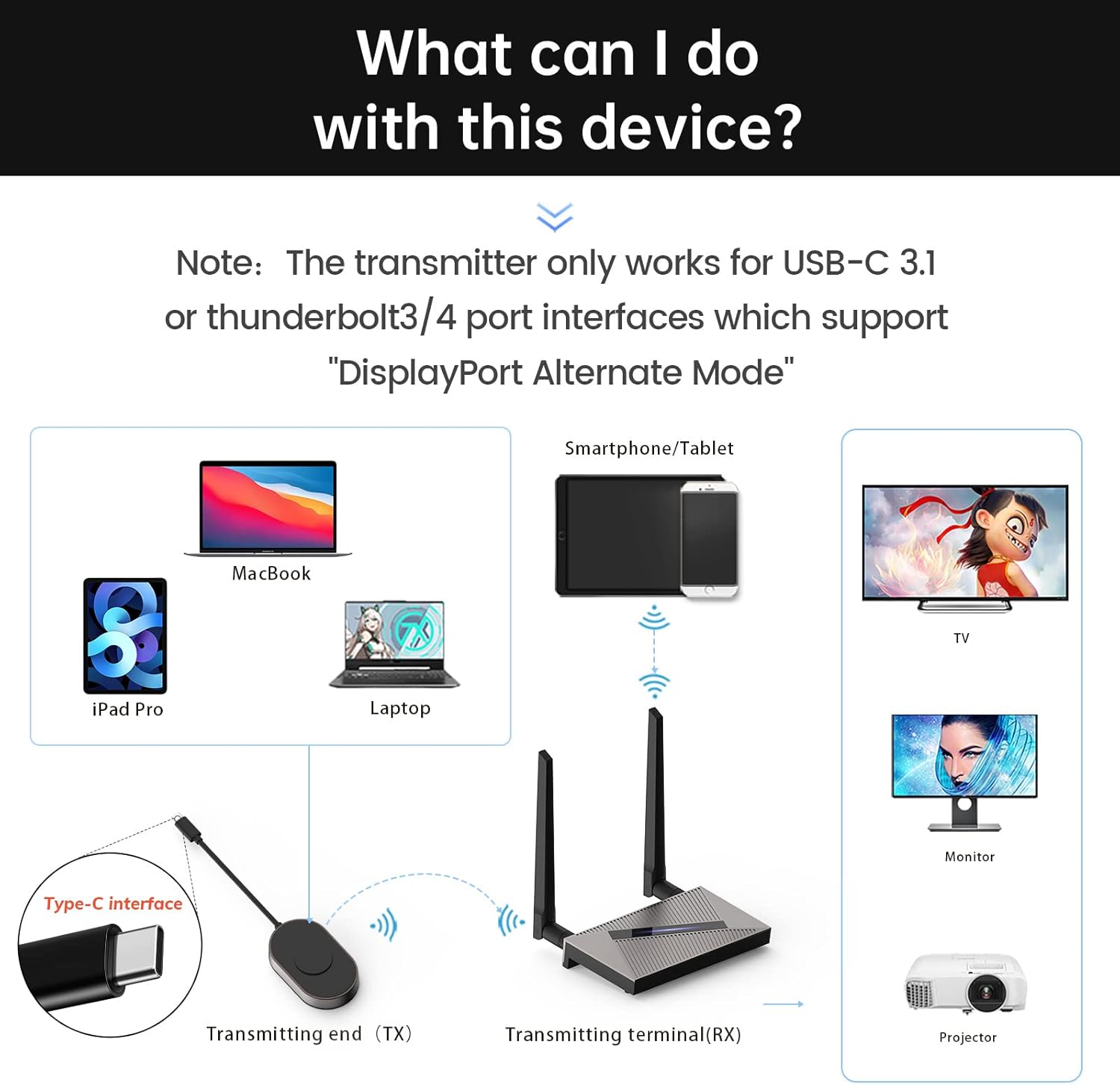
Image 3.2: Connection diagram illustrating transmitter and receiver setup with various devices.
3.3 Өткөргүчтү жана кабыл алгычты жупташтыруу
The transmitter and receiver are pre-paired from the factory. If re-pairing is necessary:
- Insert a thin object (like a pin) into the receiver's "RESET" position and hold for 5 seconds to enter pairing mode.
- Press and hold the transmitter button for 3 seconds. The indicator light will flash quickly.
- After approximately 20 seconds, the screen will show that pairing is successful.
4. Иштөө нускамалары
Once connected and paired, the system operates on a plug-and-play basis:
- Ensure both the transmitter and receiver are powered on and connected as described in Section 3.
- The display device connected to the receiver should automatically detect the incoming signal and mirror the content from your source device.
- The system supports 1080P/60Hz HD signal transmission with real-time audio synchronization and a delay of less than 0.1 seconds.
- The dual high-gain antennas (2.4G+5G) ensure a strong and stable transmission signal.

Сүрөт 4.1: Мисample of a laptop wirelessly mirroring its display to a large screen for a meeting.

Сүрөт 4.2: Мисample of a smartphone wirelessly mirroring video content to a television.
The system supports various operating systems including Windows, Mac OS/iPad OS/iOS, and Android, utilizing technologies like Airplay, DLNA, and Miracast for seamless mirroring.

Image 4.3: Compatibility details for different operating systems and mirroring protocols.
5. Техникалык тейлөө
To ensure the longevity and optimal performance of your Renkchip Wireless HDMI system, consider the following:
- Түзмөктөрдү таза жана чаңдан алыс кармаңыз. Тазалоо үчүн жумшак, кургак чүпүрөктү колдонуңуз.
- Түзмөктөрдү өтө жогорку температурага, нымдуулукка же түз күн нуруна дуушар кылбаңыз.
- Do not attempt to disassemble or repair the devices yourself. Refer to qualified service personnel if issues arise.
6. Кыйынчылыктарды
Эгер көйгөйлөргө туш болсоңуз, төмөнкү жалпы чечимдерди караңыз:
- No Signal/No Display:
- Ensure the receiver is properly powered (5V/2A).
- Verify that the HDMI/VGA cable is securely connected between the receiver and the display device.
- Confirm that your source device's USB-C port supports DisplayPort Alternate Mode.
- Check if the transmitter and receiver are successfully paired (refer to Section 3.3).
- Try connecting the transmitter to a different USB-C port on your source device, if available.
- Intermittent Connection/Signal Drop:
- Reduce the distance between the transmitter and receiver. The theoretical maximum transmission distance is 98 feet, but environmental factors like walls and air humidity can affect performance.
- Ensure there are no significant obstructions between the transmitter and receiver.
- Minimize interference from other wireless devices operating on 2.4G or 5G frequencies.
- Device Heats Up During Use:
- It is normal for the device to generate some heat due to signal decoding. The product is designed with ventilation holes to manage heat and will not affect product life during long-term use.
- Driver/APP Installation:
- This product is designed for plug-and-play operation and does not require driver or APP installation.

Image 6.1: Common questions and answers regarding the Renkchip Wireless HDMI system.
7. Техникалык шарттар
| Өзгөчөлүк | Деталь |
|---|---|
| Модел | Z08 |
| Резолюция | 1080P/60Hz |
| I / O Interfaces | Audio, Type-C, VGA, HDMI |
| Power Input | 5V 2A |
| Network | 2.4G/5G Dual Antenna |
| Материал | Zinc Alloy + ABS |
| Түс | Кара |
| Продукциянын өлчөмдөрү | 9 x 6 x 2 дюйм (болжолдуу таңгак) |
| Элемент Салмагы | 1.23 фунт |
| Байланыш технологиясы | HDMI, USB, VGA |
| Өзгөчөлүктөр | DLNA, Miracast |
| Шайкеш түзмөктөр | Smartphone, Laptop, PC, Projector, HDTV |

Image 7.1: Physical dimensions and key parameters of the transmitter and receiver.
8. Кепилдик жана колдоо
Renkchip products are designed for reliability and performance. For warranty information or technical support, please contact Renkchip customer service through the retailer where the product was purchased or visit the official Renkchip webсайт.