
1. Киришүү
This manual provides essential information and instructions for the safe and efficient use of your Blackview BV7200 Rugged Smartphone. The BV7200 is designed for durability and performance in challenging environments, featuring advanced water and dust resistance, a powerful processor, and a high-capacity battery.
Негизги өзгөчөлүктөр төмөнкүлөрдү камтыйт:
- IP68 жана IP69K сертификациясы: Advanced water and dust resistance for outdoor and demanding conditions.
- MediaTek Helio G85 Processor: Ensures smooth performance for gaming, multitasking, and general use.
- 50MP Dual Camera: Capture high-quality photos, even in low-light conditions.
- 5180 мАч Батарея: Long-lasting power with 18W fast charging support.
- 6.1-inch HD+ Display: Durable screen with Corning Gorilla Glass 3, optimized for comfortable viewing.
- Колкап режими: Allows screen operation even when wearing gloves.

Сүрөт: бүттүview Каранынview BV7200 Rugged Smartphone, highlighting its MediaTek Helio G85 processor, 50MP camera, IP68/IP69K ratings, 5180mAh battery, 6.1-inch display, and Glove Mode.
2. Орнотуу
2.1. SIM карта жана MicroSD карта орнотуу
SIM картаңызды(ларыңызды) жана/же MicroSD картаңызды орнотуу үчүн:
- Аппараттын капталындагы SIM лотокту табыңыз.
- Салгычты ачуу үчүн берилген SIM чыгаруучу куралды колдонуңуз.
- Carefully place your Nano-SIM card(s) and/or MicroSD card into the designated slots, ensuring correct orientation.
- Аспапты акырын ордунан чыккыча кайра түртүңүз.
2.2. Алгачкы заряддоо жана күйгүзүү
Биринчи колдонуудан мурун, аппаратыңызды толук заряддоо сунушталат.
- Connect the USB Type-C cable to the charging port at the bottom of the phone. Ensure the port cap is securely opened before inserting the cable and closed after charging to maintain water resistance.
- Кабелдин экинчи учун шайкеш келген кубат адаптерине туташтырып, аны розеткага сайыңыз.
- Once sufficiently charged, press and hold the Power button (usually on the right side) for a few seconds until the Blackview логотип пайда болот.
- Тил тандоо, Wi-Fi туташуусу жана Google каттоо эсебин орнотуу сыяктуу баштапкы орнотууну аяктоо үчүн экрандагы көрсөтмөлөрдү аткарыңыз.
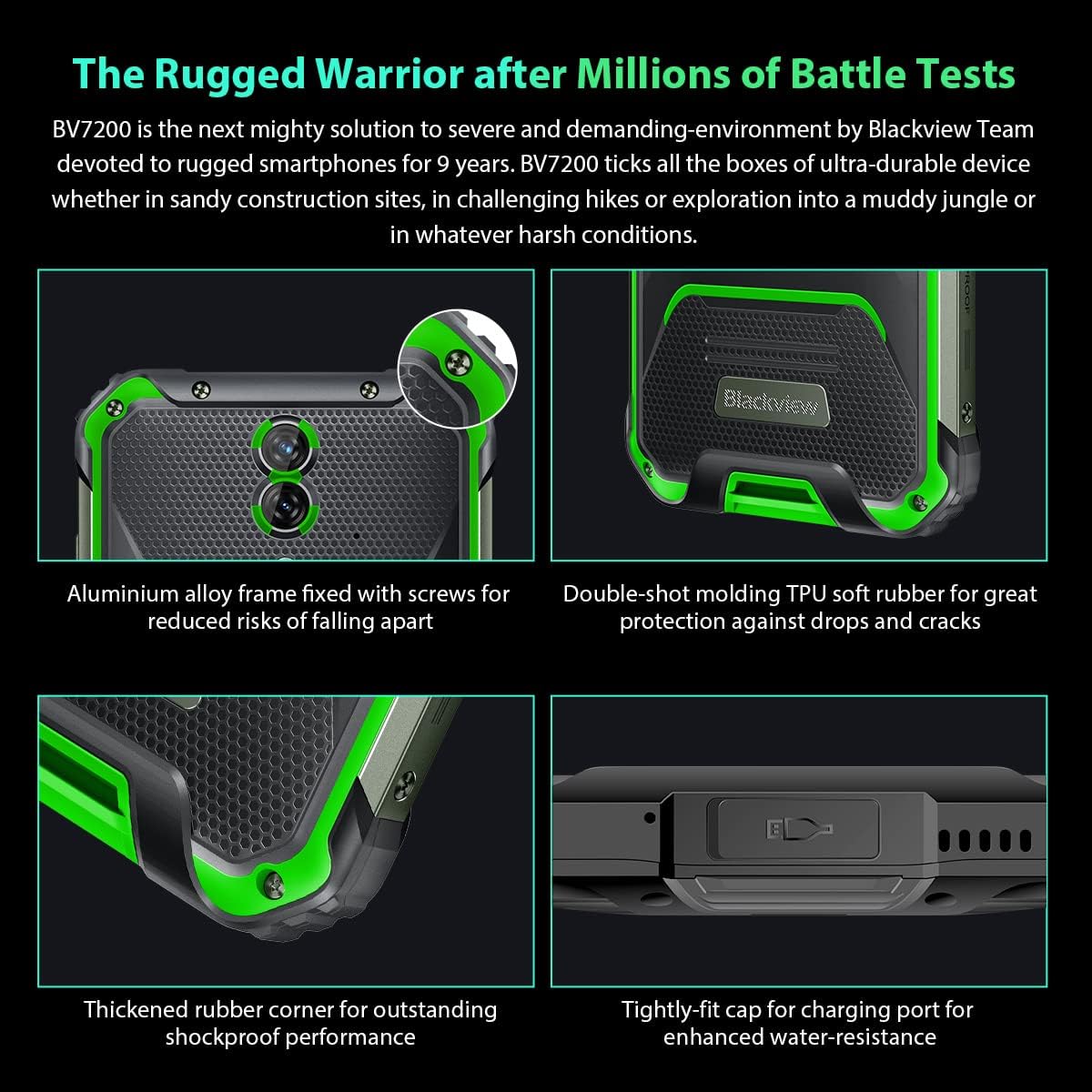
Сүрөт: Жакын план viewКаралардынview BV7200's rugged construction, including aluminum alloy frame, double-shot molding TPU rubber, thickened rubber corners, and the tightly-fit cap for the charging port, emphasizing its durability and water resistance.
3. Иштөө нускамалары
3.1. Негизги навигация
The Blackview BV7200 operates on Doke OS 3.0, based on Android 12. Use touch gestures for navigation:
- таптаңыз: Бир нерсени тандаңыз же колдонмону ачыңыз.
- Серпүү: Экрандарды же тизмелерди сыдырыңыз.
- Чымчуу: Сүрөттөрдү чоңойтуу же кичирейтүү жана web барактар.
- Узак басуу: Контексттик менюларга кириңиз же колдонмонун сүрөтчөлөрүн жылдырыңыз.
3.2. Камераны колдонуу
The BV7200 features a 50MP main rear camera and an 8MP ultra-wide/macro rear camera.
- Үй экраныңыздан же колдонмо суурмасынан Камера колдонмосун ачыңыз.
- Каалаган режимиңизди тандаңыз (Сүрөт, Видео, Портрет, Про ж.б.).
- Tap the screen to focus on a specific area.
- Сүрөткө тартуу же видео жаздырууну баштоо/токтотуу үчүн жапкыч баскычын басыңыз.

Image: Diagram illustrating the Blackview BV7200's 50MP Samsung ISOCELL JN1 main rear camera, 8MP ultra-wide and ultra-macro rear camera, and rear flash, highlighting its photographic capabilities.
3.3. Кол кап режими
The BV7200 supports Glove Mode, allowing you to operate the touchscreen while wearing gloves.
- To activate/deactivate Glove Mode, navigate to Settings > Smart Assistant > Glove Mode.
- Ensure this mode is enabled when using gloves for optimal touch responsiveness.

Image: Collage demonstrating the Blackview BV7200's Glove Mode in various scenarios, showing users operating the phone while wearing different types of gloves, emphasizing its utility in cold or industrial environments.
3.4. Water and Dust Resistance (IP68 & IP69K)
The BV7200 is certified IP68 and IP69K, making it resistant to water immersion and high-pressure water jets. This allows for use in aquatic sports or dusty environments.
- Always ensure all port caps (charging port, SIM tray) are securely closed before exposing the device to water or dust.
- Rinse the phone with clean water after exposure to saltwater or chemicals.
- Do not charge the phone if the charging port is wet. Allow it to dry completely.
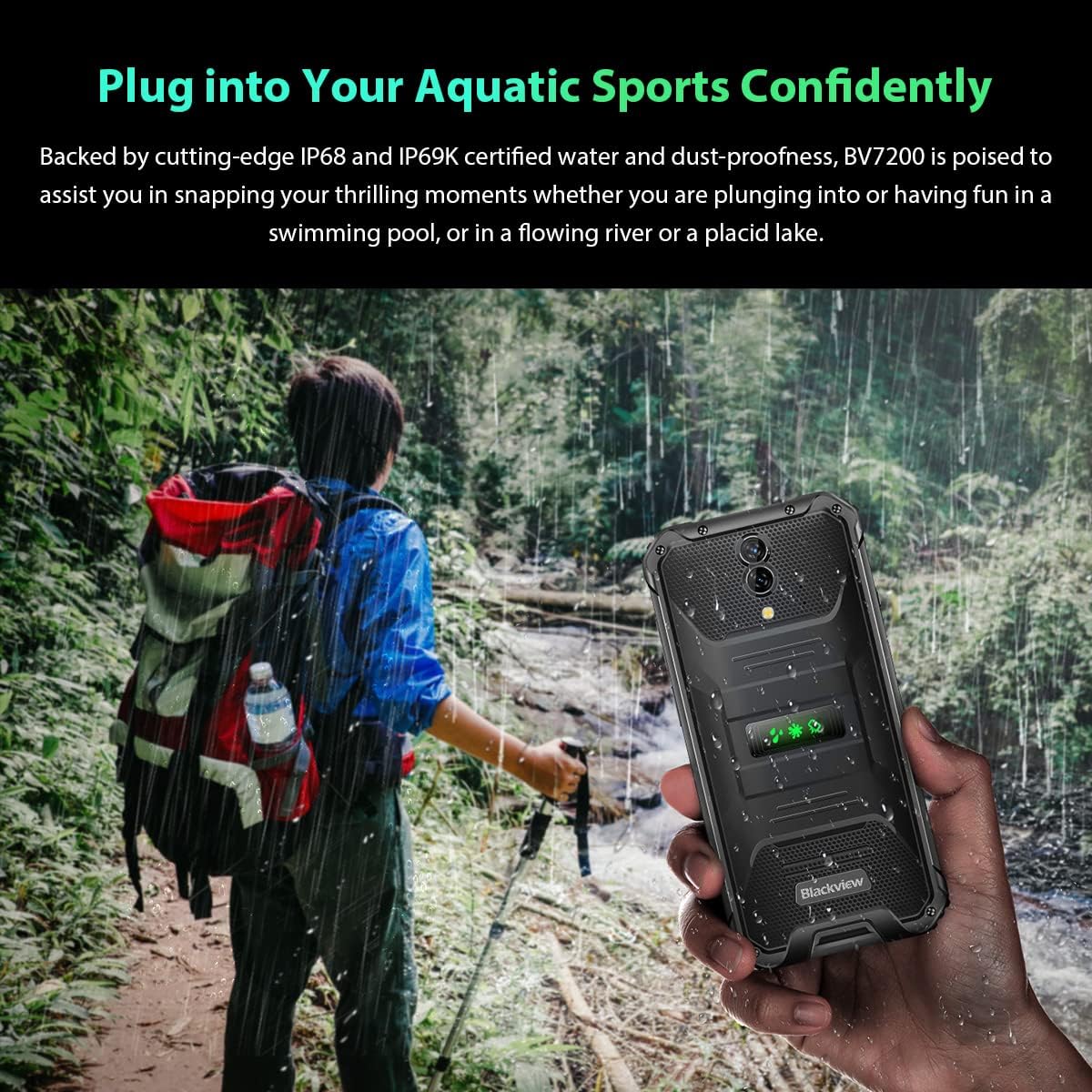
Image: A person holding the Blackview BV7200 near a stream or waterfall, illustrating its water resistance and suitability for outdoor and aquatic activities.
3.5. Батареяны башкаруу
The 5180mAh battery provides extended usage. The device supports 18W fast charging.
- Оптималдуу кубаттоо ылдамдыгы жана коопсуздугу үчүн оригиналдуу кубаттагычты жана кабелди колдонуңуз.
- The battery is designed to withstand temperatures down to -10°C.
- To prolong battery life, avoid extreme temperatures and fully discharging the battery regularly.
3.6. Эстутумду кеңейтүү
The BV7200 features 6GB of RAM with an additional 4GB virtual memory expansion, totaling 10GB, for enhanced multitasking and performance.

Image: Graphic illustrating the memory expansion feature of the Blackview BV7200, showing 6GB of physical RAM and an additional 4GB of virtual RAM, combining for a total of 10GB for improved performance.
4. Техникалык тейлөө
4.1. Аппаратыңызды тазалоо
Кара түстү тазалоо үчүнview BV7200:
- Экранды жана денени жумшак, түксүз чүпүрөк менен сүртүңүз.
- өжөр кир үчүн, бир аз d колдонууamp жумшак самын менен сүртүңүз, андан кийин кургатып аарчыңыз.
- Катуу химиялык заттарды, эриткичтерди же абразивдүү тазалагычтарды колдонбоңуз.
- Ensure all port caps are closed before cleaning with liquids.
4.2. Программалык камсыздоону жаңыртуу
Оптималдуу аткарууну, коопсуздукту жана жаңы функцияларга жетүүнү камсыз кылуу үчүн программалык камсыздоо жаңыртууларын дайыма текшерип, орнотуп алыңыз.
- барыңыз Орнотуулар > Система > Системаны жаңыртуу жеткиликтүү жаңыртууларды текшерүү үчүн.
- Жаңыртууну баштоодон мурун, түзмөгүңүздүн батареясы жетиштүү жана Wi-Fi байланышы туруктуу экенин текшериңиз.
5. Кыйынчылыктарды
5.1. Жалпы маселелер жана чечүү жолдору
- Түзмөк күйбөй жатат: Батарея заряддалганын текшериңиз. Кеминде 15 мүнөт заряддагычка туташып, анан кайра күйгүзүп көрүңүз.
- Экран жооп бербейт: Restart the device by holding the Power button for about 10-15 seconds. If the issue persists, try a factory reset (data will be lost).
- Connectivity issues (Wi-Fi/Bluetooth/Mobile Data):
- Wi-Fi/Bluetooth/Мобилдик дайындарды өчүрүү жана күйгүзүү.
- Аппаратты кайра иштетиңиз.
- Check router/network settings.
- For mobile data, ensure SIM card is correctly inserted and activated.
- Колдонмолор бузулуп жатат: Колдонмонун кэшин жана дайындарын тазалоо (Орнотуулар > Колдонмолор > [Колдонмонун аты] > Сактагыч > Кэшти тазалоо/Дайындарды тазалоо). If the problem continues, uninstall and reinstall the app.
5.2. Заводдук абалга кайтаруу
A factory reset will erase all data from your phone and restore it to its original factory settings. Back up important data before proceeding.
- барыңыз Орнотуулар > Система > Параметрлерди баштапкы абалга келтирүү > Бардык дайындарды тазалоо (деск. баштапкы абалга келтирүү).
- Confirm your decision. The device will restart and perform the reset.
6. Техникалык шарттар
Төмөндө кара түстөгү чырактын техникалык мүнөздөмөлөрү келтирилгенview BV7200:
| Өзгөчөлүк | Спецификация |
|---|---|
| Бренд | Караview |
| RAM өлчөмү | 6 GB (expandable to 10GB with virtual RAM) |
| CPU модели | MediaTek Helio G85 |
| Сактоо сыйымдуулугу | 128 ГБ (TF картасы менен 1 ТБ чейин кеңейтүүгө болот) |
| Screen Size | 6.1 дюйм |
| Резолюция | 720 x 1560 HD+ |
| Уюлдук технология | 4G |
| Зымсыз тармак технологиясы | GSM, LTE, Wi-Fi |
| Батарея сыйымдуулугу | 5180 мАч |
| Операция системасы | Android 12 (Doke OS 3.0) |
| Суу/чаңга туруктуулук | IP68, IP69K |

Сүрөт: деталдуу view of the MediaTek Helio G85 processor, highlighting its specifications including RAM, ROM, GPU, and expandable storage, emphasizing its strong performance capabilities.

Image: Graphic detailing the Blackview BV7200's 6.1-inch HD+ display specifications, including resolution (720x1560), screen-to-body ratio (83%), brightness (380cd/cm2), and PPI (283), emphasizing its visual quality and durability with Corning Gorilla Glass 3.
7. Кепилдик жана колдоо
For warranty information and technical support, please refer to the warranty card included with your product or visit the official Blackview webсайт. Кепилдик дооматтар үчүн сатып алганыңыздын далилин сактаңыз.
Көбүрөөк жардам алуу үчүн, сиз Black компаниясына кайрылсаңыз болотview кардарларды тейлөө расмий каналдар аркылуу.