
Introduction
The Audizio Brescia is an all-in-one audio system designed for versatile listening experiences. It integrates multiple audio sources including Internet Radio, DAB+, FM radio, CD player, USB MP3 playback, and Bluetooth 5.0 connectivity. Featuring a built-in 120W amplifier, it allows direct connection to passive speakers, making it a complete stereo solution. This manual provides detailed instructions for setup, operation, and maintenance of your Audizio Brescia unit.
Кутуда эмне бар
- Audizio Brescia Main Unit
- Алыстан башкаруу
- Кубаттуу адаптер
- Quick Start Guide
- FM/DAB антеннасы
- RCA аудио кабели
- 3.5mm AUX кабели

Башкаруу каражаттары жана байланыштар
Front Panel
The front panel features the primary controls and display for operating the Audizio Brescia.
- Кубат баскычы: Агрегатты күйгүзөт же өчүрөт.
- MODE баскычы: Cycles through available audio sources (Internet Radio, DAB+, FM, CD, USB, Bluetooth, AUX).
- MENU/INFO баскычы: Accesses the menu or displays information about the current track/station.
- Skip/Fast Forward/Rewind Buttons: Navigates tracks or stations.
- Ойнотуу/тындыруу баскычы: CD, USB жана Bluetooth үчүн ойнотууну башкарат.
- TFT дисплей: 2.8-inch color display showing current status, menus, and track information.
- USB порт: MP3 ойнотуу үчүн USB сактагыч түзмөктөрүн туташтыруу үчүн.
- Наушник уячасы (3.5 мм): Жеке угуу үчүн.
- FAV баскычы: Accesses or saves favorite stations/presets.
- Арткы баскыч: Мурунку менюга же экранга кайтат.
- NAVIGATION/OK Knob: Rotates to navigate menus and presses to confirm selections.
- VOLUME баскычы: Башкы үн деңгээлин тууралайт.

Арткы панель
The rear panel provides all necessary input and output connections.
- Кубат которгучу: Негизги күйгүзүү/өчүрүү баскычы.
- Кубат киргизүү: Берилген кубат адаптерине туташат.
- Динамиктин чыгышы (сол/оң): Screw terminals for connecting passive speakers (4-8 Ohm impedance).
- АЛДЫН АЛА ЧЫГУУ (Сол/Оң): RCA outputs for connecting to an external ampкөтөргүч же кубаттуу динамиктер.
- AUX IN (сол/оң): Тышкы аудио булактарын туташтыруу үчүн RCA киргизүүлөрү.
- OPTICAL Input (Toslink): Digital audio input for connecting devices like TVs.
- COAXIAL Input (RCA): Санариптик аудио киргизүү.
- Антенна туташтыргычтары: For DAB+/FM antenna and Wi-Fi antenna.

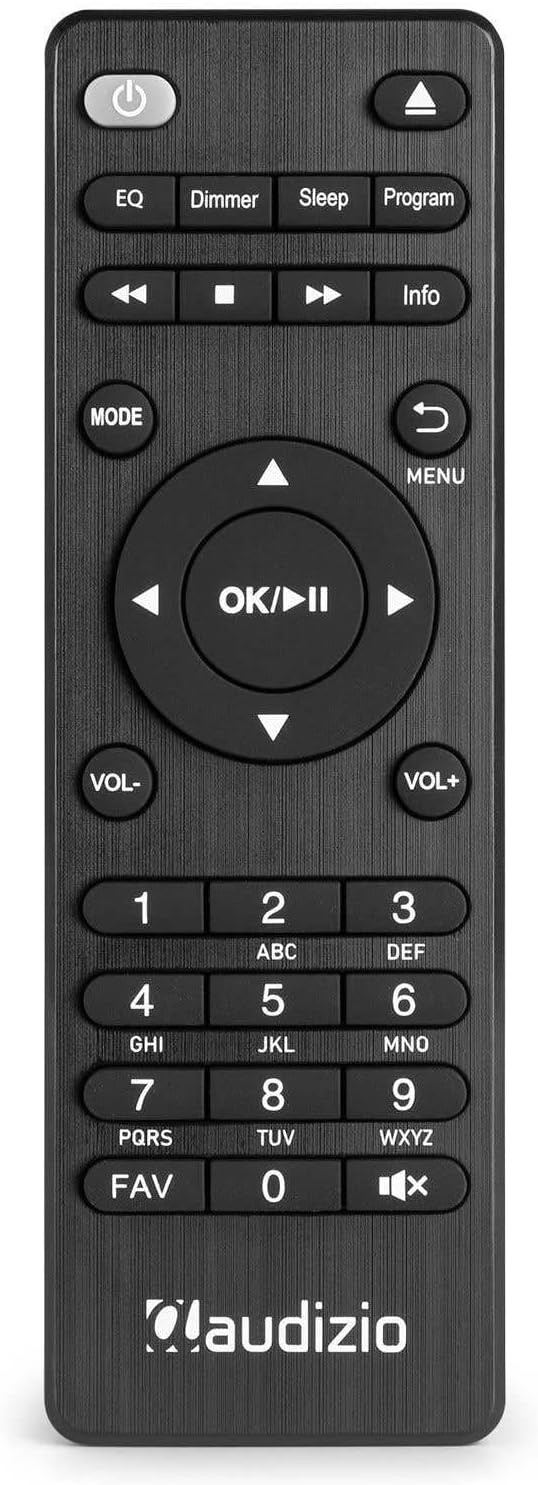
Алыстан башкаруу
Комплекттеги пульт алыстан ыңгайлуу иштөө үчүн толук функцияны камсыз кылат.
Жайгашуу
- Пакеттен чыгаруу: Бирдикти жана бардык аксессуарларды таңгактан этияттык менен алып салыңыз.
- Динамик туташуу: Connect your passive speakers to the SPEAKER OUTPUT terminals on the rear panel. Ensure correct polarity (+ to + and - to -). The ampкөтөргүч 4-8 Ом импедансы бар динамиктерди колдойт.
- Антенна туташуу: Connect the supplied DAB+/FM antenna to the corresponding connector on the rear panel. For optimal reception, extend the antenna fully. Attach the Wi-Fi antenna to its designated port.
- Кубат туташуу: Connect the power adapter to the DC IN port on the rear of the unit, then plug the adapter into a wall outlet.
- Баштапкы күйгүзүү: Flip the main power switch on the rear panel to the 'ON' position. Press the Power button on the front panel or remote control to turn on the unit.
- Биринчи жолу орнотуу устасы: Upon first power-on, the unit will guide you through an initial setup wizard. Follow the on-screen prompts to select language, time/date, and connect to your Wi-Fi network.
Иштөө нускамалары
Күйгүзүү/өчүрүү
Аппаратты күйгүзүү же өчүрүү үчүн басыңыз Күч button on the front panel or the remote control. Ensure the main power switch on the rear is in the 'ON' position.
Режим тандоо
басыңыз РЕЖИМ button on the front panel or remote control to cycle through the available audio sources: Internet Radio, DAB+, FM, CD, USB, Bluetooth, and AUX.
Интернет радио
- Select 'Internet Radio' mode using the РЕЖИМ баскычы.
- If not already connected, the unit will prompt you to connect to a Wi-Fi network. Use the NAVIGATION/OK knob to select your network and enter the password.
- Once connected, you can browse stations by location, genre, or search.
- To save a station as a favorite, tune to the desired station and press the FAV button. Follow the on-screen instructions to assign a preset number.
DAB+ радиосу
- Select 'DAB+' mode.
- The unit will automatically scan for available DAB+ stations. This may take a few minutes.
- колдонуу NAVIGATION/OK knob or the Skip buttons to browse the list of found stations.
- Басыңыз OK бекет тандоо.
- Станцияны сактоо үчүн, баскычын басыңыз FAV button and assign a preset number.
FM радиосу
- "FM" режимин тандаңыз.
- колдонуу NAVIGATION/OK knob to manually tune or press and hold the Skip buttons to auto-scan for the next available station.
- Станцияны сактоо үчүн, баскычын басыңыз FAV button and assign a preset number.
CD ойноткуч
- "CD" режимин тандаңыз.
- Gently insert a CD into the slot-loading drive on the front panel. The unit will automatically draw in the disc.
- Playback should begin automatically. Use the Play/Pause and Skip buttons for control.
- To eject the CD, press the Eject button (usually indicated by a triangle with a line below it) on the remote or front panel.

USB ойнотуу
- MP3 файлы камтылган USB сактагыч түзмөгүн (мисалы, USB флешкасын) салыңыз fileалдыңкы панелдеги USB портуна сайыңыз.
- "USB" режимин тандаңыз.
- The unit will scan the USB device. Use the NAVIGATION/OK knob to browse folders and files.
- Басыңыз OK to select and play a file.

Bluetooth
- Select 'Bluetooth' mode. The unit will enter pairing mode, indicated on the display.
- On your mobile device, enable Bluetooth and search for 'Audizio Brescia'.
- Select 'Audizio Brescia' to pair. Once paired, you can stream audio from your device to the unit.

Spotify Connect
The Audizio Brescia supports Spotify Connect, allowing you to control music playback directly from the Spotify app on your smartphone or tablet.
- Ensure your Audizio Brescia is connected to the same Wi-Fi network as your mobile device.
- Мобилдик түзмөгүңүздө Spotify колдонмосун ачыңыз.
- Ырды ойнотуп, "Жеткиликтүү түзмөктөр" сүрөтчөсүн (адатта динамиктин же компьютердин сүрөтчөсүн) таптаңыз.
- Select 'Audizio Brescia' from the list of available devices. The unit's display will show the Spotify logo and current track information.

AUX киргизүү
Connect external audio devices (e.g., MP3 players, smartphones) to the AUX IN RCA ports on the rear panel using the supplied RCA cable or a 3.5mm to RCA cable. Select 'AUX' mode to listen to the connected device.
Ойготкуч жана Уйку Таймери
The unit includes dual alarm functions and a sleep timer. Access these settings through the main menu or dedicated buttons on the remote control to configure wake-up times, alarm sources, and sleep duration.
Техникалык шарттар
| Өзгөчөлүк | Спецификация |
|---|---|
| Бренд | Аудизио |
| Модел | Brescia (102.270) |
| Ampжашоочу түрү | Д классы |
| Чыгуу күчү | 120 Ватт (макс) |
| Динамик импедансы | 4-8 Ом |
| Байланыш | Wi-Fi, Bluetooth 5.0, USB, AUX, Optical, Coaxial |
| Радио тюнер | Интернет радиосу, DAB+, FM |
| CD ойноткуч | Slot-loading |
| USB ойнотуу | MP3 compatible |
| Дисплей | 2.8 дюймдук TFT түстүү дисплей |
| Электр камсыздоо | 220-240V AC / 50Hz |
| Өлчөмдөрү (W x D x H) | 43 x 32 x 7.5 см |
| Салмагы | 3.3 кг |
| Материал | Алюминий алдыңкы панели |
Проблемаларды чечүү
- Кубат жок: Ensure the power adapter is securely connected to both the unit and the wall outlet. Check that the main power switch on the rear panel is 'ON'.
- Үн жок: Verify speaker connections and polarity. Check the volume level. Ensure the correct audio source is selected. If using external inputs (AUX, Optical, Coaxial), confirm the source device is playing and its volume is up.
- Радио кабыл алуусу начар (DAB+/FM): Extend the antenna fully. Try repositioning the antenna or the unit for better signal. For FM, consider switching to mono reception if stereo signal is weak.
- Internet Radio Not Connecting: Check your Wi-Fi network connection and password. Ensure the unit is within range of your Wi-Fi router. Restart your router and the Audizio Brescia.
- Bluetooth жупташтыруу маселелери: Ensure the unit is in Bluetooth pairing mode. Delete 'Audizio Brescia' from your mobile device's Bluetooth list and try pairing again. Ensure no other devices are currently connected to the unit via Bluetooth.
- CD Not Playing/Ejecting: Ensure the CD is inserted correctly. Check if the disc is scratched or dirty. Try a different CD. If the disc is stuck, power cycle the unit.
- USB ойнотуу көйгөйлөрү: USB түзмөгү шайкеш келген форматта экенин текшериңиз file system (e.g., FAT32) and contains supported audio files (MP3). Try a different USB device.
Техникалык тейлөө
- Тазалоо: Түзмөктүн сыртын тазалоо үчүн жумшак, кургак чүпүрөктү колдонуңуз. Абразивдүү тазалоочу каражаттарды же эриткичтерди колдонбоңуз.
- CD Drive: Avoid touching the lens inside the CD drive. Use a specialized CD lens cleaner if playback issues occur due to dust.
- Вентиляция: Ашыкча ысып кетүүнүн алдын алуу үчүн аппараттын айланасында жетиштүү желдетүүнү камсыз кылыңыз. Вентиляция тешиктерин жаап албаңыз.
- Сактагыч: Эгер аппаратты узак убакытка сактасаңыз, аны электр кубатынан ажыратып, салкын, кургак жерде сактаңыз.
Кепилдик жана колдоо
Your Audizio Brescia unit is covered by a manufacturer's warranty. Please refer to the warranty card included with your product for specific terms and conditions. For technical support, service, or further inquiries, please contact your retailer or visit the official Audizio webбайланыш маалыматы үчүн сайт.