
Introduction
The Segotep T3 White Mid-Tower ATX Gaming PC Case is designed for high-performance PC builds, offering extensive cooling support, tool-free access, and a modern aesthetic. This manual provides essential information for setting up, operating, and maintaining your PC case to ensure optimal performance and longevity.
Өзгөчөлүктөрү
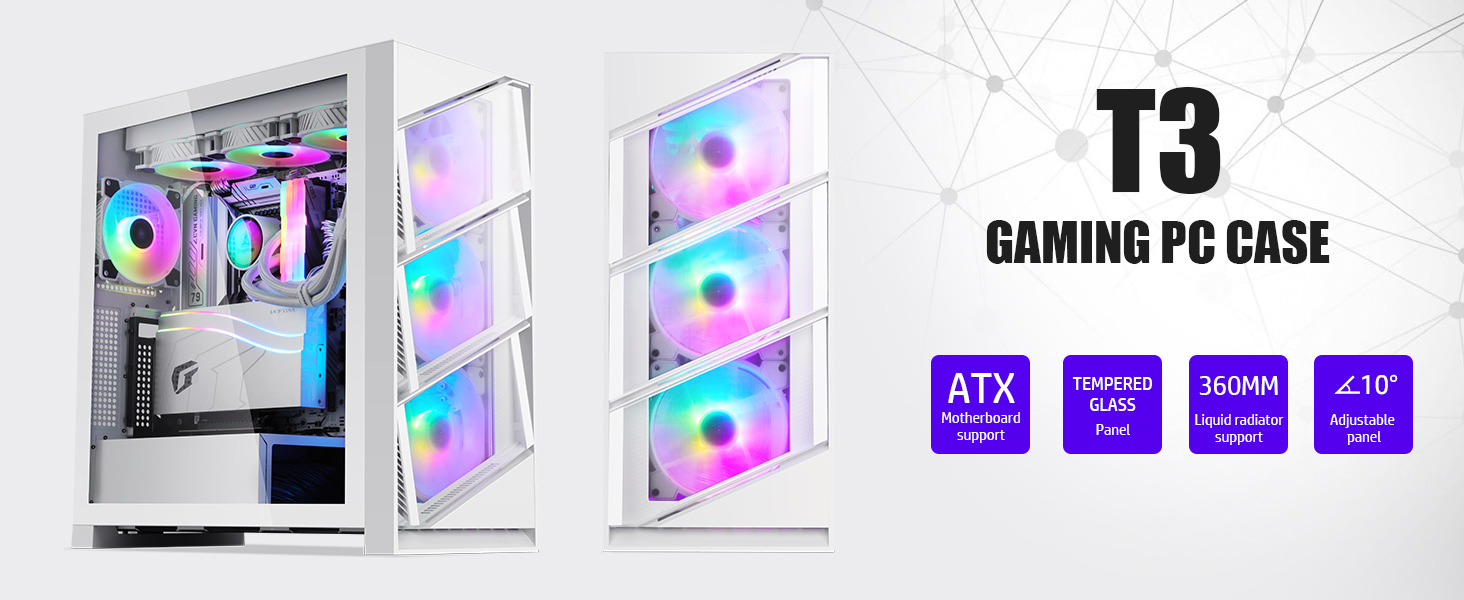
- Snap Closure Front Panel: The PC Gaming Chassis features tempered glass side panels and a snap closure front panel that showcases highly configurable components and RGB lighting. 10° Smart Panel Air Ducts are designed to provide plenty of airflow.
- CPU Cooling Focus: This ATX chassis allows fans to be mounted behind the motherboard to provide precise cooling of the CPU core, optimizing thermal performance for high-power PC models.
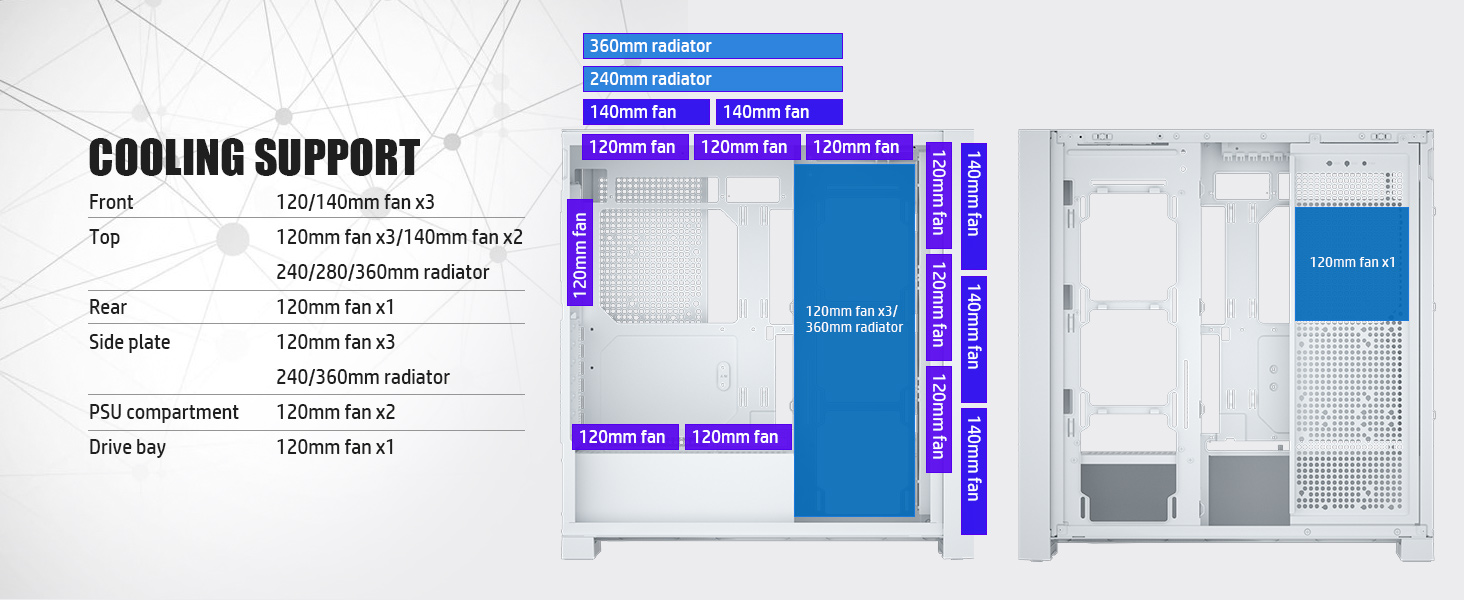
- Dual 360mm Water Cooling Support: The chassis can accommodate dual 360mm radiators, with 360mm water cooling options on both the top and sides. It supports up to 13 fans for optimal temperature management.
- Tool-Less Disassembly: The modular design enables tool-less removal of the front panel, snap-on side panels, baffles, and compartment covers, facilitating various cooling layouts and easy access for maintenance.
- Pre-installed GPU Bracket: An adjustable graphics card bracket is pre-installed, allowing for secure positioning of your GPU. The silicone pad on the holder has a temperature resistance value up to 240℃.
- Type-C Ready: Supports Type-C interface, providing excellent charging speed and data transfer rates.
- Pre-installed ARGB/PWM Fan: Includes one pre-installed ARGB/PWM fan offering 16.8 million colors for customizable lighting and efficient cooling.




Жайгашуу
Follow these general steps for assembling your PC within the Segotep T3 case:
- Ишти даярдоо: Remove the side panels and front panel using the tool-less design.
- Motherboard орнотуу: Secure your ATX, Micro-ATX, or Mini-ITX motherboard onto the standoffs.
- CPU Cooler орнотуу: Mount your CPU cooler (air or liquid) according to its specific instructions. Ensure proper clearance for air coolers (max 175mm height). For liquid coolers, utilize the top or side 360mm radiator mounts.
- Графикалык картаны (GPU) орнотуу: Insert your graphics card into the PCIe slot. Use the pre-installed adjustable GPU bracket for support.
- Сактагыч дисктерди орнотуу: Mount 2.5-inch SSDs or 3.5-inch HDDs in the designated drive bays behind the motherboard tray.
- Электр булагы (PSU) орнотуу: Install your power supply unit in its designated compartment.
- Кабелдик башкаруу: Route all cables neatly through the cutouts and use cable ties or Velcro straps to secure them, ensuring optimal airflow and a clean build.
- Install Additional Fans/Radiators: If desired, install additional fans or radiators in available mounting locations (up to 13 fans total).
- Алдыңкы киргизүү/чыгарууну туташтыруу: Connect the front panel cables (USB 3.0, USB 2.0, Type-C, Audio, Power, Reset) to your motherboard.
- Панелдерди жабуу: Reattach the side and front panels securely.
Иштеп жатат
The Segotep T3 case is designed for efficient operation with its advanced airflow features. Ensure all fans are properly connected and functioning to maintain optimal temperatures. The 10° Smart Panel Air Ducts on the front panel can be opened to enhance airflow when needed, and closed to prevent dust entry during idle periods.
Техникалык тейлөө
Regular maintenance is crucial for prolonging the life of your PC components and ensuring consistent performance. The tool-less design of the Segotep T3 case makes maintenance straightforward.
- Чаң чыпкасын тазалоо: Periodically clean the dust filters located on the top and bottom of the case. These are designed to be easily removable for cleaning.
- Ички тазалоо: With the side panels removed, use compressed air to clear dust from fans, radiators, and other components.
- Кабель башкаруу текшерүү: Кабелдердин аба агымына же желдеткичтин иштешине тоскоол болбогонун текшерүү үчүн, кээде кабелдердин өткөрмөлөрүн текшерип туруңуз.
Проблемаларды чечүү
Бул жерде кээ бир жалпы маселелер жана мүмкүн болуучу чечимдер:
- Ашыкча ысып кетүү: Ensure all fans are spinning correctly and dust filters are clean. Verify proper installation of CPU cooler and thermal paste. Check for any cable obstructions to airflow.
- Компонентти тууралоо маселелери: If a component (e.g., large GPU, thick radiator) does not fit, double-check the case specifications for maximum dimensions. The modular design allows for some flexibility in component placement.
- Алдыңкы панелдин киргизүү/чыгаруу иштебей жатат: Verify that all front panel cables are securely connected to the correct headers on your motherboard.
- RGB жарыктандыруу маселелери: Ensure the ARGB fan is correctly connected to a compatible 3-pin 5V ARGB header on your motherboard or a dedicated controller. Use motherboard software to control lighting effects.
Техникалык шарттар
| Өзгөчөлүк | Деталь |
|---|---|
| Бренд | Сеготеп |
| Сериялар | T3 |
| Модель аты | T3 |
| Иштин түрү | Ара Tower |
| Motherboard шайкештиги | ATX |
| Материал | Температуралуу айнек |
| Продукциянын өлчөмдөрү (LxWxH) | 18.5 x 9.06 x 19.29 дюйм |
| Элемент Салмагы | 22 фунт |
| USB 3.0 порттордун саны | 2 |
| USB 2.0 порттордун саны | 2 |
| Муздатуу ыкмасы | Аба, суу |
| Fan Size | 120 миллиметр (алдын ала орнотулган) |
Кепилдик жана колдоо
Segotep offers a 5-year warranty on its power supply products, demonstrating a commitment to quality and reliability. For specific warranty details regarding the T3 PC case or for any support inquiries, please refer to the official Segotep webсайтка же кардарларды тейлөөгө кайрылыңыз.
You can visit the official Segotep store for more information and product support: Segotep Store
Продукт видеосу
Расмий продукт видео showcasing the Segotep T3 Gaming PC Case features and design.