
1. Киришүү
Сатып алганыңыз үчүн рахматasing the Audizio Brescia 120W Hi-Fi Amplifier. This all-in-one audio system offers a wide range of features including Internet Radio, DAB+/FM radio, Bluetooth 5.0 connectivity, Spotify Connect, a CD player, and USB MP3 playback. It is designed to provide high-quality audio for your home entertainment.
This manual provides essential information for the safe and correct operation of your device. Please read it thoroughly before use and retain it for future reference.
2. Коопсуздук нускамалары
- Электр камсыздоо: электр менен жабдууну камсыз кылуу voltage matches the requirements specified on the unit. Connect the power cable securely.
- Вентиляция: Вентиляция тешиктерин жаап албаңыз. Ашыкча ысып кетүүнүн алдын алуу үчүн аппараттын айланасында адекваттуу аба агымын камсыз кылыңыз.
- Суу жана ным: Аппаратты жамгырга, нымга же тамчылатуучу/чачыраган суюктуктарга тийгизбеңиз. Ваза сыяктуу суюктуктар толтурулган нерселерди аппараттын үстүнө койбоңуз.
- Жылуулук булактары: Аппаратты радиаторлор, жылуулук регистрлери, мештер же башка аппараттар (анын ичинде) сыяктуу жылуулук булактарынан алыс кармаңыз. ampкөтөргүчтөр) жылуулукту пайда кылуучу.
- Тазалоо: Кургак чүпүрөк менен гана тазалаңыз. суюк тазалагычтар же аэрозолдук тазалагычтар колдонгон жок.
- Тейлөө: Агрегатты өзүңүз тейлөөгө аракет кылбаңыз. Бардык тейлөөлөрдү квалификациялуу тейлөө кызматкерлерине тапшырыңыз.
- Жайгашкан жери: Агрегатты туруктуу, тегиз бетке коюңуз. Аны күн тийген жерге же күчтүү магнит талаасына коюудан алыс болуңуз.
3. Пакеттин мазмуну
Таңгакта бардык буюмдар бар экенин текшериңиз:
- Audizio Brescia Hi-Fi Ampөмүрлүү
- Алыстан башкаруу
- FM антеннасы
- DAB+ антеннасы
- RCA аудио кабели
- Электр кабели
- Колдонуучунун Колдонмосу (бул документ)
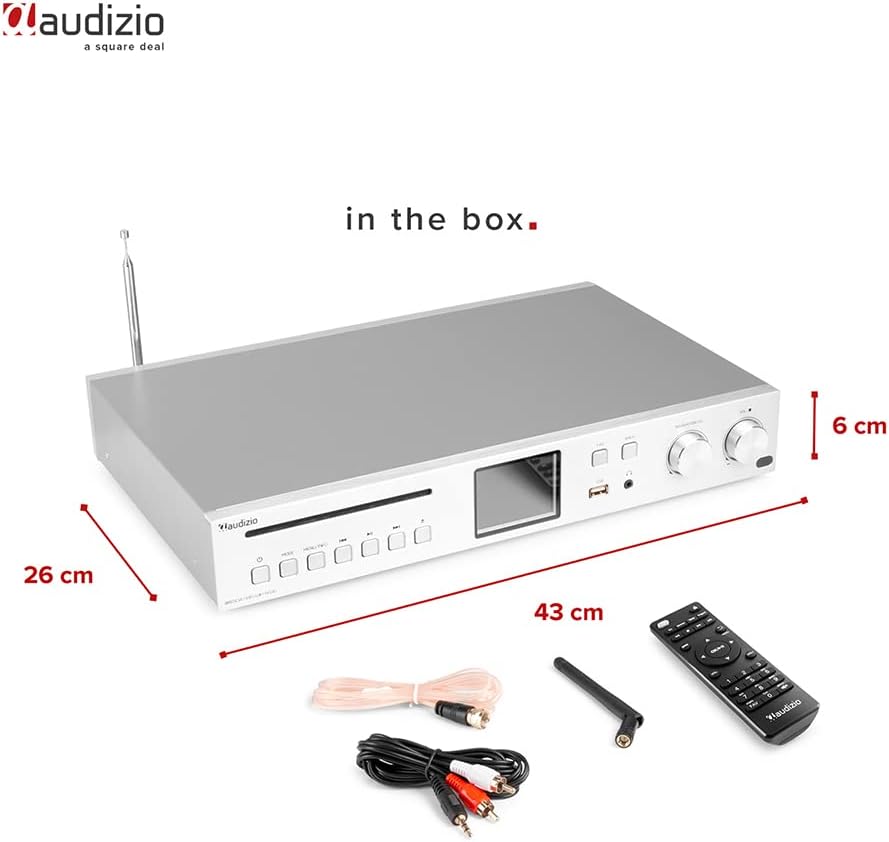
Image: Audizio Brescia amplifier with its remote control, antennas, and RCA cables, illustrating the contents of the package.
4. Продукт бүтүп калдыview
4.1 алдыңкы панели

Сүрөт: алдыңкы view of the Audizio Brescia amplifier, highlighting the CD tray, various control buttons, the 2.8" TFT color display, USB port, headphone jack, and two rotary knobs for navigation and volume.
- CD лоток: Аудио компакт-дисктерди киргизүү үчүн.
- Башкаруу баскычтары: Power, Mode, Menu/Info, Play/Pause, Skip Forward/Backward.
- 2.8" TFT дисплей: Shows current mode, track information, radio station, and menu options. Features fully adjustable backlight.
- USB порт: MP3 ойнотуу үчүн USB сактагыч түзмөктөрүн туташтыруу үчүн.
- Наушник уячасы (3.5 мм): Жеке угуу үчүн.
- FAV баскычы: Access favorite stations/presets.
- Арткы баскыч: Менюларда кайра өтүңүз.
- Navigation/CH Knob: Rotate to navigate menus or change channels; press to select.
- Үн баскычы: Чыгуу көлөмүн тууралайт.

Сүрөт: деталдуу view of the Audizio Brescia's 2.8" TFT display, illustrating the various mode icons including Internet Radio, Spotify, DAB+, FM Radio, Disc (CD), USB, and AUX input. Also shows alarm and sleep timer icons.
4.2 Арткы панель
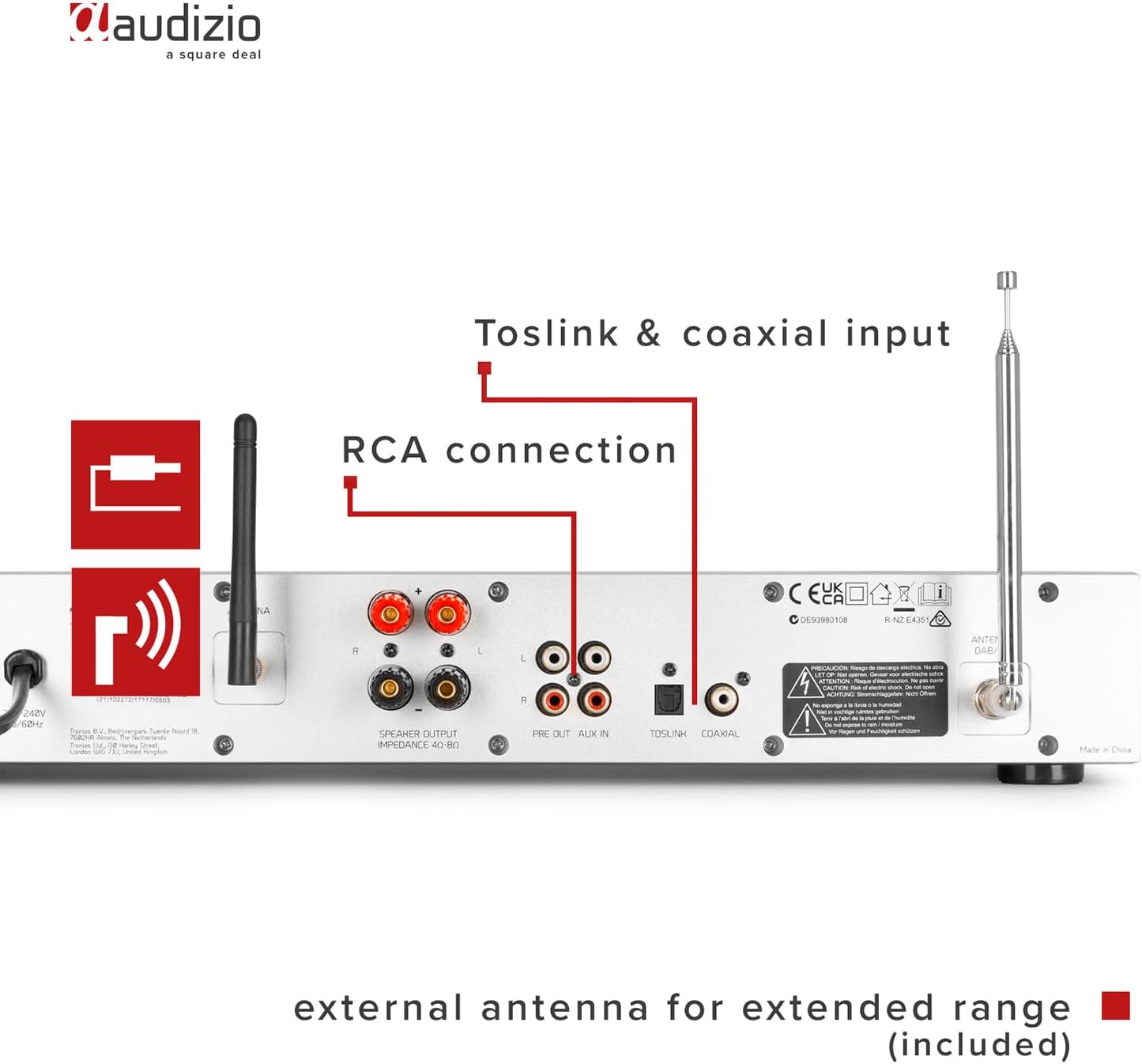
Image: Rear panel of the Audizio Brescia amplifier, detailing the speaker output terminals, RCA line input and output, Toslink optical input, Coaxial input, and connections for the external FM and DAB+ antennas.
- Speaker Outputs (L/R): Screw terminals for connecting passive speakers (4-8 Ohm impedance).
- RCA Line Input (AUX IN): For connecting external audio sources (e.g., turntable, cassette deck).
- RCA Line Output (PRE OUT): Тышкы туташуу үчүн ampкөтөргүч же кубаттуу динамиктер.
- Optical Input (Toslink): Санариптик аудио киргизүү.
- Коаксиалдуу киргизүү: Санариптик аудио киргизүү.
- Антенна туташтыргычтары: For connecting the supplied FM and DAB+ antennas.
- Кубат которгучу: Негизги күйгүзүү/өчүрүү баскычы.
- Power Inlet: Электр кабелин туташтыруу үчүн.
5. Орнотуу
5.1 Динамиктерди бириктирүү
Connect your passive speakers to the speaker output terminals on the rear panel. Ensure correct polarity (+ to + and - to -) for each speaker. The ampкөтөргүч 4-8 Ом импедансы бар динамиктерди колдойт.
5.2 Антенналарды туташтыруу
For optimal reception of DAB+ and FM radio, connect the supplied antennas to their respective connectors on the rear panel. Position the antennas for best signal strength.
5.3 Кубат туташтыруу
Connect the power cable to the power inlet on the rear panel and then plug it into a suitable wall outlet (230Vac/50Hz). Turn on the main power switch on the rear panel.
5.4 Баштапкы күйгүзүү жана тармакты орнотуу
- After connecting power, press the power button on the front panel or remote control to turn on the unit.
- The display will show the startup sequence.
- Тилди жана аймакты тандоо үчүн экрандагы көрсөтмөлөрдү аткарыңыз.
- For Internet Radio and Spotify Connect functionality, you will need to connect the amplifier to your Wi-Fi network. Navigate to the "Network" settings in the menu.
- Select your Wi-Fi network from the list and enter the password using the navigation knob and select button.
- Once connected, the unit will confirm the network status.
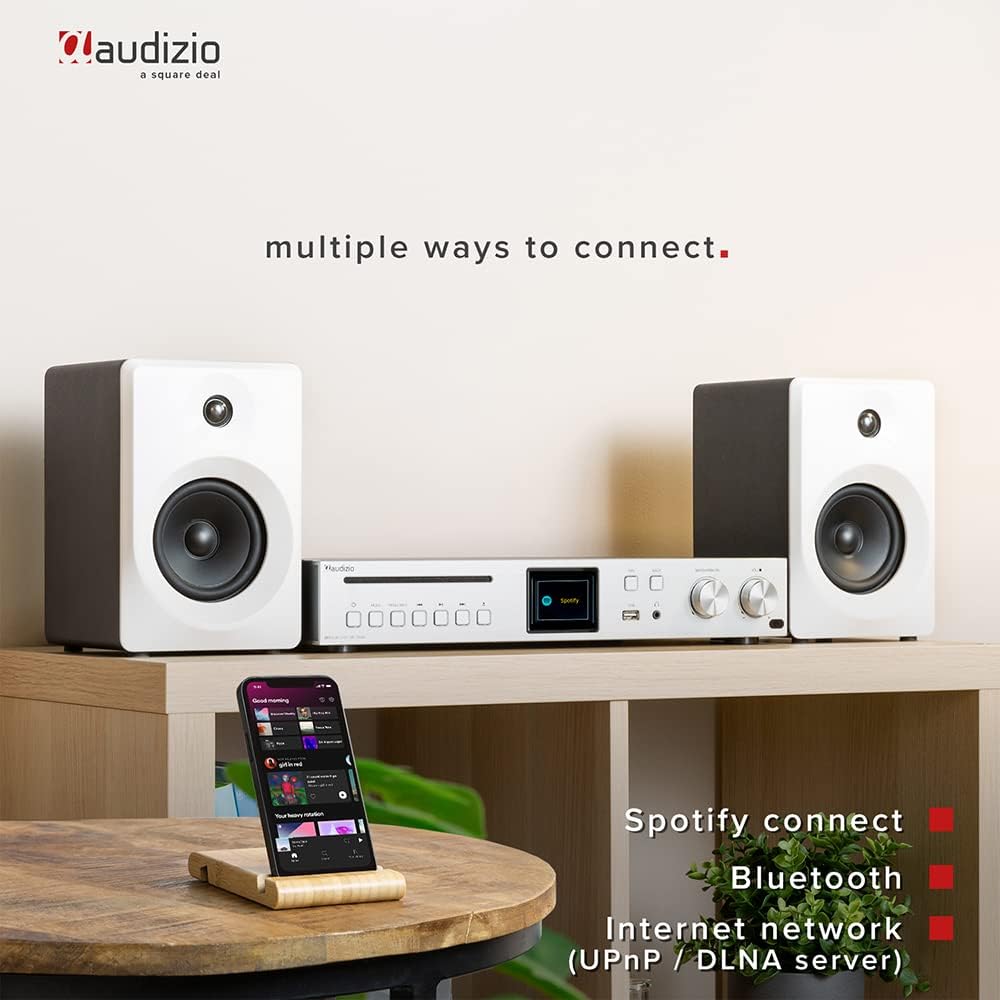
Image: The Audizio Brescia amplifier set up with speakers and a smartphone, demonstrating its versatile connectivity options including Spotify Connect, Bluetooth, and Internet network (UPnP/DLNA).
6. Иштөө нускамалары
6.1 Киргизүү булагын тандоо
Press the "MODE" button on the front panel or remote control to cycle through available input sources: Internet Radio, DAB+ Radio, FM Radio, Bluetooth, CD, USB, AUX (RCA), Optical, Coaxial.
6.2 Интернет радиосу
Once connected to Wi-Fi, select "Internet Radio" mode. You can browse stations by location, genre, or search for specific stations. The Brescia provides access to over 40,000 radio stations worldwide.

Image: The Audizio Brescia amplifier's display showing "Internet radio" mode, emphasizing its capability to connect to over 40,000 radio stations globally via the internet.
6.3 DAB+ / FM радиосу
Select "DAB+ Radio" or "FM Radio" mode. The unit will automatically scan for available stations. Use the navigation knob to select a station. For FM, you can also manually tune frequencies.
6.4 Bluetooth жупташтыруу
- Select "Bluetooth" mode on the amplifier. The display will show "Pairing".
- On your smartphone or other Bluetooth device, enable Bluetooth and search for "Audizio Brescia".
- тандаңыз amplifier from the list to pair. Once connected, you can stream audio wirelessly.
6.5 CD ойнотуу
Insert an audio CD into the CD tray. The unit will automatically switch to CD mode and begin playback. Use the play/pause and skip buttons for control.

Image: A close-up of the Audizio Brescia amplifier, highlighting the CD player slot and a USB stick inserted into the front USB port for MP3 playback. Also indicates universal headphone output.
6.6 USB MP3 ойнотуу
Insert a USB storage device containing MP3 files into the front USB port. Select "USB" mode. The unit will display the file structure, allowing you to browse and select tracks.
6.7 AUX, Optical, Coaxial Inputs
Connect external audio devices to the respective RCA, Optical (Toslink), or Coaxial inputs on the rear panel. Select the corresponding input mode on the amplifier to listen to the connected device.
6.8 Sleep Timer and Alarm Clock
The unit features a sleep timer and dual alarm clock functions. Access these settings through the system menu on the TFT display. You can set the unit to turn off automatically after a set period or wake you up with your preferred audio source.
7. Техникалык тейлөө
- Тазалоо: Агрегатты жумшак, кургак чүпүрөк менен сүртүңүз. Абразивдүү тазалагычтарды, момдорду же эриткичтерди колдонбоңуз, анткени алар финишке зыян келтириши мүмкүн.
- CD лоток: Keep the CD tray clean and free of dust. Avoid touching the lens inside the CD mechanism.
- Вентиляция: Желдетүү тешиктери чаң же таштандылар менен жабылып калбагандыгын мезгил-мезгили менен текшерип туруңуз.
- Сактагыч: Агрегатты узак убакытка сактасаңыз, аны кубаттан ажыратып, салкын, кургак жерде сактаңыз.
8. Кыйынчылыктарды
| Көйгөй | Мүмкүн себеп | Чечим |
|---|---|---|
| Күч жок | Power cable not connected; Main power switch off; Wall outlet faulty. | Check power cable connection; Ensure main power switch on rear is ON; Try a different wall outlet. |
| Динамиктерден үн жок | Speakers not connected correctly; Volume too low; Incorrect input source selected; Mute function active. | Check speaker connections and polarity; Increase volume; Select correct input source; Deactivate mute. |
| Wi-Fi'га туташпай жатат | Туура эмес Wi-Fi сырсөзү; Роутер өтө алыс; Тармак көйгөйлөрү. | Verify Wi-Fi password; Move unit closer to router or use a Wi-Fi extender; Restart router. |
| Bluetooth жупташтыруу ишке ашпай калды | Түзмөк жупташтыруу режиминде эмес; Amplifier not in Bluetooth mode; Device too far. | камсыз кылуу amplifier is in Bluetooth pairing mode; Make sure your device's Bluetooth is on and discoverable; Move devices closer. |
| CD ойнобой жатат | CD inserted incorrectly; CD is scratched/damaged; Incorrect mode selected. | Re-insert CD correctly; Try a different CD; Select CD mode. |
9. Техникалык шарттар
| Өзгөчөлүк | Деталь |
|---|---|
| Бренд | Аудизио |
| Модель номери | Брешиа |
| Ampжашоочу түрү | Класс-D |
| Чыгуу күчү | 120 Вт |
| Байланыш | Bluetooth 5.0, Wi-Fi, USB, CD, RCA, Optical (Toslink), Coaxial |
| Радио тюнер | Интернет радиосу, DAB+, FM |
| Дисплей | 2.8" TFT Color Display with adjustable backlight |
| Динамик импедансы | 4-8 Ом |
| Наушник уясы | 3.5мм |
| Электр камсыздоо | 230Vac/50Hz |
| Өлчөмдөрү (L x W x Y) | 43 x 32 x 7.5 см |
| Салмагы | 3.3 кг |
| Өзгөчөлүктөр | Spotify Connect, UPnP/DLNA support, Sleep Timer, Dual Alarm Clock, Aluminum front panel |
10. Кепилдик жана колдоо
For warranty information and technical support, please refer to the documentation provided with your purchase or visit the official Audizio webсайт. Ар кандай кепилдик дооматтары үчүн сатып алганыңыздын далилин сактаңыз.