
Introduction
The Abovsare Digital Alarm Clock is designed to provide clear time, date, and temperature information with a large LED display. Its modern design complements various room decors, and its silent operation ensures a peaceful environment. This manual provides detailed instructions for setting up and operating your new digital alarm clock.
Маанилүү коопсуздук маалыматы
- Always connect the device to a USB port or use only a 5V/1A or 5V/2A power adapter. Using an adapter with excessive voltage may cause screen damage or malfunction.
- This clock requires continuous power and must be plugged in to operate. It is not battery-operated for primary function. A built-in CR2025 3V button battery serves only as a memory backup for time data during power outages.
- Саатты өтө жогорку температурага, түз күн нуруна же жогорку нымдуулукка дуушар кылбаңыз.
- Аппаратты өз алдынча бөлүүгө же оңдоого аракет кылбаңыз. Бардык оңдоо иштери үчүн квалификациялуу тейлөө кызматкерлерине кайрылыңыз.
Пакеттин мазмуну
Сураныч, пакетте төмөнкү нерселерди текшериңиз:
- Abovsare Digital Alarm Clock (Model B0BLCYTFB2)
- USB кубат кабели
- USB Power Adapter (5V/1A or 5V/2A)
Продукт бүттүview
Familiarize yourself with the clock's components and controls.
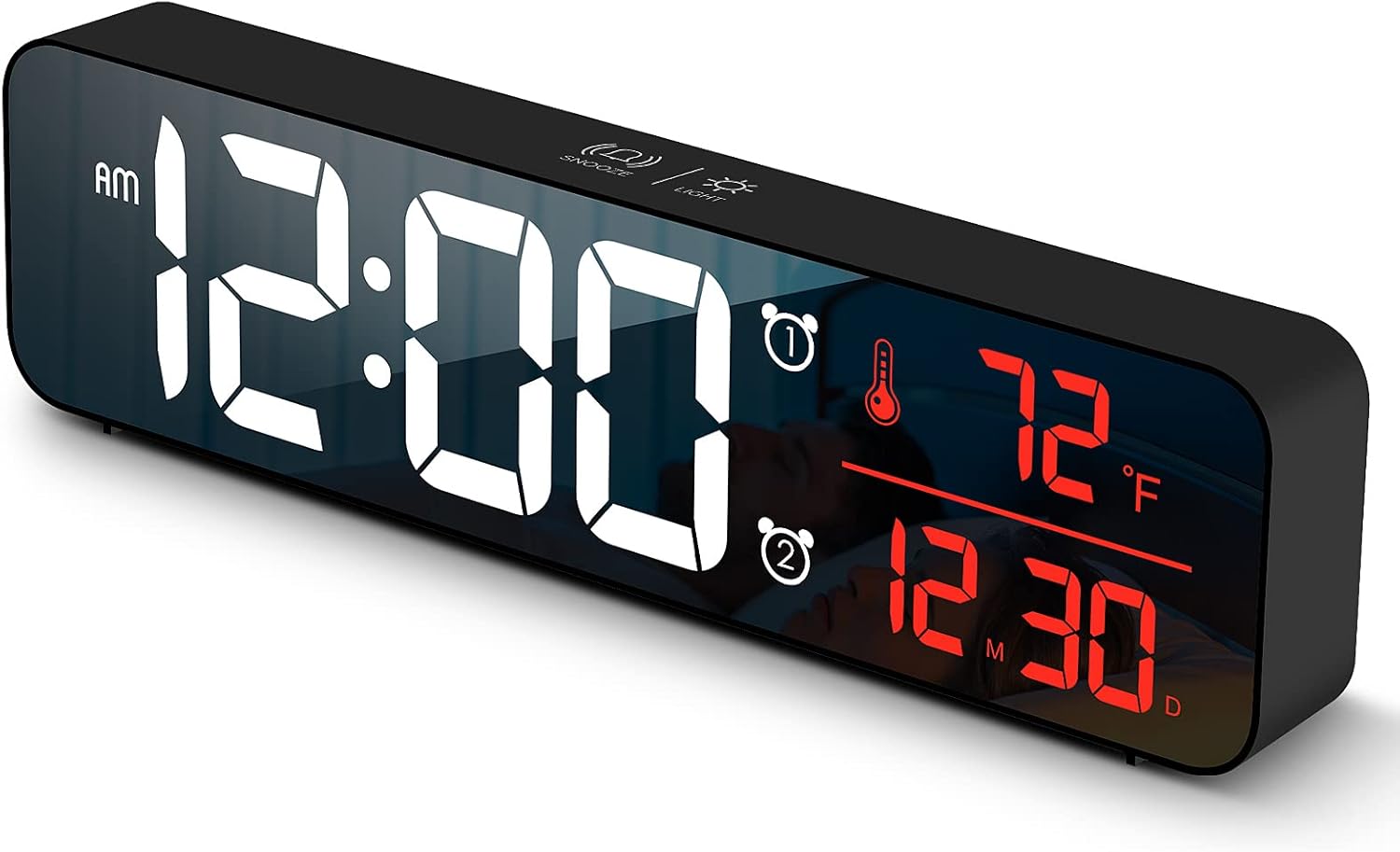
1-сүрөт: Фронт view of the Abovsare Digital Alarm Clock, displaying time, temperature, and date in red LED digits.
2-сүрөт: Арткы view of the clock, highlighting the control buttons and USB power input. The buttons are typically for setting time, alarms, and adjusting modes.
Башкаруу баскычтары жана функциялары:
- SET баскычы: Used to enter setting modes for time, date, and alarms.
- ЖОГОРУ/ТӨМӨН баскычтары: Used to adjust values during settings and navigate options.
- ALARM 1/2 Buttons: Used to activate/deactivate and set Alarm 1 and Alarm 2.
- NOOZE/LIGHT баскычы (үстүнкү): Taps to adjust brightness, long press for snooze during alarm.
- USB Power Port: Connects the clock to the power adapter.
Жайгашуу
- Кубат туташуу: Connect the provided USB power cable to the clock's USB port and then to the USB power adapter. Plug the adapter into a standard wall outlet. The display will light up.
- Баштапкы убакыт жөндөөсү:
- басыңыз SET Убакытты орнотуу режимине өтүү үчүн баскычты бир жолу басыңыз. Сааттын сандары күйүп-өчүп турат.
- колдонуу UP or ылдый саатты тууралоо үчүн баскычтар.
- Басыңыз SET again to move to minute setting. Adjust minutes with UP or ылдый.
- Басууну улантыңыз SET жыл, ай жана күн жөндөөлөрүн өзгөртүү үчүн, ар бирин тууралоо UP or ылдый.
- Басыңыз SET орнотуу режиминен чыгуу үчүн акыркы жолу.
- Температура бирдиги: The clock displays temperature in either Celsius or Fahrenheit. Refer to the operating instructions for how to switch between these units.
Иштөө нускамалары
Time, Date, and Temperature Display
The clock continuously displays the current time, date (month/day), and indoor temperature. The large LED digits ensure readability from a distance.
Жарыктыкты жөндөө

3-сүрөт: The clock on a nightstand, demonstrating its display in a bedroom setting, with text indicating 5 levels of brightness adjustment.
The clock features 5 levels of brightness. You can adjust it manually or use the automatic dimmer function.
- Кол менен тууралоо: басыңыз SNOOZE / LIGHT button on the top of the clock to cycle through the 5 brightness levels.
- Автоматтык күңүрттөө: The clock automatically adjusts brightness based on the time of day.
- 7:00 AM - 5:59 PM: Highlight brightness
- 6:00 PM - 10:59 PM: Medium brightness
- 11:00 PM - 5:59 AM: Darkest brightness
- 6:00 AM - 6:59 AM: Medium highlight
Эскертүү: If you manually adjust brightness, the clock will remember your setting for that specific time period on subsequent days. However, when a new period begins, the brightness will revert to the system's preset automatic rule.
Ойготкучтарды коюу (1-ойготкуч жана 2-ойготкуч)
The clock supports two independent alarms. This is useful for different wake-up times or for heavy sleepers.
- басыңыз 1-ДАБЛ or 2-ДАБЛ button to select which alarm to set. The alarm icon and hour digits will flash.
- колдонуу UP or ылдый ойготкуч саатын тууралоо үчүн баскычтар.
- Press the selected АЛАРМ button again to move to minute setting. Adjust minutes with UP or ылдый.
- басыңыз АЛАРМ button one last time to confirm and exit alarm setting. The alarm icon will remain lit, indicating the alarm is active.
- To deactivate an alarm, press its corresponding АЛАРМ сигнализация сүрөтчөсү дисплейден жок болгонго чейин баскычын басыңыз.
Ringtone Selection and Volume
The clock offers 40 selectable ringtones and 4 volume levels.
- During alarm setting, after setting the minutes, press the АЛАРМ button again to enter ringtone selection. Use UP or ылдый алдын алаview рингтондор.
- басыңыз АЛАРМ button again to enter volume adjustment. Use UP or ылдый to select one of the 4 volume levels.
- басыңыз АЛАРМ тандооңузду ырастоо жана чыгуу үчүн баскычты басыңыз.
Тындырма функциясы
When an alarm sounds, tap the SNOOZE / LIGHT button on the top of the clock to activate the snooze function. The alarm will temporarily pause and sound again after a set interval (typically 5-9 minutes). To turn off the alarm completely, press any other button on the back of the clock.
Memory Function

4-сүрөт: Illustration of the memory function, showing the clock retaining time settings even after a power interruption, thanks to the internal CR2025 3V button battery.
The clock includes a built-in memory function. In the event of a power disconnection, the time and alarm settings will not be lost, eliminating the need to reset them once power is restored. This function is supported by an internal CR2025 3V button battery.
Техникалык тейлөө
- Сааттын дисплейин тазалап, casing жумшак, кургак чүпүрөк менен.
- Do not use abrasive cleaners, solvents, or chemical sprays, as these may damage the surface.
- Ensure the clock remains dry and away from water sources.
Проблемаларды чечүү
| Көйгөй | Мүмкүн болгон себеп / Чечим |
|---|---|
| Display is off or flickering. |
|
| Cannot set time/alarm correctly. |
|
| Alarm is too loud or too quiet. |
|
| Clock time drifts (gains/loses minutes). |
|
| Display brightness changes unexpectedly. |
|
Техникалык шарттар
| Өзгөчөлүк | Деталь |
|---|---|
| Бренд | Абовсаре |
| Модел | B0BLCYTFB2 |
| Дисплей түрү | Digital LED |
| Түс | Wired-black Case+red Digit |
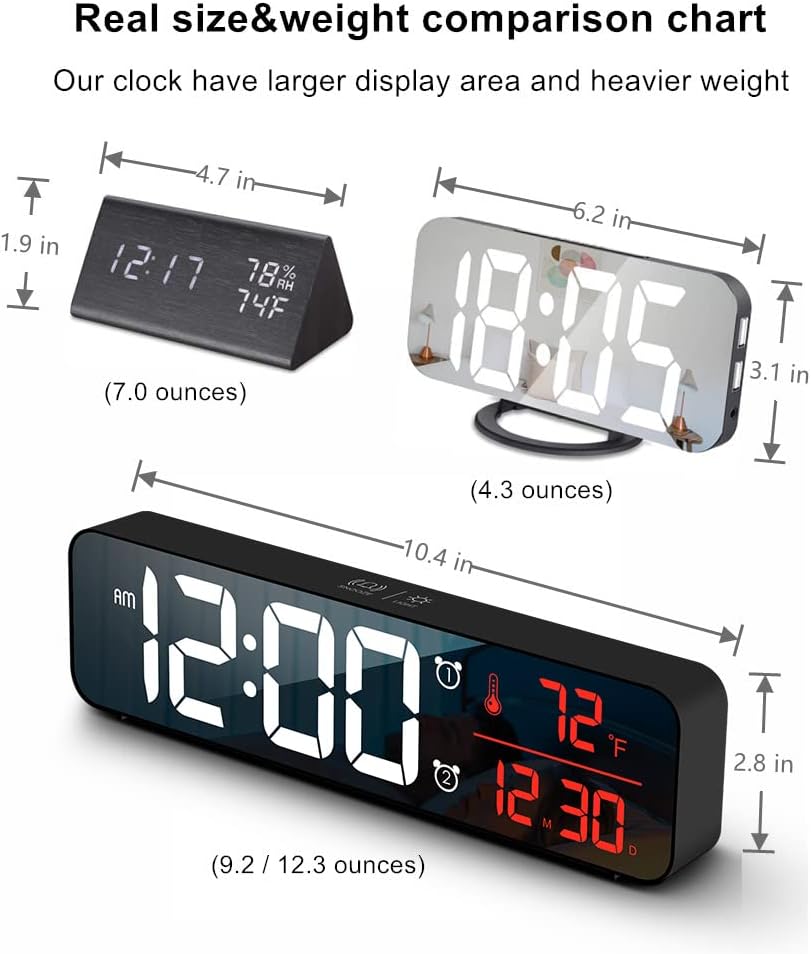
| Продукциянын өлчөмдөрү | 10.4"W x 2.8"H |
| Power Source | Corded Electric (USB-5V) |
| Өзгөчөлүктөр | Large Display, Automatic Brightness Dimmer, Memory Function, Dual Alarms, Date, Temperature |
| Монтаж түрү | Tabletop or Wall-mountable |
| Материал | Акрилонитрил бутадиен стирол (пластик) |
| Элемент Салмагы | 1 фунт (болжол менен 16 унция) |
Кепилдик жана колдоо
Abovsare is committed to providing high-quality products. For specific warranty details and customer support, please refer to the information provided at the time of purchase or visit the official Abovsare brand store.
Abovsare Brand Store: https://www.amazon.com/stores/Abovsare/page/D02B5557-764F-4435-8DFB-4333D462DA1C