
1. Киришүү
The Cubii Move is a compact, low-impact elliptical designed for seated use, allowing you to stay active while working, relaxing, or engaging in other sedentary activities. Its quiet operation and adjustable resistance levels make it suitable for various fitness levels and environments.

The Cubii Move Under Desk Elliptical, a compact and portable exercise machine.
2. Коопсуздук маалыматы
ЭСКЕРТҮҮ
- ЖУТУУ КОРКУНУЧУ: Бул продукт баскыч клеткасы же тыйындык батареяны камтыйт.
- ӨЛҮМ же жутуп алса, олуттуу жаракат алышы мүмкүн.
- Жутулган баскыч клеткасы же тыйын батареясы себеп болушу мүмкүн Ички химиялык күйүк 2 сааттын ичинде.
- САКТАЛ жаңы жана колдонулган батареялар БАЛДАРГА ЖЕТПЕЙТ.
- Батареяны жутуп же дененин кайсы бир бөлүгүнө салып коюу мүмкүн болсо, дароо медициналык жардамга кайрылыңыз.

Important safety warnings regarding battery ingestion.
3. Орнотуу
The Cubii Move is designed for easy assembly. Typically, this involves attaching the foot pedals or stabilizers to the main unit. Follow these general steps:
- Бардык компоненттерди кутудан чыгарыңыз.
- Identify the main elliptical unit and any separate foot pedals or base stabilizers.
- Align the pedals/stabilizers with the corresponding attachment points on the main unit.
- Secure them using the provided screws or fasteners. Ensure all connections are tight and stable before use.
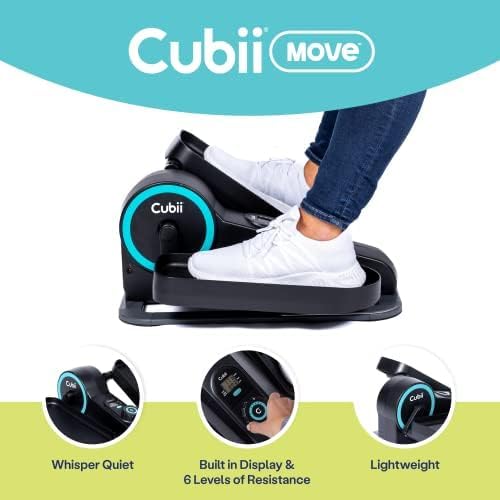
The Cubii Move is designed to be lightweight and easy to set up.
4. Иштөө нускамалары
The Cubii Move offers a smooth, low-impact workout experience. Follow these guidelines for optimal use:
4.1. Баштоо
- Place the Cubii Move on a flat, stable surface in front of your chair or couch.
- Sit comfortably with your feet placed on the pedals.
- Begin pedaling in a smooth, circular motion.
4.2. Каршылыкты жөнгө салуу
The Cubii Move features 6 levels of magnetic resistance, allowing you to customize your workout intensity. Locate the resistance knob on the unit and turn it clockwise to increase resistance or counter-clockwise to decrease it.
Video demonstrating how to adjust the resistance levels on the Cubii Move.
4.3. ЖК дисплейди колдонуу
The built-in LCD monitor tracks your workout progress. It typically displays:
- Stride Count: Педалдын айланууларынын жалпы саны.
- Пробег: Болжолдуу аралыкты басып өтүү.
- Узактыгы: Time spent exercising.
- күйгүзүлгөн калориялар: Болжолдуу сарпталган калория.
You can manually enter these statistics into the Cubii App for a more interactive fitness experience and to track your progress over time.

The Cubii Move can be used with the Cubii App for tracking and workout classes.
Official video introducing the Cubii Move Under Desk Elliptical.
5. Техникалык тейлөө
Regular maintenance ensures the longevity and smooth operation of your Cubii Move.
- Тазалоо: Агрегатты дайыма жумшак менен сүртүп туруңуз, damp кездеме. Абразивдүү тазалагычтардан же эриткичтерден качыңыз.
- Майлоо: If you notice any squeaking or stiffness in the pedals, apply a small amount of silicone-based lubricant to the moving parts, particularly around the pedal axles and joints. Refer to the specific instructions on your product packaging for recommended lubrication points.
- бекиткичтерди бекемдөө: Periodically check and tighten any screws or bolts to ensure the unit remains stable and secure.
6. Кыйынчылыктарды
If you encounter any issues with your Cubii Move, try the following troubleshooting steps:
| Көйгөй | Мүмкүн себеп | Чечим |
|---|---|---|
| Squeaking noise during use | Майлоонун жетишсиздиги, бош тетиктер | Apply silicone lubricant to moving parts. Check and tighten all screws and bolts. |
| No resistance or too little resistance | Resistance knob setting, internal mechanism issue | Ensure the resistance knob is turned to a higher setting. If the issue persists, contact customer support. |
| LCD дисплей иштебейт | Battery issue, loose connection | Check and replace the battery in the LCD unit. Ensure all connections to the display are secure. |
| Unit slides on floor during use | Smooth floor surface, lack of grip | Place the unit on a non-slip mat or carpet. Ensure the rubber feet are clean and intact. |
7. Техникалык шарттар
| Өзгөчөлүк | Деталь |
|---|---|
| Модель аты | MOVE |
| Бренд | Cubii |
| Түс | Aqua |
| Продукциянын өлчөмдөрү (D x W x Y) | 21.7" x 19.7" x 9.7" |
| Материал | Металл |
| Каршылык көрсөтүү механизми | Магниттик |
| Максималдуу салмак боюнча сунуш | 300 фунт |
| Каршылык деңгээлдердин саны | 6 |
| Элемент Салмагы | 17.6 фунт |
| Screen Size | 7 сантиметр |
| UPC | 852811008962 |
8. Кепилдик жана колдоо
The Cubii Move comes with a warranty. Please refer to the product packaging or the official Cubii website for detailed warranty information, terms, and conditions.
For customer support, technical assistance, or to inquire about replacement parts, please visit the official Cubii website or contact their customer service department using the contact information provided with your product.