
1. Продукт бүтүп калдыview
The Inandon JH19 is an all-in-one karaoke system designed for home, business, and KTV use. It features a 15.6-inch touch screen, wireless microphones, and supports various connectivity options for a comprehensive entertainment experience.

1.1-сүрөт: The Inandon JH19 integrates multiple components into a single, compact unit, simplifying setup and operation compared to traditional multi-component karaoke systems. This design saves space and enhances portability.
2. Кутуда эмне бар
Кутучаны кылдаттык менен ачыңыз жана төмөнкү нерселердин бардыгы бар экенин текшериңиз:
- Inandon JH19 Karaoke Machine (with 15.6-inch touch screen)
- Зымсыз микрофондор (2 даана)
- Кубаттуу адаптер
- HDMI HD Cable
- RCA аудио кабели
- RCA to AUX Cable
- Көмөкчү кабель
- Built-in WiFi Adapter
- Microphone Covers

2.1-сүрөт: Included accessories with the Inandon JH19 Karaoke Machine. This image displays the 15.6-inch touch screen unit, two wireless microphones, HDMI cable, RCA audio cable, RCA to AUX cable, power adapter, built-in WiFi adapter, and microphone covers.
3. Орнотуу нускамалары
3.1 Кубат туташтыруу
- Connect the power adapter to the DC input port on the back of the karaoke machine.
- Кубат адаптерин стандарттуу электр розеткасына сайыңыз.
- Press the power switch located on the back panel to turn on the device.
3.2 Audio and Video Connections
The JH19 offers multiple ports for connecting to external displays and audio systems:
- HDMI чыгышы: Connect an HDMI cable from the HDMI output port on the karaoke machine to an HDMI input port on your TV or monitor for video and audio output.
- RCA аудио чыгышы: Use the RCA audio cable to connect the RCA audio output ports (red and white) to an external ampкөтөргүч же спикер системасы.
- Санариптик оптикалык чыгаруу: For high-quality digital audio, connect an optical cable to a compatible audio receiver.
- Коаксиалдуу чыгаруу: Connect a coaxial cable to a compatible audio receiver for digital audio.
- Жаздыруу натыйжасы: Connect to a recording device if you wish to record your performance.
- MIC киргизүү: Additional microphone input port.

3.1-сүрөт: Rear panel of the Inandon JH19 showing various input/output ports including HDMI, RCA audio, digital optical, coaxial, recording, USB, and MIC inputs, along with the power switch and network port.
3.3 Тармактык туташуу
The JH19 supports both Wi-Fi and wired network connections:
- Wi-Fi: The device has built-in Wi-Fi. Navigate to the system settings on the touch screen to connect to your wireless network.
- Тармак порту: Connect an Ethernet cable to the network port on the back of the machine for a stable wired internet connection.
3.4 Микрофонду орнотуу
The system comes with two wireless microphones. Ensure they are charged and powered on. The microphones will automatically pair with the karaoke machine.
4. Иштөө нускамалары
4.1 Сенсордук экран интерфейсинде багыт алуу
The 15.6-inch touch screen provides intuitive control over the system. Tap icons and menus to select functions, browse songs, and adjust settings.
4.2 Song Selection Methods
The Inandon JH19 offers multiple ways to find and select songs:
- By Touch Screen: Browse the extensive song library directly on the 15.6-inch touch screen.
- By Mobile App: Download the dedicated mobile application to control the karaoke machine from your smartphone.
- By Intelligent Voice Assistant: Use voice commands to search for and select songs.
- By WeChat Scan Code: Utilize the WeChat application to scan a code for song ordering.

4.1-сүрөт: Illustration of the four primary methods for ordering songs on the Inandon JH19: WeChat Scan Code, Mobile App, Intelligent Voice Assistant, and direct Touch Screen interaction.
4.3 Sound Effect Settings
Adjust microphone and music sound effects for a personalized audio experience. The system features DSP digital reverb for enhanced vocal quality.
- Access the "Sound" menu on the touch screen.
- Adjust parameters such as Microphone Volume, Music Volume, Frequency, and various sound effects (e.g., Reverb, Echo).
- Utilize the Music EQ settings to fine-tune audio output (e.g., Default, Popular, Rock, Classical, Straight, Custom).

4.2-сүрөт: Screenshot of the DSP digital reverb microphone and sound effect settings interface on the Inandon JH19, showing options for adjusting microphone and music parameters, and various EQ presets.
4.4 Тилди тандоо
The system supports multiple languages. To change the interface language:
- Системанын жөндөөлөрүнө өтүңүз.
- Select the "Lang" or "Language" option.
- Choose your preferred language from the available options (e.g., English, Chinese, Japanese, Korean, Vietnamese, Thai, Malay, Indonesian, Filipino, French, Russian).

4.3-сүрөт: The multi-language selection screen of the Inandon JH19, displaying various language options for the user interface.
4.5 Cloud Song Library and Entertainment Modes
Access a vast library of songs and various entertainment features:
- Cloud Download: The system allows free download of songs from the cloud. The library includes a wide range of genres and languages, such as Chinese, Cantonese, Hokkien, English, Japanese, Korean, Vietnamese, Thai, and Malaysian songs.
- Home Entertainment Mode: Beyond karaoke, the JH19 supports applications like YouTube, Live Online TV, Music Apps, and screen casting for games, providing a comprehensive home entertainment hub.

4.4-сүрөт: Бүттүview of the Inandon JH19's cloud song download feature, highlighting the extensive library of songs available in various languages.
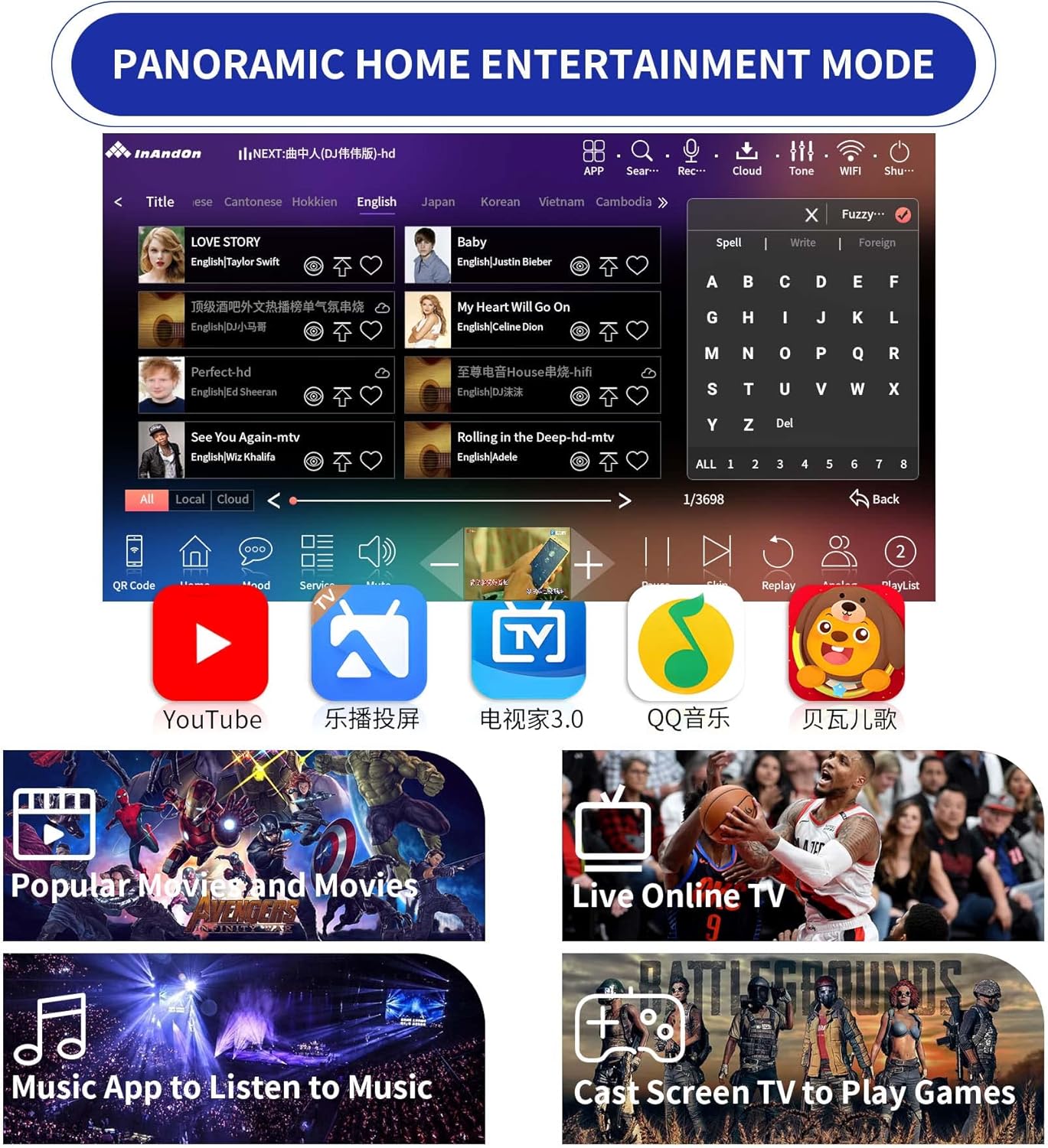
4.5-сүрөт: Screenshot of the Inandon JH19's panoramic home entertainment mode, showcasing access to platforms like YouTube, Live TV, music applications, and screen casting for games.
5. Техникалык тейлөө
- Тазалоо: Use a soft, dry cloth to clean the touch screen and exterior surfaces. Avoid abrasive cleaners or solvents.
- Сактагыч: When not in use for extended periods, store the karaoke machine in a cool, dry place away from direct sunlight and extreme temperatures.
- Микрофонго кам көрүү: Keep microphones dry and clean. Replace microphone covers periodically for hygiene.
- Программалык камсыздоо жаңыртуулары: Periodically check for system software updates through the device's settings to ensure optimal performance and access to new features.
6. Кыйынчылыктарды
- Кубат жок:
- Ensure the power adapter is securely connected to both the machine and a working electrical outlet.
- Check if the power switch on the back of the unit is in the "ON" position.
- Үн чыгышы жок:
- Verify that the HDMI or RCA audio cables are correctly connected to your TV/audio system.
- Check the volume levels on both the karaoke machine and your external audio system.
- Ensure the correct input source is selected on your TV or audio receiver.
- Microphones Not Working:
- Ensure the wireless microphones are powered on and have sufficient battery charge.
- Confirm that the microphones are paired with the karaoke machine. Refer to the microphone's specific instructions if pairing issues persist.
- Wi-Fi'га туташуу мүмкүн эмес:
- Check if your Wi-Fi router is working correctly and within range.
- Туура Wi-Fi сырсөзүн киргизгениңизди текшериңиз.
- Try restarting both the karaoke machine and your Wi-Fi router.
- Сенсордук экран жооп бербейт:
- Аппаратты кайра иштетиңиз.
- Экран таза жана таштандыдан таза экенин текшериңиз.
7. Техникалык шарттар
| Өзгөчөлүк | Деталь |
|---|---|
| Модель номери | JH19 |
| Screen Size | 15.6 дюйм (сенсордук экран) |
| Сактагыч | 4TB HDD (approx. 92,000 songs pre-loaded) |
| Эс | 8 ГБ |
| Процессор | 8-өзөктүү чип |
| Аудио иштетүү | Built-in DSP Chip |
| Байланыш | Wi-Fi, Ethernet, HDMI, RCA Audio, Digital Optical, Coaxial, USB (2.0), 3.5 mm Jack |
| Микрофондор | 2 Зымсыз микрофон |
| Power Source | Battery Powered (with Power Adapter) |
| Шайкеш түзмөктөр | Смартфон |
| Элемент Салмагы | 11 фунт |
| Пакеттин өлчөмдөрү | 16.93 x 11.81 x 8.86 дюйм |
| Дата биринчи жеткиликтүү | 4-ноябрь, 2022-жыл |
8. Кардарларды колдоо кызматы
For further assistance, technical support, or warranty inquiries, please contact Inandon customer service through the retailer where the product was purchased or visit the official Inandon webсайт.
Please have your model number (JH19) and purchase date available when contacting support.