
1. Киришүү
This manual provides detailed instructions for the setup, operation, and maintenance of your MageGee Star98 Mechanical Keyboard. Designed for gaming and daily use, this 98-key wired keyboard features blue mechanical switches, customizable backlighting, and a hot-swappable design for personalized key switch replacement.
2. Пакеттин мазмуну
- MageGee Star98 Mechanical Keyboard
- USB кабели
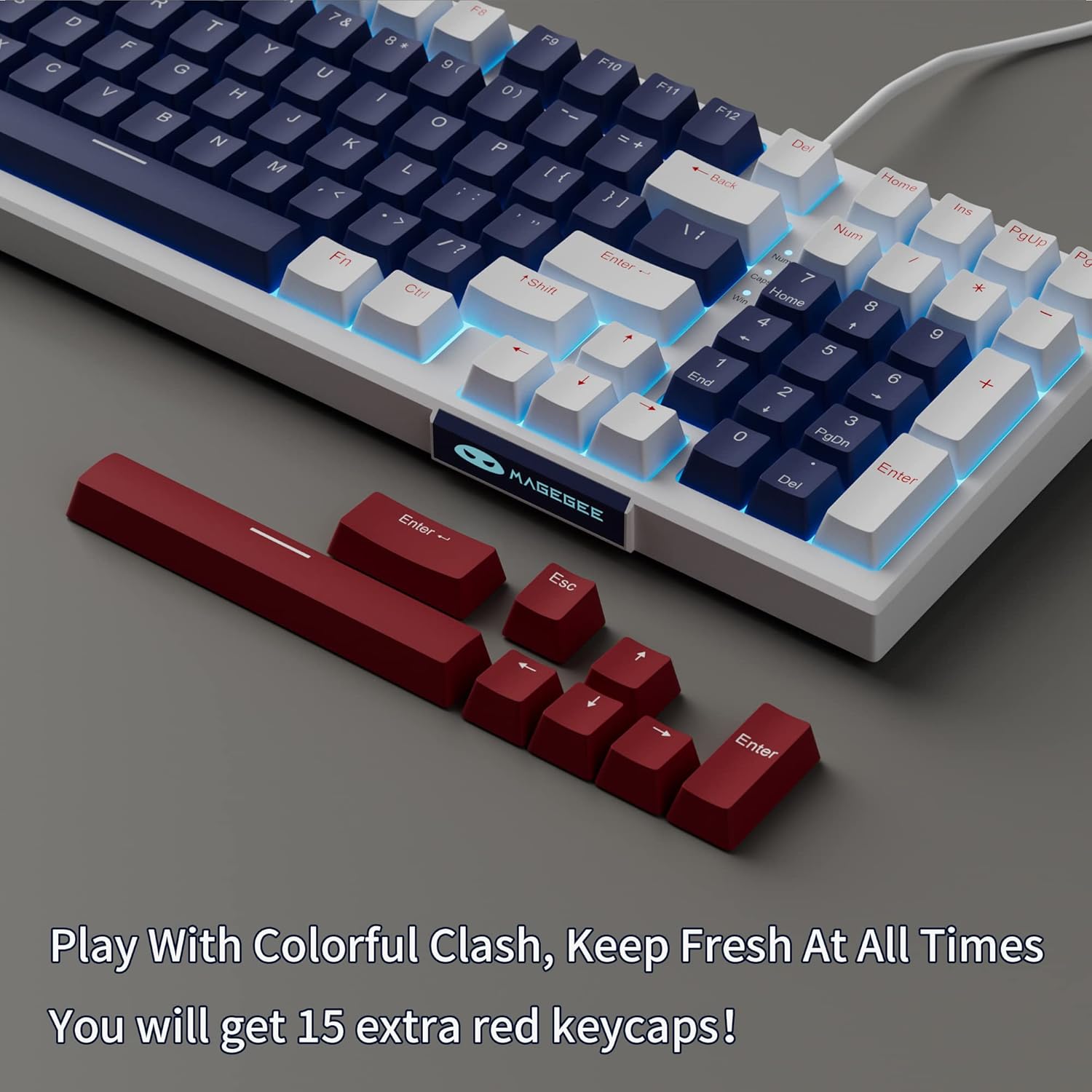
- Additional Red Keycaps (15 pieces)

Image: The MageGee Star98 keyboard displayed with a set of 15 additional red keycaps, highlighting the customization option.
3. Продукциянын өзгөчөлүктөрү
- Comfortable Typing Experience: Equipped with blue mechanical switches for tactile feedback and a stepped layout for ergonomic typing.
- 98 Негизги Анти-Гостинг: All 98 keys can be pressed simultaneously without conflict, ensuring fast and accurate input.
- Mixed Keycaps & Adjustable Tilt Legs: Features 3-color mixed double injection keycaps for clear backlighting and foldable brackets for adjustable typing angles.
- Ысык алмаштырылуучу дизайн: Compatible with most 3-pin and 5-pin mechanical switches, allowing for easy customization and replacement.
- Solid Sea Blue Backlight: Multiple backlight modes with a solid sea blue color, which can also be turned off.
- Кеңири шайкештик: Supports Win2000, Win XP, Win ME, Vista, Win7, Win8, Win10, Android, Linux, Mac operating systems. Plug and play functionality via USB.

Image: A diagram illustrating the compact 98-key layout of the MageGee Star98 keyboard, highlighting its space-saving design while retaining full functionality.
4. Орнотуу нускамалары
- Баскычтопту туташтыруу: Locate the USB cable provided in the package. Plug one end into the USB port on the back of the keyboard and the other end into an available USB port on your computer.
- Системаны таануу: Your operating system should automatically detect and install the necessary drivers for the keyboard. This is a plug-and-play device, so no additional software installation is typically required.
- Ийилген буттарды тууралоо: For ergonomic comfort, unfold the adjustable tilt legs located on the underside of the keyboard to achieve your preferred typing angle.

Image: The MageGee Star98 keyboard connected to a laptop, demonstrating the USB connection point and overall setup.
5. Иштөө нускамалары
5.1 Жарыкты башкаруу
The keyboard features a solid sea blue backlight with multiple operating modes. Use the following key combinations to control the backlighting:
- Fn + [Ачкыч]: Specific key combinations for changing backlight modes are typically indicated on the keycaps themselves (e.g., Fn + Ins, Fn + Home, Fn + PgUp, Fn + Del, Fn + End, Fn + PgDn). Refer to the keycap legends for exact functions.
- Fn + Өйдө/Төмөн жебе: Арткы жарыктын жарыктыгын тууралаңыз.
- Fn + Сол/Оң жебе: Арткы жарыктын жыштыгын жөндөңүз (динамикалык режимдер үчүн).
- Fn + Win: Оюн учурунда кокусунан басылып калбашы үчүн Windows баскычын кулпулайт.
5.2 Ыкчам алмаштыруучу которгучтар
The MageGee Star98 keyboard supports hot-swappable mechanical switches, allowing you to change switches without soldering. This feature is compatible with most 3-pin and 5-pin mechanical switches on the market.
- Баскыч капкагын алып салуу: Керектүү баскычтоптун капкагын акырын алып салуу үчүн баскычтоптун капкагын тартуучу каражатты (кошулмада жок) колдонуңуз.
- Которуштурууну алып салуу: Use a switch puller (not included) to carefully grip the switch and pull it straight up.
- Жаңы которгуч киргизүү: Align the pins of the new switch with the holes on the PCB. Press down firmly until the switch clicks into place. Ensure the pins are not bent.
- Баскыч капкагын алмаштыруу: Place the keycap onto the new switch stem and press down.
Сүрөт: жакын план view of the keyboard demonstrating the hot-swappable switch feature, with several keycaps and switches removed to show the underlying mechanism.
Video: An official video demonstrating the features of the MageGee Sky98 Mechanical Gaming Keyboard, including its hot-swappable switches and design.
6. Техникалык тейлөө
- Клавиатураны тазалоо: жумшак колдонуу, damp cloth to wipe down keycaps. For deeper cleaning, keycaps can be removed using a keycap puller (not included) and washed with mild soap and water. Ensure they are completely dry before reattaching.
- Тазалоочу өчүргүчтөр: Use compressed air to remove dust and debris from between the switches. Avoid spraying liquids directly into the switches.
- Кабельге кам көрүү: Зыян келтирбөө үчүн USB кабелинин кескин ийилип же кыйшайып кетишинен алыс болуңуз.
- Сактагыч: Клавиатураны таза, кургак жерде, өтө жогорку температурадан жана түз күн нурунан алыс сактаңыз.
7. Кыйынчылыктарды
- Баскычтоп жооп бербейт:
Ensure the USB cable is securely connected to both the keyboard and the computer. Try plugging the keyboard into a different USB port or a different computer to rule out port issues.
- Ачкычтар иштебейт:
If individual keys are not responding, check if any debris is lodged under the keycap or switch. For hot-swappable switches, try removing and re-inserting the switch, or replacing it with a known working switch.
- Backlight Not Working/Flickering:
Ensure the backlight is not turned off (check Fn key combinations). Try adjusting brightness. If flickering persists, ensure the keyboard is connected to a stable USB port providing sufficient power.
- Windows Key Locked:
Басыңыз Fn+Win to toggle the Windows key lock function.
8. Техникалык шарттар
| Өзгөчөлүк | Деталь |
|---|---|
| Бренд | MageGee |
| Модель номери | Жылдыз98 |
| Keyboard Description | Механикалык |
| Ачкычтардын саны | 98 |
| Которуу түрү | Tactile (Blue Switches) |
| Байланыш технологиясы | Зымдуу (USB) |
| Арткы жарыктандыруу | Single Color (Sea Blue), Multiple Modes |
| Ыкчам алмаштырылуучу | Yes (3-pin and 5-pin switches) |
| Шайкеш түзмөктөр | Компьютер, ноутбук |
| Шайкеш OS | Win2000, Win XP, Win ME, Vista, Win7, Win8, Win10, Android, Linux, Mac |
| Материал | Акрилонитрил бутадиен стирол (ABS) |
| Өзгөчө өзгөчөлүк | Ergonomic, Anti-Ghosting |
9. Кепилдик жана колдоо
The MageGee Star98 Mechanical Keyboard comes with a 1 жылдык кепилдик сатып алынган күндөн тартып. Бул кепилдик өндүрүш кемчиликтерин жана нормалдуу колдонуудан келип чыккан маселелерди камтыйт.
For technical support, warranty claims, or any questions regarding your product, please contact MageGee customer service through the retailer's platform or the official MageGee website. Please have your purchase receipt and product model number (Star98) ready when contacting support.