
1. Киришүү
1.1 Продукт бүттүview
The ZKTeco MB2000 is an advanced access control and attendance recording device designed for efficient management of personnel entry and exit. It features fingerprint recognition technology for secure and reliable identification. This manual provides detailed instructions for the installation, operation, and maintenance of your MB2000 device.
1.2 Негизги өзгөчөлүктөрү
- Манжа изин таануу: High-accuracy biometric identification for access and attendance.
- IPX7 International Protection Rating: Provides protection against water immersion up to 1 meter for 30 minutes.
- Жеңил дизайн: Facilitates easy installation and portability.
- Зымсыз туташуу: Enables flexible data transfer and device management.
1.3 Пакеттин мазмуну
Пакетте бардык буюмдар бар экенин текшериңиз:
- ZKTeco MB2000 Fingerprint Device
- Монтаждоочу стенд
- User Card (for initial setup or specific functions)
- Кубат адаптери (ачык тизмеде жок, бирок иштөө үчүн арналган)
- Колдонуучунун Колдонмосу (бул документ)
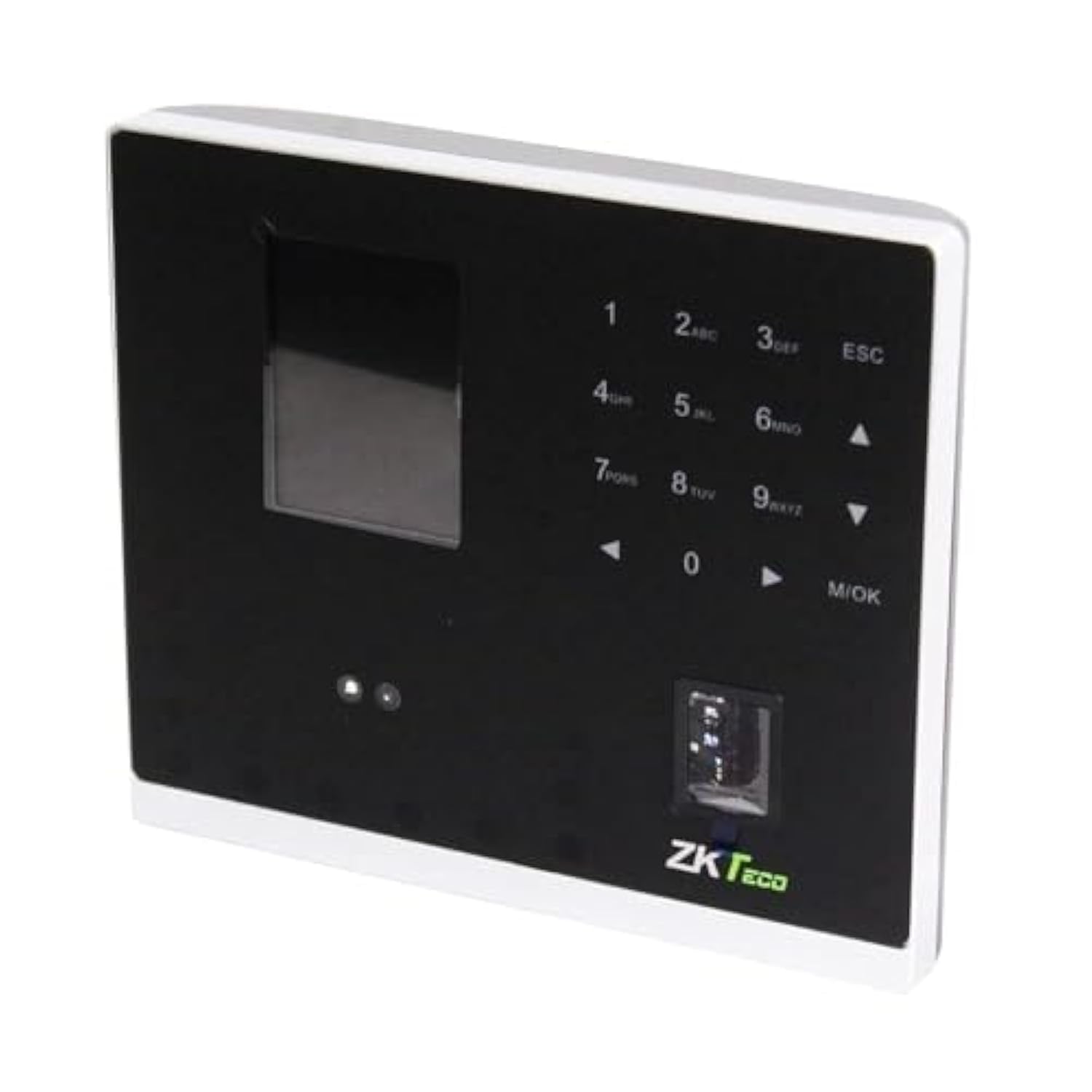
1.1-сүрөт: ZKTeco MB2000 Access Control and Attendance Recording Device. This image shows the front view of the compact device, highlighting its fingerprint sensor and display screen.
2. Коопсуздук маалыматы
Жаракат алуунун же бузулуунун алдын алуу үчүн, түзмөктү колдонуудан мурун бардык коопсуздук көрсөтмөлөрүн окуп чыгып, түшүнүңүз.
- Электр камсыздоо: Use only the specified power adapter provided with the device. Using an incorrect power supply may damage the device and void the warranty.
- Курчап турган чөйрө: Do not expose the device to extreme temperatures, direct sunlight, or corrosive substances. While rated IPX7, prolonged submersion or exposure to high-pressure water jets is not recommended.
- Колдонуу: Avoid dropping or subjecting the device to strong impacts. Do not attempt to disassemble or repair the device yourself. Contact qualified service personnel for assistance.
- Тазалоо: Тазалоо үчүн жумшак, кургак чүпүрөктү колдонуңуз. Суюк же аэрозольдук тазалагычтарды колдонбоңуз.
3. Орнотуу колдонмосу
3.1 Таңгактан чыгаруу жана текшерүү
Carefully remove the device and all accessories from the packaging. Inspect for any signs of damage. If any components are missing or damaged, contact your supplier immediately.
3.2 Аппаратты орнотуу
The MB2000 can be mounted using the provided stand. Choose a stable, flat surface for placement. Ensure the device is positioned at a comfortable height for users to access the fingerprint sensor.
- Attach the stand securely to the back of the MB2000 device.
- Place the device with the stand on your desired surface.
- Ensure the device is stable and will not easily tip over.
3.3 Кубат туташтыруу
Кубат адаптерин түзмөктүн кубат киргизүү портуна туташтырып, андан кийин аны стандарттуу электр розеткасына сайыңыз. Түзмөк автоматтык түрдө күйөт.
3.4 Баштапкы конфигурация
Upon first power-on, the device may prompt you to set up an administrator. Follow the on-screen instructions to register the first administrator fingerprint or card. This administrator will have privileges to manage users and device settings.
4. Иштөө нускамалары
4.1 Колдонуучуну каттоо
Жаңы колдонуучуну каттоо үчүн:
- Access the device menu using the administrator's fingerprint or card.
- Navigate to the 'User Management' section.
- Select 'Add User'.
- Enter the user's ID and name (if applicable).
- Register the user's fingerprint by placing their finger on the sensor multiple times as prompted.
- Alternatively, register a user card by presenting it to the device's card reader.
- Колдонуучунун маалыматын сактаңыз.
4.2 Кирүүнү көзөмөлдөө
For access control, registered users can gain entry by:
- Манжа изин текшерүү: Place a registered finger on the sensor. The device will verify the fingerprint and grant access if authorized.
- Card Presentation: Present a registered user card to the device's card reader. The device will verify the card and grant access if authorized.
4.3 Attendance Recording
The device automatically records attendance when a user successfully verifies their identity for access. The timestamp of the verification is logged as an attendance record.
4.4 Маалыматтарды башкаруу
Attendance logs and user data can be managed through the device's interface or by connecting to a compatible software (if available). Refer to the device's on-screen menu for options to download data via USB or network connection.
5. Техникалык тейлөө
5.1 Тазалоо
Үзгүлтүксүз тазалоо оптималдуу иштөөнү сактоого жардам берет:
- Манжа сенсор: Gently wipe the sensor surface with a soft, lint-free cloth. Do not use abrasive materials or harsh chemicals.
- Түзмөктүн бети: Clean the device's exterior with a slightly damp cloth, then dry immediately with a soft, dry cloth.
5.2 Программалык камсыздоо жаңыртуулары
Өндүрүүчүнү текшериңиз website periodically for software or firmware updates. Updates can improve performance, add features, or fix bugs. Follow the provided instructions carefully when performing updates.
5.3 Маалыматтын резервдик көчүрмөсү
Regularly back up attendance logs and user data to prevent loss. This can typically be done via USB export or through connected management software.
6. Кыйынчылыктарды
This section addresses common issues you might encounter with the MB2000 device.
| Көйгөй | Мүмкүн себеп | Чечим |
|---|---|---|
| Түзмөк күйбөйт. | No power, faulty adapter, or power outlet issue. | Check power connection. Ensure the adapter is correctly plugged in. Test the power outlet with another device. |
| Манжа изи таанылган жок. | Манжа изи катталган эмес, сенсор кир же туура эмес жайгаштырылган. | Ensure the fingerprint is registered. Clean the sensor. Place the finger flat and centered on the sensor. Try re-registering the fingerprint. |
| Card not recognized. | Card not registered or incorrect card type. | Verify the card is registered. Ensure it is a compatible card type. |
| Маалыматтарды өткөрүп берүү маселелери. | Incorrect settings, cable issues, or software incompatibility. | Check network settings or USB cable connection. Ensure the management software is compatible and correctly configured. |
7. Техникалык шарттар
| Спецификация | Деталь |
|---|---|
| Модель номери | MB2000 |
| Бренд | ZKTeco |
| Жеткирүү өлчөмдөрү | 31 x 25.5 x 12.5 см |
| Элемент Салмагы | 1.5 кг |
| Өзгөчөлүктөр | Жеңил |
| Байланыш | Зымсыз |
| Түс | Кара |
| Камтылган компоненттер | Fingerprint device, stand, card |
| Эл аралык коргоо рейтинги | IPX7 (Суу өткөрбөйт) |
| Каналдардын саны | 1 |
| Биринчи жеткиликтүү күн | 6-ноябрь, 2022-жыл |
8. Кепилдик жана колдоо
For warranty information, please refer to the warranty card included with your product or the purchase documentation. For technical support or service inquiries, please contact your local ZKTeco distributor or visit the official ZKTeco webбайланыш маалыматы үчүн сайт.