
Introduction
The MoesGo 2nd Generation WiFi Smart Light Switch provides intelligent control over your home lighting. This 4-gang smart switch integrates with your 2.4GHz WiFi network, allowing for remote control via the MOES or Smart Life app, and voice control through Amazon Alexa and Google Home. It features a unique Star Ring halo for soft illumination in the dark and is constructed from premium PC+ABS fireproof material for durability. This manual provides detailed instructions for installation, setup, and operation.
Коопсуздук маалыматы
ЭСКЕРТҮҮ: ЭЛЕКТР ТОКУКТУНУН ЧЫГУУ КОРКУНУЧУ. Electricity can cause personal injury and property damage. If handled improperly, you are not sure about any part of these instructions, please seek professional assistance from a qualified electrician. Ensure all work meets applicable local and national codes.
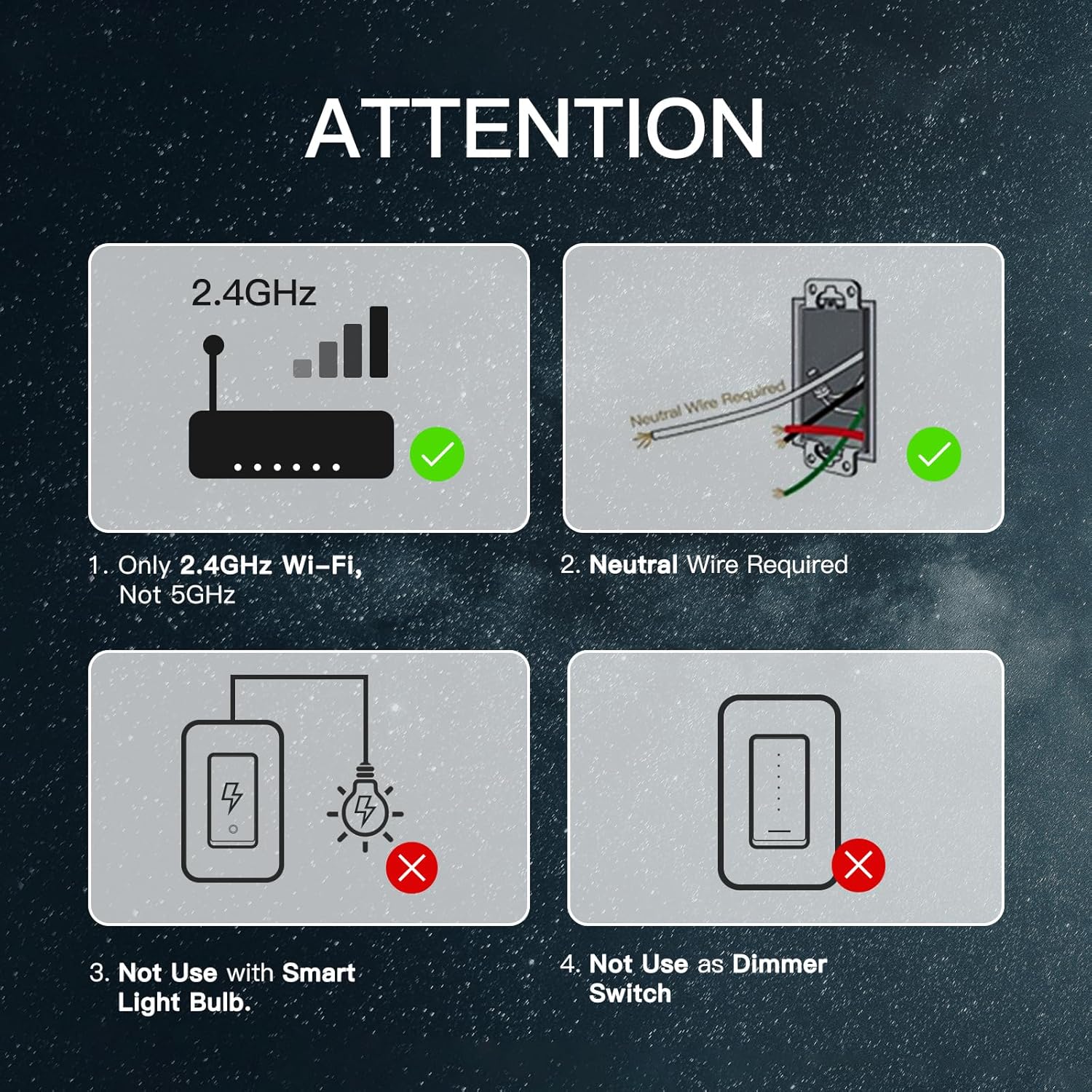
- NEUTRAL WIRE IS REQUIRED орнотуу үчүн.
- This switch supports a 100-245V input and a maximum load of 10A.
- менен гана шайкеш келет 2.4 ГГц WiFi тармактары (not 5GHz).
- Do not use with smart light bulbs.
- Do not use as a dimmer switch.
- Always turn off the power circuit at the circuit breaker before performing any installation or maintenance.
Кутуда эмне бар
Your MoesGo 4-Gang WiFi Smart Light Switch package includes:
- MoesGo 4-Gang Smart Light Switch (Model: XH-US4-MG)
- Дубал плитасы
- Wire Nuts
- Монтаждоо бурамалар
- Instruction Manual
Техникалык шарттар
| Спецификация | Нарк |
|---|---|
| Модел | XH-US4-MG |
| Иштөө режими | ON-OFF-ON |
| Учурдагы рейтинг | 10 Amps |
| Operating Voltage | 100-245V AC, 120 Volts |
| Байланыш түрү | Адатта жабык |
| Connectivity Protocol | Wi-Fi (2.4 ГГц гана) |
| Башкаруу ыкмасы | Колдонмо, тийүү, үн |
| Controller Type | Amazon Alexa, Android, Google Жардамчысы |
| Позициялардын саны | 4 |
| Материал | Plastic (PC+ABS fireproof) |
| Элементтин өлчөмдөрү (L x W x Y) | 11.69 x 5.3 x 2.7 inches (Switch body: 118x209x35mm) |
| Ватtage | 1200 ватт |
| Эл аралык коргоо рейтинги | IP20 |

Орнотуу
Маанилүү: A neutral wire is required for this smart switch. If you are unsure about electrical wiring, consult a qualified electrician.
1-кадам: Электр кубатын өчүрүңүз
Locate your circuit breaker panel and turn off the power to the switch you are replacing. Verify power is off using an electrical tester.
2-кадам: Эски которгучту алып салыңыз
Carefully remove the faceplate from the old switch. Use an electrical tester to confirm no voltage in the circuit. Loosen the screw terminals and remove the old switch from the wall box. Take a photo of the existing wiring for reference before disconnecting any wires.
Step 3: Wire the New Smart Switch (Single Pole Installation)
Connect the wires from your wall box to the new smart switch using the provided wire nuts. Ensure each connection is secure.
- туташтыруу Line/Load wire (usually black) to the 'Line/Load' terminal on the smart switch.
- туташтыруу Нейтралдуу wire (usually white) to the 'Neutral' terminal on the smart switch.
- туташтыруу Жер wire (usually bare copper or green) to the 'Ground' terminal on the smart switch.
- For single pole setups, cap off any unused 'L2' terminals on the smart switch.
Step 4: Wire the New Smart Switch (3-Way Installation)
For 3-way control, use the 'Multi-Control Association' feature in the MOES App to link multiple switches wirelessly. This eliminates the need for complex traveler wires in a traditional setup. Refer to the app setup section for details on multi-control association.
Step 5: Secure the Switch and Faceplate
Carefully push the wired smart switch into the wall box. Secure it with the provided screws. Attach the new faceplate.
6-кадам: Кубатты калыбына келтириңиз
Return to your circuit breaker panel and turn the power back on.
App Setup & Voice Control Integration
The MoesGo Smart Light Switch is compatible with the MOES App and Smart Life App. Ensure your phone is connected to a 2.4GHz WiFi network.
Step 1: Download and Register
Download the MOES App or Smart Life App from your app store. Register or log in to your account.
2-кадам: Жупташтыруу режимине кириңиз
Press and hold the switch button for approximately 6 seconds until the white indicator light flashes rapidly. This indicates the switch is in pairing mode.
3-кадам: Колдонмого түзмөк кошуу
Open the MOES/Smart Life App. Click on 'Add Device' or the '+' icon. The app should automatically discover the smart switch. If not, select 'Lighting' then 'Switch (Wi-Fi)' and follow the on-screen prompts.
4-кадам: WiFi туташуу
Select your 2.4GHz WiFi network and enter the password. The app will connect the switch to your network. Once connected, you can rename the switch for easier identification.
Step 5: Integrate with Alexa/Google Home
Үн менен башкарууну иштетүү үчүн:
- Alexa үчүн: Open the Amazon Alexa app. Go to 'Skills & Games', search for 'Smart Life' (or 'MOES'), and enable the skill. Link your Smart Life/MOES account with your Amazon account. Discover devices.
- Google Home үчүн: Open the Google Home app. Tap the '+' icon, then 'Set up device', then 'Works with Google'. Издөө 'Smart Life' (or 'MOES') and link your account.

Иштөө нускамалары
Кол менен башкаруу
Press the physical button on the smart switch to manually turn the connected lights on or off.
App Control (MOES/Smart Life App)
Колдонмого туташкандан кийин, сиз төмөнкүлөрдү жасай аласыз:
- Алыстан күйгүзүү/өчүрүү: Control lights from anywhere.
- Пландаштыруу: Set specific times for lights to turn on or off (e.g., for kids' bedtime).
- Артка саноо таймери: Set a timer for lights to automatically turn off after a set duration.
- Random Schedule: Simulate an occupied home for enhanced security by randomizing light activity.
- Инкинг: Automatically turn off devices after a set time.
- Күйгүзүү абалы: Choose the default state (on, off, or last state memory) after a power outage.
- Топтук көзөмөл: Бир эле учурда бир нече акылдуу которгучтарды башкарыңыз.
- Сахна байланышы: Create custom scenes to activate multiple devices with a single command.
- Бөлүшүү башкаруусу: Түзмөктү башкарууну үй-бүлө мүчөлөрү менен бөлүшүңүз.


Үн менен башкаруу
Use voice commands with your Amazon Alexa or Google Home device to control your lights. Examples:
- "Alexa, turn on/off [switch name]."
- "Google, turn on/off [switch name]."

Wireless Multi-Control (3-Way/4-Way)
Utilize the "Multi-Control Association" feature in the MOES App to link multiple switches wirelessly. This allows for 3-way or 4-way control of lights without traditional traveler wires, ideal for hallways and large rooms.

Техникалык тейлөө
To maintain optimal performance and appearance of your MoesGo Smart Light Switch:
- Clean the surface with a soft, dry cloth. Avoid abrasive cleaners or solvents.
- Өчүргүчтүн ашыкча нымдуулукка же түз чачыраган сууга дуушар болбогонун текшериңиз.
- Periodically check for firmware updates in the MOES/Smart Life app to ensure the latest features and security patches.
Көйгөйлөрдү чечүү (Көп берилүүчү суроолор)
- If you cannot add your Smart Device:
- Ensure the Smart Device is powered on.
- Verify your phone is connected to a 2.4GHz Wi-Fi network (not 5GHz).
- Check your router settings. If it's dual-band, ensure 2.4GHz Wi-Fi is enabled and connect your phone to it.
- Confirm your Wi-Fi router's security setting is WPA2-PSK and authorization type is AES, or set both as auto. Wireless mode cannot be 11n only.
- Use English and numbers to name your Wi-Fi router. Otherwise, Smart Life may not recognize it.
- Maintain a strong Wi-Fi connection by keeping the smart device close to the router during setup.
- If the maximum number of router connections has been reached, turn off some connected devices and try again.
- Switch unresponsive or offline: Check power at the circuit breaker. Ensure Wi-Fi signal strength is adequate. Try restarting the switch by turning off and on the power at the breaker.
- Үн менен башкаруу иштебей жатат: Verify the Smart Life/MOES skill is enabled and linked in your Alexa/Google Home app. Ensure the device name is recognized by your voice assistant.
Кепилдик жана колдоо
MoesGo provides a 1 жылдык кепилдик for this product. During the free warranty period, if the product breaks down during normal use, we offer free maintenance. This warranty does not cover natural disasters, man-made equipment failures, disassembly, or repair without permission.
For any questions or support, please contact the dedicated customer support team. Refer to the official webакыркы өзгөртүүлөр жана байланыш маалыматы үчүн сайт.
Өндүрүүчү: WENZHOU NOVA NEW ENERGY CO.,LTD
Электрондук почта: service@moeshouse.com