
Introduction
The MAGIC-REFINER AK873 is a wired 75% Tenkeyless (TKL) mechanical gaming keyboard designed for enhanced desktop ergonomics and functionality. It features a compact layout while retaining essential keys, a stable gasket structure for reduced typing noise, and hot-swappable switches for personalized typing experiences. The keyboard is equipped with durable PBT keycaps, vibrant rainbow LED backlighting, and a custom coiled USB-C cable for reliable connectivity across various systems.

Image: The MAGIC-REFINER AK873 keyboard in grey and white with an orange coiled USB cable.
Пакеттин мазмуну
The following items are included in your keyboard package:
- 1x MAGIC-REFINER AK873 Mechanical Keyboard
- 1x Custom Coiled USB-A to Type-C Aviation Cable
- 2x Extra Keycaps (Esc + Space)
- 4x Free Switches (Blue Switch)
- 1x Баскыч капкагын тарткыч
- 1x Которгуч тарткыч
- 1x Колдонуучунун колдонмосу

Image: A visual representation of the keyboard and all included accessories: coiled cable, extra keycaps, switches, and puller tools.
Орнотуу жана туташуу
The AK873 keyboard supports multiple connection modes: wired USB, 2.4GHz wireless, and Bluetooth. The mode switch is located on the underside of the keyboard.
Зымдуу туташуу
- Connect the custom coiled USB-C cable to the keyboard's USB-C port.
- Connect the USB-A end of the cable to your computer.
- Ensure the mode switch on the keyboard's underside is set to the 'USB' position.
- Баскычтоп азыр колдонууга даяр.
2.4GHz зымсыз туташуу
- Locate the 2.4G wireless receiver (dongle) stored magnetically on the underside of the keyboard.
- Insert the 2.4G receiver into an available USB port on your computer.
- Set the mode switch on the keyboard's underside to the '2.4G' position.
- For manual pairing, press and hold FN + Q until the Q key flashes slowly. The white light on the Q key will flash rapidly. After inserting the receiver, the Q key light will return to backlight mode, indicating successful pairing.
Bluetooth туташуу
- Set the mode switch on the keyboard's underside to the 'BT' position.
- Басып кармап туруңуз FN + W, FN + E, же FN + R for 3-5 seconds to enter pairing mode for Bluetooth device 1, 2, or 3 respectively. The corresponding key (W, E, or R) will flash.
- On your device (PC, Mac, Android, etc.), search for 'KN85 BT-1', 'KN85 BT-2', or 'KN85 BT-3' in your Bluetooth settings and connect.
- Once connected, the key will stop flashing, and the keyboard will return to normal mode.

Image: The keyboard connected to a laptop, demonstrating wide compatibility with Windows, Mac, and Android systems.
Иштөө режимдери
The AK873 keyboard offers three operating modes, selectable via a switch on the underside:
- Wired Mode (USB): For direct, low-latency connection.
- 2.4 ГГц зымсыз режими: For wireless connectivity via the included USB dongle.
- Bluetooth Mode (BT): Connects up to three different Bluetooth-enabled devices.
Additionally, the keyboard features a MAC/WIN system switch to optimize key functions for your operating system.
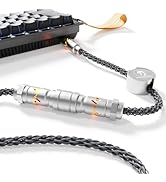
Image: Close-up of the keyboard's underside, highlighting the MAC/WIN and tri-mode (BT/USB/2.4G) switches, and the magnetic dongle storage.
Function and Combination Keys
The AK873 keyboard utilizes FN (Function) key combinations to access various features, including backlight control, multimedia functions, and system settings.
Арткы жарыкты башкаруу
- FN + \|: Cycle through 22 backlight effects.
- FN + ↑: Арткы жарыктын жарыктыгын жогорулатыңыз.
- FN + ↓: Арткы жарыктын жарыктыгын азайтыңыз.
- FN + ←: Жарыктын ылдамдыгын азайтыңыз.
- FN + →: Арткы жарыктын ылдамдыгын жогорулатыңыз.
- FN + киргизүү: Switch backlight color (for certain modes).
Multimedia Functions (FN + F1-F12)
- FN + F1: Медиа ойноткуч
- FN + F2: Көлөмү -
- FN + F3: Көлөм +
- FN + F4: Үнсүз
- FN + F5: Токто
- FN + F6: Мурунку трек
- FN + F7: Ойнотуу/Тыныгуу
- FN + F8: Кийинки трек
- FN + F9: Email
- FN + F10: Браузер
- FN + F11: Менин компьютерим
- FN + F12: Калькулятор

Image: The keyboard displaying various FN key combinations for multimedia control and other functions.
Ыңгайлаштыруу
The AK873 keyboard offers extensive customization options for both its switches and keycaps, allowing users to tailor their typing experience.
Ыкчам алмаштыруучу которгучтар
The keyboard features a hot-swappable PCB board, supporting most 3-pin and 5-pin switches without soldering. This allows for easy replacement of switches to achieve different tactile and auditory feedback. The included switches are Blue Switches, known for their clicky feedback.

Сүрөт: жакын план view of the keyboard with several keycaps removed, revealing the hot-swappable blue switches underneath.
PBT Keycaps
The keycaps are made from durable, oil-resistant PBT material using a doubleshot molding process, ensuring longevity and a pleasant texture. The keyboard also includes a detachable magnetic cover, allowing users to switch between a classic or floating keycap style.
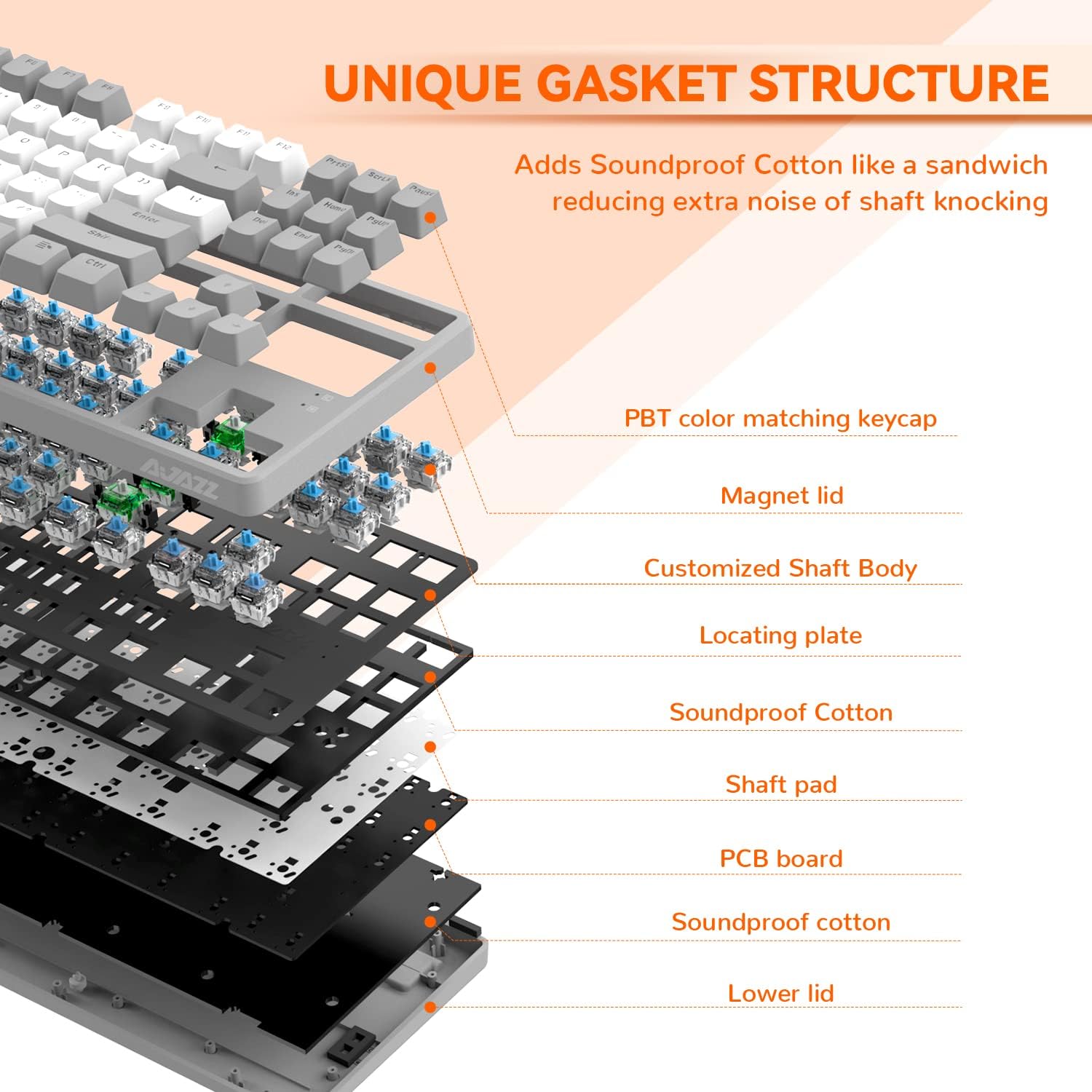
Image: A diagram illustrating the detachable magnetic cover, showing how it can be used to switch between classic and floating keycap styles.
Асан-үсөн LED арткы жарыгы
The AK873 features vibrant rainbow LED backlighting with 22 different effects. The translucent characters on the keycaps allow the light to shine through clearly. Users can adjust brightness, speed, and even customize individual key lighting through the dedicated software.

Image: The keyboard illuminated with multiple rainbow backlight effects, showcasing the 22 available options.
Official Product Video: Magic-Refiner AK873 Gaming Keyboard
Video: An official product video from MAGIC-REFINER US demonstrating the features and functionality of the AK873 Gaming Keyboard, including its design, switches, and lighting effects.
Техникалык тейлөө
Regular maintenance helps ensure the longevity and optimal performance of your keyboard.
Тазалоо
- Use the included keycap puller to carefully remove keycaps for thorough cleaning.
- Баскычтоптун капкактарын жумшак, d менен сүртүңүзamp кездеме.
- Use a brush or compressed air to remove dust and debris from between the switches.
- The detachable magnetic cover can be easily removed for cleaning the keyboard surface.
Которуу жана клавиатура алмаштыруу
- To replace a keycap, gently pull it upwards using the keycap puller.
- To replace a switch, use the switch puller to carefully grip the switch and pull it straight upwards.
- Align the pins of the new switch with the holes on the PCB and press down gently until it clicks into place.
Проблемаларды чечүү
If you encounter issues with your AK873 keyboard, try the following solutions:
- Туташуу маселелери: Ensure the mode switch (USB, 2.4G, BT) is set correctly. For wireless modes, verify the receiver is properly inserted or Bluetooth is paired. Try reconnecting the cable or re-pairing the wireless connection.
- Жооп бербеген ачкычтар: Check if the keyboard is in the correct operating system mode (MAC/WIN). If a specific key is unresponsive, consider replacing the switch using the hot-swappable feature.
- Арткы жарык иштебей жатат/туура эмес: Adjust brightness and speed using FN key combinations. If using custom lighting, ensure the software settings are correctly applied.
- Батарея заряддалбай жатат: Ensure the USB-C cable is securely connected to both the keyboard and a 5V USB power source. The charging indicator light should flash red while charging and turn green when fully charged.
Техникалык шарттар
| Өзгөчөлүк | Деталь |
|---|---|
| Продукциянын өлчөмдөрү | 14.29 x 5.39 x 1.46 дюйм (36.3 x 13.7 x 3.7 см) |
| Элемент Салмагы | 2.55 фунт |
| Өндүрүүчү | СЫЙКЫРДУУ ТАЗАЛООЧУ |
| Байланыш технологиясы | USB-A, USB-C (Wired), 2.4GHz Wireless, Bluetooth |
| Keyboard Description | Ergonomic, Mechanical, 75% TKL Layout (87 Keys) |
| Сунушталган Колдонуулар | Оюндар |
| Өзгөчөлүктөр | Mixed Color PBT Keycaps, Hot-swappable Switches, Magnetic Cover, Gasket Structure |
| Түс | Grey White/Blue Switch |
| Баскычтоптун арткы жарыгы | Rainbow LED (22 effects) |
| Шайкеш түзмөктөр | Laptop, PC (Win 7/8/10/11/Vista, Mac, Android, PS4, PS5, Xbox Switch) |
| Батарея | 4000mAh |
Кепилдик жана колдоо
For warranty information, technical support, or any product-related inquiries, please refer to the official MAGIC-REFINER website or contact their customer service directly. Details can typically be found in the included user manual or on the manufacturer's official product pages.