
1. Introduction and Overview
This manual provides detailed instructions for the proper setup, operation, and maintenance of your Techbee TE02 Indoor Digital Electrical Outlet Timer Plug. This device is designed to automate the power supply to your electrical appliances, offering convenience, energy savings, and enhanced home security through its programmable features.
The Techbee TE02 timer plug features a large, easy-to-read display and intuitive controls, allowing for precise scheduling of up to 20 ON/OFF programs per day. It also includes advanced functions such as a countdown timer and a random ON/OFF mode for vacation security. Its built-in battery ensures that your programmed settings are retained even during power outages.
2. Продукциянын өзгөчөлүктөрү
- Кеңири программалоо: Supports up to 20 weekly ON-OFF timing programs for flexible scheduling.
- Артка саноо функциясы: Allows for precise delay ON/OFF timing, from 1 second up to 99 hours, 59 minutes, and 59 seconds.
- Anti-theft Random Mode: Activates lights or other appliances at varying times to simulate occupancy, deterring potential intruders.
- Колдонуучуга ыңгайлуу дисплей: Features a large screen for clear visibility of digits and numbers.
- Power Outage Коргоо: Equipped with a built-in NiMH 1.2V battery to retain programmed settings for over 30 days during power interruptions.
- Versatile Time Format: Interchangeable 12-hour (AM/PM) and 24-hour formats.
- Негизделген розетка: Designed with a 3-prong plug and socket for safe use with a wide range of appliances.
- Тынч операция: Operates completely silently, making it suitable for home use.
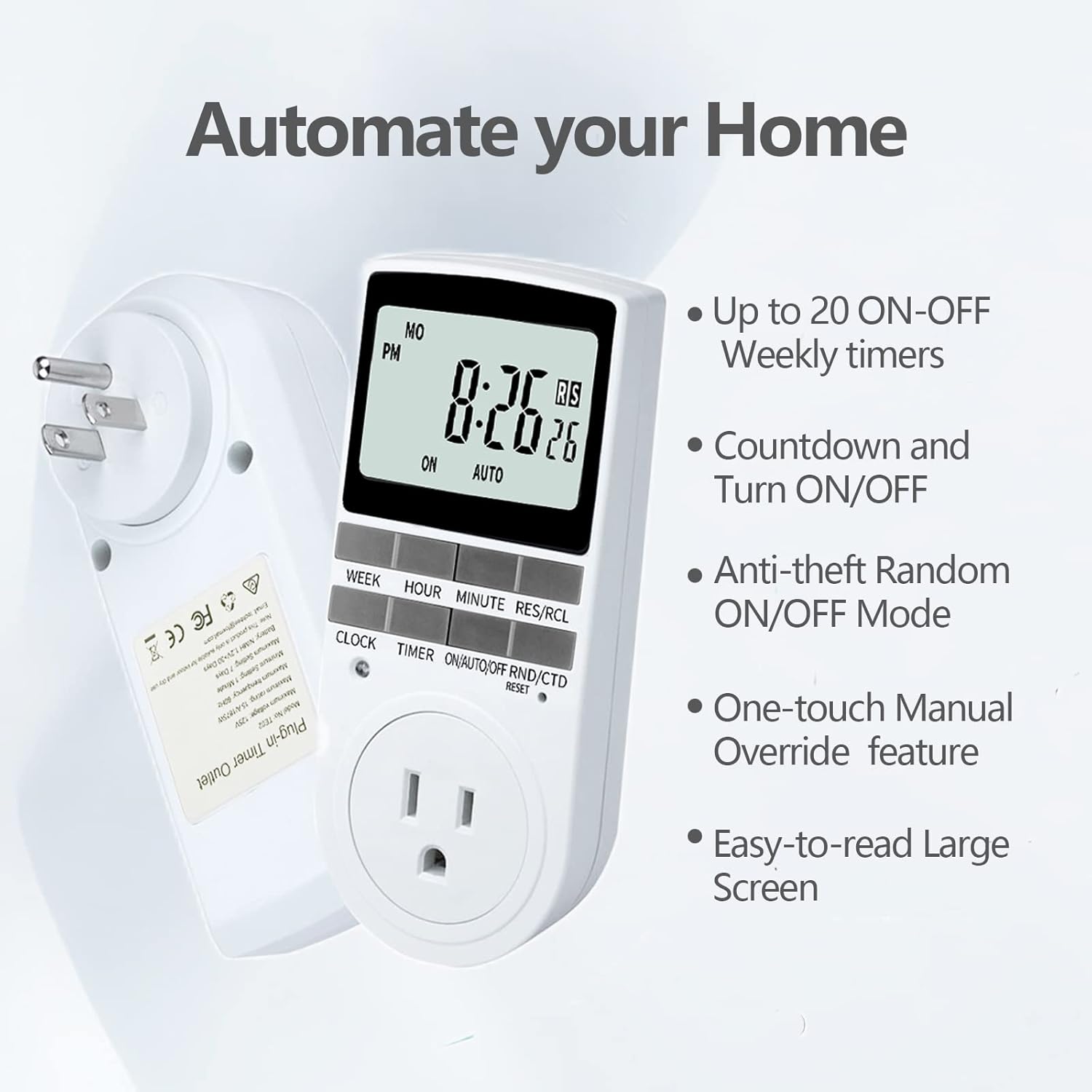
Figure 2.1: Key features of the Techbee TE02 Digital Timer Plug.
3. Техникалык шарттар
| Спецификация | Нарк |
|---|---|
| Модель номери | TE02 |
| Максималдуу томtage | 125V |
| Максималдуу рейтинг | 15А / 1875 Вт |
| Максималдуу жыштык | 60Hz |
| Минималдуу орнотуу аралыгы | 1 Minute (1 second for countdown) |
| Maximum Setting Duration | 7 күн |
| Батарея түрү | NiMH 1.2V (retains settings >30 days) |
| Орнотуулардын саны | 20 ON-OFF programs |

Figure 3.1: Technical data and features as displayed on the product packaging.
4. Орнотуу
Before initial use, it is recommended to plug the timer into a live outlet for at least 30 minutes to charge the internal battery. This ensures that the timer retains its settings even if unplugged or during a power outage.
- Unpack the timer plug and included instruction manual.
- Locate a standard 125V grounded electrical outlet.
- Plug the Techbee TE02 timer directly into the wall outlet. The display should illuminate.
- басыңыз RESET button (usually a small recessed button) using a non-metallic pointed object (like a pen tip) to clear all previous settings and ensure proper function.
- Proceed to set the current time and day as described in the 'Operating Instructions' section.

Figure 4.1: The Techbee TE02 Digital Timer Plug ready for setup.
Видео 4.1: Бүттүview of the Techbee TE02 timer plug, including unboxing and initial setup steps.
5. Иштөө нускамалары
5.1. Учурдагы убакытты жана күндү коюу
- басыңыз СААТ button. The display will show the current time.
- кармап жатканда СААТ баскычын басыңыз ЖУМА to set the current day (MO, TU, WE, TH, FR, SA, SU).
- кармап жатканда СААТ баскычын басыңыз HOUR to set the current hour (12-hour or 24-hour format).
- кармап жатканда СААТ баскычын басыңыз MINUTE учурдагы мүнөттү коюуга.
- бошотуңуз СААТ орнотууларды сактоо үчүн баскыч.
5.2. Programming ON/OFF Times (Up to 20 Programs)
- басыңыз ТАЙМЕР button to enter programming mode. The display will show "1 ON".
- Басыңыз ЖУМА to select the day(s) for this program (e.g., MO, TU, WE, TH, FR, SA, SU, or various combinations).
- Басыңыз HOUR каалаган КҮЙГҮЗҮҮ саатын коюу үчүн.
- Басыңыз MINUTE каалаган КҮЙГҮЗҮҮ МҮНӨТҮН коюу үчүн.
- Басыңыз ТАЙМЕР кайрадан. Дисплейде "1 OFF" көрсөтүлөт.
- Бул программа үчүн каалаган ӨЧҮРҮҮ убакытын коюу үчүн 2-4 кадамдарды кайталаңыз.
- Басууну улантыңыз ТАЙМЕР to cycle through programs "2 ON", "2 OFF" up to "20 ON", "20 OFF", setting each as needed.
- Бардык керектүү программаларды орноткондон кийин, баскычын басыңыз СААТ программалоо режиминен чыгып, учурдагы убакытты көрсөтүүгө кайтуу үчүн баскычты басыңыз.

Figure 5.1: Programming the timer for daily routines.
5.3. Артка саноо функциясы
The countdown function allows the timer to turn ON or OFF after a specified duration.
- басыңыз ON/AUTO/OFF RND/CTD button repeatedly until "CTD" appears on the display.
- Басыңыз HOUR, MINUTE, жана RES/RCL (for seconds) to set the desired countdown duration.
- Басыңыз ТАЙМЕР to start the countdown. The display will show the remaining time.
- Once the countdown reaches zero, the connected appliance will either turn ON or OFF, depending on its initial state.

Figure 5.2: Setting a countdown timer to turn an appliance ON or OFF.
5.4. Random Function (Anti-theft Mode)
The random function helps deter intruders by turning connected lights or appliances ON and OFF at irregular intervals.
- басыңыз ON/AUTO/OFF RND/CTD button repeatedly until "RND" appears on the display.
- The timer will now randomly turn the connected appliance ON and OFF within a set time window (typically 6 PM to 6 AM, but the Techbee TE02 offers random from any time).
- Өчүрүү үчүн басыңыз ON/AUTO/OFF RND/CTD button again until "AUTO" or "ON"/"OFF" is displayed.

Figure 5.3: Utilizing the random function for home security.
5.5. Кол менен өзгөртүү
You can manually switch the timer's output state without affecting the programmed settings.
- басыңыз ON/AUTO/OFF RND/CTD режимдер арасында айлануу үчүн баскыч: ON (ар дайым күйүк), АВТО (follows programs), ӨЧҮРҮҮ (always off), RND (random), CTD (countdown).
- Тандоо ON or ӨЧҮРҮҮ for immediate control. The timer will remain in this state until manually changed or switched back to АВТО.
6. Техникалык тейлөө
- Тазалоо: Тазалоодон мурун таймерди розеткадан ажыратыңыз. Сыртын жумшак, кургак чүпүрөк менен сүртүңүз. Суюк тазалагычтарды же абразивдүү материалдарды колдонбоңуз.
- Сактагыч: If storing the timer for an extended period, ensure the internal battery is charged by plugging it in for a few hours every few months. Store in a cool, dry place away from direct sunlight and extreme temperatures.
- Батарея: The internal NiMH battery is designed for long-term use and retains settings for over 30 days. It is not user-replaceable.
7. Кыйынчылыктарды
- Таймердин дисплейи бош:
- Ensure the timer is securely plugged into a live electrical outlet.
- The internal battery might be fully discharged. Plug the timer in for at least 30 minutes to charge it.
- Программалар активдештирилбейт:
- Учурдагы убакыт жана күн туура коюлганын текшериңиз.
- Check that the timer is in АВТО режими.
- Ensure the ON/OFF programs are set correctly and do not overlap in an unintended way.
- Confirm the connected appliance is functioning correctly and its power switch is in the ON position.
- Timer Not Responding to Buttons:
- Perform a full reset by pressing the RESET button with a pointed object. You will need to re-enter all settings after a reset.
- Appliance Does Not Turn ON/OFF with Countdown:
- Таймердин күйүп турганын текшериңиз CTD mode and the countdown duration is set.
- Verify the connected appliance is working and its power switch is ON.
8. Кепилдик жана колдоо
For warranty information, technical support, or any inquiries regarding your Techbee TE02 Digital Timer Plug, please refer to the official documentation provided with your product or visit the official Techbee store.
Кошумча колдоо жана продукт жөнүндө маалыматты төмөнкү дарекке кирип таба аласыз Techbee Store on Amazon.
A detailed PDF instruction manual is also available for download: Колдонуу боюнча нускамалар (PDF).