
1. Киришүү
The SHANLING UA2 Plus is a compact and powerful portable USB DAC/AMP designed to enhance your audio experience across various devices. Featuring an ES9038Q2M DAC chip and dual RT6863 amplifier chips, it supports high-resolution audio up to 32bit/768kHz and DSD512. With both 3.5mm single-ended and 4.4mm balanced outputs, it offers versatile connectivity for a wide range of headphones. Its small size and robust build make it an ideal companion for on-the-go high-fidelity sound.
2. Пакеттин мазмуну
Сураныч, төмөнкү нерселер үчүн кутучаны белгилеңиз:
- 1x SHANLING UA2 Plus Portable DAC/AMP
- 1x USB Type-C to C Data Cable
- 1x USB A to Type-C Adapter
- 1x Ыкчам Баштоо Көрсөтмөсү
- 1x Кепилдик картасы

Image: Contents of the SHANLING UA2 Plus retail box, showing the device, cables, and manuals.
Video: An unboxing video of the SHANLING UA2 Plus USB DAC/AMP, demonstrating the contents of the package.
3. Продукт бүтүп калдыview
Негизги өзгөчөлүктөрү:
- DAC чип: ES9038Q2M for high-fidelity audio conversion.
- Ampөмүр берүүчү: Dual RT6863 Amp chips for powerful and clean output.
- Жогорку чечилиштеги аудио: Supports up to 32bit/768kHz and DSD512.
- Чыгуулары: 3.5mm Single-Ended and 4.4mm Balanced headphone jacks.
- Чыгуу күчү: Up to 195mW@32Ω (Balanced) and 125mW@32Ω (Single-Ended).
- Шайкештик: Android, iOS, Windows, Mac, Nintendo Switch.
- Көчүрүү мүмкүнчүлүгү: Compact size (1.97x0.7x0.25 inches) and lightweight (10.6g).
- Колдонмону башкаруу: Customizable settings via the Eddict Player app.
- Кубаттуулугу: Optimized power consumption for extended battery life on connected devices.
- LED көрсөткүчү: Displays current sampling rate and MQA status.
Компоненттер жана башкаруу элементтери:
The UA2 Plus features a minimalist design with essential controls and indicators.
- USB-C порту: For data connection and power.
- Режим баскычы: Used for various settings and UAC1.0 mode for Nintendo Switch.
- 3.5 мм бир учтуу чыгаруу: Стандарттуу кулакчын уячасы.
- 4.4мм салмактуу чыгаруу: For balanced headphones, offering higher power and improved sound quality.
- LED көрсөткүчү: Located near the USB-C port, changes color to indicate sampling rate and MQA status.
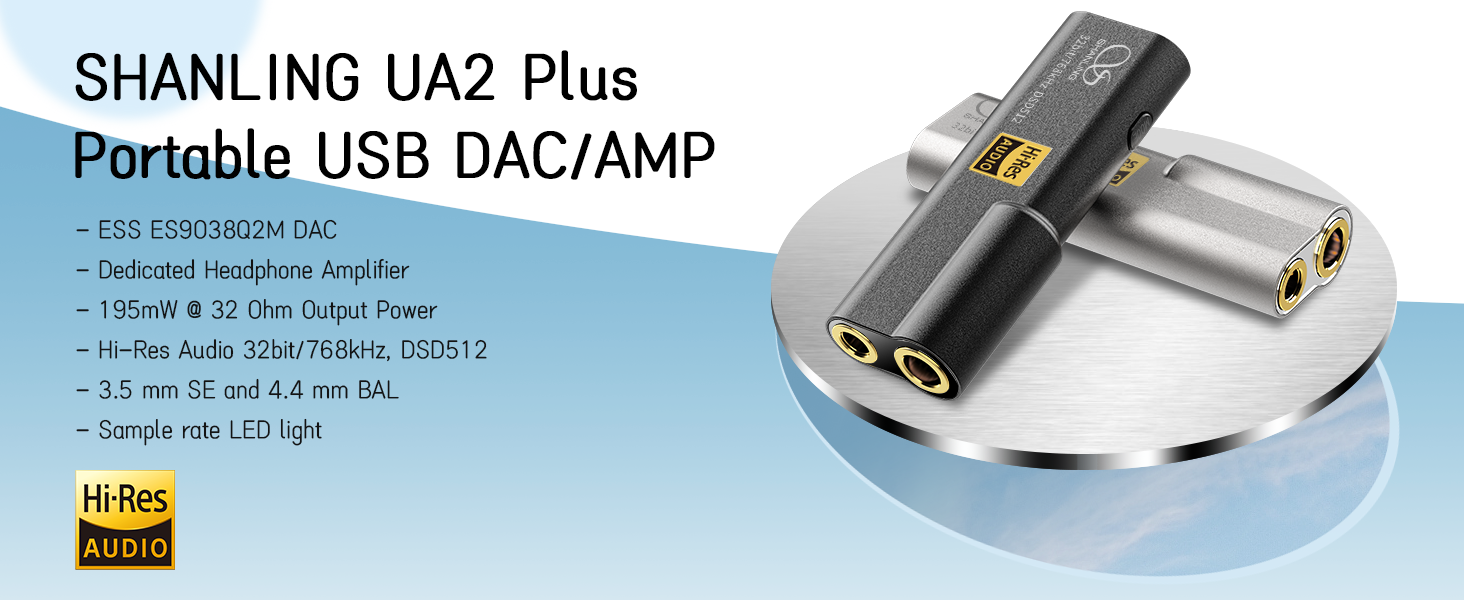
Сүрөт: An overview of the SHANLING UA2 Plus highlighting its internal components and output capabilities.

Image: The LED indicator on the UA2 Plus, explaining the color codes for various sampling rates (Blue: 44.1/48 kHz, Green: 88.2/96 kHz, Yellow: 176.4/192 kHz, Purple: 352/384/705/768 kHz, White: DSD, Red: UAC1.0 mode).
4. Орнотуу
4.1 Түзмөктөргө туташуу
The UA2 Plus is designed for plug-and-play operation with most compatible devices.
- Android түзмөктөрү: Connect the UA2 Plus to your Android phone using the provided USB Type-C to C cable. Ensure your phone supports USB OTG audio output.
- iOS түзмөктөрү: A special Lightning to USB-C cable (e.g., Shanling L3 cable) is required for iOS compatibility. Standard OTG cables are not compatible.
- Windows/Mac Computers: Use the provided USB Type-C to C cable and the USB A to Type-C adapter (if needed) to connect to your computer. Drivers may be required for Windows for optimal performance (download from SHANLING official webсайт).
- Nintendo Switch: Connect the UA2 Plus and press down the Mode switch while connecting to enable UAC1.0 mode for compatibility.

Image: The SHANLING UA2 Plus connected to a Nintendo Switch, illustrating its use for gaming.
4.2 App Control (Eddict Player)
The Eddict Player app allows for advanced control and customization of your UA2 Plus settings. Download the app from your device's official app store (Google Play Store for Android, App Store for iOS).
- Туташуу: Ensure your UA2 Plus is connected to your device.
- Колдонмону ачуу: Launch the Eddict Player app.
- Access USB Control: Navigate to the USB Control section within the app.
- Select UA2 Plus: Choose your UA2 Plus from the list of connected devices.
- Ыңгайлаштыруу: Adjust settings such as digital filters, gain, volume, and more.
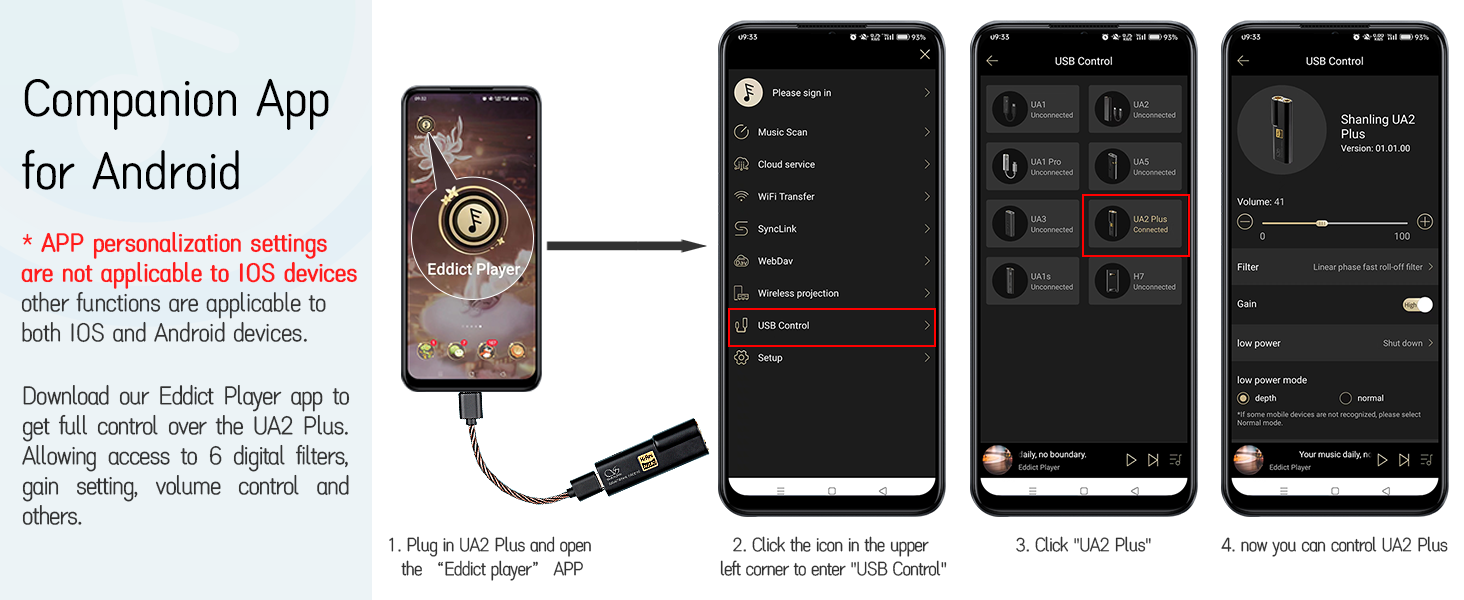
Image: A visual guide to using the Eddict Player app for controlling the UA2 Plus, showing the connection and settings interface.
Video: A tutorial demonstrating the SyncLink connection method for Android and iOS devices using the Eddict Player app, which is applicable to the UA2 Plus for app control.
5. Иштөө нускамалары
5.1 Негизги операция
The UA2 Plus is designed for simple operation. Once connected to a compatible device, it will typically power on automatically.
- Үндү көзөмөлдөө: Volume is primarily controlled via the connected source device (phone, computer). The UA2 Plus acts as a high-quality audio output.
- Режим баскычы: A short press of the 'MODE' button cycles through available digital filters. A long press (while connecting to Nintendo Switch) activates UAC1.0 mode.
5.2 LED көрсөткүчтөрү
The LED indicator on the UA2 Plus provides visual feedback on the device's status:
- Көк: 44.1 / 48 kHz sampылдамдыгы.
- Жашыл: 88.2 / 96 kHz sampылдамдыгы.
- Сары: 176.4 / 192 kHz sampылдамдыгы.
- Кызгылт көк: 352 / 384 / 705 / 768 kHz sampылдамдыгы.
- Ак: DSD 64 / 128 / 256 / 512 playback.
- Кызыл: 44.1 / 48 kHz (Switch Mode / UAC1.0).

Image: The LED indicator on the UA2 Plus, detailing the color codes for various audio formats and modes.
6. Техникалык тейлөө
To ensure the longevity and optimal performance of your SHANLING UA2 Plus, please follow these maintenance guidelines:
- Тазалоо: Түзмөктү тазалоо үчүн жумшак, кургак чүпүрөктү колдонуңуз. Катуу химиялык заттарды же абразивдүү материалдарды колдонуудан алыс болуңуз.
- Сактагыч: Аппаратты түз күн нурунан жана экстремалдык температурадан алыс салкын, кургак жерде сактаңыз.
- Коргоо: Avoid dropping the device or exposing it to excessive force, which could damage internal components or the glass panels.
- Нымдуулук: Аппаратты суудан жана жогорку нымдуулуктан алыс кармаңыз.
7. Кыйынчылыктарды
If you encounter any issues with your UA2 Plus, please refer to the following common troubleshooting steps:
- Үн жок:
- Ensure the UA2 Plus is securely connected to both the source device and headphones.
- Check the volume level on both the source device and within the Eddict Player app.
- Verify that the correct audio output is selected on your source device (e.g., 'SHANLING UA2 Plus' in sound settings).
- For iOS devices, confirm you are using a compatible Lightning to USB-C cable.
- Түзмөк таанылган жок:
- Түзмөктү кайра туташтырууга аракет кылыңыз.
- Түзмөктү өчүрүп күйгүзүңүз.
- For Windows computers, ensure the necessary drivers are installed.
- For Nintendo Switch, ensure UAC1.0 mode is activated by pressing the Mode button during connection.
- Үзгүлтүксүз туташуу:
- Check the USB cable for damage and ensure it is firmly seated.
- Башка USB портун же кабелин колдонуп көрүңүз.
- Үн сапаты начар:
- Жогорку сапаттагы аудиону колдонуп жатканыңызды текшериңиз files.
- Check headphone connections and ensure they are fully inserted.
- Adjust digital filter and gain settings in the Eddict Player app.
8. Техникалык шарттар
| Өзгөчөлүк | Description |
|---|---|
| Модель аты | UA2 Plus |
| DAC чип | ES9038Q2M |
| Amp Чип | Dual RT6863 |
| Hi-Res колдоо | 32bit/768kHz, DSD512 |
| Output Power (4.4mm BAL) | 195мВт@32Ω |
| Output Power (3.5mm SE) | 125мВт@32Ω |
| Ызы-чуунун катышы | 121дБ чейин |
| Наушник уясы | 3.5 mm Jack, 4.4 mm Balanced Jack |
| Байланыш технологиясы | Зымдуу (USB-C) |
| Шайкеш түзмөктөр | Android, iOS, Windows, Mac, Nintendo Switch |
| Элемент Салмагы | 10.6 г (0.37 унция) |
| Материал | Металл |
9. Кепилдик жана колдоо
Your SHANLING UA2 Plus comes with a warranty card included in the package. Please refer to the warranty card for specific terms and conditions.
For further support, product updates, or to explore other SHANLING products, please visit the official SHANLING webсайт же алардын Amazon дүкөнү: