
Lorex W881AADB-E
Lorex 4K Spotlight имараттын ичиндеги/сыртындагы Wi-Fi 6 коопсуздук камерасы үчүн колдонуучу колдонмосу
Модель: W881AADB-E
1. Киришүү
Бул колдонмодо Lorex 4K Spotlight имараттын ичиндеги/тышкы Wi-Fi 6 коопсуздук камераңызды, W881AADB-E моделин орнотуу, иштетүү жана тейлөө боюнча кеңири көрсөтмөлөр берилген. Бул камера 4K Ultra HD чечилиши, акылдуу коопсуздук жарыктандыруу жана адамдарды, унааларды, жаныбарларды жана таңгактарды акылдуу аныктоо мүмкүнчүлүктөрү сыяктуу өркүндөтүлгөн функциялар менен коопсуздугуңузду жогорулатуу үчүн иштелип чыккан. Туура орнотууну жана иштешин камсыз кылуу үчүн продуктуну колдонуудан мурун бул колдонмону кылдат окуп чыгыңыз.
2. Пакеттин мазмуну
Сиздин пакетте бардык компоненттер бар экенин текшериңиз:
- Lorex 4K Spotlight имараттын ичиндеги/сыртындагы Wi-Fi 6 коопсуздук камерасы (W881AADB-E модели)
- Кубаттуу адаптер
- Орнотуу комплекти (бурамалар, якорьлор)
- Quick Start Guide
- 32 ГБ Micro SD картасы (алдын ала орнотулган болушу мүмкүн)

Сүрөт: Lorex 4K Spotlight Wi-Fi 6 коопсуздук камерасы, анын чекене кутусу жана 32 ГБ Micro SD картасы. Камера кара түстө, эки ак прожектор жана жашыл LED тилкеси бар. Куту 4K видео жаздырууну, Wi-Fi 6, акылдуу коопсуздук жарыктандыруусун жана кыймылды аныктоону баса белгилейт.
3. Орнотуу жана орнотуу
3.1 Баштоодон мурун
- Оптималдуу иштеши үчүн Wi-Fi роутериңиз Wi-Fi 6 технологиясын колдой турганын текшериңиз.
- Lorex Home тиркемесин смартфонуңуздун колдонмолор дүкөнүнөн жүктөп алыңыз.
- Орнотууга ылайыктуу жерди (үйдүн ичинде же сыртында) так аныктаңыз view жана электр розеткасына кирүү.
3.2 Камераны орнотуу кадамдары
- Камераны орнотуу: Берилген орнотуу комплектин колдонуп, камераны тандалган бетке бекем орнотуңуз. Камеранын каалаган жерди жаап тургандай кылып жайгаштырылганын текшериңиз.
- Электр тогуна туташуу: Камераны камтылган кубат адаптерин колдонуп кубат булагына туташтырыңыз.
- View Колдонмодо: Lorex Home колдонмосун ачып, эгер сизде аккаунт түзө элек болсо, түзүңүз жана жаңы камераңызды кошуу үчүн колдонмодогу көрсөтмөлөрдү аткарыңыз. Бул, адатта, камерадагы QR кодун сканерлөөнү же анын маалыматтарын кол менен киргизүүнү камтыйт.
Сүрөт: Орнотуунун үч тез кадамын көрсөткөн графика: 1. Камераны орнотуу (ачкычтын сүрөтчөсү), 2. Айнымалы токко туташтыруу (вилканын сүрөтчөсү), 3. View Колдонмодо (смартфон сүрөтчөсү). Сүрөттө дубалга орнотулган камера көрсөтүлгөн.

Сүрөт: Ачык түстөгү сырткы дубалга орнотулган, жашыл LED жылмаюусу бар кара Lorex коопсуздук камерасы, сыртта орнотулганын көрсөтүп турат.
4. Камераны иштетүү
4.1 Live View жана Ойнотуу
Түз эфирдеги видео каналдарга кирүү жана кайраview foo жазылганtagLorex Home тиркемеси аркылуу. 4K Ultra HD чечилиши натыйжалуу мониторинг жүргүзүү үчүн так жана деталдуу сүрөттөрдү берет.

Сүрөт: 4K Ultra HD видео сапатын көрсөткөн бөлүнгөн сүрөт. Сол жагында алыстан бакчада оюнчук менен ойноп жаткан бала көрсөтүлгөн, ал эми оң жагында санариптик чоңойтулган, тунук сүрөт көрсөтүлгөн. view баланын колдорунун жана оюнчуктун сүрөтү, 4K чечилишинин майда-чүйдөсүнө чейин сакталышын баса белгилейт.
4.2 Акылдуу коопсуздук жарыктандыруу
Камерада түсүн өзгөртүүгө мүмкүн болгон LED тилкеси бар. Бул жарыктандыруу коркутуу же кош келүү жарыгы катары колдонулушу мүмкүн. Жөндөөлөрдү Lorex Home колдонмосу аркылуу тууралаңыз.

Сүрөт: LED тилкеси жарыктандырылган Lorex камерасы, ошондой эле Lorex Home тиркемесиндеги LED жарыгынын түсүн тандоо үчүн түс дөңгөлөгүн көрсөткөн смартфондун экраны. Бул Smart Security Lighting функциясын көрсөтөт.

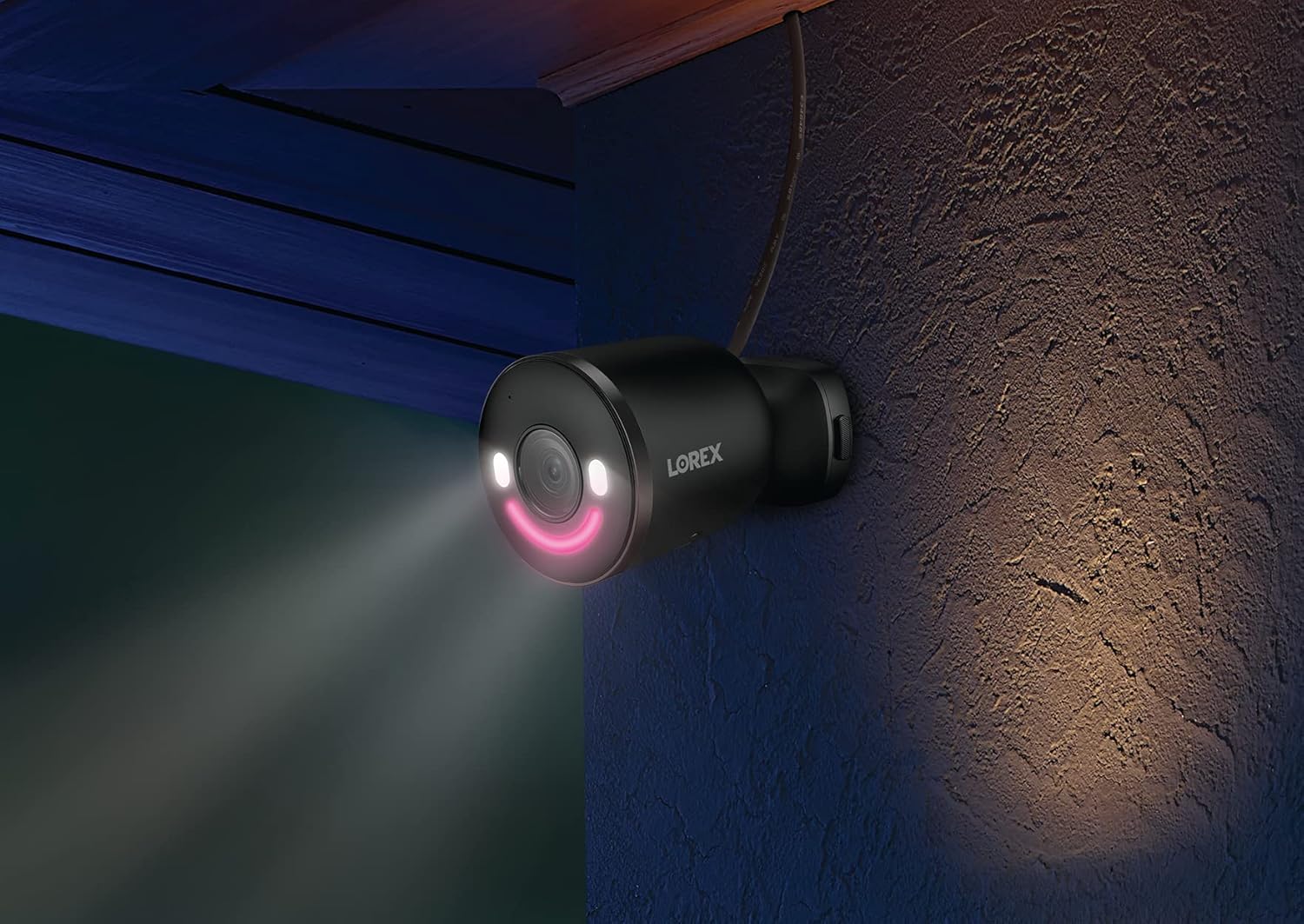
Сүрөт: Түнкүсүн дубалга орнотулган Lorex коопсуздук камерасы, анын акылдуу коопсуздук жарыгы кызгылт түстө жарык чыгарып, жакынкы аймакты жарыктандырат. Бул камеранын жарык аз шарттарда жарыктандыруу мүмкүнчүлүктөрүн көрсөтөт.
4.3 Smart Motion Detection
Камера белгилүү бир объектилерди аныктоо үчүн өркүндөтүлгөн кыймылды аныктоону колдонот. Сиз төмөнкүлөр үчүн эскертүүлөрдү конфигурациялай аласыз:
- Адамды аныктоо
- Унаа аныктоо
- Жаныбарларды аныктоо
- Пакетти аныктоо
Эскертүү: Адамды, унааны жана/же жаныбарларды аныктоо иштетилгенде, таңгак аныктоону бир убакта иштетүүгө болбойт. Таңгак аныктоону колдонуу үчүн, сиз башка аныктоо түрлөрүн өчүрүшүңүз керек.

Сүрөт: Lorex Home тиркемесин көрсөтүп турган смартфонду кармап турган кол. Тиркемеде "Кимдир бирөөнү алдыңкы эшиктин коңгуроосу аныктады" деген эскертме көрсөтүлөт, анда жандуу сигнал берилет. view акылдуу кыймылды аныктоо эскертүү функциясын көрсөткөн эскиз.
4.4 Эки тараптуу сүйлөшүү
Lorex Home тиркемеси аркылуу коноктор менен байланышуу же каалабаган конокторду түздөн-түз токтотуу үчүн орнотулган микрофонду жана динамикти колдонуңуз.
4.5 Lorex Fusion интеграциясы
Бул камераны шайкеш келген Lorex Fusion коопсуздук камера системалары менен зымсыз интеграциялоого болот, бул сизге кеңейтилген камтуу жана борборлоштурулган башкаруу үчүн зымдуу жана Wi-Fi камераларын айкалыштырууга мүмкүндүк берет.

Сүрөт: Lorex Fusion системасын көрсөткөн диаграмма. Үйдүн айланасындагы ар кандай Lorex камераларына (ок, купол, эшик коңгуроосу, прожектор) туташкан Wi-Fi сигналдары бар борбордук жаздыруучу блок көрсөтүлгөн, бул ар кандай камера түрлөрүн бир системага бириктирүү мүмкүнчүлүгүн көрсөтөт.
4.6 Жергиликтүү сактоо
Камера Micro SD картасы (32 ГБ кошулган) аркылуу жергиликтүү сактагычты колдойт, бул сиздин видеоңуздун сапатын камсыздайтtage купуя сакталат жана ай сайын төлөмсүз жеткиликтүү.

Сүрөт: Видео файлдар үчүн жергиликтүү сактагычты билдирген Micro SD карта жана ачык катуу дискtage, жаздыруу үчүн ай сайын төлөм талап кылынбай турганын баса белгилейт.
5. Техникалык тейлөө
- Тазалоо: Мезгил-мезгили менен камеранын линзасын жумшак, гamp ачык сүрөт сапатын камсыз кылуу үчүн кездеме. Абразивдүү тазалагычтардан алыс болуңуз.
- Программалык камсыздоонун жаңыртуулары: Камераңызда эң акыркы функциялар жана коопсуздук жакшыртуулары бар экенине ынануу үчүн Lorex Home колдонмосунда жеткиликтүү микропрограмма жаңыртууларын үзгүлтүксүз текшерип туруңуз.
- Кубат туташуу: Айрыкча, сыртка орнотулганда, электр туташуусунун бекем жана бузулбагандыгын текшериңиз.
- Micro SD картасы: Эгерде жергиликтүү сактагыч колдонулса, Micro SD картанын туура иштешин жана жетиштүү сактагыч орду бар-жогун мезгил-мезгили менен текшерип туруңуз. Зарыл болсо, алмаштырып туруңуз.
6. Кыйынчылыктарды
| Көйгөй | Мүмкүн себеп | Чечим |
|---|---|---|
| Камера Wi-Fi'га туташпай жатат | Туура эмес Wi-Fi сырсөзү, камера роутерден өтө алыс, роутер Wi-Fi 6 менен шайкеш келбейт, тармактык тоскоолдук. |
|
| Видеонун сапаты начар | Кир линза, Wi-Fi сигналынын күчү төмөн, өткөрүү жөндөмдүүлүгү жетишсиз. |
|
| Кыймылды аныктоо эскертмелери туура эмес | Туура эмес сезгичтик жөндөөлөрү, аныктоо зоналары оптималдаштырылган эмес, карама-каршы аныктоо түрлөрү иштетилген. |
|
| Micro SD картага видео жаздыруу жок | SD карта толуп калган, бузулган же туура эмес салынган; жаздыруу жөндөөлөрү туура эмес. |
|
7. Техникалык шарттар
| Өзгөчөлүк | Деталь |
|---|---|
| Модель номери | W881AADB-E |
| Видео тартуунун резолюциясы | 4K Ultra HD |
| Байланыш технологиясы | Зымсыз (Wi-Fi 6) |
| Ички/тышкы колдонуу | Сыртта |
| Power Source | Зымдуу электр (12 ватт) |
| Field Of View | 140 градус |
| Өзгөчөлүктөр | Кыймыл сенсору, Түнкү көрүү (Түнкү түс), Акылдуу коопсуздук жарыктандыруу, Эки тараптуу сүйлөшүү |
| Аныктоо түрлөрү | Адам, Унаа, Жаныбар, Таңгак |
| Сактагыч | Micro SD (256 ГБ чейин, 32 ГБ кошо алганда) |
| Эл аралык коргоо рейтинги | IP65 |
| Иштөө температурасы | 55 градус Цельсийге чейин |
| Өлчөмдөрү (L x W x Y) | 307 x 344 x 307 дюйм (Эскертүү: Бул өлчөм маалыматтарды киргизүүдө ката кеткен окшойт. Так физикалык өлчөмдөр үчүн продуктунун таңгагын караңыз.) |
| Элемент Салмагы | 1.72 фунт |
| Шайкеш түзмөктөр | Смартфон (Lorex Home App), Amazon Alexa |
8. Кепилдик жана колдоо
Кепилдик жөнүндө маалымат, техникалык колдоо жана кошумча ресурстар үчүн расмий Lorex веб-сайтына кириңиз webсайтына кириңиз же Lorex кардарларды тейлөө кызматына кайрылыңыз. Кепилдик боюнча дооматтар үчүн сатып алуу дүмүрчөгүңүздү сактап коюңуз.
Онлайн ресурстар: www.lorex.com
9. Коопсуздук боюнча маанилүү маалымат
- Камера менен кошо берилген кубат адаптерин гана колдонуңуз.
- Камераны иштөө диапазонунан тышкары өтө жогорку температурага (55°C чейин) дуушар кылбаңыз.
- Бардык кабелдердин, айрыкча сырткы чөйрөдө, тийиштүү түрдө бекитилгенин жана корголгонун текшериңиз.
- Камераны бөлүктөргө бөлүүгө же өзгөртүүгө аракет кылбаңыз. Бул кепилдикти жокко чыгарат.
- Байкоо камераларын колдонууга байланыштуу бардык жергиликтүү мыйзамдарды жана жоболорду сактаңыз.
Ask a question about this manual
Ask about setup, troubleshooting, compatibility, parts, safety, or missing instructions. Manuals+ will review the question and use this page’s manual context to help answer it.