
Introduction
Welcome to the user manual for your new VERTU iVERTU-81 5G smartphone. This guide provides essential information to help you set up, operate, maintain, and troubleshoot your device. Please read this manual thoroughly to ensure optimal performance and longevity of your smartphone.
Кутуда эмне бар
Upon unboxing your VERTU iVERTU-81, please verify that all components are present:
- VERTU iVERTU-81 5G Smartphone
- Кубаттуу адаптер
- USB-C Cable (not explicitly listed but implied for charging)
- SIM Ejector Tool (not explicitly listed but implied for SIM tray)
- Quick Start Guide (not explicitly listed but implied)
Эгерде кандайдыр бир нерселер жок болсо же бузулса, кардарларды колдоо менен байланышыңыз.
Жайгашуу
1. SIM карталарды салуу
The VERTU iVERTU-81 supports dual Nano SIM cards for 5G dual card dual standby functionality.
- Телефонуңуздун капталындагы SIM карта салгычын табыңыз.
- SIM чыгаруучу куралды лотоктун жанындагы кичинекей тешикке салып, лоток чыгып кеткиче акырын түртүңүз.
- Place your Nano SIM cards into the designated slots on the tray, ensuring the gold contacts face down.
- SIM лотокту кылдаттык менен телефонго кайра кыстарыңыз.
2. Баштапкы күйгүзүү жана орнотуу
- Press and hold the power button until the VERTU logo appears.
- Тилиңизди тандоо, Wi-Fi тармагына туташуу жана Google аккаунтуңузду орнотуу үчүн экрандагы көрсөтмөлөрдү аткарыңыз.
- Configure security settings such as fingerprint, face unlock, or a PIN/pattern.
3. Батареяны заряддоо
Before first use, it is recommended to fully charge your device. Use the provided power adapter and USB-C cable.
- USB-C кабелин телефондун ылдый жагындагы заряддоо портуна туташтырыңыз.
- Кабелдин экинчи учун кубат адаптерине туташтырыңыз, анан адаптерди розеткага сайыңыз.
- The phone supports 55W fast charging. A full charge can be achieved rapidly.

Image: The VERTU iVERTU-81 smartphone connected to a charger, displaying a '55W Fast Charge' notification on its screen, indicating rapid battery replenishment.
Түзмөгүңүздү иштетүү
Дисплей жана навигация
The iVERTU-81 features a 6.67-inch OLED FHD+ display with a 120Hz high refresh rate, providing a clear and immersive viewing experience. The display is designed to adapt to blue light, caring for your eyes.
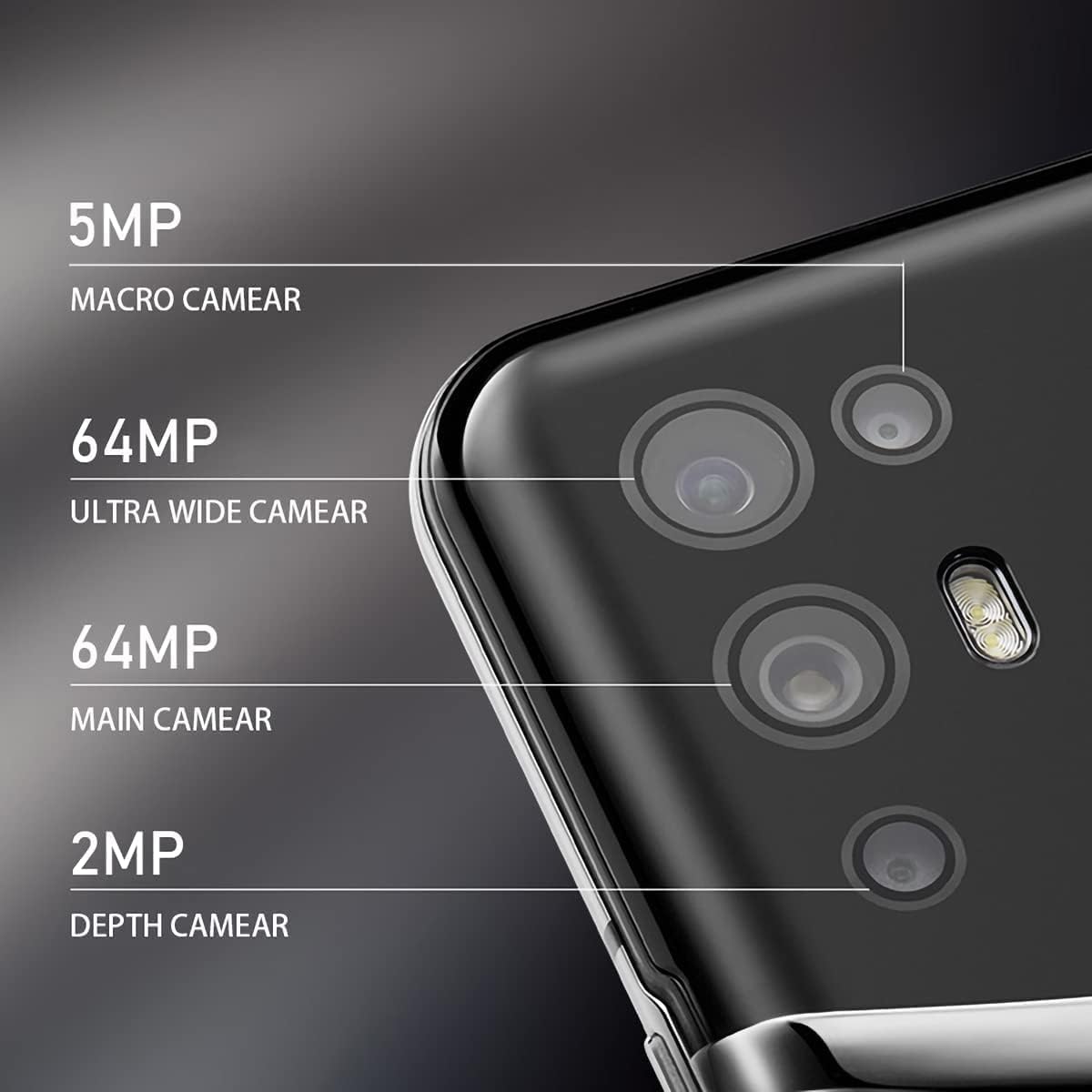
Image: The VERTU iVERTU-81 smartphone showcasing its 6.67-inch OLED display with vibrant colors, featuring a dancer and text highlighting '6.67" OLED Display' and '90hZ' (likely indicating refresh rate).
Performance
Powered by a Snapdragon 888 octa-core chip and 12GB RAM, the iVERTU-81 delivers powerful performance for a smooth gaming and multitasking experience.

Image: Two hands holding the VERTU iVERTU-81 smartphone, which displays a graphically intensive game, illustrating the device's 'Powerful Performance'.
Аудио сапаты
Experience master sound quality with 3D audio technology and HiFi sound. The device also features exclusive ringtones compiled by the London Symphony Orchestra.

Image: The VERTU iVERTU-81 smartphone displaying an image of an orchestra, accompanied by text highlighting 'Master Sound Quality', '3D audio technology', 'HiFi sound quality', and 'London Symphony Orchestra compiled exclusive ringtones'.
Камеранын өзгөчөлүктөрү
The iVERTU-81 is equipped with a professional photography configuration, allowing you to capture high-quality images and videos.
Арткы камера системасы
- 64MP Негизги камера: Жогорку чечилиштеги сүрөттөр үчүн.
- 64MP Ultra Wide Angle Camera: Кеңири пейзаж жана топтук кадрлар үчүн.
- 5MP макро камера: Жакын планда деталдуу сүрөткө тартуу үчүн.
- 2MP тереңдик камерасы: For enhanced portrait mode with bokeh effects.
Алдыңкы камера
- 16MP алдыңкы камера: Таза селфи жана видео чалуулар үчүн.
Видео жаздыруу
Support for 4K 60FPS high-definition video shooting with two-way anti-shake technology ensures smooth and stable video capture. Intelligent focus assists in sharp and clear recordings.

Сүрөт: деталдуу view of the VERTU iVERTU-81's rear camera module, labeling its four lenses: 5MP Macro, 64MP Ultra Wide, 64MP Main, and 2MP Depth cameras.

Image: The VERTU iVERTU-81 smartphone displaying its camera interface, capturing a snowboarder in action, with text emphasizing 'Professional Photography' and support for '4K 60FPS HD video shooting, two-way anti-shake, intelligent focus'.
Техникалык тейлөө
To ensure the longevity and optimal performance of your VERTU iVERTU-81 smartphone, follow these maintenance guidelines:
- Тазалоо: Телефондун экранын жана корпусун тазалоо үчүн жумшак, түксүз чүпүрөктү колдонуңуз. Абразивдүү материалдардан же катуу химиялык заттардан алыс болуңуз.
- Программалык камсыздоо жаңыртуулары: Regularly check for and install system updates to ensure your device has the latest security patches and features.
- Батареяга кам көрүү: Avoid extreme temperatures. Do not fully discharge the battery frequently. Use only the provided or certified charging accessories.
- Сактагычты башкаруу: Мезгил-мезгили менен ачык-айкын керексиз files and apps to maintain optimal performance. The phone comes with 512GB ROM.
- Коргоо: Физикалык зыяндан сактануу үчүн коргоочу капты жана экранды колдонууну ойлонуп көрүңүз.
Проблемаларды чечүү
If you encounter issues with your VERTU iVERTU-81, refer to the following common troubleshooting steps:
Түзмөк күйбөй жатат
- Батарея заряддалганын текшериңиз. Кайра күйгүзүүдөн мурун телефонду заряддагыч түзүлүшкө кеминде 15 мүнөт туташтырыңыз.
- Кайра иштетүүгө мажбурлоо үчүн кубат баскычын 10-15 секунд басып туруңуз.
Poor Network Signal
- SIM картаңыз туура салынганын текшериңиз.
- Тармакты жакшыраак каптаган аймакка жылыңыз.
- Телефонуңузду өчүрүп күйгүзүңүз.
- Verify that your mobile data or 5G settings are correctly configured.
Колдонмолор бузулуп жатат же катып жатат
- Көйгөйлүү колдонмону жаап, кайра ачыңыз.
- Clear the app's cache and data in the phone's settings.
- Колдонмонун акыркы версиясына жаңыртылганын текшериңиз.
- Телефонуңузду өчүрүп күйгүзүңүз.
Батареянын бат түгөнү
- Экран жарыктыгын азайтып, экрандын таймаутун кыскараак коюңуз.
- Disable unused features like Wi-Fi, Bluetooth, GPS, or 5G when not needed.
- Фондо иштеп жаткан энергияны көп талап кылган колдонмолорду аныктап, жабыңыз.
- Check for system updates, as they often include battery optimizations.

Image: The VERTU iVERTU-81 smartphone connected to a charger, displaying '4200mAh Long Battery Life' and '55W fast charge' text, emphasizing its battery capacity and quick charging capability.
Communication Encryption
The device features communication encryption for double protection of your data and privacy.

Image: A visual representation of a safe door, overlaid with various security-related terms such as 'encryption', 'firewalls', 'privacy', and 'information security', illustrating the concept of 'Communication Encryption Double Protection'.
Техникалык шарттар
| Өзгөчөлүк | Спецификация |
|---|---|
| Модель аты | iVERTU-81 |
| Операция системасы | Android |
| Процессор | Snapdragon 888 (Octa-core) |
| RAM | 12 ГБ |
| Эстутум сактоо сыйымдуулугу | 512 ГБ |
| Screen Size | 6.67 дюйм |
| Дисплей түрү | OLED |
| Резолюция | 2400 x 1080 |
| Жаңыртуу ылдамдыгы | 120 Гц |
| Арткы камера | 64MP Main + 64MP Ultra Wide + 5MP Macro + 2MP Depth |
| Алдыңкы камера | 16MP |
| Батарея сыйымдуулугу | 4200 миллионamp Саат |
| Заряддоо | 55W тез кубаттоо |
| Зымсыз оператор | Кулпусу ачылган |
| Уюлдук технология | 5G |
| Connectivity Technologies | Wi-Fi, GPS |
| Түс | Calf Leather-Brown |
Кепилдик жана колдоо
For warranty information and customer support, please refer to the warranty card included with your product or visit the official VERTU webсайт. Кепилдик дооматтар үчүн сатып алганыңыздын далилин сактаңыз.
For technical assistance or service inquiries, please contact VERTU customer service through the channels provided on their official webсайт.