
Micool S03
Micool S03 кулакчындарынын сөөк өткөргүчтүү кулакчындарынын колдонуучу колдонмосу
Модели: S03
Introduction
Thank you for choosing the Micool S03 Ear-Clip Bone Conduction Headphones. These headphones are designed to provide a comfortable, open-ear listening experience with advanced Bluetooth 5.3 technology, HiFi sound quality, and long battery life. This manual provides detailed instructions for setup, operation, maintenance, and troubleshooting to ensure optimal performance and longevity of your device.

Image: The Micool S03 Ear-Clip Bone Conduction Headphones, black, resting inside their open charging case. The earbuds feature a unique ear-clip design.
Пакеттин мазмуну
- Micool S03 Ear-Clip Bone Conduction Headphones (Left and Right)
- Зымсыз кубаттоо кутусу
- Колдонуучунун Колдонмосу (бул документ)
Продукт бүттүview
The Micool S03 headphones utilize bone conduction technology, allowing for an open-ear design that does not block the ear canal. This design enhances comfort during extended wear and allows awareness of ambient sounds.

Image: A woman wearing the Micool S03 Ear-Clip Headphones, demonstrating their comfortable, open-ear fit.
Негизги өзгөчөлүктөрү:
- Сөөк өткөргүч технологиясы: Delivers sound through the cheekbones, leaving ear canals open.
- Bluetooth 5.3: Ensures stable connection and low power consumption.
- Painless Ear-Clip Design: Ergonomically designed for comfort during long periods of wear.
- HD Noise Elimination Call: Dual microphones with ENC for clear calls.
- IPX Waterproof: Терге жана чачырандыларга туруктуу, спорт менен машыгууга ылайыктуу.
- Smart Touch Control: Музыка жана чалуулар үчүн интуитивдик башкаруу.
- Батареянын узак иштөө мөөнөтү: Бир заряд менен 6.5 саатка чейин, кубаттоочу куту менен 36 саатка чейин.
Орнотуу жана жупташтыруу
Наушникти жана капты заряддоо:
- Place both earbuds into the charging case. Ensure they are correctly seated; indicator lights on the case will confirm charging.
- Connect the charging case to a USB power source using a compatible USB cable (not included).
- The charging case has a 350mAh capacity, providing multiple charges for the earbuds. A full charge for the earbuds takes approximately 2.17 hours.

Image: An illustration detailing the battery life of the Micool S03 headphones: 6.5 hours single listening time, 36 hours total listening time with the 350mAh charging compartment.
Баштапкы жупташтыруу:
- Наушниктердин заряддалганын текшериңиз.
- Заряддоо кутучасын ачыңыз. Кулакчындар жупташтыруу режимине автоматтык түрдө кирет.
- Түзмөгүңүздө (смартфон, планшет, ноутбук) Bluetooth иштетиңиз.
- Издөө available Bluetooth devices and select "S03" from the list.
- Туташкандан кийин үн билдирүүсү ийгиликтүү жупташтырууну ырастайт.
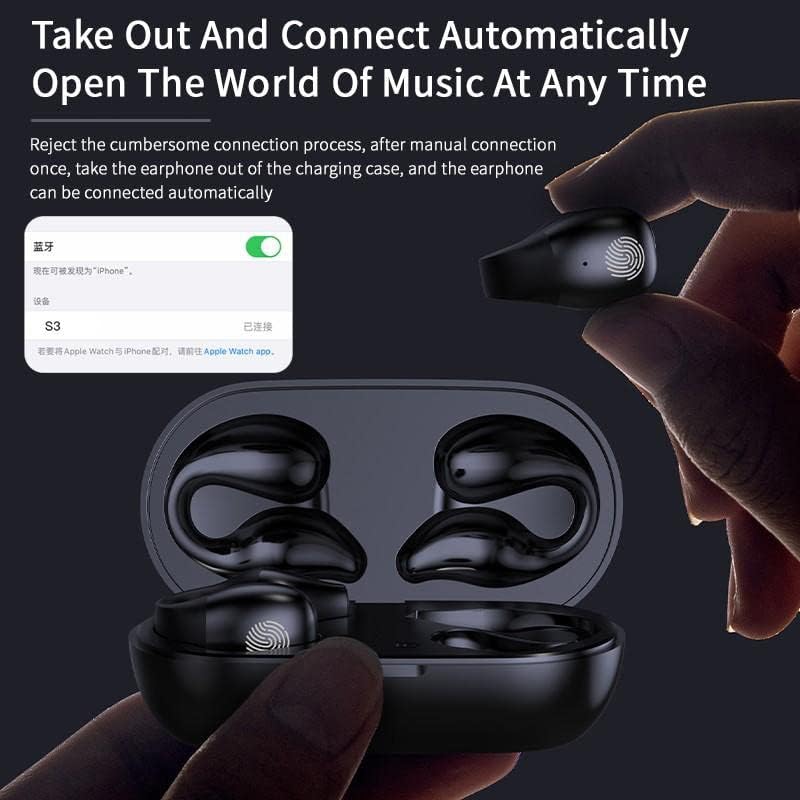
Image: A hand taking an earbud out of the charging case, with a phone screen showing "S03 Connected", illustrating the automatic connection feature.
The headphones support master-slave switching technology, allowing either earbud to be used independently.
Иштөө нускамалары
Наушник тагынуу:
Gently clip the headphones onto your ear, ensuring the bone conduction transducer rests comfortably near your temple, just in front of your ear canal. The design is intended to be painless and secure.
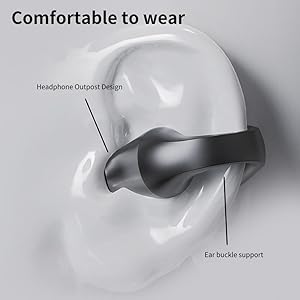
Image: A diagram illustrating the correct placement of the Micool S03 ear-clip headphone on the ear, highlighting the headphone outpost design and ear buckle support for comfortable wear.
Сенсордук башкаруу каражаттары:
The Micool S03 headphones feature intelligent touch controls on each earbud. The touch-sensitive area is typically located on the outer surface of the earbud.

Image: A diagram showing the smart fingerprint touch area on the Micool S03 earbud, indicating how gentle touches complete commands quickly.
| Акция | Функция |
|---|---|
| Бир таптоо (Сол/Оң) | Музыка ойнотуу/тындыруу, Чалууга жооп берүү/аяктоо |
| Эки жолу таптаңыз (оңго) | Кийинки трек |
| Эки жолу таптаңыз (солго) | Мурунку трек |
| Үч жолу таптап (Сол/Оң) | Үн жардамчысын жандырыңыз |
| Узак басуу (2 секунд) | Чакырууну четке кагуу |
| Узак басуу (3 секунд) | Power On/Off (if not in case) |
Эскертүү: Үндү башкаруу адатта туташкан түзмөгүңүз аркылуу башкарылат.
Техникалык тейлөө жана кам көрүү
- Тазалоо: Кулакчындарды жана кубаттоочу кутучаны тазалоо үчүн жумшак, кургак, мамыксыз чүпүрөктү колдонуңуз. Абразивдүү тазалоочу каражаттарды же эриткичтерди колдонбоңуз.
- Суу каршылык: The headphones are waterproof and sweat-resistant (IPX rating). However, they are not designed for submersion. Avoid exposing them to strong jets of water or prolonged immersion. Dry them thoroughly after exposure to sweat or water.
- Сактагыч: Колдонулбай турган учурда, кулакчындарды коргоо жана кубаттоо үчүн кубаттоочу кутучасында сактаңыз. Түз күн нурунан жана өтө жогорку температурадан алыс, салкын, кургак жерде сактаңыз.
- Батареяга кам көрүү: Батареянын иштөө мөөнөтүн узартуу үчүн, кулакчындарды бат-баттан толук кубаттап турбаңыз. Узак мөөнөткө колдонулбаса да, аларды дайыма заряддап туруңуз.
Проблемаларды чечүү
| Көйгөй | Мүмкүн чечим |
|---|---|
| Кулакчындар жупташкан жок |
|
| Үн жок же үнү төмөн |
|
| Intermittent connection/skipping |
|
| Кулакчындар заряддалбай жатат |
|
Техникалык шарттар
| Өзгөчөлүк | Деталь |
|---|---|
| Модель аты | S03 |
| Бренд | Micool |
| Байланыш технологиясы | Зымсыз (Bluetooth 5.3) |
| Аудио драйвер түрү | Сөөк өткөргүч айдоочу |
| Кулак жайгаштыруу | Open Ear (Ear-Clip) |
| Noise Control | Активдүү ызы-чууну жокко чыгаруу (чалуулар үчүн) |
| Батареянын иштөө мөөнөтү (бир кубаттоо) | 6.5 саатка чейин |
| Батареянын жалпы иштөө мөөнөтү (корпусу менен) | 36 саатка чейин |
| Заряддоо убактысы | Approx. 2.17 Hours (earbuds in case) |
| Заряддоо кутусунун кубаттуулугу | 350mAh |
| Bluetooth диапазону | 10 метр |
| Сууга туруктуулук деңгээли | Суу өткөрбөйт (тер өткөрбөйт) |
| Башкаруу ыкмасы | тийүү |
| Шайкеш түзмөктөр | Уюлдук телефондор, ноутбуктар, планшеттер |
| Материал | Пластик |
| Элемент Салмагы | 0.08 килограмм (болжол менен 2.82 унция) |
| Пакеттин өлчөмдөрү | 5.12 x 3.07 x 1.38 дюйм |
Кепилдик жана колдоо
Micool is committed to providing high-quality products and excellent customer service. For any inquiries, technical support, or warranty claims, please refer to the following:
- Сатуудан кийинки тейлөө: Micool provides 24-hour after-sales service.
- VIP Service: Any item purchased is eligible for VIP service.
- Байланыш маалыматы: Please visit the official Micool website or refer to the contact details provided on your purchase receipt for direct support.
For more information about Micool and their products, you can visit the Micool Store on Amazon.
Ask a question about this manual
Ask about setup, troubleshooting, compatibility, parts, safety, or missing instructions. Manuals+ will review the question and use this page’s manual context to help answer it.