
Keychron K7P-H3
Keychron K7 Pro QMK/VIA Mechanical Keyboard User Manual
Model: K7P-H3 | Brand: Keychron
Продукт бүттүview
The Keychron K7 Pro is an ultra-slim wireless custom mechanical keyboard designed for versatility and performance. It features a 65% compact layout, QMK/VIA programmability, hot-swappable low-profile Gateron mechanical switches, and vibrant RGB backlighting. This manual provides essential information for setting up, operating, and maintaining your keyboard.

Figure 1: Keychron K7 Pro QMK/VIA Ultra-Slim Mechanical Keyboard.
Пакеттин мазмуну
Upon unboxing your Keychron K7 Pro, please ensure all the following items are present:
- 1x Fully Assembled Keyboard (including Case, PCB, 1 set x Keycaps (Double Shot PBT), 1 set x Switches (Gateron Low Profile))
- 1x Type-A to Type-C кабели
- 1x Switch Puller (Hot-Swappable Version only)
- 1x Баскыч капкагын тарткыч
- User Manual
- Key Switch Explanation Card

Figure 2: Contents of the Keychron K7 Pro package.
Орнотуу колдонмосу
1. Баштапкы байланыш
The Keychron K7 Pro supports both wireless Bluetooth and wired USB Type-C connections.
Зымдуу туташуу:
Connect the provided USB Type-C cable from the keyboard to your computer's USB port. The keyboard will automatically be recognized and begin charging.
Bluetooth байланыш:
- Ensure the keyboard's mode switch (located on the side) is set to Bluetooth.
- On your device (laptop, phone, tablet), enable Bluetooth and search for new devices.
- Select "Keychron K7 Pro" from the list of available devices to pair. The keyboard can connect to up to 3 devices wirelessly.
- Switch between paired devices using the designated function keys (refer to the Key Combinations Table).

Figure 3: Keychron K7 Pro with keycaps for macOS, Windows, and Linux compatibility.
Иштөө нускамалары
1. QMK & VIA Programmability
The K7 Pro is fully programmable with QMK and VIA software, allowing you to remap keys, create macros, and customize lighting effects. Connect the keyboard via USB-C to access these features through the VIA application.

Figure 4: VIA software interface for key remapping and macro programming.
2. RGB арткы жарыктандыруу
The keyboard features 22 types of RGB backlight settings, along with a static white option. You can adjust hue, saturation, brightness, and effect speed directly from the keyboard.

Figure 5: Keychron K7 Pro showcasing анын RGB арткы жарыгы.
3. Key Combinations Table
Utilize the following key combinations for various functions and controls:
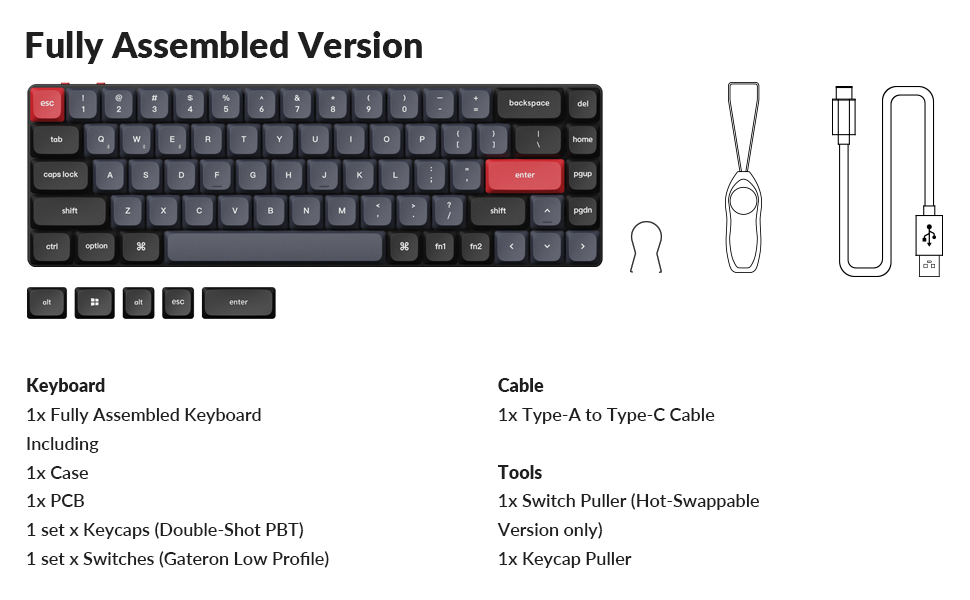
Figure 6: Key combinations for the Keychron K7 Pro.
4. Ыкчам алмаштыруучу которгучтар
The K7 Pro features hot-swappable sockets, allowing you to change Gateron low-profile mechanical switches without soldering. Use the provided switch puller tool for this process.

7-сүрөт: Ысык алмаштырылуучу которгучтун функциясы.
Техникалык тейлөө
1. Тазалоо
Regularly clean your keyboard to ensure optimal performance and longevity. Use a soft, dry cloth to wipe down the keycaps and frame. For deeper cleaning, you may remove keycaps using the provided keycap puller and use compressed air to clear debris from beneath the switches.
2. Батареяга кам көрүү
To prolong battery life, avoid fully discharging the keyboard frequently. Charge the keyboard using the provided USB-C cable when the battery indicator shows low power.
Проблемаларды чечүү
- Баскычтоп жооп бербей жатат: Ensure the keyboard is charged and the connection mode (wired/Bluetooth) is correctly selected. Try reconnecting the cable or re-pairing via Bluetooth.
- Bluetooth байланыш көйгөйлөрү: Ensure your device's Bluetooth is enabled and the keyboard is within range. Try forgetting the device on your computer and re-pairing.
- Арткы жарык иштебейт: Check the backlight settings using the key combinations (refer to the Key Combinations Table). Ensure the backlight is not turned off or set to minimum brightness.
- Катталбай жаткан ачкычтар: For hot-swappable switches, ensure the switch is fully seated in its socket. If the issue persists, try replacing the switch.
Продукт спецификациялары
| Өзгөчөлүк | Деталь |
|---|---|
| Модель номери | K7P-H3 |
| Байланыш | Bluetooth, USB Type-C |
| Макет | 65% (68 ачкыч) |
| Которгучтар | Low-Profile Gateron Brown Mechanical Switch (Hot-swappable) |
| Арткы жарык | RGB (22 түрү) |
| Баскыч капкактары | Кош-атуу PBT |
| Материал | Polybutylene Terephthalate, Aluminum |
| Батарея | 1 Литий Полимердик батарейка (кошулган) |
| Элемент Салмагы | 1.59 фунт |
| Өлчөмдөр | 12.95 x 5.51 x 1.61 дюйм |
| Шайкеш OS | macOS, Windows, Linux |
Кепилдик жана колдоо
For warranty information and technical support, please visit the official Keychron webсайтка же кардарларды тейлөөгө кайрылыңыз. Кепилдик дооматтар үчүн сатып алуу дүмүрчөгүңүздү сактаңыз.
Official Keychron Store: Keychron Amazon Store
Ask a question about this manual
Ask about setup, troubleshooting, compatibility, parts, safety, or missing instructions. Manuals+ will review the question and use this page’s manual context to help answer it.