
1. Киришүү
This manual provides detailed instructions for the BAISHUN C57 Aux Bluetooth Adapter. This device allows you to wirelessly stream audio from your Bluetooth-enabled devices to non-Bluetooth audio systems, such as car stereos, home stereos, wired speakers, and headphones, using a 3.5mm auxiliary input. It supports Bluetooth 5.3 for stable connections, hands-free calling, and True Wireless Stereo (TWS) functionality.
2. Продукт бүтүп калдыview
2.1 Пакеттин мазмуну
- BAISHUN C57 Aux Bluetooth Adapter
- USB заряддоо кабели
- Колдонуучунун Колдонмосу (бул документ)
2.2 Негизги өзгөчөлүктөрү
- Bluetooth 5.3 технологиясы: Provides a stable connection, faster pairing speed, and higher sound quality compared to older Bluetooth versions.
- 3.5 мм AUX киргизүү: Аудио түзүлүштөрдүн кеңири спектри менен шайкеш келет.
- Камтылган микрофон: Үнсүз чалууну иштетет.
- Чыныгы зымсыз стерео (TWS) колдоосу: Allows pairing two adapters for a stereo sound experience.
- Үн жардамчысын колдоо: Activate Siri or other voice assistants.
- Компакт жана портативдик дизайн: Ар кандай орнотууларда алып жүрүү жана колдонуу оңой.
- Батарея менен иштейт: Offers wireless freedom with a working range of up to 33 feet (10 meters).
2.3 Продукт диаграммасы
Сүрөт 1: BAISHUN C57 Aux Bluetooth Adapter with labeled components. This image shows the 3.5mm AUX port, Multifunction key, Microphone, Previous song/Volume- button, Next song/Volume+ button, TWS function key, LED indicator light, and DC/5V charging port.

Сүрөт 2: Key features of the adapter. This image highlights the LED indicator, support for hands-free calling, and the portable design of the device.
3. Орнотуу жана жупташтыруу
3.1 Күйгүзүү/өчүрүү
- Күйгүзүү үчүн: Long press the Multifunction (MFB) button until the LED indicator flashes. The device will automatically enter pairing mode.
- Өчүрүү үчүн: Long press the Multifunction (MFB) button until the LED indicator turns off.
3.2 Аудио системага туташуу
Insert the 3.5mm AUX plug of the adapter into the auxiliary input port of your car stereo, home stereo, wired speaker, or headphones.
3.3 Bluetooth жупташтыруу
- Ensure the BAISHUN C57 adapter is powered on and in pairing mode (LED indicator flashing).
- Смартфонуңузда же башка Bluetooth иштетилген түзмөгүңүздө Bluetooth жөндөөлөрүнө өтүңүз.
- Издөө available devices and select "C57" from the list.
- Once connected, the LED indicator on the adapter will stop flashing and remain solid blue.

Сүрөт 3: Visual guide for initial setup. This image illustrates the steps: 1) Long press the button to power on, 2) Plug into the audio system, and 3) Enable Bluetooth on your phone, search for 'C57' and pair.

Сүрөт 4: Compatibility diagram. This image shows the adapter connecting to a wired speaker, home stereo, car audio system, phone, tablet, and computer, demonstrating its wide range of applications.
4. Иштөө нускамалары
4.1 Музыканы ойнотуу
- Ойнотуу/тындыруу: Short press the Multifunction (MFB) button.
- Кийинки трек: Short press the "Next song" button.
- Мурунку трек: Short press the "Previous song" button.
- Көлөмү: Long press the "Next song" button.
- Үнүн азайтуу: Long press the "Previous song" button.
4.2 Hands-Free чалуу
- Чакырууга жооп берүү: Short press the Multifunction (MFB) button when an incoming call rings.
- Чакырууну аяктоо: Short press the Multifunction (MFB) button during a call.
- Чакырууну четке кагуу: Long press the Multifunction (MFB) button when an incoming call rings.
- Акыркы номерди кайра терүү: Double press the Multifunction (MFB) button.
4.3 Үн жардамчысын жандыруу
To activate your device's voice assistant (e.g., Siri), short press the Multifunction (MFB) button three times.

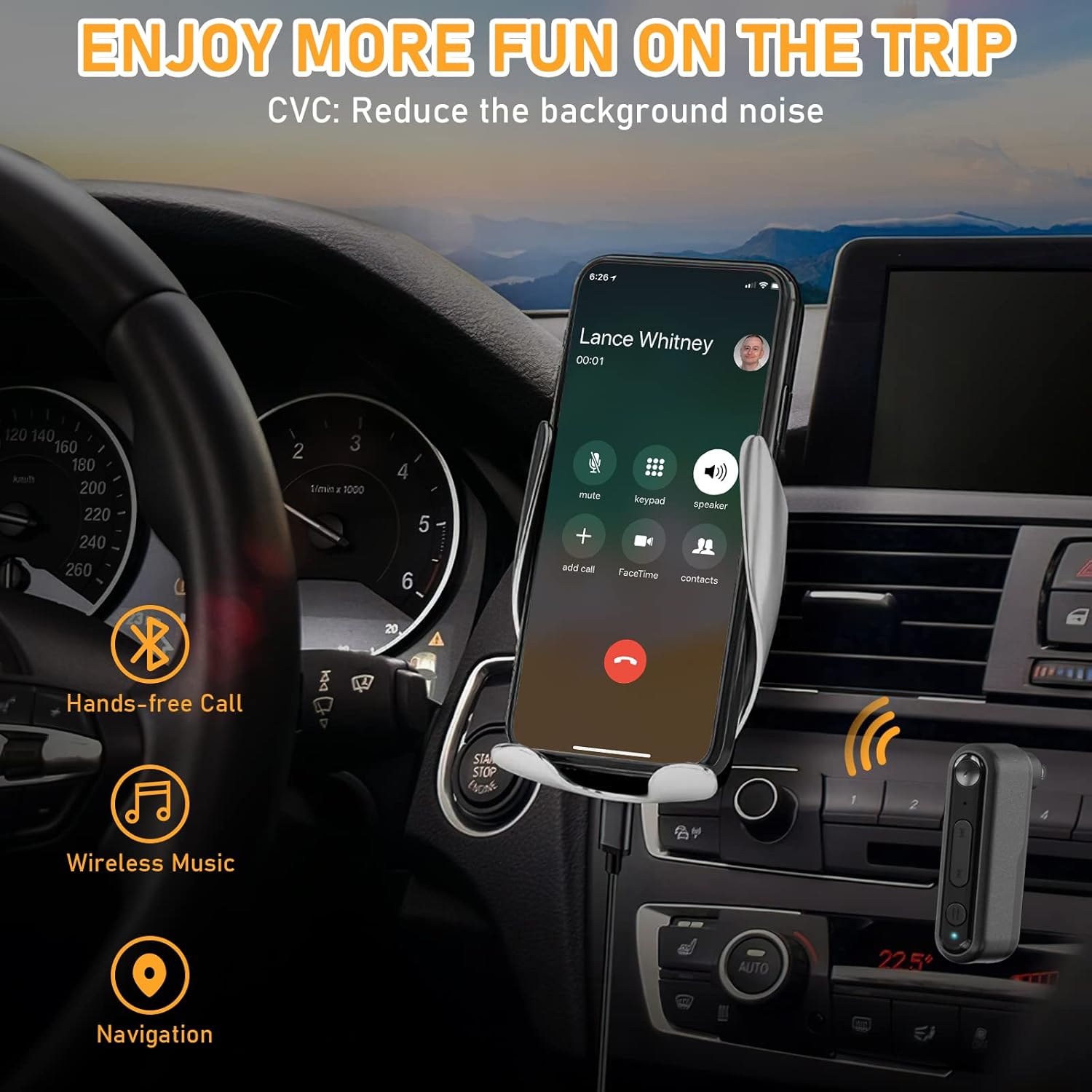
Сүрөт 5: Hands-free communication and navigation. This image shows the adapter being used in a car for hands-free calls, wireless music, and navigation, enhancing driving safety.
5. Чыныгы зымсыз стерео (TWS) жупташтыруу
The BAISHUN C57 adapter supports True Wireless Stereo (TWS), allowing you to pair two adapters together to create a left and right stereo channel for an immersive audio experience. This feature is ideal for parties, movies, or music listening with two separate speakers.
5.1 TWS Pairing Steps
- Ensure both BAISHUN C57 adapters are powered on and not connected to any other Bluetooth device.
- Short press the TWS function key on one adapter. This adapter will become the primary unit (e.g., Right channel).
- Short press the TWS function key on the second adapter. This adapter will become the secondary unit (e.g., Left channel).
- The two adapters will automatically pair with each other. Once paired, the LED indicators will change to indicate a successful TWS connection.
- Now, connect your Bluetooth-enabled device (e.g., smartphone) to the primary BAISHUN C57 adapter via Bluetooth (search for "C57").
- Audio will now be streamed in true stereo through both connected speakers.

Сүрөт 6: True Wireless Stereo (TWS) setup. This image illustrates how two adapters can be paired to deliver separate left and right audio channels to two speakers, controlled by a single smartphone.
6. Заряддоо
When the battery is low, the LED indicator will flash red. To charge the BAISHUN C57 adapter:
- Connect the provided USB charging cable to the DC/5V charging port on the adapter.
- Plug the other end of the USB cable into a standard USB power source (e.g., wall adapter, computer USB port, car charger).
- LED индикатору заряддоо учурунда катуу кызыл жарыкты көрсөтөт.
- Once fully charged, the LED indicator will turn off or change to blue (depending on the model).
A full charge typically takes 3-5 hours and provides several hours of operation, though actual battery life may vary based on usage and volume levels.
7. Техникалык тейлөө
- Аппаратты кургак кармаңыз. Нымдуулуктун, жамгырдын же суюктуктун таасиринен алыс болуңуз.
- Аппаратты өтө жогорку температурага (ысык же муздак) тийгизбеңиз.
- Аппаратты жумшак, кургак чүпүрөк менен тазалаңыз. Катуу химиялык заттарды же абразивдүү тазалагычтарды колдонбоңуз.
- Store the device in a clean, dust-free environment when not in use.
- Аппаратты түшүрүүдөн же катуу таасирлерден сактаныңыз.
8. Кыйынчылыктарды
| Көйгөй | Мүмкүн себеп | Чечим |
|---|---|---|
| Түзмөк күйбөйт. | Батарея түгөнүп калды. | Берилген USB кабелин колдонуу менен аппаратты толугу менен заряддаңыз. |
| Cannot pair with my Bluetooth device. | Adapter is not in pairing mode. Bluetooth is disabled on your device. Adapter is too far from your device. | Long press MFB to enter pairing mode (flashing LED). Телефонуңузда/планшетиңизде Bluetooth иштетилгенин текшериңиз. Move the adapter closer to your Bluetooth device (within 33ft/10m). |
| Жупташтыргандан кийин үн чыкпайт. | Үн өтө төмөн. 3.5mm AUX cable is not fully inserted. Incorrect audio input selected on your stereo. | Increase volume on both the adapter and your audio system. Ensure the 3.5mm plug is securely connected. Select the correct AUX input on your car/home stereo. |
| Аудио сапаты начар же ажыратылган. | Интерференция же аралык. Батарея аз. | Move closer to the adapter and away from potential interference sources. Charge the adapter fully. |
| TWS жупташтыруу ишке ашпай калды. | Adapters are already paired to another device. Incorrect TWS pairing steps. | Ensure both adapters are disconnected from other Bluetooth devices before TWS pairing. Follow the TWS pairing steps precisely as outlined in Section 5.1. |
9. Техникалык шарттар
- Модел: C57
- Bluetooth версиясы: 5.3
- Байланыш: 3.5mm AUX Input, Bluetooth
- Кубат булагы: Кайра заряддалуучу литий-иондук батарейка
- Иштөө диапазону: 33 фут (10 метр) чейин
- Продукциянын өлчөмдөрү: 2.12 x 1.87 x 0.55 дюйм (болжол менен)
- Элемент Салмагы: 1.44 унция (болжол менен)
- Өзгөчөлүктөр: Built-In Microphone, Hands-Free Calls, True Wireless Stereo (TWS)

Сүрөт 7: Bluetooth 5.3 advantages. This image highlights the benefits of Bluetooth 5.3, including 2X more stable connection, 2X faster transmission, and higher sound quality compared to Bluetooth 5.0.
10. Кепилдик маалыматы
For specific warranty terms and conditions, please refer to the product packaging or contact BAISHUN customer support directly. Warranty coverage typically includes manufacturing defects for a specified period from the date of purchase.
11. Кардарларды колдоо кызматы
If you encounter any issues or have questions not covered in this manual, please contact BAISHUN customer support through your purchase platform or visit the official BAISHUN website for assistance. Please have your product model (C57) and purchase details ready when contacting support.