
1. Киришүү
This manual provides essential information for the installation, operation, and maintenance of your Montech Titan Gold 850W ATX 3.0 Power Supply. This high-end power supply is designed for gaming systems, featuring 80 Plus Gold and Cybenetics Gold certifications, fully modular cabling, and readiness for PCIe 5.0 with a new 12VHPWR connector. Please read this manual thoroughly before installation and use to ensure proper functionality and safety.

Figure 1: Montech Titan Gold 850W Power Supply and its retail packaging.
2. Коопсуздук маалыматы
Always observe the following safety precautions to prevent injury or damage to your power supply and system components:
- Ensure the power supply is disconnected from the AC power outlet before installation or handling.
- Электр жабдыгын ачпаңыз casinг. Жогорку томtages ичинде бар жана колдонуучу тейлей турган бөлүктөр жок.
- Электр менен жабдууну жакшы желдетилген жерге, жылуулук булактарынан, тике күн нурунан жана нымдан алыс орнотуңуз.
- Бул кубат булагы менен кошо берилген модулдук кабелдерди гана колдонуңуз. Шайкеш келбеген кабелдерди колдонуу зыян келтириши мүмкүн.
- Тутумду күйгүзүүдөн мурун бардык туташтыргычтар бекем орнотулганын текшериңиз.
3. Пакеттин мазмуну
Пакетте бардык буюмдар бар экенин текшериңиз:
- Montech Titan Gold 850W Power Supply Unit
- Modular Cable Set (including 12VHPWR cable)
- AC Power Cord
- Монтаждоо бурамалар
- Кабелдик байлагычтар/липучка боолор
- Колдонуучунун Колдонмосу (бул документ)

Figure 2: Included modular cables and accessories for the power supply.
4. Орнотуу жана орнотуу
Электр менен камсыздоону орнотуу үчүн төмөнкү кадамдарды аткарыңыз:
- Компьютериңиздин корпусун даярдаңыз: Ensure your PC case is compatible with ATX power supplies.
- PSU орнотуу: Secure the power supply into the designated PSU bay in your PC case using the provided mounting screws. Ensure the fan is oriented correctly for optimal airflow (typically facing downwards if your case has a bottom vent).
- Модулдук кабелдерди туташтыруу: Identify the necessary cables for your motherboard, CPU, graphics card(s), and storage devices. Connect these cables to the corresponding ports on the power supply. The fully modular design allows you to connect only the cables you need, reducing clutter.
- Компоненттерге туташуу: Route the connected cables through your case's cable management channels and connect them to your motherboard (24-pin ATX, 8-pin EPS/CPU), graphics card(s) (PCIe, including the 12VHPWR for compatible GPUs), and storage drives (SATA, Molex).
- Коопсуз байланыштар: Double-check all connections to ensure they are firm and properly seated.

Figure 3: ашыкview of the modular cable connection ports on the power supply.
5. Иштөө нускамалары
After installation, follow these steps to operate your power supply:
- AC кубатына туташтыруу: Plug the AC power cord into the power supply's AC inlet and then into a wall outlet or surge protector.
- Кубат которгучу: Кубат булагынын арткы бетиндеги негизги кубат которгучун таап, аны "ON" (I) абалына буруңуз.
- Система күйүк: Press the power button on your PC case to start your computer.
- Smart Zero Fan Feature: This power supply includes a 'Smart Zero Fan' switch. When enabled (ON), the fan will remain off under low load conditions for silent operation. The fan will automatically activate when the load increases to maintain optimal temperatures. If disabled (OFF), the fan will operate continuously.

Figure 4: Rear panel with main power switch and Smart Zero Fan control.
6. Техникалык тейлөө
To ensure the longevity and optimal performance of your power supply, periodic maintenance is recommended:
- Чаңды тазалоо: Regularly clean dust from the power supply's fan intake and exhaust vents using compressed air. Ensure the power supply is turned off and unplugged before cleaning.
- Кабелдик текшерүү: Periodically check all modular cable connections for looseness or damage. Re-seat any loose cables.
- Экологиялык шарттар: Maintain a clean, dry, and cool environment for your PC to prevent excessive heat and dust buildup.

5-сүрөт: Жогорку view of the power supply, highlighting the fan grill for cleaning.
7. Кыйынчылыктарды
Эгерде сиз электр менен камсыздоодо көйгөйлөргө туш болсоңуз, төмөнкү кеңири таралган көйгөйлөрдү жана чечимдерди караңыз:
- Кубат жок:
- AC кубат шнуру кубат булагына жана розеткага бекем сайылганын текшериңиз.
- Verify the main power switch on the PSU is in the 'ON' (I) position.
- Check all modular cable connections, especially the 24-pin ATX and 8-pin EPS/CPU cables, for secure seating.
- Дубалдагы розеткада кубат бар экенин ырастоо үчүн башка аспап менен сынап көрүңүз.
- Система күтүлбөгөн жерден өчөт:
- This could indicate an overload or overheating. Ensure your system's power consumption does not exceed the PSU's 850W capacity.
- Check for proper ventilation around the PSU and inside the PC case. Clean any dust buildup.
- Ensure the 'Smart Zero Fan' is functioning correctly or try disabling it to force continuous fan operation.
- Fan Not Spinning (under low load):
- If the 'Smart Zero Fan' feature is enabled, the fan will not spin under low loads. This is normal operation. The fan will activate when the system load increases.
- If the fan never spins even under high load with 'Smart Zero Fan' disabled, contact customer support.
8. Техникалык шарттар
Detailed technical specifications for the Montech Titan Gold 850W Power Supply:
| Өзгөчөлүк | Спецификация |
|---|---|
| Бренд | Монтех |
| Модель аты | Titan Gold 850W (TIS0124) |
| Ватtage | 850 Ватт |
| Чыгуу Wattage | 750 Watts (Note: Product title states 850W, specifications list 750W. Please verify with manufacturer if discrepancy is critical.) |
| Натыйжалуулуктун сертификациясы | 80 Plus Gold, Cybenetics Gold |
| Форма фактору | ATX |
| Энергия менен жабдуунун дизайны | Толук модулдук |
| Туташтыргыч түрү | ATX, PCIe 5.0 (12VHPWR) |
| Муздатуу ыкмасы | Аба (1 желдеткич) |
| Элемент Салмагы | 7.52 фунт |
| Дата биринчи жеткиликтүү | 13-декабрь, 2022-жыл |
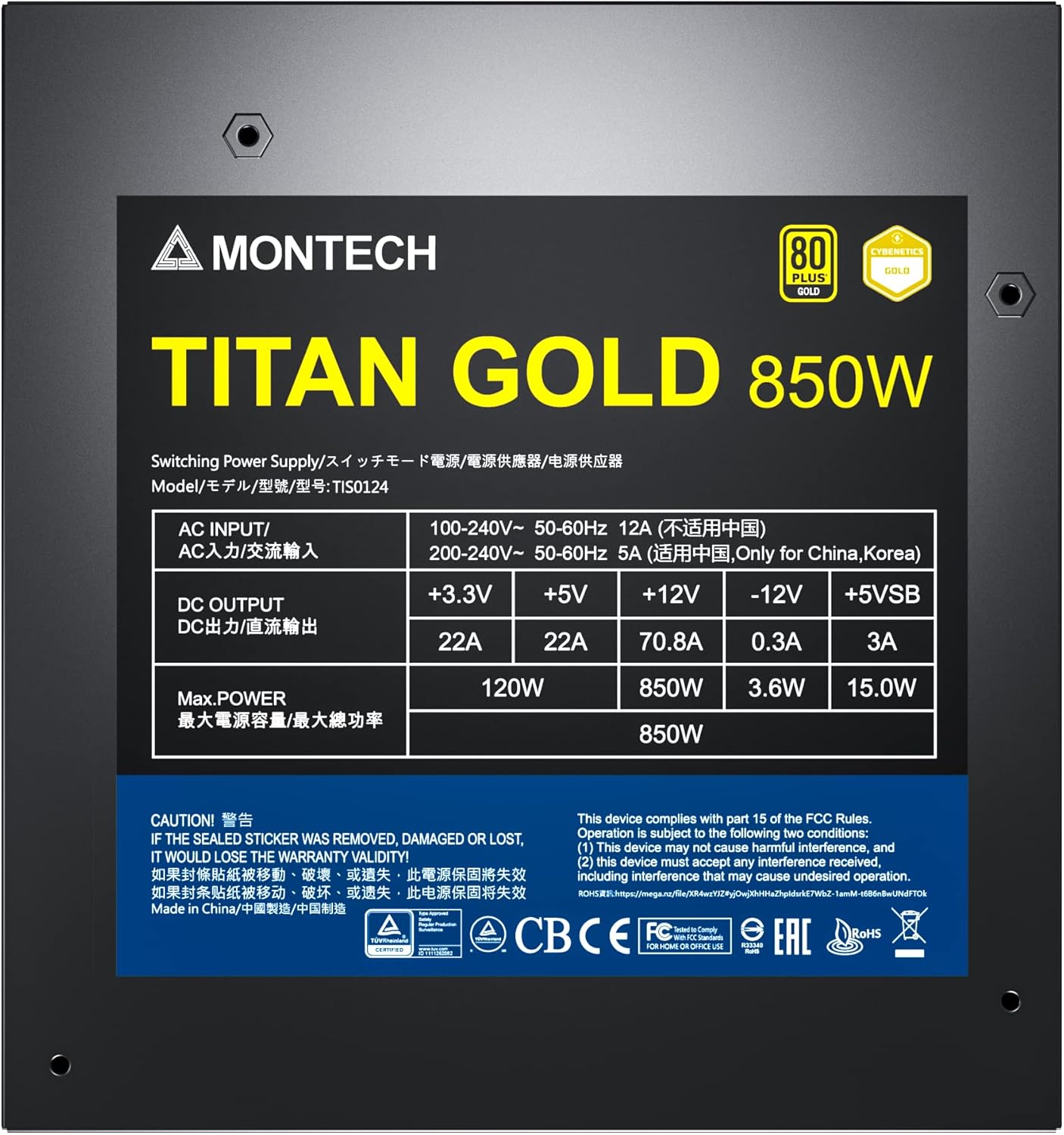
Figure 6: Product label displaying electrical specifications and certifications.
9. Кепилдик жана колдоо
The Montech Titan Gold 850W Power Supply comes with a 10 жылдык кепилдик, ensuring long-term reliability and peace of mind. For technical support, warranty claims, or further assistance, please visit the official Montech webсайтка же кардарларды тейлөө бөлүмүнө кайрылыңыз.
Кепилдикти текшерүү үчүн сатып алганыңыздын далилин сактап коюңуз.


