
Introduction
Welcome to the instruction manual for your MokerLink 12-Port Gigabit Ethernet Switch. This document provides detailed information on the product's features, installation, operation, and troubleshooting to ensure optimal performance and longevity of your device.
Продукт бүттүview
The MokerLink 12-Port Gigabit Ethernet Switch is an unmanaged network switch designed for small office/home office (SOHO) and small to medium business (SMB) environments. It features 8 Gigabit PoE+ ports, 2 Gigabit Uplink ports, and 2 Gigabit SFP ports, offering flexible connectivity and power options for various network devices.

Сүрөт 1: Алдыңкы view of the MokerLink 12-Port Gigabit Ethernet Switch, showcasing анын компакттуу дизайны жана портунун жайгашуусу.
Негизги өзгөчөлүктөрү
- 12 гигабиттик порттор: Includes 8 Gigabit PoE+ ports, 2 Gigabit Uplink ports, and 2 Gigabit SFP ports for versatile network connections.
- High PoE Power: Supports IEEE 802.3af/at standards, providing up to 30W per port with a total power budget of 120W.
- Башкарылбаган Plug & Play: Automatically detects devices and provides data links, compatible with both PoE and non-PoE devices without requiring complex configuration.
- Узартуу режими: Allows PoE ports 7-8 to extend transmission distance up to 250 meters at a speed of 10Mbps.
- PoE Watchdog: Automatically monitors PoE devices and restarts ports if a device becomes unresponsive, enhancing network reliability.
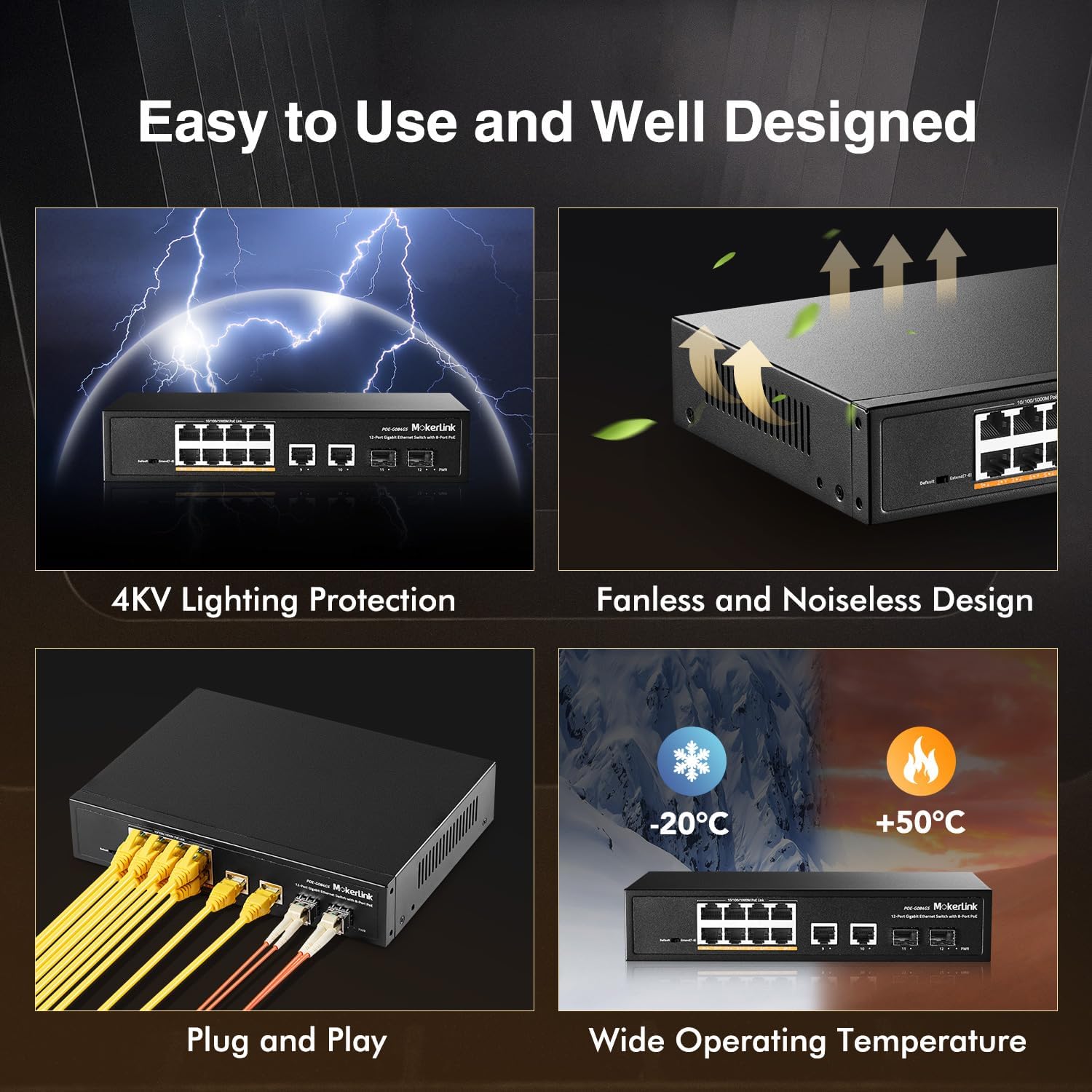
- желдеткичсиз дизайн: Ensures silent operation, suitable for various environments.
- Узак металл корпус: Provides robust protection and heat dissipation.
- 4 кВ чагылгандан коргоо: Offers enhanced protection against electrical surges.
- Кеңири иштөө температурасы: -20°Cден +50°Cге чейинки температурада ишенимдүү иштейт.

Figure 2: Visual representation of the MokerLink 12-Port Gigabit Ethernet Switch's main features.
Пакеттин мазмуну
Пакеттин мазмунун кылдат текшериңиз. Эгерде кандайдыр бир буюм жок же бузулса, дароо сатуучуга кайрылыңыз.
- 1 x MokerLink 12-Port Gigabit PoE Switch
- 1 х Кубат кабели
- 1 x User Manual
Аппараттык камсыздоонун сүрөттөлүшү
Front Panel
The front panel of the switch features all network ports, LED indicators, and a DIP switch for mode selection.
3-сүрөт: Детальдуу view of the switch's front panel with port labels and DIP switch.
- 1-8 порттору: Gigabit PoE+ Ethernet ports (10/100/1000Mbps). These ports provide both data and power to connected PoE-compatible devices.
- 9-10 порттору: Gigabit Uplink Ethernet ports (10/100/1000Mbps). Used for connecting to routers, NVRs, or other network devices.
- 11-12 порттору: Gigabit SFP Ports. Used for fiber optic connections with compatible SFP modules (single-mode or multimode).
- DIP которуу: Used to select between Default Mode and Extend Mode.
Арткы панель
The rear panel includes the AC power input.

4-сүрөт: Арткы view of the switch, highlighting the AC power input.
- AC Input 100-240V: Power connector for the switch.
LED көрсөткүчтөрү
Коммутатордо абал жөнүндө маалымат берүү үчүн LED индикаторлору бар:
- PWR LED: Ажыраткыч күйгүзүлгөндө күйөт.
- Шилтеме/Акт LED'лери (ар бир порт үчүн): Illuminates when a network link is established and flashes during data transmission.
- PoE светодиоддору (ар бир PoE порту үчүн): Illuminates when PoE power is being supplied to a connected device.
Орнотуу жана орнотуу
1-кадам: Пакеттен чыгаруу
Carefully remove the switch from its packaging. Ensure all components listed in the "Package Contents" section are present and undamaged.
2-кадам: Power Connection
Connect the power cord to the AC input on the rear panel of the switch and then to a standard electrical outlet. The PWR LED on the front panel should illuminate, indicating that the switch is receiving power.
3-кадам: Тармактык байланыштар
Connect your network devices to the switch as follows:
- Connecting PoE Devices: Connect your PoE-compatible devices (e.g., IP cameras, wireless access points, IP phones) to ports 1-8 using standard Ethernet cables. The Link/Act and PoE LEDs for these ports will light up, indicating a successful connection and power delivery.
- Connecting Non-PoE Devices: Connect non-PoE network devices (e.g., computers, routers, NVRs) to any of the Gigabit Ethernet ports (1-10). The switch will automatically detect non-PoE devices and provide data connectivity without power.
- Жогорку шилтемеге туташуу: Connect one of the Gigabit Uplink ports (9 or 10) to your router or main network backbone using an Ethernet cable.
- SFP Connection: For fiber optic connections, insert compatible SFP modules into ports 11-12 and connect fiber optic cables.
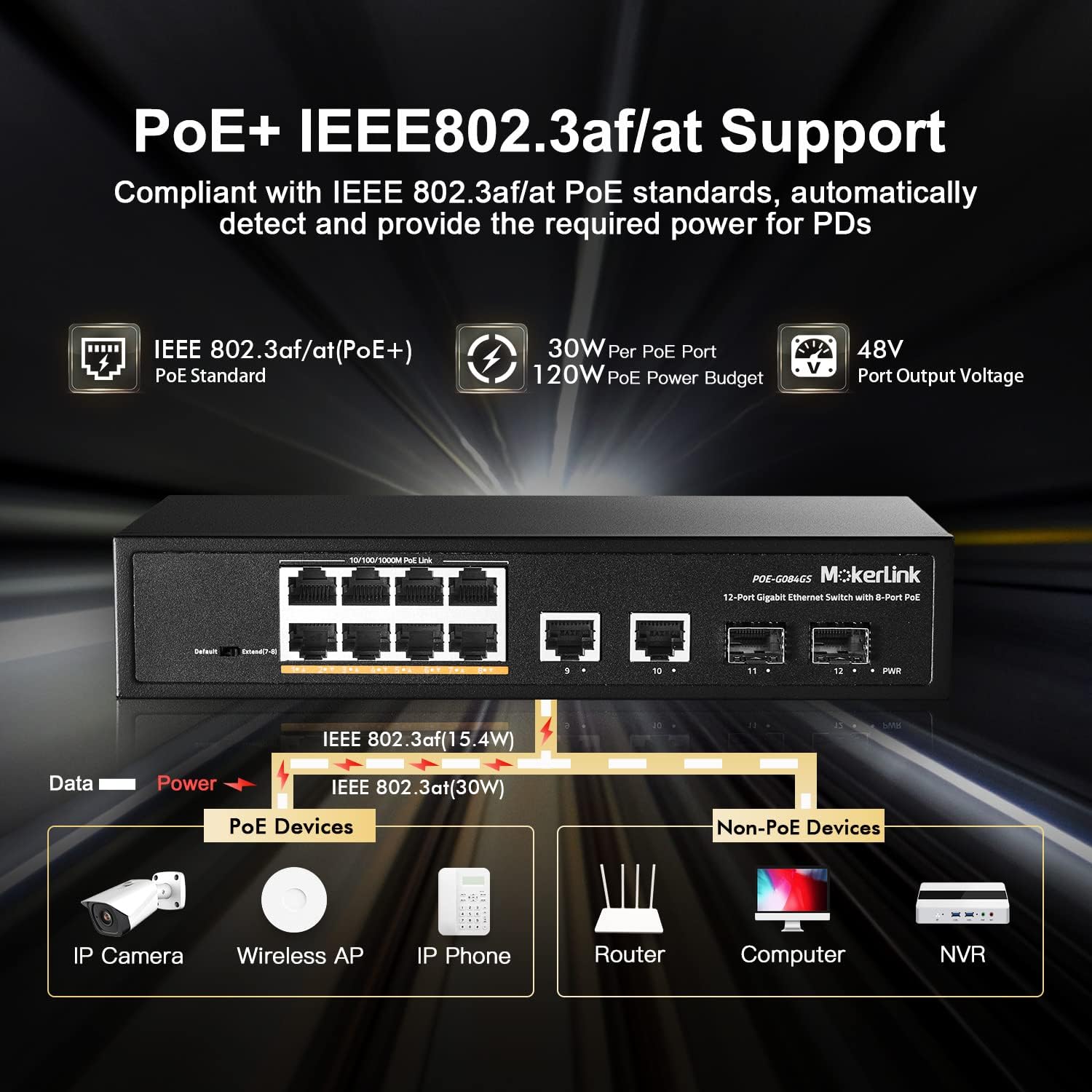
5-сүрөт: Мисample of connecting various devices to the MokerLink PoE switch.
Иштөө нускамалары
The MokerLink 12-Port Gigabit Ethernet Switch is an unmanaged, plug-and-play device. No software configuration is typically required for basic operation.
Маалыматтарды өткөрүү
Once devices are connected and powered on, the switch will automatically facilitate high-speed data transmission between all connected devices at Gigabit speeds (10/100/1000Mbps).
Power over Ethernet (PoE)
For devices connected to PoE+ ports (1-8) that support IEEE 802.3af/at standards, the switch will automatically detect their power requirements and supply the necessary power through the Ethernet cable. This eliminates the need for separate power adapters for PoE-compatible devices.
Advanced Features: Extend Mode and PoE Watchdog
The DIP switch on the front panel allows you to enable advanced features for specific ports.

Figure 6: DIP switch settings and their effect on port distance and speed.
Кеңейтүү режими
When the DIP switch is set to "Extend" mode, PoE ports 7 and 8 will operate at a reduced speed of 10Mbps but can extend the PoE transmission distance up to 250 meters. This feature is particularly useful for connecting devices located further away, such as outdoor IP cameras, where standard Ethernet cable length limits (100 meters) would otherwise be an issue.
PoE Watchdog
Simultaneously, enabling Extend Mode also activates the PoE Watchdog function for ports 7 and 8. The PoE Watchdog continuously monitors the status of connected PoE devices. If a device becomes unresponsive or drops its connection, the switch will automatically restart the corresponding PoE port to re-establish the connection, improving system reliability and reducing the need for manual intervention.
Проблемаларды чечүү
If you encounter issues with your MokerLink switch, please refer to the following troubleshooting tips:
- Кубат жок: Ensure the power cord is securely connected to both the switch and a working electrical outlet. Check if the PWR LED is illuminated. If not, try a different power outlet.
- Шилтеме жок/Аракет: Verify that Ethernet cables are securely connected to both the switch and the connected device. Ensure the connected device is powered on and functioning correctly. Try a different Ethernet cable or port to rule out cable or port issues.
- No PoE Power: Confirm that the connected device is PoE-compatible (IEEE 802.3af/at standard). Check if the PoE LED for the port is illuminated. If using Extend Mode, ensure the device can operate at 10Mbps.
- Жай туташуу: Ensure all connected devices and cables support Gigabit Ethernet for optimal performance. If using Extend Mode, remember that ports 7-8 will operate at 10Mbps.
- Үзгүлтүксүз туташуу: Check for loose cable connections. Ensure the switch is placed in a well-ventilated area to prevent overheating, as excessive heat can affect performance.
Техникалык шарттар
| Өзгөчөлүк | Деталь |
|---|---|
| Бренд | MokerLink |
| Модель номери | POE-G084GS |
| Порттардын саны | 12 (8 GE PoE+, 2 GE Uplink, 2 Gigabit SFP) |
| Маалыматтарды өткөрүү ылдамдыгы | 1000 Мегабит секундасына |
| PoE стандарты | IEEE 802.3af / боюнча |
| PoE порту үчүн максималдуу кубаттуулук | 30 Ватт |
| Жалпы PoE кубаттуулугу бюджети | 120 Ватт |
| Которуу түрү | Башкарылбайт |
| Иштин материалы | Металл |
| Муздатуу | Күйөрмансыз |
| Иштөө температурасы | -20°Cден +50°Cге чейин |
| Тtage | 100-240V AC киргизүү |
| Элемент Салмагы | 1.25 килограмм |
Кепилдик жана колдоо
This MokerLink product comes with a 1-year warranty. For technical support or warranty inquiries, please contact MokerLink customer service through their official webпродукт сатылып алынган сайт же платформа.
For further assistance, please refer to the MokerLink official store page: MokerLink дүкөнү.