
1. Киришүү
Thank you for choosing the Pinell Supersound 001. This compact and versatile radio offers a superior audio experience with its integrated equalizer, allowing you to customize the sound to your preference. The Supersound 001 supports DAB+ and FM radio reception, as well as audio streaming via Bluetooth 5.0 from your mobile devices. Designed for flexibility, it can be powered by either an AC adapter or batteries, making it suitable for both home and portable use.
2. Коопсуздук маалыматы
- Кубат булагы: Белгиленген кубат адаптерин гана колдонуңуз. Voltage сиздин аймактын талаптарына дал келет.
- Батареяны колдонуу: If using batteries, ensure they are inserted with correct polarity. Do not mix old and new batteries, or different types of batteries. Remove batteries if the unit will not be used for an extended period.
- Суу жана ным: Do not expose the unit to rain, moisture, or dripping/splashing liquids. Keep away from objects filled with liquids, such as vases.
- Жылуулук: Аппаратты радиаторлор, жылуулук регистрлери, мештер же башка аппараттар (анын ичинде) сыяктуу жылуулук булактарынын жанына койбоңуз. ampкөтөргүчтөр) жылуулукту пайда кылуучу.
- Вентиляция: Адекваттуу вентиляцияны камсыз кылыңыз. Эч кандай желдетүүчү тешиктерди жаап албаңыз.
- Тазалоо: Тазалоодон мурун электр кубатынан ажыратыңыз. Жумшак, кургак чүпүрөктү колдонуңуз. Суюк тазалагычтарды же аэрозоль тазалагычтарды колдонбоңуз.
- Тейлөө: Бул продуктту өзүңүз тейлөөгө аракет кылбаңыз. Бардык тейлөөнү квалификациялуу тейлөө кызматкерлерине тапшырыңыз.
3. Пакеттин мазмуну
Сураныч, бардык элементтер бар экенин текшериңиз:
- Pinell Supersound 001 Radio
- Кубаттуу адаптер
- User Manual
4. Продукт бүтүп калдыview
Familiarize yourself with the controls and display of your Pinell Supersound 001 radio.
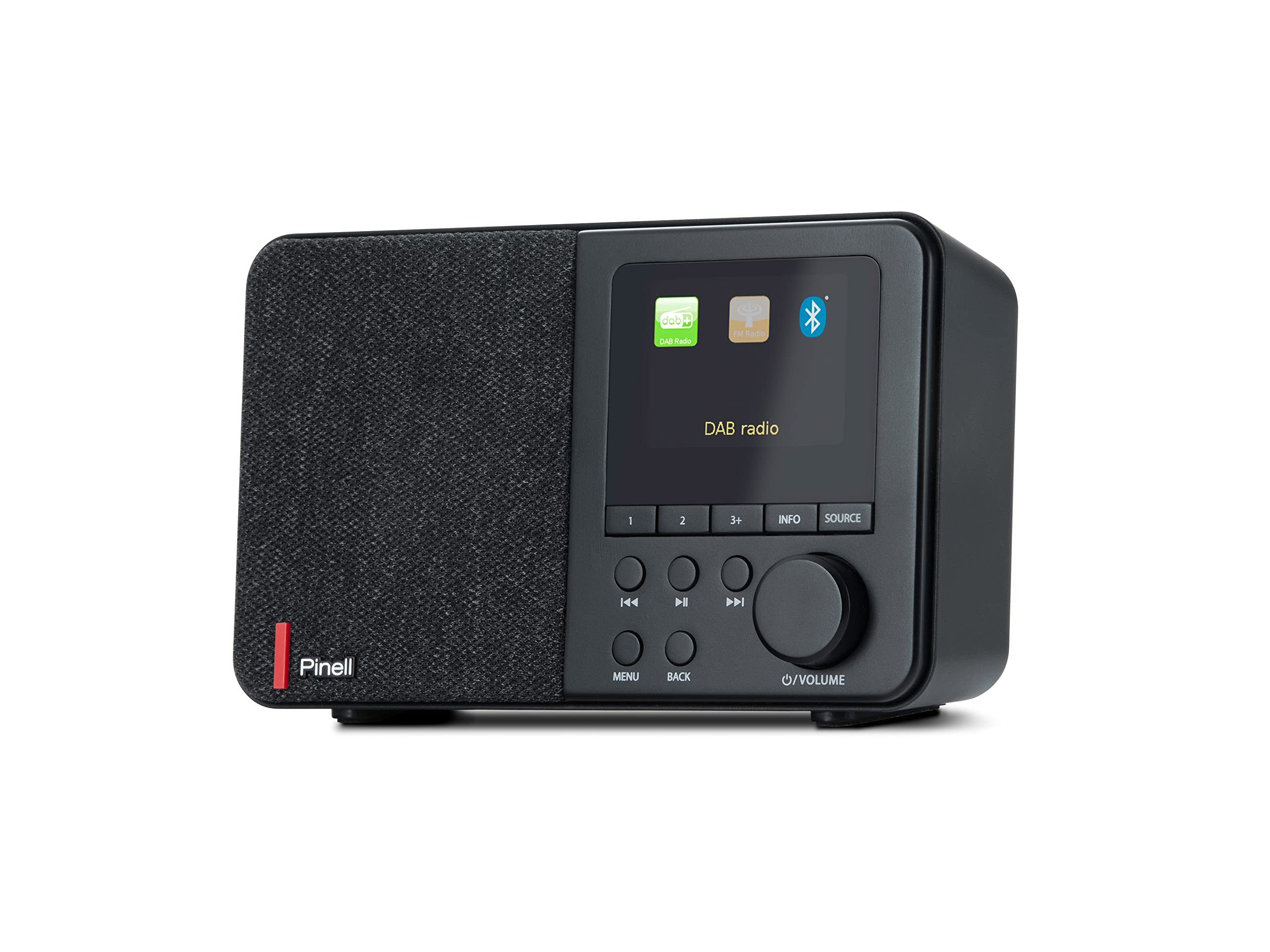
The image displays the front panel of the Pinell Supersound 001 radio. On the left is the speaker grille. The right side features a monochrome display showing 'DAB', 'NRK P1+', '11:03', and 'Distriktsnyheter', indicating DAB+ mode with station information. Below the display are several buttons: '1', '2', '3+', 'INFO', 'SOURCE', 'MENU', 'BACK', and navigation/playback controls (left, play/pause, right). A large rotary knob for volume and power is located on the bottom right.
Башкаруу жана функциялар:
- Дисплей: Shows station information, time, menu options, and settings.
- Баяндамачы: Integrated 3W RMS speaker for audio output.
- 1, 2, 3+ Buttons: For quick access to stored radio station presets.
- INFO баскычы: Учурдагы станция же трек жөнүндө кошумча маалыматты көрсөтөт.
- SOURCE баскычы: Switches between DAB+, FM, and Bluetooth input modes.
- Navigation Buttons (◀◀, ►►): Navigate through menus, stations, or tracks.
- Play/Pause Button (►█): Play or pause audio in Bluetooth mode.
- MENU баскычы: Орнотуулар жана опциялар үчүн негизги менюга кирет.
- Арткы баскыч: Мурунку менюга же экранга кайтат.
- Үн/кубат баскычы: Rotate to adjust volume. Press to power on/off the unit.
- Гарнитура уячасы: Located on the back or side for private listening.
5. Орнотуу
5.1 Кубат туташтыруу
The Supersound 001 can be powered by the included AC adapter or by batteries (not included).
- AC кубаттуулугу: Connect the power adapter to the DC IN socket on the back of the radio, then plug the adapter into a wall outlet.
- Батарея кубаттуулугу: Open the battery compartment (usually on the bottom or back). Insert the required number of batteries (e.g., AA or C, refer to the compartment label) ensuring correct polarity. Close the compartment securely.
5.2 Антенна
For optimal radio reception, ensure the telescopic antenna is fully extended and positioned vertically. Adjust its direction for the best signal quality.
6. Иштөө нускамалары
6.1 Күйгүзүү/өчүрүү
басыңыз Volume/Power knob to turn the radio on or off.
6.2 Булакты тандоо
басыңыз SOURCE баскычы repeatedly to cycle through available modes: DAB+, FM, and Bluetooth.
6.3 DAB+ радио режими
- Биринчи колдонуу: When you first switch to DAB+ mode, the radio will automatically perform a full scan for available stations. This may take a few minutes.
- Станцияны тандоо: колдонуу ◀◀ жана ►► buttons to browse through the list of available DAB+ stations. Press the Volume/Power knob бекет тандоо.
- Маалымат дисплей: басыңыз INFO баскычы to cycle through different information displays, such as program type, signal strength, bit rate, and time/date.
6.4 FM радио режими
- Авто сканерлөө: FM режиминде басып, кармап туруңуз ►► Кийинки жеткиликтүү станцияны автоматтык түрдө издөө үчүн баскычты басыңыз.
- Кол менен жөндөө: баскычын кыскача басыңыз ◀◀ or ►► buttons to fine-tune the frequency step-by-step.
- Маалымат дисплей: басыңыз INFO баскычы чейин view Эгерде бар болсо, RDS (Радио маалымат системасы) жөнүндө маалымат.
6.5 Bluetooth 5.0 режими
- Жупташтыруу: радиону Bluetooth режимине которуу үчүн SOURCE баскычы. The display will show 'Pairing' or 'Waiting for connection'. On your mobile device, enable Bluetooth and search for 'Pinell Supersound 001'. Select it to pair.
- Ойнотуу: Once paired, you can play audio from your device. Use the Ойнотуу/тындыруу баскычы on the radio or your device to control playback. The ◀◀ жана ►► buttons can be used to skip tracks.
6.6 Алдын ала орнотууларды сактоо жана кайра чакырып алуу
- Дүкөн: Tune to your desired station (DAB+ or FM). Press and hold one of the 1, 2, or 3+ buttons дисплей станция сакталганын ырастаганга чейин.
- Эскертүү: Тиешелүү баскычты кыскача басыңыз 1, 2, or 3+ button to instantly tune to the saved station.
6.7 Alarm Clock, Sleep Timer, and Snooze
Access these functions via the МЕНЮ баскычы.
- Ойготкуч: Navigate to 'Alarm' in the menu. Set the alarm time, source (DAB+, FM, or buzzer), and volume.
- Уйку таймери: Navigate to 'Sleep' in the menu. Set a duration (e.g., 15, 30, 60 minutes) after which the radio will automatically turn off.
- Чырым: Ойготкуч басылганда, басыңыз Volume/Power knob (or a designated snooze button if available) to temporarily silence it for a short period.
6.8 Эквалайзердин жөндөөлөрү
The integrated equalizer allows you to adjust the audio output. Navigate to 'Equalizer' or 'Sound Settings' in the МЕНЮ. You can choose from preset equalizer modes or customize bass and treble levels to suit your listening preference.
6.9 Гарнитураны колдонуу
Connect standard 3.5mm headphones to the headphone jack for private listening. The main speaker will be muted automatically.
7. Техникалык тейлөө
- Тазалоо: Use a soft, dry, lint-free cloth to clean the radio's surface. Do not use abrasive cleaners, waxes, or solvents.
- Сактагыч: Эгерде радиону узак убакытка сактап жатсаңыз, агып кетпеши үчүн батарейкаларды алып салыңыз. Салкын, кургак жерде сактаңыз.
- Антеннага кам көрүү: Ийилип же сынбаш үчүн телескоптук антеннаны акырын кармаңыз.
8. Кыйынчылыктарды
Эгер көйгөйлөргө туш болсоңуз, төмөнкү жалпы көйгөйлөрдү жана чечимдерди караңыз:
- Кубат жок:
- Check if the AC adapter is securely connected to both the radio and the power outlet.
- If using batteries, ensure they are correctly inserted and not depleted. Replace if necessary.
- Радио кабыл алуусу начар (DAB+/FM):
- Телескоптук антеннаны толук узартыңыз жана тууралаңыз.
- Try moving the radio to a different location, away from potential interference sources (e.g., other electronic devices, thick walls).
- Perform a full scan for DAB+ stations in the menu.
- Bluetooth жупташтыруу маселелери:
- Радио Bluetooth жупташтыруу режиминде экенин текшериңиз.
- Make sure Bluetooth is enabled on your mobile device and it is within range (typically 10 meters).
- Түзмөктү жупташып, кайра жупташып көрүңүз.
- Ensure no other Bluetooth devices are actively connected to the radio.
- Үн жок:
- Check the volume level on both the radio and your connected Bluetooth device.
- Ensure headphones are not connected if you expect sound from the speaker.
- Verify the correct source (DAB+, FM, Bluetooth) is selected.
9. Техникалык шарттар
| Бренд | Pinell |
| Модель аты | Супер үн 001 |
| Модель номери | BP001 |
| Түс | Кара |
| Байланыш технологиясы | Bluetooth 5.0, Headphone Jack |
| Өзгөчөлүктөр | Integrated Clock, Portable, Equalizer |
| Шайкеш түзмөктөр | Headphones, Bluetooth-enabled devices |
| Power Source | AC Adapter, Batteries (not included) |
| Радио топтору колдоого алынат | FM, DAB+ |
| RMS Power Output | 3 Вт |
| Продукциянын өлчөмдөрү (L x W x Y) | 7.1 x 17.5 x 10.6 см |
10. Кепилдик жана колдоо
Pinell products are designed for reliability and performance. For specific warranty details, please refer to the warranty card included with your purchase or visit the official Pinell website. If you require technical support or have questions not covered in this manual, please contact Pinell customer service through their official channels.