
United LED24HS82A11
UNITED LED24HS82A11 24 дюймдук HD Ready Smart Android TV колдонуучусунун колдонмосу
Model: LED24HS82A11
Introduction
This user manual provides comprehensive instructions for the setup, operation, maintenance, and troubleshooting of your UNITED LED24HS82A11 24-inch HD Ready Smart Android TV. Please read this manual thoroughly before using your television to ensure proper and safe operation.
The UNITED LED24HS82A11 is a versatile 24-inch HD Ready Smart TV powered by Android 11, offering a wide range of entertainment options. It features pre-installed applications, built-in Chromecast and Airplay for seamless content streaming, and full internet connectivity via Wi-Fi and Ethernet. It also supports DVB/T2/S2/C, MPEG-4, and HEVC Main 10 for various broadcasting standards.
Коопсуздук маалыматы
Өрттүн, электр шокунун же жаракаттын алдын алуу үчүн ар дайым төмөнкү коопсуздук чараларын сактаңыз:
- Телевизорду жамгырга же нымга тийгизбеңиз.
- Желдетүүчү тешиктерди жаппаңыз.
- Электр шнурунун кыпчылып калбагандыгын же басып калбагандыгын текшериңиз.
- Чагылган бороондо же көпкө чейин пайдаланылбай турганда сыналгыны розеткадан ажыратыңыз.
- Бардык тейлөөлөрдү квалификациялуу тейлөө кызматкерлерине тапшырыңыз.
Жайгашуу
1. Таңгактан чыгаруу жана стендге орнотуу
Carefully remove the TV and all accessories from the packaging. Place the TV face down on a soft, clean surface to prevent screen damage.
Attach the two stand feet to the bottom of the TV using the provided screws. Ensure they are securely fastened.

1-сүрөт: Каптал view of the UNITED LED24HS82A11 TV, illustrating its slim profile and potential port locations.
2. Туташтыруучу кабельдер
- Күч: Кубат шнурун телевизордун кубат киргизүү булагына, андан кийин розеткага туташтырыңыз.
- Антенна/кабель: Connect your antenna or cable TV coaxial cable to the "RF In" port.
- HDMI түзмөктөрү: Blu-ray ойноткучтары, оюн консолдору же приставкалар сыяктуу тышкы түзмөктөрдү HDMI портторуна туташтырыңыз.
- Ethernet (милдеттүү эмес): For a wired internet connection, connect an Ethernet cable from your router to the TV's LAN port.
3. Баштапкы орнотуу устасы
Once powered on, the TV will guide you through the initial setup process. Follow the on-screen prompts to:
- Каалаган тилиңизди тандаңыз.
- Wi-Fi тармагыңызга туташыңыз (эгер Ethernet колдонулбаса).
- Google аккаунтуңуз менен кириңиз (милдеттүү эмес, бирок Smart TV функцияларынын толук версиясы үчүн сунушталат).
- Жеткиликтүү телеканалдарды (антенна/кабель) издөө.
Иштеп жатат
Алыстан башкарууview
Familiarize yourself with the buttons on the remote control for easy navigation and control of your TV's functions.
ТВнын негизги функциялары
- Күйгүзүү/өчүрүү: Пульттагы же сыналгыдагы кубат баскычын басыңыз.
- Үндү көзөмөлдөө: Үндү жогорулатуу/төмөндөтүү баскычтарын колдонуңуз.
- Канал тандоо: Channel Up/Down баскычтарын же сандык тактаны колдонуңуз.
- Киргизүү булагы: Press the "Source" or "Input" button to switch between HDMI, TV, and other inputs.
Smart TV Features (Android 11)
Your TV runs on Android 11, providing access to a vast ecosystem of apps and services.

Figure 2: The UNITED LED24HS82A11 TV showcasing its Android TV home screen, featuring popular streaming applications like YouTube, Prime Video, and Netflix.
- Башкы экран: Navigate the home screen to access pre-installed apps (Netflix, YouTube, Prime Video), recommended content, and settings.
- Google Play дүкөнү: Download additional apps, games, and content from the Google Play Store.
- Chromecast камтылган: Cast content directly from your compatible smartphone, tablet, or computer to the TV. Look for the Cast icon in supported apps.
- Эфир ойнотуу: For Apple devices, use Airplay to stream videos, photos, and music from your iPhone, iPad, or Mac to the TV.
- Интернет байланышы:
- Wi-Fi: Go to Settings > Network & Internet to connect to your wireless network.
- Ethernet: If an Ethernet cable is connected, the TV will automatically use the wired connection.
Техникалык тейлөө
Телевизорду тазалоо
- Тазалоодон мурун дайыма сыналгыдан ажыратыңыз.
- Экранды акырын сүртүү үчүн жумшак, мамыксыз чүпүрөктү колдонуңуз. Өжөр тактар үчүн,ampen the cloth slightly with water or a screen cleaner specifically designed for electronics.
- Телевизорду сүртүңүз casing жумшак, кургак чүпүрөк менен. Абразивдүү тазалагычтарды же эриткичтерди колдонуудан алыс болуңуз.
Программалык камсыздоо жаңыртуулары
Your TV may receive software updates to improve performance and add new features. You can check for updates via Settings > Device Preferences > About > System update.
Проблемаларды чечүү
Телевизоруңузда көйгөйлөргө туш болсоңуз, төмөнкү жалпы көйгөйлөрдү жана аларды чечүү жолдорун караңыз:
| Көйгөй | Мүмкүн болгон себеп / Чечим |
|---|---|
| Күч жок | Электр шнурунун сыналгыга жана розеткага бекем сайылганын текшериңиз. Башка розеткадан аракет кылып көрүңүз. |
| Сүрөт жок / Үн жок | Ensure the correct input source is selected (e.g., HDMI 1, TV). Check cable connections. For TV channels, perform a channel scan. |
| Wi-Fi'га туташпай жатат | Wi-Fi сырсөзүңүздү ырастаңыз. Роутериңизди жана сыналгыңызды өчүрүп күйгүзүңүз. Сыналгы Wi-Fi сигналыңыздын чегинде экенин текшериңиз. |
| Пульт иштебейт | Текшерип, батарейкаларды алмаштырыңыз. Пульт менен сыналгынын IR сенсорунун ортосунда эч кандай тоскоолдуктар жок экенин текшериңиз. |
| Колдонмолор жүктөлбөй жатат / Жай иштеши | Check your internet connection speed. Clear app cache (Settings > Apps > [App Name] > Clear cache). Restart the TV. |
Техникалык шарттар
Below are the technical specifications for the UNITED LED24HS82A11 TV:
| Өзгөчөлүк | Спецификация |
|---|---|
| Бренд | United |
| Модель номери | LED24HS82A11 |
| Screen Size | 24 дюйм |
| Дисплей технологиясы | LED |
| Резолюция | 768p (1366 x 768 пиксел) |
| Жаңыртуу ылдамдыгы | 60 Гц |
| Операция системасы | Android 11 |
| Байланыш | Wi-Fi, Ethernet, HDMI, RF, USB |
| Өзгөчөлүктөр | Flat Screen, Chromecast Built-in, Airplay, Pre-installed Apps (Netflix, YouTube, Prime Video) |
| Аспект катышы | 16:9 |
| Продукциянын өлчөмдөрү (L x W x Y) | 12D x 60.5W x 43.2H сантиметр |
| Камтылган компоненттер | 1 mini AV adapter cable, 1 remote control with 2 AAA 1.5V batteries |
| Энергия эффективдүүлүгү классы | F |
| Энергияны керектөө (SDR) | 21.0 Вт |
| Энергияны керектөө (HDR) | 21.0 Вт |
| Энергияны керектөө (күтүү режиминде) | 0.3 Вт |

Figure 3: The energy efficiency label for the UNITED LED24HS82A11 TV, indicating an 'F' energy class rating and 21 kWh per 1000 hours of operation.
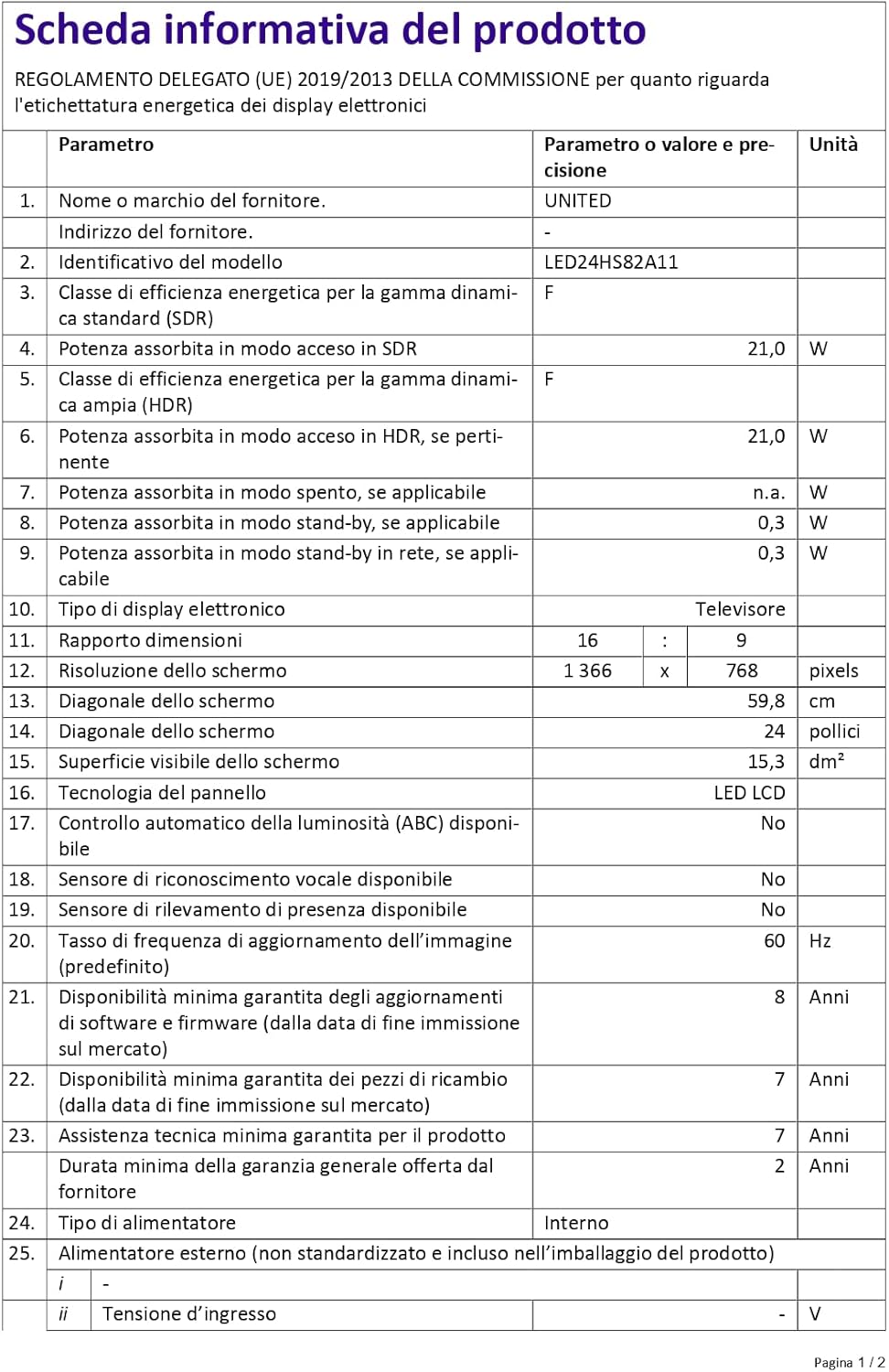
Figure 4: A detailed product information sheet for the UNITED LED24HS82A11 TV, providing comprehensive technical specifications and compliance details.
For more detailed information, please refer to the official EPREL database: https://eprel.ec.europa.eu/qr/1087921
Кепилдик жана колдоо
Your UNITED LED24HS82A11 TV comes with the following support and warranty provisions:
- Minimum General Warranty: 2 жыл
- Technical Assistance Availability: 7 жыл
- Программанын жаңыртууларына кепилдик берилет: 8 Years from market placement date
- Запастык бөлүктөрдүн болушу: 7 Years from market placement date
For technical support or warranty claims, please contact your retailer or the manufacturer's authorized service center. Keep your proof of purchase for warranty validation.
Ask a question about this manual
Ask about setup, troubleshooting, compatibility, parts, safety, or missing instructions. Manuals+ will review the question and use this page’s manual context to help answer it.