
Introduction
This manual provides essential information for the safe and efficient operation of your BougeRV 220WH Portable Power Station. Please read all instructions carefully before use and retain this manual for future reference.
Продукт өзгөчөлүктөрү
- 6H+ Running Time Extension: Designed to extend the running time of BougeRV CRPRO Refrigerators by over 6 hours in ECO Mode.
- Кеңири шайкештик: Features a cigarette lighter output port compatible with 95% of 12V car refrigerators. Includes Type-C and USB-A ports for simultaneous charging of phones, cameras, and laptops.
- 2H Fast Solar Recharging: Supports up to 100W max solar input, allowing recharging to 80% in 2 hours. Also supports pass-through recharging via AC, DC, and Type-C.
- Dynamic Smart Panel: Informative display panel monitors exact remaining power (0-100%) and recharging process.
- Коопсуздукту коргоо системасы: Built-in protections against over-temperature, over-voltage, over-charge, and over-current.
Кутуда эмне бар
- 1x BougeRV 220Wh Portable Power Station
- 1x 60W USB-C to USB-C Charger Cable
- 1x Унаа заряддоо кабели
- 1x Ыкчам баштоо колдонмосу
Жайгашуу
The BougeRV 220WH Portable Power Station is designed for easy integration with compatible portable refrigerators. Follow these steps to install and begin using your power station:
- Locate the battery compartment on your compatible BougeRV refrigerator.
- Press the release buttons on the sides of the power station.
- Slide the power station into the designated compartment until it clicks securely into place.
- Ensure the power station is firmly seated and the connection is established.

Image: The BougeRV 220WH Portable Power Station being inserted into the side compartment of a portable refrigerator, illustrating how it extends the running time.
Video: This video demonstrates the simple 4-step installation process of the BougeRV 173Wh Detachable Battery into a compatible dual-zone refrigerator, highlighting its pass-through recharging capability.
Иштөө нускамалары
The power station features an intuitive smart display panel for easy monitoring and control.
- Күйгүзүү/өчүрүү: Press and hold the power button on the top of the power station for 3 seconds to turn it on or off.
- Батарея деңгээлин текшерүү: Briefly press the power button to illuminate the LED indicators, showing the remaining battery life.
- Monitor Display Panel: The dynamic smart panel displays the exact remaining power (0-100%) and indicates the recharging process.
- MAX/ECO Mode Switch: If your refrigerator supports it, press the dedicated button to switch between MAX (for rapid cooling) and ECO (for energy efficiency) modes.
- Температураны көзөмөлдөө: Use the '+' and '-' buttons on your refrigerator's control panel to adjust the desired temperature.

Image: The upgraded smart display panel of the BougeRV 220WH Portable Power Station, showing battery percentage, input, and output wattage, capable of monitoring remaining power.
Video: This video demonstrates the cooling test of a BougeRV refrigerator, showing how to operate the touch screen display to set temperatures and monitor performance.
Заряддоо нускамалары
The BougeRV 220WH Portable Power Station offers multiple convenient recharging options:
- Күн энергиясы менен заряддоо: Connect a compatible solar panel (up to 100W max input) to the power station. It can recharge to 80% in approximately 2 hours.
- AC кайра заряддоо: Use the provided AC adapter to plug the power station into a standard wall outlet.
- DC кайра заряддоо: Utilize the included car charging cable to recharge the power station from your vehicle's 12V DC outlet.
- Type-C Recharging: Use the 60W USB-C to USB-C charger cable for Type-C recharging.

Image: The BougeRV 220WH Portable Power Station connected to a solar panel for recharging, demonstrating the solar charging capability.

Image: The BougeRV 220WH Portable Power Station connected to an AC wall outlet for recharging, showing the AC charging method.

Image: The BougeRV 220WH Portable Power Station connected to a car cigarette lighter for DC recharging, illustrating the in-car charging option.
Battery Protection Modes
The power station is equipped with a comprehensive battery protection system to ensure safety and longevity. It features High (H), Medium (M), and Low (L) modes for voltage protection, which can be adjusted via the refrigerator's control panel (refer to your refrigerator's manual for specific instructions).
- Over-Temp Protection: Prevents overheating of the battery.
- Ашык-томtage Коргоо: Ашыкча томдон коргойтtage киргизүү.
- Ашыкча заряддан коргоо: Батареянын ашыкча заряддалышынан коргойт.
- Ашыкча ток коргоо: Ашыкча ток тартуунун зыянын алдын алат.
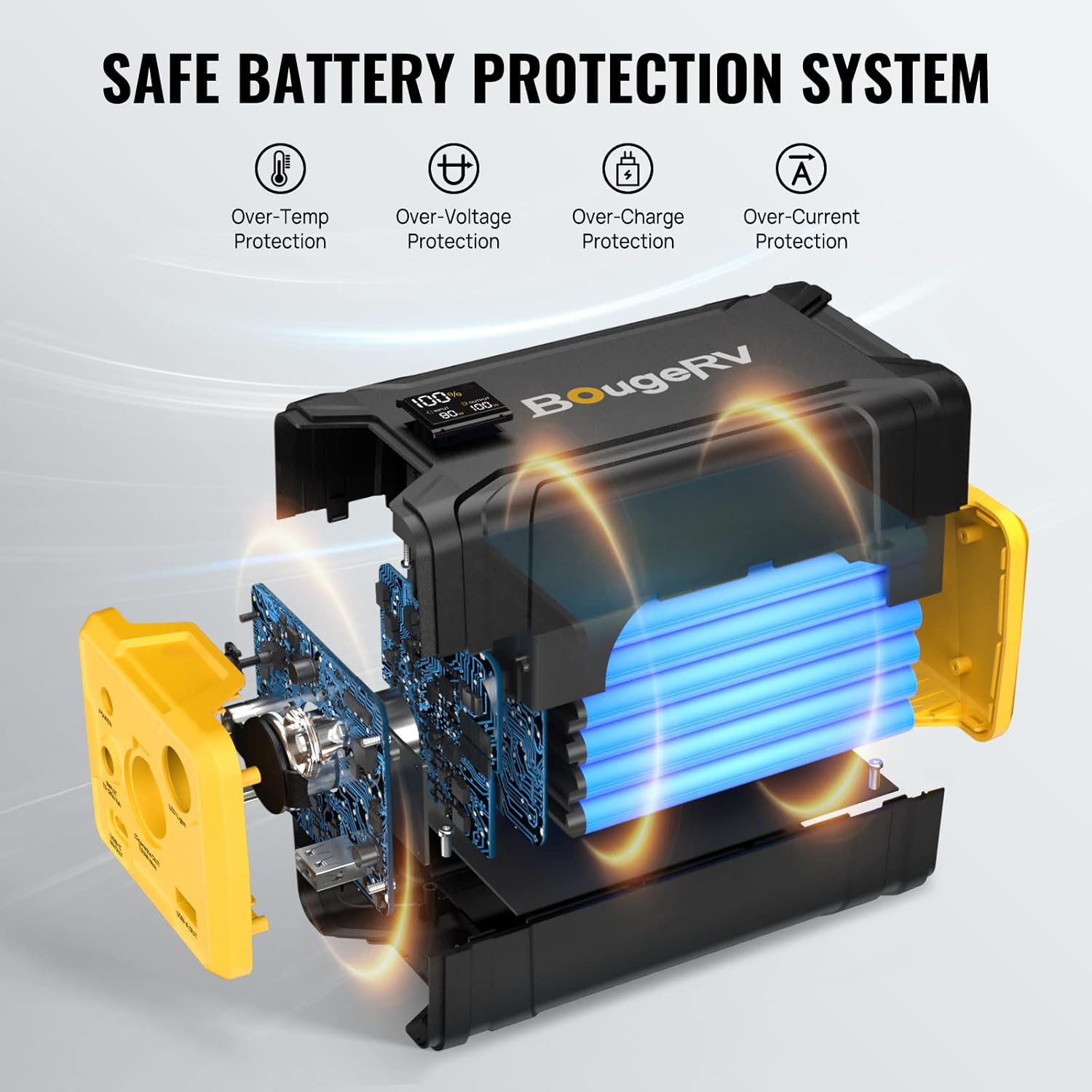
Image: A diagram illustrating the safe battery protection system of the BougeRV 220WH Portable Power Station, including over-temp, over-voltage, over-charge, and over-current protection.
Шайкештик
The BougeRV 220WH Portable Power Station is specifically designed to integrate with BougeRV CRPRO, CR, Aspen, and Aspen Pro series refrigerators. Its cigarette lighter output port also ensures compatibility with most other 12V car refrigerators on the market.

Image: A diagram illustrating the compatibility of the BougeRV 220WH Portable Power Station with various BougeRV refrigerator models, including CRPRO, CR, Aspen, and Aspen Pro series.

Image: The BougeRV 220WH Portable Power Station displaying its cigarette port for 12V refrigerators, USB-A port, and USB-C port, highlighting its wide compatibility with various devices.
Техникалык тейлөө
- Keep the power station clean and dry. Avoid exposure to extreme temperatures or moisture.
- Колдонулбаганда салкын, кургак жерде сактаңыз.
- Бардык кабелдерди жана туташууларды эскирүүнүн же бузулуунун белгилерин мезгил-мезгили менен текшерип туруңуз.
- Do not attempt to disassemble or repair the power station yourself. Contact customer support for assistance.
Проблемаларды чечүү
- Электр станциясы күйбөй жатат: Ensure the power button is pressed and held for 3 seconds. Check if the battery is completely depleted and requires recharging.
- Refrigerator Not Receiving Power: Verify that the power station is securely inserted into the refrigerator compartment. Check all cable connections. Ensure the power station has sufficient charge.
- Slow Recharging: Confirm that the charging source (solar panel, AC adapter, car charger) is providing adequate power. Ensure solar panels are in direct sunlight.
- Ката коддору: Refer to your refrigerator's user manual for specific error code definitions and troubleshooting steps related to battery protection modes.
Техникалык шарттар
| Өзгөчөлүк | Деталь |
|---|---|
| Бренд | BougeRV |
| Модель номери | SYZ-G200 |
| Элемент Салмагы | 3.3 фунт |
| Элементтин өлчөмдөрү | 7.08 x 3.3 x 3 дюйм |
| Туташтыргыч түрү | USB 2.0, C түрү |
| Батареялардын саны | 1 литий-иондук батарейкалар талап кылынат |
| Өзгөчө өзгөчөлүк | Portable |
Кепилдик жана колдоо
The BougeRV 220WH Portable Power Station comes with 2-year technical support. For any product questions or assistance, please do not hesitate to contact BougeRV customer service.