
1. Киришүү
Thank you for choosing the CPVAN BC01 Pro Outdoor Solar Security Camera. This manual provides essential information for the proper installation, operation, and maintenance of your device. Please read this manual thoroughly before use and retain it for future reference.
Коопсуздук маалыматы:
- Ensure the camera is installed in a location where it is protected from direct impact.
- Камераны бөлүктөргө бөлүүгө же өзгөртүүгө аракет кылбаңыз. Бул кепилдикти жокко чыгарып, зыян келтириши мүмкүн.
- Use only the specified power source and charging methods.
- Камераны жана анын компоненттерин балдар жетпеген жерде сактаңыз.
2. Продукт бүтүп калдыview
The CPVAN BC01 Pro is a wireless outdoor security camera designed for continuous surveillance with solar power. It features 1080P HD video, color night vision, PIR motion detection, and two-way audio communication.
Негизги өзгөчөлүктөрү:
- Күн энергиясы: Integrated 5000mAh rechargeable battery with solar panel for continuous charging.
- 1080P HD видео: Delivers clear 1920x1080 resolution images and videos.
- Түнкү көрүнүш: Equipped with 8 IR LEDs and a powerful spotlight for full-color night vision.
- PIR кыймылды аныктоо: Advanced algorithms reduce false alarms and support AI identification of people, vehicles, and packages.
- Эки тараптуу аудио: Communicate with visitors or deter intruders via the built-in microphone and speaker.
- IP66 аба ырайы: Designed to withstand dust and water splashes, operating in temperatures from -20°C to 50°C (-4°F to 122°F).
- 100% зымсыз: Flexible installation with a 360° adjustable wall mount.
Пакеттин мазмуну:
Пакетиңизде бардык буюмдар бар экенин текшериңиз:
- CPVAN BC01 Pro Camera
- Күн панели (1.6 Вт)
- Wall Mount Bracket (360° adjustable)
- Монтаждоо бурамалар жана дубал сайгычтар
- USB заряддоо кабели (3 метр)
- User Manual
- SIM Ejector Tool (for SD card slot access)

Image: Package contents of the CPVAN BC01 Pro camera system.
3. Орнотуу
3.1 Алгачкы заряддоо
Before first use, fully charge the camera's internal battery using the provided USB cable and a 5V/2A power adapter (not included). This ensures the camera has sufficient power to operate during initial setup and periods of low sunlight.
3.2 Колдонмону орнотуу
жүктөп алыңыз VicoHome APP from your smartphone's app store (iOS App Store or Google Play Store). Register an account and log in.
3.3 Камераны жупташтыруу
- Open the VicoHome APP and tap the "+" icon to add a new device.
- Follow the on-screen instructions to select your camera model.
- Power on the camera. The camera will enter pairing mode (indicated by a flashing LED).
- Смартфонуңузду 2.4 ГГц Wi-Fi тармагына туташтырыңыз. Камера 5 ГГц Wi-Fi'ды колдоого албайт.
- Scan the QR code displayed on your phone screen with the camera lens. Hold the phone approximately 15-20 cm (6-8 inches) from the camera until you hear a confirmation sound.
- Туташтырылгандан кийин, камераңызга ат коюп, орнотуу процессин аягына чыгарыңыз.
3.4 Камераны жана күн панелин орнотуу
Орнотуу үчүн ачык жерди тандаңыз view сиз көзөмөлдөгүңүз келген жана алган аймактын ample direct sunlight for the solar panel. The camera and solar panel are IP66 weatherproof, suitable for outdoor use.

Image: CPVAN BC01 Pro camera with solar panel for extended standby time.
- Бургулоо пункттарын белгилөө: Дубалдагы буроо тешиктерин белгилөө үчүн монтаждык кронштейнди шаблон катары колдонуңуз.
- Бургулоо тешиктери: Белгиленген жерлерге тешиктерди бургула жана дубал тыгындарын киргизгиле.
- Кашаларды тиркөө: Securely fasten the camera and solar panel mounting brackets to the wall using the provided screws.
- Бурчту тууралоо: Adjust the camera and solar panel to the desired angles. The solar panel should be positioned to receive maximum direct sunlight throughout the day. The 3-meter cable allows for flexible placement of the solar panel away from the camera if needed.
- Күн панелин туташтыруу: Күн батареясынын кабелин камеранын кубаттоо портуна туташтырыңыз.

Image: The camera and solar panel are IP66 waterproof, suitable for all weather conditions.
4. Иштөө нускамалары
4.1 Live View жана Жаздыруу
Open the VicoHome APP and select your camera to access the live viewБул жерден сиз кол менен видео жаздырып, скриншотторду тартып жана мүлкүңүздү реалдуу убакыт режиминде көзөмөлдөй аласыз.
4.2 Кыймылды аныктоо жана эскертүүлөр
The camera uses PIR (Passive Infrared) motion detection to identify movement. When motion is detected, the camera will automatically record a video clip and send an alert notification to your smartphone.
- Сезгичтикти тууралоо: In the app settings, you can adjust the motion detection sensitivity to minimize false alarms.
- AI таануу: The camera supports intelligent AI recognition (subscription may be required) to differentiate between people, vehicles, and packages, providing more precise alerts.
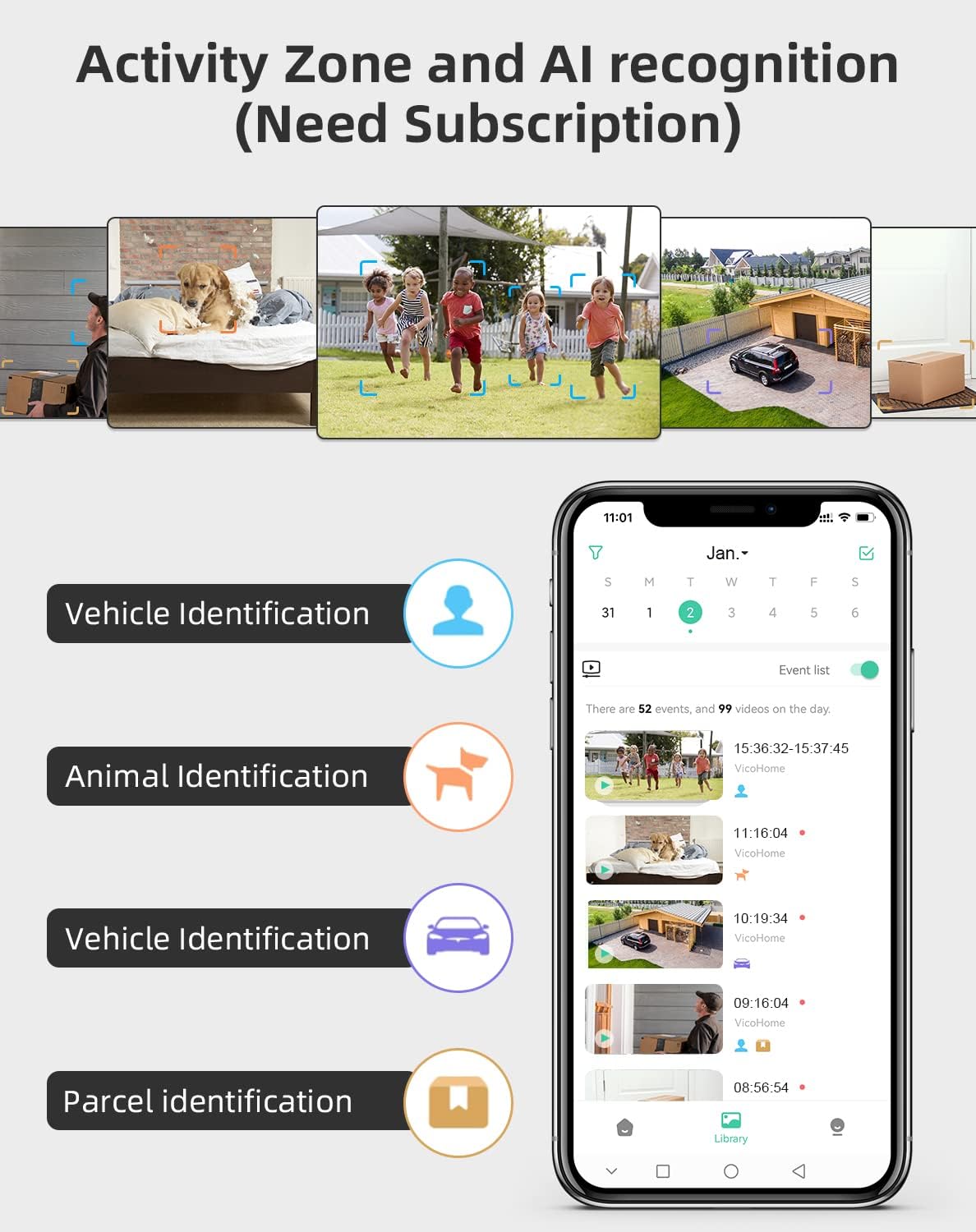
Image: Activity Zone and AI recognition features available through the VicoHome app (subscription may be required).

Image: Real-time alerts with built-in spotlight for clearer night visibility.
4.3 Эки тараптуу аудио
Utilize the two-way audio feature to communicate through the camera. Tap the microphone icon in the live view interface to speak, and listen through the camera's speaker.

Image: Two-way talk feature allowing real-time communication.
4.4 Түнкү көрүү режимдери
Камера эки түнкү көрүү режимин сунуштайт:
- Infrared режими: Automatically activates in low light, providing clear black and white video.
- Түнкү көрүнүш: The powerful built-in spotlight can be activated to provide full-color video at night.

Image: Comparison of White Light Mode (color night vision) and Infrared Mode.
4.5 Иш-аракеттер зоналары
Камеранын талаасындагы белгилүү бир аймактарды аныктаңыз view where you want to receive motion alerts. This helps focus surveillance on critical areas and further reduces unwanted notifications.
4.6 Сактоо параметрлери
The camera supports two storage methods for recorded video clips:
- Булуттагы сактагыч: Access recorded events via the VicoHome cloud service (subscription may be required).
- Жергиликтүү сактагыч: Insert a microSD card (up to 128GB, not included) into the camera's slot for local recording.

Image: Cloud storage and local SD card storage options.
5. Техникалык тейлөө
5.1 Тазалоо
- Сүрөттүн так сапатын камсыз кылуу үчүн камеранын линзасын жумшак, кургак чүпүрөк менен дайыма тазалап туруңуз.
- Wipe the solar panel periodically to remove dust, dirt, or debris that may obstruct sunlight and reduce charging efficiency.
5.2 Батареяга кам көрүү
- Ensure the solar panel receives adequate sunlight to maintain battery charge.
- If the camera is installed in a location with limited sunlight, occasional manual charging via USB may be necessary.
- Avoid exposing the camera to extreme temperatures outside its operating range (-20°C to 50°C).
6. Кыйынчылыктарды
If you encounter issues with your CPVAN BC01 Pro camera, refer to the following common problems and solutions:
- Камера Wi-Fi'га туташпай жатат: Ensure your Wi-Fi network is 2.4GHz. Check Wi-Fi signal strength at the camera's location. Restart your router and the camera.
- Кыймыл эскертүүлөрү жок: Check motion detection settings in the app. Ensure sensitivity is appropriate. Verify that activity zones are correctly configured.
- Сүрөттүн сапаты начар: Камера линзасын тазалаңыз. Талаада эч кандай тоскоолдуктар жок экенин текшериңиз view. Check network stability for live streaming.
- Батарея кубатталбай жатат: Ensure the solar panel is clean and receiving direct sunlight. Check the connection between the solar panel and the camera.
- Эки тараптуу аудио иштебей жатат: Check microphone and speaker permissions for the VicoHome app on your phone. Ensure volume settings are correct.
For further assistance, you can use the feedback function within the VicoHome APP:

Image: Sending feedback via the VicoHome app for technical support.
7. Техникалык шарттар
| Өзгөчөлүк | Спецификация |
|---|---|
| Модель номери | BC01 |
| Бренд | CPVAN |
| Байланыш технологиясы | Зымсыз (Wi-Fi 2.4 ГГц) |
| Power Source | Күн энергиясы жана батарея менен иштейт |
| Батарея | 1 Lithium-ion (included), 5000mAh |
| Күн панели Wattage | 1.6 Ватт |
| Тtage | 5 вольт |
| Видео жаздыруу чечими | 1080p (1920x1080) |
| Viewбурч | 120 градус |
| Түнкү көрүү диапазону | 10 метр |
| Түнкү көрүнүш түрү | Infrared and Color Night (with spotlight) |
| Өзгөчө өзгөчөлүк | PIR Motion Detector, Two-Way Audio, AI Recognition |
| Эл аралык коргоо рейтинги | IP66 |
| Иштөө температурасы | -20°Cден 50°Cге чейин (-4°Fтен 122°Fге чейин) |
| Монтаж түрү | Дубалга орнотуу |
| Башкаруу ыкмасы | Application (VicoHome APP) |
| Сунушталган колдонуу | Сырткы коопсуздукту көзөмөлдөө |
| Чоңойтуу түрү | Оптикалык масштаб |
8. Кепилдик жана колдоо
CPVAN products are designed for reliability and performance. For warranty information, please refer to the warranty card included in your product packaging or contact CPVAN customer support directly.
If you require technical assistance or have questions not covered in this manual, please contact our support team through the VicoHome APP's feedback section or visit the official CPVAN webбайланыш маалыматы үчүн сайт.