
Introduction
This manual provides essential instructions for setting up, operating, and maintaining your SKYMEE Owl Robot Pet Camera Treat Dispenser, Model AIC20. This interactive device allows you to monitor, interact with, and reward your pets remotely using a smartphone application.
Коопсуздук маалыматы
- Аппараттын кыйрабашы үчүн туруктуу, жалпак бетке коюлганын текшериңиз.
- Түзмөктү суудан же ашыкча нымдуулуктан алыс кармаңыз.
- Берилген кубат адаптерин гана колдонуңуз.
- Do not allow pets to chew on the power cord.
- Бул аппарат үй ичинде колдонуу үчүн гана иштелип чыккан.
Пакеттин мазмуну
Пакетте бардык буюмдар бар экенин текшериңиз:
- SKYMEE Owl Robot (Model AIC20)
- Заряддоо кабели
- Колдонуучунун Колдонмосу (бул документ)
- Lid (for treat compartment)
Продукт бүттүview
Familiarize yourself with the main components of your Owl Robot.

Figure 1: Product Exterior. Бул сүрөт алдыңкы жагын көрсөтөт view of the Owl Robot, highlighting key features such as the Full HD 1080P Camera, Microphone, Speaker, Thermal Sensing Point, Touch Mode indicator, and Feeding Mouth. The wheels are visible on either side.
- Full HD 1080P Camera: Provides clear video feed with 4x zoom and night vision.
- Микрофон: Эки тараптуу аудио байланышты камсыз кылат.
- Баяндамачы: Allows you to speak to your pets.
- Feeding Mouth: Dispenses treats.
- Дөңгөлөктөр: For mobility and remote driving.
- Treat Compartment: Located under the lid, for storing pet treats.
Жайгашуу
1. Аппаратты заряддоо
Before first use, fully charge the Owl Robot using the provided charging cable. The device uses a Type-C charging port.
2. Колдонмону орнотуу жана туташуу
- Download the official SKYMEE app from your smartphone's app store (available for iOS and Android).
- Аккаунт үчүн катталыңыз же кириңиз.
- Follow the in-app instructions to add your Owl Robot device.
- Ensure your home Wi-Fi network is 2.4Ghz, as the device is not compatible with 5Ghz Wi-Fi.
- For remote control functionality, the device must be connected to your home 2.4Ghz Wi-Fi.
- For use without a network (AP mode), the device can connect directly to your phone's hotspot.

Figure 2: Outdoor Mode. This image illustrates the Owl Robot connecting to a device hotspot for operation in AP mode, allowing use without a home Wi-Fi network.
3. Loading Treats
Open the lid of the treat compartment and fill it with your pet's favorite treats. The device supports treats with a size range of 4mm-16mm.
Video 1: SKYMEE Owl Robot Overview. Бул видео жалпы маалымат беретview of the SKYMEE Owl Robot, demonstrating its features and functionality, including treat dispensing.
Иштөө нускамалары
1. Remote Control and Driving
Use the app's control lever to manually drive the Owl Robot around your home. This allows you to track your pets and engage them in interactive games.
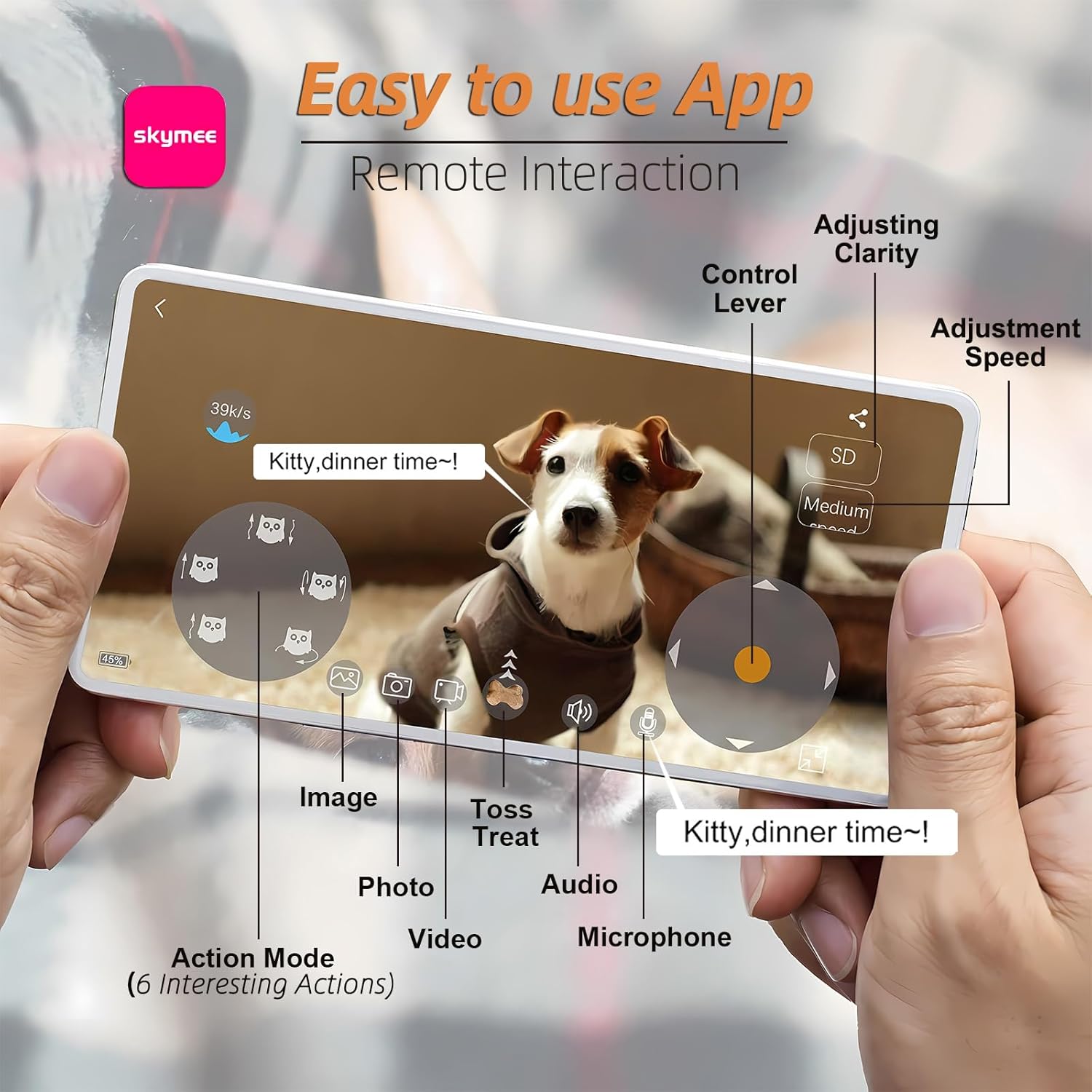
Figure 3: Easy-to-Use App. This image shows the mobile application interface with controls for adjusting clarity, speed, taking photos/videos, using two-way audio, and selecting action modes.
2. Камеранын өзгөчөлүктөрү
- 1080p Full HD: View your pets clearly with high-definition video.
- 4x чоңойтуу: Zoom in to see more details.
- Түнкү көрүнүш: The camera features 8 infrared lights for clear viewing in low-light conditions. This can be set to automatic or manual control via the app.
- Сүрөт жана видео жаздыруу: Capture high-quality images and videos directly from the app and save them to your phone or share on social media.

Figure 4: Night Vision. This image demonstrates the night vision capability of the Owl Robot's camera, providing a clear view in dark environments.
3. Treat Tossing & Two-Way Audio
- Treat Tossing: Remotely dispense treats to reward or engage your pets. You can make the robot move and leave a snack trail.
- Эки тараптуу аудио: Speak to your pets and hear their responses through the built-in microphone and speaker.
4. Smart Interaction & PIR Detection
- Smart Interaction: The robot can automatically trigger multiple action modes through infrared sensing to interact with your pet.
- PIR аныктоо: The Owl Robot will automatically react when touched and detects pet behavior.
- TF Recording: Video can be recorded automatically after installing a TF card (not included), allowing 24/7 monitoring.

Figure 5: Interactive Play. This image illustrates the Owl Robot engaging with dogs through both game interaction and treat feeding functionalities.
5. Multi-User and Sharing
One app account can support up to 8 people to watch online simultaneously. Photos and videos can be shared to social media platforms.
Техникалык тейлөө
- Тазалоо: Regularly clean the treat compartment and the exterior of the device to prevent buildup.
- Батареянын иштөө мөөнөтү: The device is designed for approximately 8 hours of daily use. It offers 8-10 hours in drive mode, 15+ days in interactive mode, and 50 days in sleep mode on a single charge.
Проблемаларды чечүү
- Туташуу маселелери: Ensure your device is connected to a 2.4Ghz Wi-Fi network. If issues persist, try restarting both your router and the Owl Robot.
- Treat Dispensing Problems: Check that treats are within the recommended size (4mm-16mm) and that the compartment is not overfilled or jammed.
- Pet Interaction: Some pets may be initially wary. Encourage interaction with treats and gentle voice commands through the two-way audio.
Техникалык шарттар
| Өзгөчөлүк | Деталь |
|---|---|
| Модель аты | AIC20 |
| Видео тартуунун резолюциясы | 1080p |
| Байланыш технологиясы | Wireless (2.4Ghz Wi-Fi) |
| Башкаруу ыкмасы | Колдонмо |
| Элементтин өлчөмдөрү (L x W x Y) | 9.1 x 5.5 x 5.5 дюйм |
| Элемент Салмагы | 2.16 фунт |
| Материал | Пластик |
| Өзгөчө өзгөчөлүк | Lightweight, Portable, Night Vision, Two-way Audio, Treat Dispenser |
Кепилдик жана колдоо
For warranty information and technical support, please refer to the official SKYMEE website or contact customer service through the mobile application.