1. Киришүү
This manual provides detailed instructions for the installation, operation, and maintenance of the Supermicro X13SEI-F Server Motherboard. This motherboard is designed for high-performance server applications, supporting Intel Xeon processors with an LGA4677 socket and DDR5 memory.
Please read this manual thoroughly before attempting to install or operate the motherboard to ensure proper setup and to prevent damage to the components.
2. Коопсуздук маалыматы
Жабдуулардын бузулушун жана жаракат алуусун алдын алуу үчүн төмөнкү коопсуздук чараларын сактаңыз:
- Кандайдыр бир компоненттерди орнотуудан же алып салуудан мурун, ар дайым кубат шнурун кубат булагынан ажыратыңыз.
- Wear an anti-static wrist strap when handling the motherboard and other components to prevent electrostatic discharge (ESD).
- Ensure the installation environment is dry and free from static electricity.
- Motherboard нымга же экстремалдык температурага дуушар кылбаңыз.
- Сезимтал компоненттерге тийбеш үчүн, энелик платаны четтеринен кармаңыз.
- Электр туташууларына байланыштуу коопсуздук боюнча атайын көрсөтмөлөрдү алуу үчүн электр менен камсыздоо блогунун колдонмосун караңыз.
3. Пакеттин мазмуну
Бардык буюмдардын бар экенин жана жакшы абалда экенин текшериңиз. Эгерде кандайдыр бир буюмдар бузулган же жок болсо, сатуучуга кайрылыңыз.
- Supermicro X13SEI-F Server Motherboard
- I / O Shield
- SATA кабелдери (саны ар кандай болушу мүмкүн)
- Quick Reference Guide / User Manual (this document)
- Driver CD/DVD or USB drive (or download instructions)
4. Продукт бүтүп калдыview
The Supermicro X13SEI-F is a high-performance server motherboard featuring the LGA4677 socket, designed to support Intel Xeon Scalable processors. It offers robust memory capabilities with 8 DDR5 DIMM slots, supporting up to 4800MHz memory speed. The board also includes multiple PCIe slots for expansion.
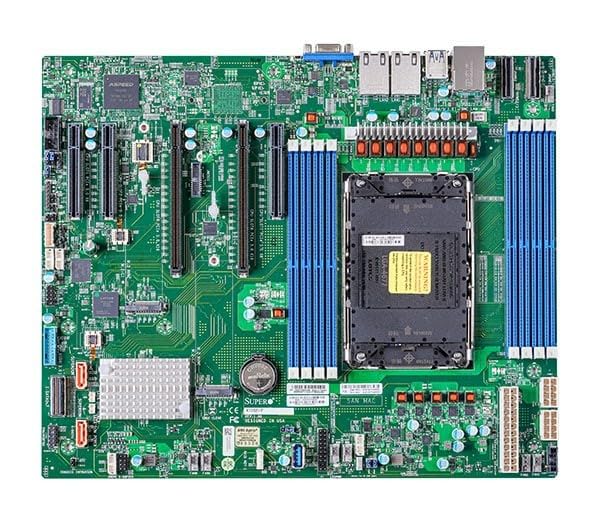
Figure 1: Supermicro X13SEI-F Server Motherboard. This image displays the overall layout of the motherboard, including the CPU socket, DIMM slots, and various connectors.
4.1 Негизги өзгөчөлүктөрү
- CPU розеткасы: LGA4677 for Intel Xeon Scalable Processors
- Чипсет: Intel C621
- Эстутум: 8x DDR5 DIMM slots, up to 4800MHz
- Кеңейтүү уячалары: Multiple PCIe slots (specific configuration depends on model variant)
- Сактагыч: Support for various storage interfaces (SATA, NVMe - specific details in specifications)
- Networking: Integrated LAN controllers
5. Орнотуу жана орнотуу
Before beginning installation, ensure your system case is compatible with the motherboard's form factor and that you have all necessary components.
5.1 CPU орнотуу (LGA4677)
- Motherboard LGA4677 розеткасын табыңыз.
- Carefully open the CPU socket retention mechanism according to the instructions provided with your CPU or motherboard.
- Align the CPU with the socket, ensuring the triangular mark on the CPU matches the mark on the socket. Do not force the CPU into the socket.
- CPUну розеткага акырын түшүрүңүз.
- Close the CPU socket retention mechanism until it locks securely.
- CPU муздаткычын өндүрүүчүнүн көрсөтмөлөрүнө ылайык орнотуңуз.
5.2 RAM орнотуу (DDR5)
- Locate the 8 DDR5 DIMM slots on the motherboard.
- DIMM уячасынын эки учундагы бекитүүчү клиптерди ачыңыз.
- DDR5 эстутум модулундагы оюкту DIMM уячасындагы ачкыч менен тууралаңыз.
- Insert the memory module firmly into the slot until the retention clips snap into place. Ensure both clips are closed.
- For optimal performance, refer to the motherboard's manual for recommended memory population order.
5.3 PCIe картасын орнотуу
- Identify the appropriate PCIe slot for your expansion card (e.g., GPU, RAID card).
- Шассиңизден тиешелүү кеңейтүү уячасынын капкагын алып салыңыз.
- Align the PCIe card with the slot and press down firmly until it is fully seated.
- Картаны корпуска бурамалар же бекиткич менен бекитиңиз.
5.4 Сактагыч түзүлүштү орнотуу
- SATA дисктери: Connect SATA data cables from the motherboard's SATA ports to your SATA hard drives or SSDs. Connect power cables from the PSU to the drives.
- NVMe M.2 Drives: Locate the M.2 slots. Insert the M.2 drive at an angle, then push it down and secure it with the provided screw or retention mechanism.
5.5 Кубат туташтыруу
- 24 пин ATX кубат туташтыргычын кубат булагыңыздан энелик платадагы негизги розеткага туташтырыңыз.
- Connect the 8-pin (or 4+4 pin) EPS 12V CPU power connector(s) to the corresponding sockets near the CPU.
- Бардык кубат туташуулары коопсуз экенин текшериңиз.
5.6 Front Panel Connections
Connect the front panel cables (Power LED, HDD LED, Power Switch, Reset Switch, USB, Audio) from your chassis to the corresponding headers on the motherboard. Refer to the motherboard's silkscreen labels or the detailed manual for exact pin configurations.
6. Иштөө нускамалары
6.1 Биринчи жүктөө
- After completing all hardware installations, connect the monitor, keyboard, and mouse.
- Connect the power cord to the power supply and turn on the power switch on the PSU.
- Шассидеги кубат баскычын басыңыз.
- The system should power on, and you should see the BIOS/UEFI POST screen.
6.2 BIOS/UEFI орнотуу
BIOS/UEFI орнотуунун утилитасына кирүү үчүн, басыңыз DEL or F2 key repeatedly during the POST process. Within the BIOS/UEFI, you can configure:
- Жүктөө тартиби
- Системанын убактысы жана күнү
- CPU жана эстутум орнотуулары
- Storage configurations (RAID, AHCI)
- Желдетүүчү ылдамдыкты көзөмөлдөө
- Коопсуздук орнотуулары
BIOS/UEFIден чыгуудан мурун өзгөртүүлөрдү сактаңыз.
6.3 Операциялық системаны орнотуу
Insert your operating system installation media (USB drive or DVD) and set it as the primary boot device in the BIOS/UEFI. Follow the on-screen instructions to install your preferred operating system. After installation, install all necessary drivers from the Supermicro website or the provided driver media.
7. Техникалык тейлөө
7.1 Тазалоо
- Regularly clean dust from the motherboard and system components using compressed air.
- Тазалоодон мурун системанын өчүрүлгөнүн жана розеткадан ажыратылганын текшериңиз.
- Суюк тазалагычтарды түздөн-түз компоненттерге колдонуудан алыс болуңуз.
7.2 Микропрограмма жаңыртуулары
Мезгил-мезгили менен Supermicro текшерип туруңуз website for updated BIOS/UEFI firmware. Firmware updates can improve system stability, performance, and compatibility. Follow the specific instructions provided by Supermicro for updating the firmware to avoid system damage.
8. Кыйынчылыктарды
Бул бөлүмдө сиз кабылышы мүмкүн болгон жалпы маселелерди чечүү жолдору каралган.
8.1 Кубат жок / POST жок (Күчтү иштетүү өзүн-өзү сыноо)
- Электр байланыштарын текшерүү: Ensure the 24-pin ATX and 8-pin EPS 12V power connectors are securely seated.
- Электр кубатын текшерүү: Кубат берүүчү блокту (PSU) башка система же PSU сынагычы менен текшериңиз.
- Reseat компоненттери: Reseat the CPU, RAM modules, and any expansion cards.
- CMOS тазалоо: Refer to the motherboard manual for instructions on how to clear the CMOS (Complementary Metal-Oxide-Semiconductor) settings, which can resolve boot issues.
- Минималдуу конфигурация: Try booting with only the CPU, one RAM stick, and the necessary power connections.
8.2 Display Output жок
- Монитор туташуу: Ensure the monitor is properly connected to the graphics output (either integrated or discrete GPU) and is powered on.
- Графикалык карта: If using a discrete graphics card, ensure it is fully seated in its PCIe slot and has all necessary power connectors from the PSU.
- Интегралдык графика: If your CPU supports integrated graphics, try connecting the monitor to the motherboard's video output to rule out a discrete GPU issue.
8.3 Operating System Not Booting
- Жүктөө тартиби: Check the BIOS/UEFI settings to ensure the correct boot device (e.g., SSD, HDD) is selected as the primary boot option.
- Drive Connections: Verify that your storage drives are properly connected (data and power).
- ОС орнотуу: If the OS is newly installed, ensure the installation process completed successfully and all drivers are installed.
9. Техникалык шарттар
| Өзгөчөлүк | Деталь |
|---|---|
| Бренд | Supermicro |
| Модель аты | MBD-X13SEI-F-B |
| CPU розетка | LGA 4677 |
| Шайкеш процессорлор | Intel Xeon Scalable |
| Чипсет түрү | Intel C621 |
| RAM эс технологиясы | DDR5 |
| Memory Speed | 4800 МГц |
| RAM Slots | 8x DDR5 DIMM slots |
| Продукциянын өлчөмдөрү (LxWxH) | 16 x 12 x 5 дюйм |
| Элемент Салмагы | 3.19 фунт |
| Биринчи жеткиликтүү күн | 20-январь, 2023-жыл |
Note: Specifications are subject to change without notice. For the most current information, please refer to the official Supermicro product page.
10. Кепилдик жана техникалык колдоо
10.1 Кепилдик маалыматы
Supermicro products are covered by a limited warranty. For detailed warranty terms and conditions, including duration and coverage, please visit the official Supermicro website or consult the warranty card included with your product. Keep your proof of purchase for warranty claims.
10.2 Техникалык колдоо
For technical assistance, driver downloads, BIOS updates, and further product information, please visit the official Supermicro support webсайт:
https://www.supermicro.com/support
Before contacting support, please have your motherboard model number (MBD-X13SEI-F-B) and serial number ready.