
Introduction
Thank you for choosing the Xmenha Open Ear Bluetooth Wireless Ear Clip Headphones. These headphones are designed for comfort and stability, particularly suitable for sports and daily activities. The open-ear design allows you to remain aware of your surroundings while enjoying audio. This manual provides detailed instructions for setup, operation, maintenance, and troubleshooting to ensure optimal performance and longevity of your device.
Пакеттин мазмуну
Сураныч, пакетте төмөнкү нерселерди текшериңиз:
- 1 x Pair of Xmenha Wireless Ear Clip Headphones
- 1 х заряддоо кутусу
- 1 х USB-C кубаттоо кабели
- 1 x User Manual
Продукт бүттүview
The Xmenha ZXY-JX80 headphones feature an ergonomic ear clip design for secure fit and comfort. The charging case provides portable power and includes an LED display for battery status.

Image: Xmenha ZXY-JX80 headphones inside their charging case, displaying battery levels.

Image: Diagram illustrating the touch control area and functions on the Xmenha ZXY-JX80 headphone.
Жайгашуу
1. Наушникти жана капты заряддоо
Биринчи колдонуудан мурун, наушникти жана кубаттоочу кутучаны толук заряддаңыз.
- Наушниктерди заряддоо кутусуна салыңыз. Алардын туура отурганын текшериңиз.
- Connect the USB-C charging cable to the charging port on the case and plug the other end into a USB power source (e.g., wall adapter, computer USB port).
- The LED display on the charging case will indicate the charging status. A full charge typically takes about 1.5 hours.
- Once fully charged, disconnect the charging cable. The charging case has a 400 mAh battery capacity, providing multiple recharges for the headphones.
2. Наушник тагынуу
The ear clip design ensures a secure and comfortable fit.
- Gently hold the earlobe.
- Position the ear clip headset over your earlobe.
- Slide the headset upwards until it sits comfortably and securely on your ear. The ergonomic design is intended to optimize weight distribution and prevent falling during activity.
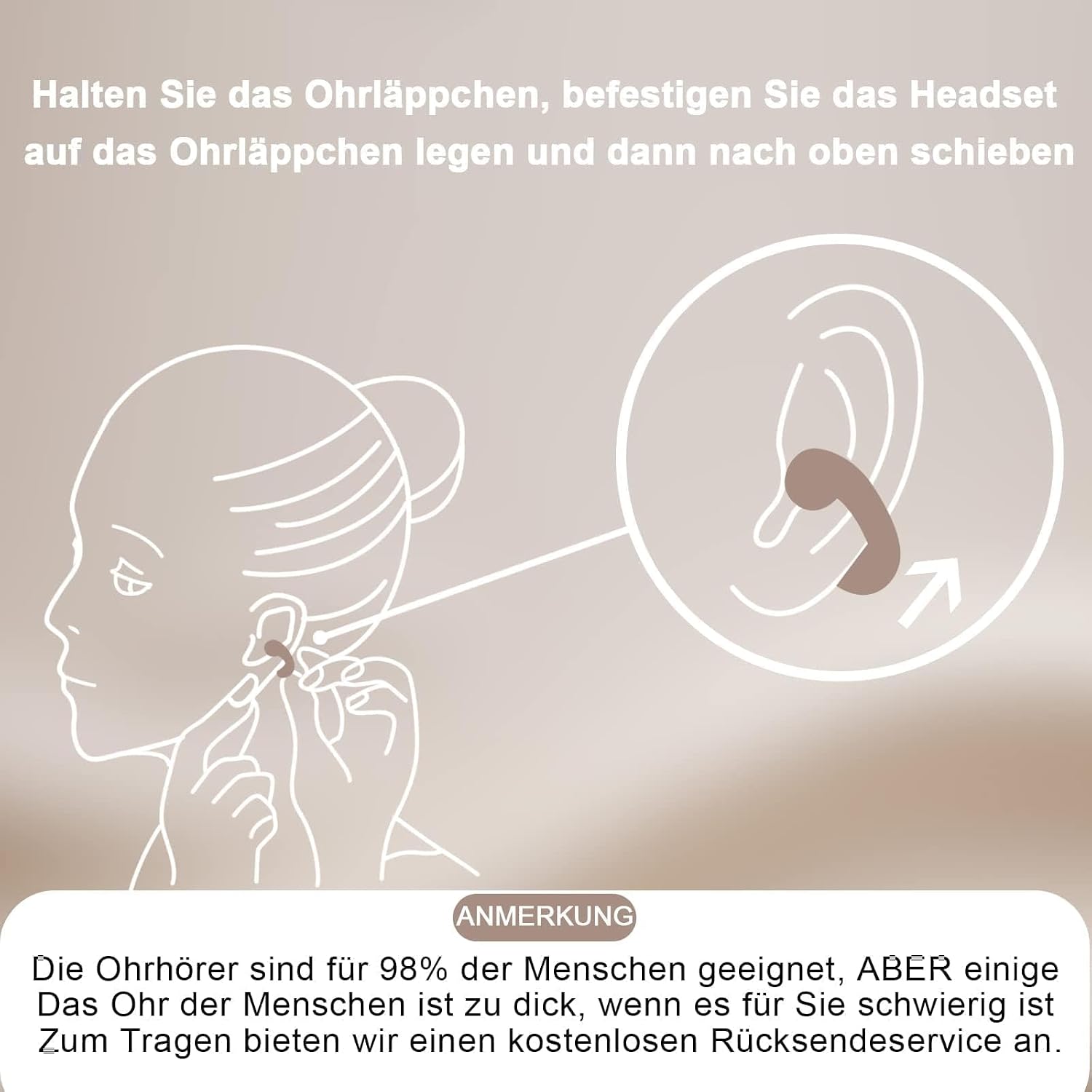
Image: Visual guide on correctly positioning the ear clip headphones on the ear.
3. Bluetooth Жупташтыруу
The headphones use Bluetooth 5.3 for a fast and stable connection.
- Заряддоо кутучасын ачыңыз. Кулакчындар автоматтык түрдө күйүп, жупташтыруу режимине кирет.
- Мобилдик түзмөгүңүздө (смартфон, планшет ж.б.) Bluetooth жөндөөлөрүнө өтүңүз.
- Издөө available devices and select "Xmenha ZXY-JX80" (or similar name) from the list.
- Once connected, you will hear an audible confirmation, and the headphones will be ready for use.
- The headphones will automatically connect to the last paired device when removed from the case, if Bluetooth is enabled on the device.
Иштөө нускамалары
The Xmenha ZXY-JX80 headphones feature intuitive touch controls on each earbud.
Күйгүзүү/өчүрүү
- Күйгүзүү: Заряддоо кутучасын ачсаңыз, наушниктер автоматтык түрдө күйөт.
- Өчүрүү: Наушниктерди кайра заряддоо кутусуна салып, капкагын жабыңыз. Алар автоматтык түрдө өчүп, кубаттай башташат.
Музыканы ойнотуу
- Ойнотуу/тындыруу: Кулакчындардын биринин тийүү аймагын бир жолу таптаңыз.
- Кийинки трек: Оң кулакчындын тийүү аймагын эки жолу таптаңыз.
- Мурунку трек: Сол кулакчындын тийүү аймагын эки жолу таптаңыз.
Чалууларды башкаруу
- Чалууга жооп берүү/аяктоо: Кулакчындардын биринин тийүү аймагын бир жолу таптаңыз.
- Чакырууну четке кагуу: Кулакчындардын биринин тийүү аймагын 2 секунд басып туруңуз.
Үндү көзөмөлдөө
- Көлөмү: Оң кулакчындын тийүү аймагын үч жолу таптаңыз.
- Үнүн азайтуу: Сол кулакчындын тийүү аймагын үч жолу таптаңыз.
Үн жардамчысы
- Үн Жардамчысын жандыруу: Кулакчындардын биринин тийүү аймагын 3 секунд басып туруңуз.
Техникалык тейлөө
Туура кам көрүү кулакчындарыңыздын иштөө мөөнөтүн узартат.
- Тазалоо: Use a soft, dry, lint-free cloth to clean the headphones and charging case. Do not use harsh chemicals or abrasive materials.
- Суу каршылык: The headphones are waterproof and resistant to daily splashes, sweat, and rain. However, they are not designed for submersion. Avoid exposing them to strong jets of water or prolonged immersion. Ensure they are dry before placing them back in the charging case.
- Сактагыч: Колдонулбаганда, наушниктерди чаңдан жана бузулуудан коргоо үчүн заряддоо кутусуна сактаңыз. Кургак, салкын жерде сактаңыз.
- Батареяга кам көрүү: To preserve battery life, avoid fully discharging the headphones and charging case frequently. Charge them regularly, even if not in constant use.
Проблемаларды чечүү
Эгер көйгөйлөргө туш болсоңуз, төмөнкү чечимдерди колдонуп көрүңүз:
| Көйгөй | Мүмкүн чечим |
|---|---|
| Кулакчындар күйбөйт. | Ensure the headphones are charged. Place them in the charging case and check the case's battery level. |
| Түзмөк менен жупташтыруу мүмкүн эмес. | 1. Түзмөгүңүздө Bluetooth иштетилгенин текшериңиз. 2. Make sure the headphones are in pairing mode (open the case). 3. Forget/delete the headphones from your device's Bluetooth list and try pairing again. 4. Ensure the headphones are within 10 meters of your device. |
| Үн жок же үнү төмөн. | 1. Check the volume level on both the headphones and your connected device. 2. Ensure the headphones are properly connected to your device. 3. Recharge the headphones. |
| үзгүлтүктүү байланыш. | 1. Ensure there are no obstructions between the headphones and your device. 2. Move closer to your device. 3. Avoid environments with strong Wi-Fi or other wireless interference. |
| Заряддоо куту заряддалбай жатат. | 1. Check the USB-C cable and power adapter for damage. 2. Try a different USB-C cable or power source. 3. Заряддоо порту таза жана калдыктары жок экенин текшериңиз. |
Техникалык шарттар
- Модел: ZXY-JX80
- Bluetooth версиясы: 5.3
- Өткөрүү расстояние: Болжол менен 10 метр (33 фут)
- Headphone Playback Time: 4-5 hours (per charge)
- Батарейканын кубаттуулугун кубаттоо: 400 мАч
- Заряддоо порту: USB-C
- Суу каршылык: IPX4 (Resistant to splashes, sweat, and rain)
- Колдоого алынган системалар: All Bluetooth-enabled devices and mobile phones
Коопсуздук маалыматы
- Продукцияны ажыратпаңыз же өзгөртпөңүз.
- Продукцияны экстремалдык температурадан, тике күн нурунан жана ачык оттон алыс кармаңыз.
- Өнүмдү түшүрүүдөн же катуу таасирлерге дуушар кылуудан качыңыз.
- Do not use the product at excessively high volumes for prolonged periods to prevent hearing damage.
- Продукцияны жана анын батарейкасын жергиликтүү эрежелерге ылайык таштаңыз.
Кепилдик жана колдоо
If you receive a defective product or have any questions during use, please contact the seller or manufacturer for assistance. Please refer to your purchase documentation for specific warranty terms and conditions.